Kubernetes vs Docker Compose: Which Do You Need? (2026)
 MD Rakibul Islam RakibFull-stack developer, DevOps & Linux engineer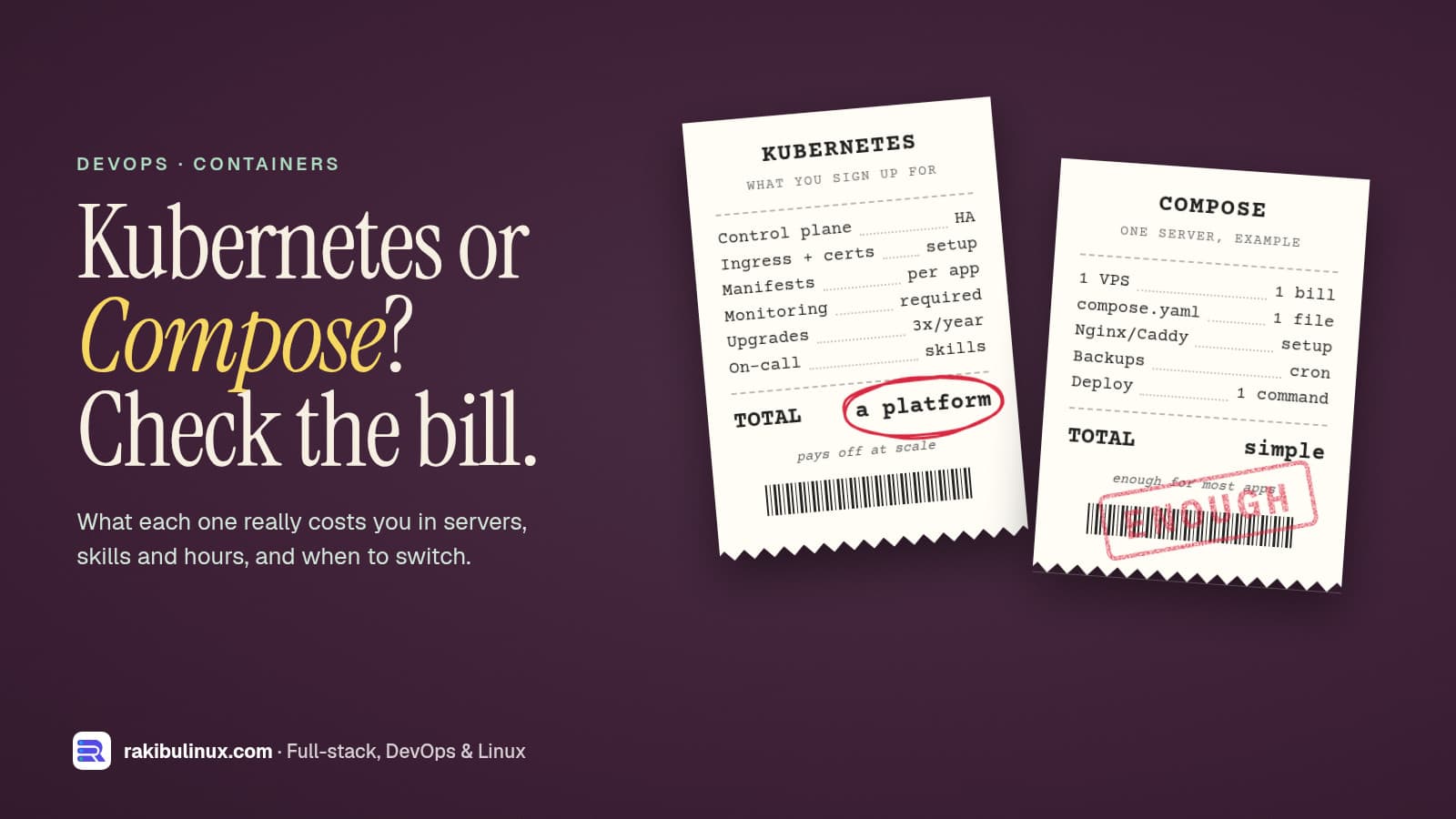
Use Docker Compose for a few apps on one or two servers. Move to Kubernetes when you need many nodes, autoscaling or zero-downtime rollouts across a cluster.
"Should we be on Kubernetes?" is one of the first questions startups and agencies ask me, usually because a job post, an investor or a blog said so. Most of the time the honest answer is "not yet". This website and its API run in production on a single server with PM2 and Nginx, and I deploy self-hosted tools like Jitsi Meet with Docker Compose on single servers. Here is how I decide, without the hype in either direction.
Key takeaways
- Different jobs: Compose runs a group of containers on one machine. Kubernetes schedules containers across a cluster of machines and keeps them in the desired state.
- Compose is enough for most apps with one to roughly ten services, one or two servers, and a team without a dedicated platform engineer.
- Kubernetes pays off with many services, multiple nodes, autoscaling, strict uptime targets and people who can run it.
- The real cost of Kubernetes is people, not servers: upgrades, networking, ingress, monitoring and on-call.
- Middle ground exists: k3s, managed Kubernetes, or a PaaS layer such as Coolify or Kamal on plain servers.
What Docker Compose actually does
Compose reads one compose.yaml file and starts the containers, networks and volumes it describes on a single Docker host. In production it gives you restart policies, health checks, start order and environment files:
services:
  api:
    image: ghcr.io/acme/api:1.4.2
    restart: unless-stopped
    env_file: .env
    depends_on:
      db:
        condition: service_healthy
    ports:
      - "127.0.0.1:5000:5000"
  db:
    image: postgres:17
    restart: unless-stopped
    volumes:
      - pgdata:/var/lib/postgresql/data
    healthcheck:
      test: ["CMD-SHELL", "pg_isready -U postgres"]
      interval: 10s
volumes:
  pgdata:
Deploying is docker compose pull && docker compose up -d --wait. What Compose doesn't do: spread containers across several machines, move them when a server dies, or autoscale. If the host goes down, everything on it goes down until it comes back. My Docker Compose production checklist covers the settings that make a single host solid, including binding ports to 127.0.0.1 so Docker doesn't bypass your firewall.
What Kubernetes adds
Kubernetes treats a group of servers as one pool. You declare what should run (a Deployment with three replicas, a Service, an Ingress), and its control plane keeps reality matching that declaration:
- Self-healing across machines: if a node dies, its pods are rescheduled on healthy nodes.
- Rolling updates and rollbacks built in, gated by readiness probes.
- Horizontal autoscaling of pods on CPU, memory or custom metrics, and of nodes with a cluster autoscaler on cloud providers.
- Service discovery, config, secrets and network policies as first-class objects.
- A huge ecosystem: Helm charts, operators for databases, GitOps tools like Argo CD and Flux.
The price is complexity. A production cluster needs an ingress controller, certificate management, a storage class for volumes, monitoring and log collection, and someone who understands how they fail. Kubernetes ships about three minor releases a year, and each is supported for a limited time, so upgrades are a regular chore, not a one-off.
Choose Docker Compose when
- You have one app or a handful of services (web, API, worker, database, cache).
- One good server handles the load, maybe with a second for the database or as a warm standby.
- A few minutes of downtime during a rare server failure is acceptable, and you have tested backups.
- Nobody on the team wants to be a Kubernetes administrator.
- Budget matters: one VPS is far cheaper than three or more nodes plus load balancers. My self-hosting cost breakdown shows how far a single server goes.
For zero-downtime deploys without Kubernetes, use release folders or blue/green containers behind Nginx with a health check and automatic rollback. That's how this site deploys (see GitHub Actions deploy with auto-rollback).
Choose Kubernetes when
- You run many services owned by several teams and need a common way to deploy them.
- Traffic is spiky enough that autoscaling saves real money or prevents outages.
- You need high availability across machines or zones, with uptime commitments to customers.
- You already depend on its ecosystem (operators, service mesh, GitOps), or a customer requires it.
- You have, or will pay for, people who can operate it: in-house, a managed service, or a contractor on retainer.
The middle ground
- Managed Kubernetes (EKS, GKE, AKS, DigitalOcean, and others) runs the control plane for you. You still own the workloads, ingress, upgrades of node pools and add-ons. Check each provider's current pricing for control plane fees.
- k3s is a lightweight, certified Kubernetes distribution. Its docs list 2 CPU cores and 2 GB RAM as the minimum for a server node, so it fits on small VPSs and is a good way to learn or run a small cluster.
- A PaaS layer on your own servers such as Coolify, Dokku or Kamal gives you git-push deploys, SSL and multiple apps per server without running a cluster.
Migrating from Compose to Kubernetes later
Starting with Compose doesn't lock you in. Containers are the same images; what changes is the deployment description. Keep these habits and the move is mostly translation:
- Configure everything with environment variables, never baked-in files.
- Keep containers stateless; data lives in the database or object storage (I moved uploads to S3-compatible storage for this reason, see self-hosted S3 options).
- Expose a health endpoint and log to stdout.
- Tag images by version, never deploy
latest.
Tools like Kompose can generate starter Kubernetes manifests from a compose.yaml, but review them; production manifests need resource limits, probes and ingress rules it can't guess.
Frequently asked questions
Is Docker Compose good enough for production?
Yes, for many apps. With restart policies, health checks, pinned image versions, a reverse proxy, monitoring and tested backups, Compose on a single well-sized server runs plenty of real businesses reliably.
Is Kubernetes overkill for a small startup?
Usually, before you have several services, real traffic and someone to run it. The time spent on the cluster is time not spent on the product. Revisit the decision when scaling or uptime problems actually appear.
Can Docker Compose run on multiple servers?
Not by itself; Compose targets a single Docker host. You can run separate Compose stacks on several servers behind a load balancer, or use Docker Swarm, which accepts a similar file format, but at that point compare it with k3s or managed Kubernetes.
What is the difference between Kubernetes and Docker?
Docker builds and runs containers. Kubernetes orchestrates containers across many machines: it decides where they run, restarts them, scales them and routes traffic to them. Kubernetes runs standard container images, including the ones you build with Docker.
Is k3s production ready?
Yes. k3s is a CNCF-certified Kubernetes distribution used in production, especially on edge devices and small clusters. You still need the usual Kubernetes skills to operate it.
Not sure which one fits?
I set up Docker Compose and Kubernetes environments for startups and agencies, and I'll tell you honestly when you don't need the bigger one. See my DevOps services or contact me with a short description of your app and traffic.

Written by
MD Rakibul Islam Rakib
Full-stack developer, DevOps engineer and Linux system administrator with 5+ years of production experience. I deploy, harden and fix servers and web apps for clients worldwide, and everything in this article runs on real servers I manage, including this site.
- Kubernetes vs Docker Compose
- Docker Compose production
- Kubernetes for small teams
- k3s
- container orchestration
- DevOps