17
Technologies
12
Key features
8
Screenshots
Private
Client project
Overview
A self-hosted warehouse management system for a third-party logistics (3PL) business: one install runs several warehouses for several client companies, from the receiving dock to the truck, and each client only ever sees its own stock.
The brief
The goal was a WMS the business owns outright. It had to run on its own server, handle more than one warehouse and more than one client company from day one, and work with ordinary hardware: any keyboard-wedge barcode scanner and network Zebra label printers. No paid cloud service was allowed as a hard dependency. Carrier APIs, cloud storage and error tracking are optional add-ons, so the warehouse keeps working if a subscription lapses.
The feature list was modelled on what the big platforms (Microsoft Dynamics 365, Oracle WMS, Manhattan) treat as basic: directed putaway, waves, license plates, replenishment, cycle counting, cross-docking, returns and labor tracking. A warehouse that has only "receive" and "pick" outgrows its software in a few months.
What a normal day looks like in it
- Receiving: a truck arrives against a purchase order or ASN. The receiver scans each product on a handheld, enters lot and expiry where needed, and marks damaged units. The system creates a GRN and tells the putaway team which bin each pallet should go to, and why it picked that bin.
- Orders: client orders come in on screen or through the REST API. Stock is reserved and allocated with row locks, so two orders can never take the same units.
- Picking: orders are grouped into waves, and pick tasks are sorted in walking order through the aisles. Pickers get their next task on the handheld, scan the bin, scan the product, done.
- Packing and shipping: the packer gets a carton suggestion and a weight check, prints a Zebra label, and the shipment, manifest and bill of lading are produced from the same data.
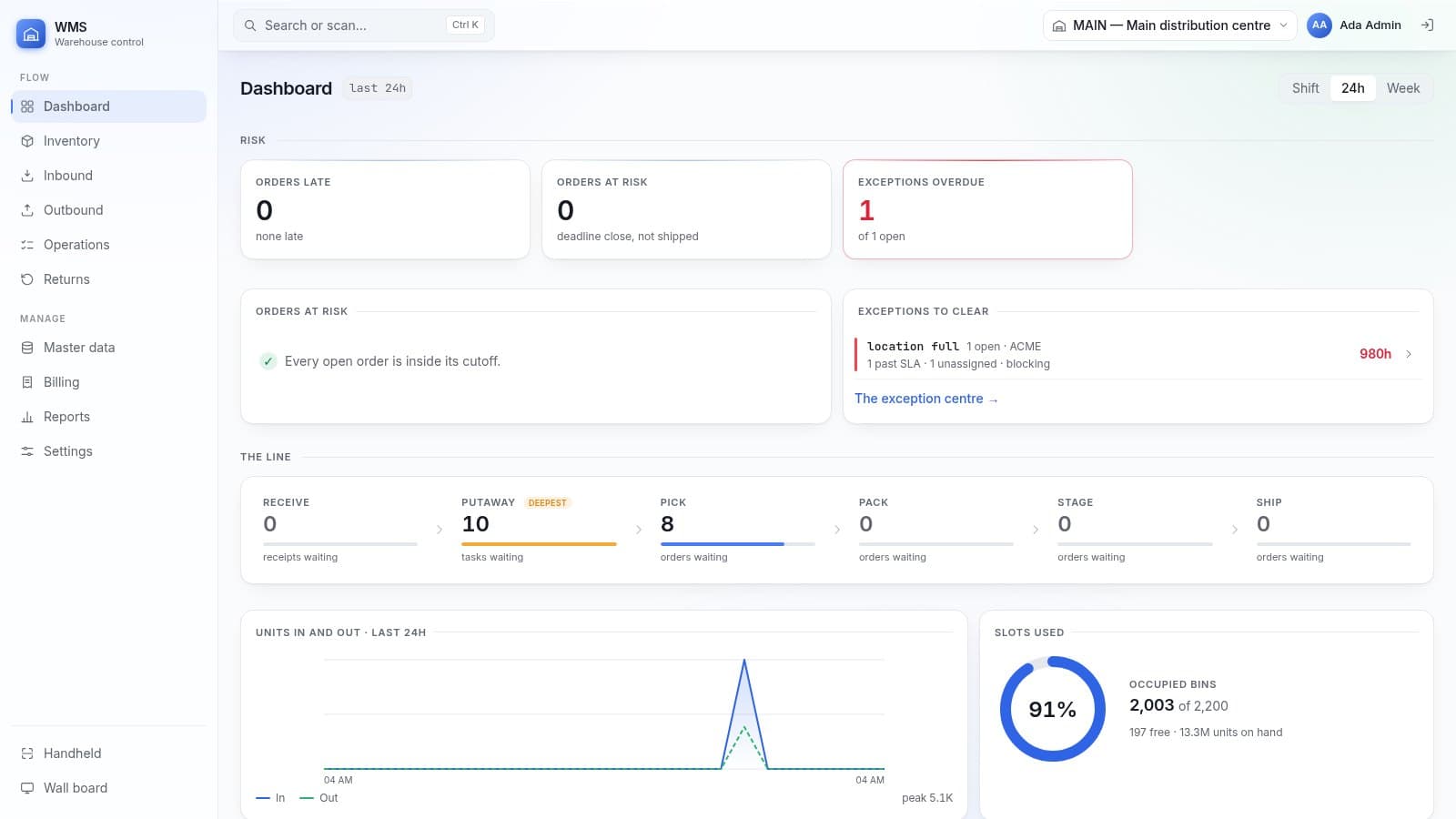
- Supervisors watch it all on a live dashboard and a dark wall board on the warehouse TV, with an exceptions queue (short picks, full locations, damaged stock) that has owners and SLA timers.
- Clients log in to their own portal to check stock, orders, receipts and shipments, and pull their reports without emailing anyone.
Three apps, one system
The desk app is for office staff and supervisors: more than 60 screens covering master data, inbound, inventory, outbound, cycle counts, returns, 3PL billing, 16 reports and settings, with a Ctrl+K search that also accepts a barcode. The handheld app is built for gloved hands on a handheld scanner: one scan per screen, big buttons, loud error feedback, and actions queue up and sync when the Wi-Fi drops between racks. The client portal is a read-only window for each customer.
The parts we were most careful about
In a 3PL, the worst possible bug is one client seeing another client's stock. So the client filter is not something each screen remembers to add: it is injected into every database query by middleware, and a dedicated check script tries to break it.
Stock can only change in one place in the code. Every movement is written to an append-only ledger (a database trigger refuses edits and deletes), balances are updated from that ledger, and a nightly job checks the two still agree. Quantities and money are fixed decimals, never floats. Database constraints refuse negative stock or allocating more than is on hand, even if the application code has a bug. Every change is in an audit trail linked by a hash chain, so you can tell if someone tampered with history.
Double scans and double clicks happen all day on a warehouse floor. Every write carries an idempotency key, so the second one is ignored instead of receiving the same pallet twice.
How it was tested
There are 17 automated check suites. The most important one walks a real product through the whole warehouse over HTTP (receive, put away, allocate, wave, pick, pack, ship) and asserts that the ledger equals the balance at both ends. Another opens 84 screens in headless Chrome at handheld size and fails on any console error, failed request, sideways scroll or button smaller than a gloved thumb. We load-tested it with about 100,000 stock records and 130,000 ledger rows. The screenshots here are from a local run with demo data.
Where it is now
The software is finished and every check passes. The next step is user acceptance testing with real pickers on the warehouse floor, so it is not public yet. If you run a warehouse or a 3PL and want a walkthrough, get in touch.
Key features
- Multi-warehouse, multi-client (3PL): each client sees only its own stock
- Receiving against POs and ASNs, with lot, expiry, damage and QC
- Directed putaway that records which rule chose the bin
- Allocation with row locks, so two orders never take the same units
- Waves and pick tasks sorted in walking order
- Packing with carton suggestion, weight check and Zebra ZPL labels
- Handheld scanner app that keeps working through Wi-Fi drops
- Cycle counts, replenishment, slotting, returns and cross-dock
- Client portal and 3PL billing from captured warehouse events
- Live dashboard, wall board and 16 reports with CSV export
- Append-only stock ledger and hash-chained audit trail
- Self-hosted with Docker Compose, no paid service required