Vercel vs Self-Hosting in 2026: Real Costs Compared
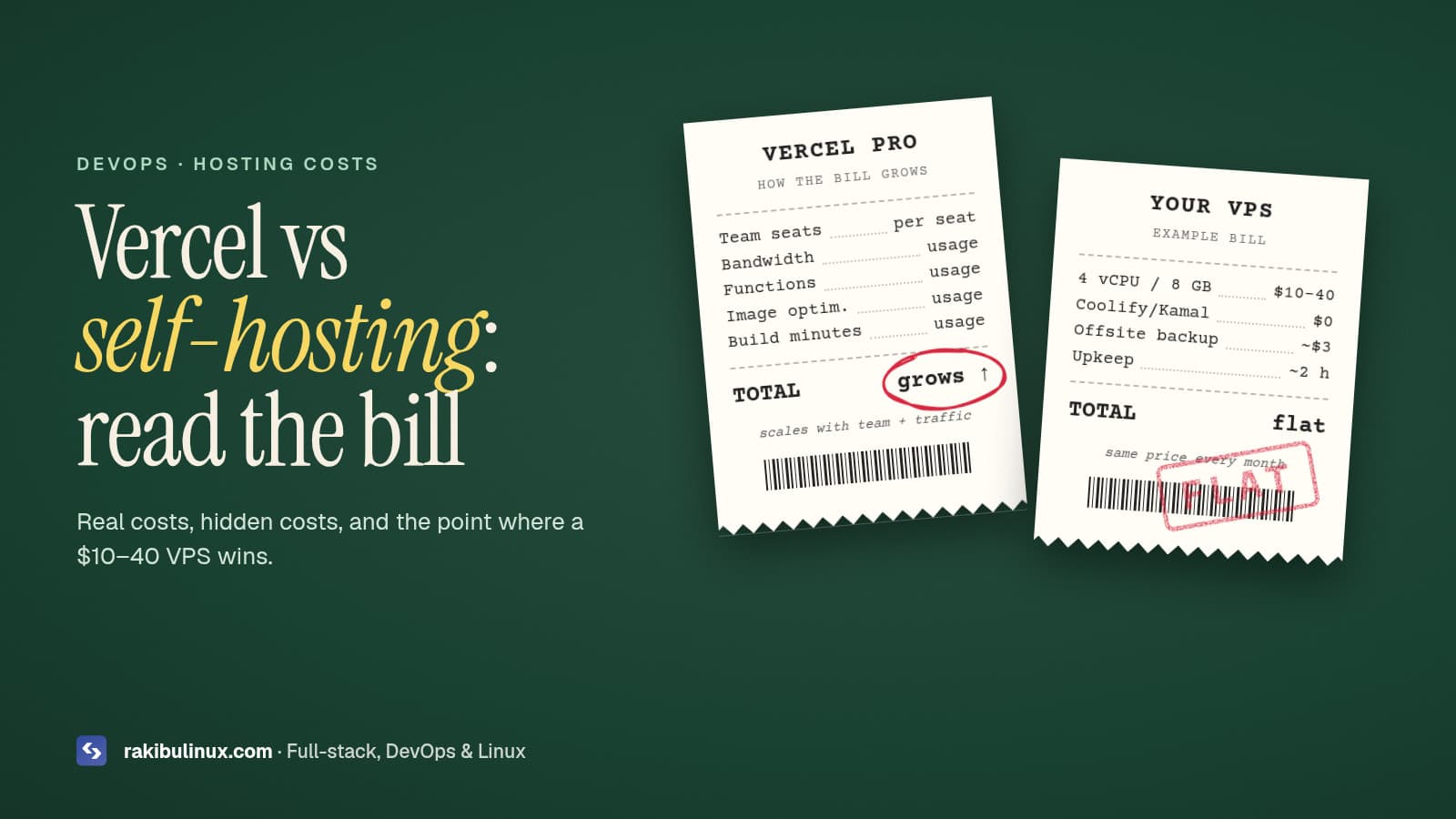
Vercel is cheapest for one small app. With several apps, steady traffic or long-running jobs, a $10–40 VPS running Coolify, Dokploy or Kamal usually costs less.
Every week I talk to founders and agencies who are surprised by a hosting bill. The app did not change much, but traffic grew, the team grew, or a few background jobs got added, and the platform invoice tripled. Other teams go the opposite way: they move to a cheap VPS, skip backups and monitoring, and pay for it later in downtime.
This article compares the real cost of Vercel and self-hosting in 2026, including the hidden costs that pricing pages do not show. I run my own sites on a self-managed VPS and also help clients who are happy on Vercel, so this is not a sales pitch for either side.
Key takeaways
- Vercel's real price is per seat plus usage. Pro plans are billed per team member, and bandwidth, function execution and build minutes above the included quota are charged on top.
- A VPS is a flat fee. Roughly $5–40 per month buys enough CPU and RAM to host many small apps, a database and a cache.
- Self-hosting adds work, not just savings: updates, backups, monitoring and security are now your job (or your DevOps partner's job).
- Open-source PaaS tools like Coolify and Dokploy give you a Vercel-style dashboard on your own server.
- The break-even point usually arrives when you have more than two or three production apps, a growing team, or workloads that do not fit serverless.
How Vercel pricing really works
Vercel's free Hobby plan is for personal, non-commercial projects. Commercial projects need Pro, which is priced per team member per month and includes a usage allowance. Beyond the allowance you pay for what you use: data transfer, serverless and edge function execution, image optimization, build minutes and some add-ons. Enterprise plans are custom-priced.
This model is excellent when you are small. You pay almost nothing to start, and you get preview deployments, a global CDN and zero server maintenance. The bill grows with three things:
- Team size. Five developers cost five seats, even if only one person deploys.
- Traffic and media. Image-heavy sites and large downloads push bandwidth and optimization usage up.
- Server work. Heavy API routes, AI calls that wait on slow model responses, and frequent revalidation all add function time.
Always check the current numbers on Vercel's pricing page; they change, and your usage dashboard is the only reliable forecast.
What self-hosting costs
The server
A VPS from Hetzner, DigitalOcean, Vultr, Linode or Contabo with 2–4 vCPUs and 4–8 GB RAM costs roughly $5–40 per month depending on the provider and region. That single server can run several Next.js or Node.js apps, PostgreSQL, Redis and a reverse proxy. Bandwidth is usually included in generous amounts.
The deployment layer
- Coolify: the most popular open-source, self-hosted PaaS. Git push deploys, preview deployments, databases and a polished dashboard. It needs some RAM for itself (plan on a 4 GB server or larger).
- Dokploy: a newer alternative with a similar Docker-based approach and a clean UI. Lighter and growing fast.
- Kamal: the CLI tool from 37signals (makers of Basecamp and HEY). No dashboard; it SSHes into your servers, deploys Docker images and switches traffic with zero downtime.
- Plain PM2 + Nginx + GitHub Actions: the leanest option with the fewest moving parts. This is what I use for this website. Full guide: deploy Next.js 16 on a VPS.
The hidden costs
This is where honest comparisons differ from marketing posts. When you self-host, you also take on:
- Security updates for the OS, runtime and database.
- Backups that you have actually tested restoring.
- Monitoring and alerts for uptime, disk space and memory.
- Incident time. When the server has a problem at 2 a.m., nobody else will fix it.
Budget a few hours per month for this, or a monthly maintenance retainer with someone who does it for a living. Even with that included, multi-app teams usually come out ahead.
Three realistic scenarios
Scenario 1: Solo founder, one marketing site
One developer, a Next.js landing page and blog, modest traffic. Winner: Vercel. You will likely stay inside the Pro allowance, and your time is better spent on the product than on servers.
Scenario 2: Agency with 10 client sites
Three developers, ten small production sites, each with light traffic. On a per-seat, per-project platform the bill adds up quickly. Two well-managed VPS servers with Coolify or a scripted PM2 setup can host all ten for a flat monthly fee. Winner: self-hosting, often by a wide margin.
Scenario 3: SaaS with background jobs and websockets
A product with a NestJS API, scheduled jobs, a queue worker and real-time chat. Serverless functions are not designed for long-running processes or persistent websocket connections, so you would need extra services anyway. Winner: self-hosting or a hybrid, where the frontend stays on Vercel and the API, workers and database run on a VPS.
A simple decision framework
Stay on Vercel if most of these are true:
- You have one or two apps and a small team.
- Preview URLs for every pull request are central to your workflow.
- Your backend is light, or lives elsewhere already.
- Nobody on the team wants to own servers.
Move to self-hosting (or hybrid) if most of these are true:
- Your monthly platform bill is growing faster than your revenue.
- You run long tasks, workers, cron jobs, websockets or self-hosted AI models.
- You need data to stay in a specific country or on hardware you control.
- You host many small sites for clients.
How to migrate without drama
- Audit Vercel-specific features you rely on: edge middleware, image optimization, cron, KV or Blob storage, analytics.
- Pick replacements: Next.js middleware and image optimization run fine on
next start; cron becomes systemd timers or a worker; Blob storage becomes S3-compatible storage (see my guide to self-hosted S3 after MinIO). - Build a CI/CD pipeline with automatic rollback so deploys stay boring. Here is the pipeline I use.
- Harden the server before DNS points at it.
- Lower DNS TTL, switch, watch logs, and keep the Vercel project for a week as a fallback.
Frequently asked questions
What is the best Vercel alternative in 2026?
For a self-hosted dashboard experience, Coolify is the most popular choice, with Dokploy close behind. For CLI-driven teams, Kamal is excellent. For the simplest setup on one server, PM2 with Nginx and a deploy script is hard to beat.
Is a VPS fast enough compared with a CDN?
For most audiences, yes, especially with static assets cached for a long time. If your users are spread worldwide, put a CDN like Cloudflare in front of the VPS and you get global caching for free or at low cost.
Can I self-host Next.js with all features?
Yes. Server components, server actions, ISR, middleware and image optimization all work with next start. Some multi-instance caching needs extra configuration.
How much time does self-hosting take each month?
With automated updates, backups and monitoring in place, a few hours per month for a small fleet. Without automation it can be much more, which is why setup quality matters.
Can I use both Vercel and a VPS?
Absolutely. A hybrid setup is common: the marketing site and frontend on Vercel, the API, database and workers on a VPS.
Get a hosting cost review
Send me your current hosting bill and a short description of your stack, and I will tell you honestly whether moving makes sense, what it would cost, and what the risks are. I handle the migration, CI/CD, hardening and ongoing maintenance. See my DevOps services or contact me.
- Vercel alternative
- self-hosting
- Coolify
- Dokploy
- Kamal
- VPS hosting
- hosting costs