Docker Bypasses UFW on Ubuntu: Why and How to Fix It
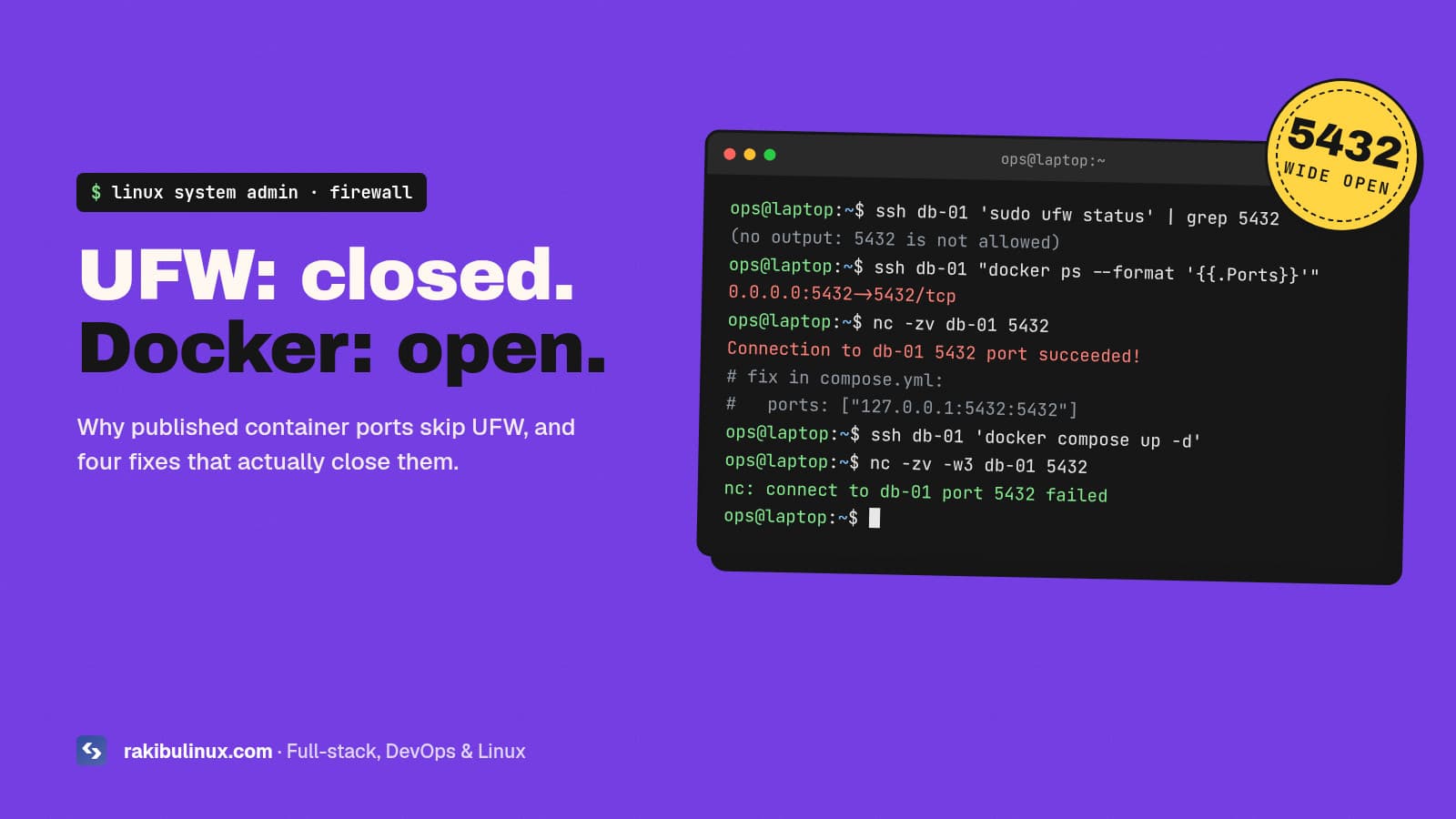
Docker publishes container ports with its own iptables rules, which run before UFW's. Fix it by binding ports to 127.0.0.1 or filtering in DOCKER-USER.
This one surprises almost everyone who runs Docker on a VPS. You set up UFW, allow only SSH, HTTP and HTTPS, run ufw status and feel safe. Then you start Postgres or Redis in Docker with -p 5432:5432, and it's reachable from the whole internet, even though UFW lists no rule for it. Docker's own documentation warns that publishing ports is insecure by default. Here is why it happens, how to check your servers in one minute, and four fixes, starting with the simplest.
Key takeaways
- Published ports skip UFW. Docker rewrites the destination in the
nattable and sends the packet throughFORWARD, while UFW mostly filtersINPUT. - By default,
-p 5432:5432listens on all interfaces (0.0.0.0and[::]). - Fix 1 (best): don't publish internal services at all, or publish them on
127.0.0.1only. - Fix 2: set
"ip": "127.0.0.1"indaemon.jsonso localhost becomes the default. - Fix 3: filter public traffic in the
DOCKER-USERchain. Never set"iptables": falseas a fix; it breaks container networking.
Why does Docker bypass UFW?
UFW is a front end for iptables (on Ubuntu 24.04, iptables itself runs on top of nftables). Its rules live mostly in the INPUT chain, which handles packets addressed to the host itself.
When you publish a port, Docker adds a DNAT rule in the nat table's PREROUTING chain. A packet arriving for port 5432 gets its destination rewritten to the container's internal IP before filtering. From then on it isn't addressed to the host any more. It's being routed to another network (the Docker bridge), so it goes through the FORWARD chain, where Docker's own rules accept it. UFW's INPUT rules never see it.
How to check your server in one minute
List what Docker publishes on every interface:
docker ps --format 'table {{.Names}}\t{{.Ports}}' | grep -E '0\.0\.0\.0|\[::\]|:::'
sudo ss -tlnp | grep docker-proxy
Anything showing 0.0.0.0:PORT or [::]:PORT is reachable from outside unless your cloud provider's firewall blocks it. Confirm from a different machine, not from the server itself:
nc -zv -w3 your.server.ip 5432
nmap -Pn -p 1-65535 your.server.ip    # slower, finds everything
Databases, Redis, Elasticsearch, admin panels and internal APIs are the usual findings. Open Redis and Elasticsearch instances are a common way servers get compromised or wiped.
Fix 1: Don't publish internal ports (or publish them on localhost)
The best fix is not to expose the port at all. Containers on the same Docker network reach each other by service name, so your app container doesn't need Postgres published on the host:
# compose.yml
services:
  app:
    image: my-app
    ports:
      - "127.0.0.1:3000:3000"   # only Nginx on the host talks to it
    environment:
      DATABASE_URL: postgres://app:secret@db:5432/app
  db:
    image: postgres:17
    # no "ports:" at all. Reachable as db:5432 inside the network
    volumes: [pgdata:/var/lib/postgresql/data]
volumes:
  pgdata:
When the host itself needs the port (Nginx proxying to an app container, or you connecting through an SSH tunnel), publish it on 127.0.0.1. Then expose only Nginx on 80 and 443, which is the same pattern as my Next.js on a VPS setup. To reach the database from your laptop, use an SSH tunnel instead of opening the port:
ssh -N -L 5432:127.0.0.1:5432 you@your.server
Docker versions before 28.0.0 had a gap where hosts on the same layer-2 network could still reach ports published on localhost. Another reason to stay up to date.
Fix 2: Make localhost the default bind address
To protect against someone writing -p 6379:6379 later, change Docker's default host IP for published ports:
# /etc/docker/daemon.json
{
  "ip": "127.0.0.1"
}
sudo systemctl restart docker
docker compose up -d --force-recreate   # existing containers keep old bindings
Now an unqualified -p 6379:6379 binds to localhost, and you have to write 0.0.0.0: on purpose to expose something. This setting covers the default bridge network. For user-defined networks, set com.docker.network.bridge.host_binding_ipv4 on the network or use default-network-opts in daemon.json. Docker's port-publishing docs describe both.
Fix 3: Filter in the DOCKER-USER chain
Sometimes a container port must be public, but only to some addresses: a database your office connects to, or a metrics endpoint for one monitoring server. Docker leaves an empty DOCKER-USER chain for this, and it runs before Docker's own forwarding rules. Following Docker's documented pattern:
# allow replies to established connections
sudo iptables -I DOCKER-USER -m conntrack --ctstate RELATED,ESTABLISHED -j ACCEPT
# drop new traffic arriving on the public interface unless it comes from the office IP
sudo iptables -I DOCKER-USER 2 -i eth0 ! -s 198.51.100.7 -m conntrack --ctstate NEW -j DROP
Replace eth0 with your public interface (ip route get 1.1.1.1 shows it). Rules added with iptables don't survive a reboot, so persist them with iptables-persistent or add them to /etc/ufw/after.rules. If you'd rather keep everything in UFW syntax, the community ufw-docker helper script automates this pattern. Read it before running it as root.
Fix 4: Use the cloud firewall as a second layer
Hetzner, DigitalOcean, AWS and most providers offer a network firewall that filters traffic before it reaches your VM. Docker can't touch it. Allow only 22 (ideally from your IPs only), 80 and 443 there, and a mistake on the server stays private. It's not a replacement for Fix 1, but it's cheap insurance.
What not to do
- Don't set
"iptables": falseindaemon.json. Docker docs warn it's not appropriate for most users. Containers lose outbound internet access and port publishing breaks in confusing ways. - Don't rely on
ufw deny 5432. It adds an INPUT rule, and Docker traffic doesn't pass through INPUT. - Don't switch firewall backends to fix this. Docker 29 added experimental nftables support, but there's no
DOCKER-USERequivalent there yet. Stay on the default iptables backend unless you plan to manage nftables rules yourself.
Add it to your hardening routine
Put a port check into every server review: docker ps for 0.0.0.0 bindings and an external nmap scan. My Ubuntu 24.04 hardening checklist covers the rest of the server. If you run self-hosted tools like Ollama and Open WebUI or self-hosted S3 storage, check those containers first. Their admin ports are exactly what scanners look for.
Frequently asked questions
Does Docker bypass UFW for all ports?
Only for ports you publish with -p or ports:. Container ports that aren't published aren't reachable from outside. Host services such as SSH and Nginx are still filtered by UFW normally.
Is binding to 127.0.0.1 enough?
For most setups, yes. Only processes on the host can connect. On Docker versions older than 28.0.0, machines on the same local network segment could still reach localhost-published ports, so keep Docker updated.
Does this affect Docker on Ubuntu 24.04 specifically?
It affects every Linux distribution where Docker manages iptables, including Ubuntu 22.04, 24.04 and Debian. UFW is just the place people notice it, because it gives a false sense of safety.
What about Podman?
Rootless Podman publishes ports through a user-space proxy rather than kernel NAT rules, so the behaviour is different. Check with an external scan rather than assuming either way.
Should I use ufw-docker?
It's a reasonable option if you want to manage container access with UFW-style commands. It's a third-party script that edits your firewall rules, so read it first. For most servers, Fix 1 and Fix 2 are enough.
Want your servers checked?
I audit and harden Linux servers running Docker: exposed ports, firewall rules, SSH, updates, backups and monitoring, with a written report of what I changed. See my Linux system admin services or book a server review.
- Docker UFW
- Docker firewall
- DOCKER-USER
- Ubuntu
- iptables
- server security
- Linux system admin