Slopsquatting: Stop AI From Installing Fake npm Packages
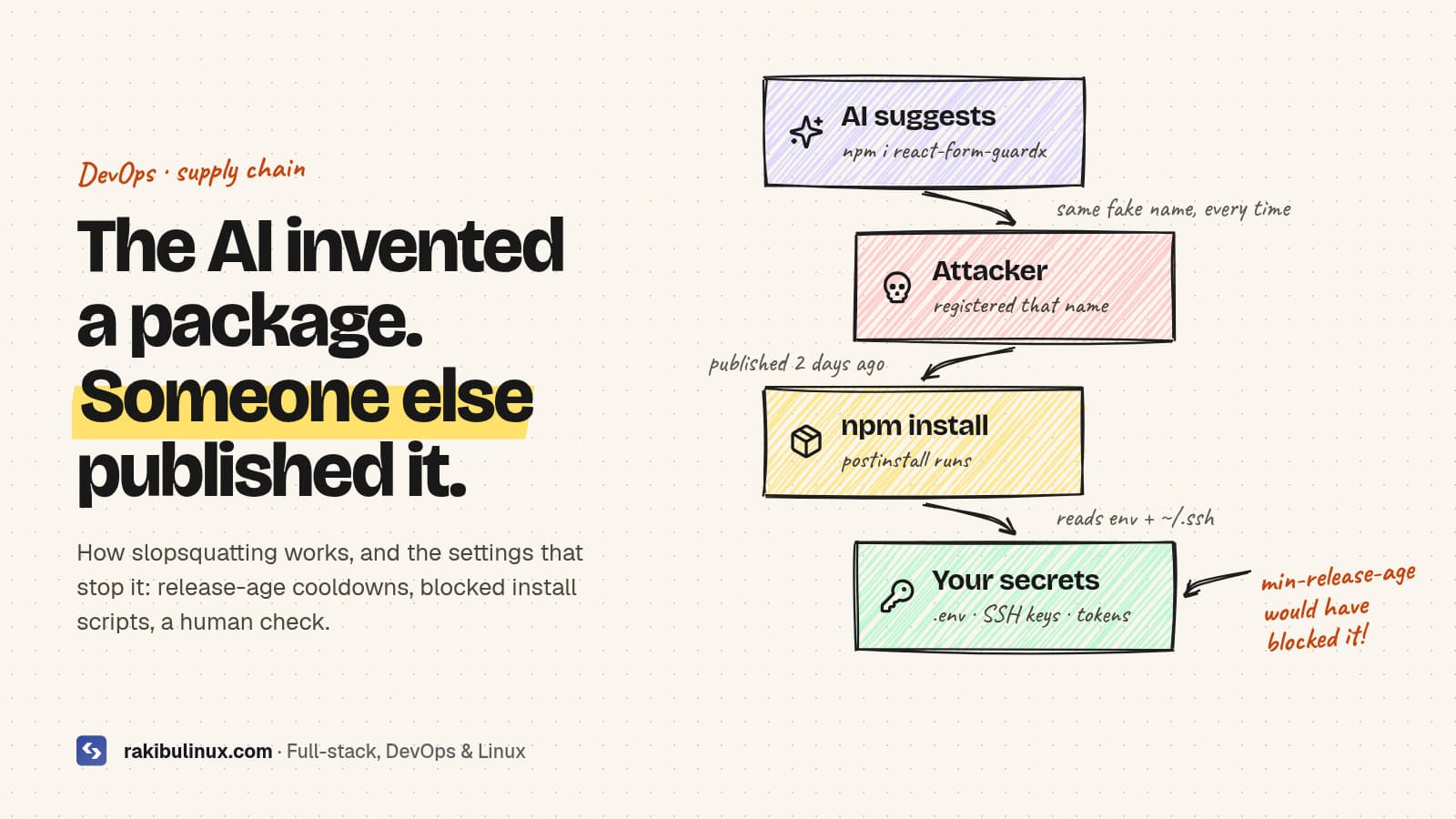
Slopsquatting is when attackers publish packages under names AI tools hallucinate. Stop it with release-age cooldowns, blocked install scripts and name checks.
When an AI coding agent writes npm install for a package that doesn't exist, the command just fails. Unless someone has already registered that name and filled it with malware. That's slopsquatting, and it matters more now that agents run install commands themselves. The fixes are mostly config: a few lines in .npmrc or pnpm-workspace.yaml, and a rule in your agent's instructions. Here is how the attack works and a setup that blocks it on any Node project.
Key takeaways
- Models hallucinate package names, and repeat them. In a large 2025 study, 19.7% of AI-generated code samples referenced at least one package that didn't exist, and many fake names came back on every rerun.
- Repeatable names are what make the attack work. An attacker registers the name once and waits for agents to install it.
- Release-age cooldowns (npm
min-release-age, pnpmminimumReleaseAge) block brand-new versions, which is where most malicious packages live. - Block dependency install scripts. pnpm 10+ does this by default; npm needs
ignore-scripts. - Never let an agent add a dependency without review. Put the rule in AGENTS.md and enforce it in CI.
What is slopsquatting?
The name, coined by Python security developer Seth Larson, mixes "AI slop" with typosquatting. Typosquatting relies on people mistyping lodash. Slopsquatting relies on models confidently inventing a plausible package, such as react-form-guardx (a made-up example), which an attacker then publishes.
The research behind it is solid. A USENIX Security 2025 paper by Spracklen and colleagues generated 576,000 code samples across 16 models and found:
- 19.7% of samples included at least one hallucinated package, with 205,474 unique fake names.
- Open-source models hallucinated far more often (21.7% on average) than commercial ones (5.2%).
- When the same prompt was rerun ten times, 43% of hallucinated names appeared every time.
Newer frontier models hallucinate less, but even a small rate becomes a real risk once agents run thousands of installs a day without a person reading the command.
How the attack plays out
- An attacker prompts popular models with common tasks and collects the package names they invent.
- They publish those names on npm or PyPI, often with a convincing README and a working-looking API.
- A developer, or an agent running unattended, installs the package.
- A
postinstallscript runs on the developer's machine or in CI and reads environment variables,.envfiles, SSH keys and cloud tokens.
Step 4 happens during install, before any of your code runs. That's why the most useful defences act at install time.
Defence 1: Add a release-age cooldown
Most malicious packages and hijacked versions are caught and removed within days. If your package manager refuses versions younger than a few days, you skip that window entirely.
npm (11.10 or newer; older versions silently ignore the setting), in the project's .npmrc:
# refuse versions published less than 7 days ago
min-release-age=7
pnpm (10.16 or newer; the value is in minutes, and pnpm 11 defaults to 1440, one day), in pnpm-workspace.yaml:
minimumReleaseAge: 10080 # 7 days
When you really need a fresh release, such as an urgent security patch, allow that one version explicitly. Check npm --version on every machine and CI runner. A cooldown that's silently ignored gives you false confidence.
Defence 2: Stop install scripts from running
Since version 10, pnpm doesn't run dependencies' preinstall/postinstall scripts unless you allow them. Newer pnpm versions use an allowBuilds map for that; older ones use onlyBuiltDependencies. Bun also skips lifecycle scripts for packages that aren't in its trusted list. With npm, turn them off yourself:
# .npmrc
ignore-scripts=true
A few packages with native code genuinely need their build step. Allow them by name after checking them, rather than allowing everything. This one setting turns most install-time malware into a harmless tarball sitting in node_modules.
Defence 3: Check every new name before installing
Before installing a package an AI suggested, spend thirty seconds on it:
npm view react-form-guardx name time.created repository.url maintainers
# 404 = doesn't exist (hallucinated). Created last week with no repo = walk away.
- Does it exist, and is it the package the docs of the library you're using actually mention?
- How old is it, how many weekly downloads does it have, and does it link to a real repository?
- Is there a well-known package that already does this? Prefer it.
Watch for cross-ecosystem traps too. A name hallucinated for Python may exist on npm as a completely different, possibly malicious, package.
Defence 4: Lock down the agent and CI
- Rules file: add "Never add or upgrade a dependency without asking. Propose the package name and why." to your AGENTS.md or CLAUDE.md.
- Hooks: in Claude Code, a PreToolUse hook can block
npm install <name>-style commands outright, which is stronger than a rule the model might ignore. - CI installs from the lockfile only:
npm ciorpnpm install --frozen-lockfile. A dependency added without a reviewed lockfile change fails the build. - Least-privilege CI secrets: the install step shouldn't see deploy keys. My GitHub Actions deploy guide uses a separate deploy job and a forced-command SSH key for this reason.
- Review dependency diffs in pull requests the way you review code. A new package in
package.jsondeserves a comment explaining why.
What if a bad package already ran?
- Remove it, delete
node_modulesand the lockfile entry, and reinstall from a known-good lockfile. - Rotate every secret the machine or CI runner could read:
.envvalues, cloud keys, npm and GitHub tokens, SSH keys. - Check for persistence: new SSH keys in
authorized_keys, cron jobs, shell profile changes, unexpected GitHub workflows. - Report the package to the registry so it gets taken down for everyone.
Slopsquatting is one item on a longer list. For the rest, see my vibe coding security checklist.
Frequently asked questions
What is the difference between typosquatting and slopsquatting?
Typosquatting targets humans mistyping a real package name. Slopsquatting targets AI tools that invent names that never existed. The defences overlap, but slopsquatting scales with how much code agents install without supervision.
Does npm audit catch slopsquatted packages?
Not reliably. npm audit reports known vulnerabilities in the advisory database. A new malicious package has no advisory until someone reports it, which is why cooldowns and blocked scripts matter more.
What minimum release age should I use?
Three to seven days is a common choice. It skips the window when most malicious versions are caught, while keeping you reasonably current. Allow exceptions for urgent security patches.
Are paid AI models safe from hallucinating packages?
They hallucinate less, but not never. Commercial models averaged about 5% in the 2025 study, and newer models still produce fake names now and then. Verify any package you haven't heard of.
Does this affect Python and pip too?
Yes. PyPI has the same problem. Use pinned, hash-checked requirements, review new dependencies, and consider tools that delay or vet new releases.
Want your pipeline locked down?
I harden Node.js supply chains and CI/CD: lockfile-only installs, cooldowns, script allow-lists, least-privilege secrets and agent guardrails. See my DevOps services or ask for a pipeline review.
- slopsquatting
- npm security
- supply chain security
- AI coding agents
- pnpm
- vibe coding
- DevOps