Skip to content
All articles
Oct 5, 20267 min read

Lovable App to Production: Host It on Your Own Server
Lovable App to Production: Host It on Your Own Server

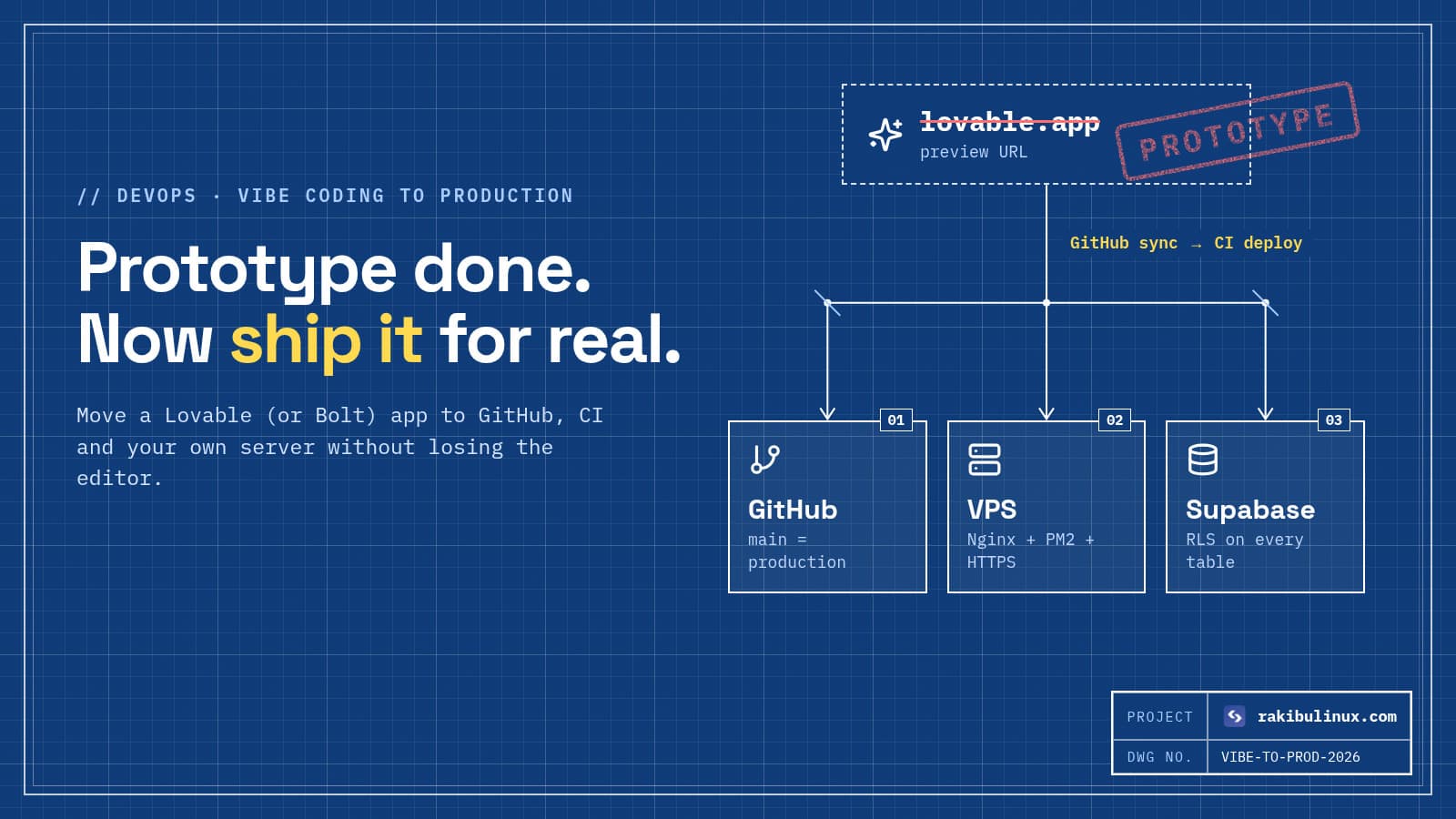
To run a Lovable app in production on your own server, sync it to GitHub, review security, build it in CI and serve it with Nginx (static) or PM2 (SSR).

Lovable, Bolt and similar builders are great at getting a working product in front of people in days. The trouble starts when that product gets customers: you want your own domain and server, real backups, a review step before changes go live, and costs that don't jump with usage. The good news is that a Lovable app is a normal codebase you own. This guide moves it onto the same production setup this website runs on: GitHub, GitHub Actions, Nginx and PM2 on an Ubuntu VPS. You can keep editing in Lovable afterwards.

Key takeaways

  • You own the code. Lovable syncs both ways with GitHub, so the repo becomes the source of truth.
  • Check which stack you have. Lovable apps created from 13 May 2026 use TanStack Start with server-side rendering; older ones are React + Vite static apps. They deploy differently.
  • Review security before moving anything. Missing Row Level Security on Supabase tables is the most common serious problem in AI-built apps.
  • Deploy from CI, not from the editor. Every change to main runs checks, builds, and goes live only if the health check passes.
  • The backend can stay on Supabase. Move the frontend first; moving the database is a separate project.

Step 1: Connect GitHub and get the code running locally

In Lovable, connect the project to GitHub. Changes in the editor push to the repo, and commits you push to the active branch sync back into Lovable. Clone it and run it:

git clone git@github.com:you/my-app.git && cd my-app
npm ci
cp .env.example .env    # or create it: VITE_SUPABASE_* values
npm run dev
npm run build           # must pass before anything else

Look at package.json to see which stack you have. If the build script is plain vite build and outputs a dist/ folder, it's a static single-page app. If it depends on @tanstack/react-start and has a start script, it's a server-rendered Node app.

Step 2: Do a security review first

Moving hosts doesn't fix security, and a migration is the right moment to look. The browser bundle contains your Supabase URL and public anon key by design. That's safe only if every table has Row Level Security policies. In 2025, CVE-2025-48757 documented Lovable apps whose tables were readable by anyone because those policies were missing.

At minimum: enable RLS on every table, confirm no service_role key is in the frontend, check that edge functions verify the user, and add rate limits to anything that calls a paid API. My vibe coding security checklist has the full list with test commands.

Step 3: Prepare the server

A 2 GB VPS is plenty for most Lovable frontends. Harden it first (SSH keys, firewall, automatic updates; see my Ubuntu 24.04 hardening checklist), then install Nginx and Node.js LTS. Use a release-folder layout so deploys are atomic and rollbacks take a second:

/srv/my-app/
├── releases/20261005-1430-e4f5a6b/
├── shared/.env            # build-time and runtime variables
└── current -> releases/20261005-1430-e4f5a6b

Step 4a: Serve a Vite (static) app with Nginx

A static build is just files. Nginx serves them and sends unknown paths to index.html so client-side routes work:

server {
    server_name app.example.com;
    root /srv/my-app/current/dist;

    location /assets/ {
        expires 1y;
        add_header Cache-Control "public, immutable";
    }
    location / {
        try_files $uri $uri/ /index.html;
    }
}

Remember that VITE_* variables are baked in at build time. Changing them means rebuilding, not restarting.

Step 4b: Run a TanStack Start (SSR) app with PM2

A server-rendered app is a Node process. Build it, then run the start command from package.json under PM2 and proxy to it:

// /srv/my-app/ecosystem.config.js
module.exports = { apps: [{
  name: "my-app",
  cwd: "/srv/my-app/current",
  script: "npm", args: "run start",
  env: { NODE_ENV: "production", PORT: 3000 },
}]};
location / {
    proxy_pass http://127.0.0.1:3000;
    proxy_set_header Host $host;
    proxy_set_header X-Forwarded-Proto $scheme;
}

Then pm2 start ecosystem.config.js && pm2 save, and add HTTPS with certbot --nginx. Server rendering has a side benefit: crawlers and AI search bots see real HTML, which helps you get cited by ChatGPT and AI Overviews.

Step 5: Deploy from GitHub Actions

Push-to-deploy with checks is what turns a prototype into a product. On every push to main:

  1. Install and run the type check and build in CI. A broken build never reaches the server.
  2. SSH to the server with a deploy-only key and build the commit into a new release folder.
  3. Swap the current symlink, reload Nginx or PM2, and hit a health URL.
  4. If the health check fails, swap back to the previous release automatically.

I've written up the full workflow, including the forced-command SSH key and the rollback script, in GitHub Actions CI/CD to a VPS with automatic rollback.

Lovableedit + preview GitHubmain Actionscheck + build your VPSswap + health two-way sync: code edits show up in Lovable
Lovable stays your editor, GitHub becomes the source of truth, and every change goes through CI before the server swaps to it. Developers can push to the same repo and Lovable picks it up.

Step 6: Decide what to do with the backend

Lovable's backend is built on Supabase, and Lovable's docs describe moving it to managed Supabase or self-hosted Supabase. For most teams the right order is:

  • Now: keep the database where it is, with RLS reviewed, backups enabled and a separate staging project.
  • Later, if needed: move to your own Supabase project or self-host Supabase with Docker on a server you control.
  • Only with a real reason: rewrite onto plain PostgreSQL and your own API. Auth, storage, realtime and edge functions all need replacing, so treat it as a rebuild, not a migration.

Step 7: Production basics people skip

  • Error tracking (Sentry or similar) for the frontend and functions.
  • Uptime checks on the homepage and one API call.
  • Database backups you have actually restored once.
  • A staging copy on a subdomain, deployed from a staging branch.
  • Branch rules: AI edits go to a branch and merge through a pull request, so nothing reaches production unreviewed.

Frequently asked questions

Can I host a Lovable app outside Lovable?

Yes. The code syncs to your GitHub repo and is a standard React project, either a Vite static app or a TanStack Start SSR app depending on when it was created. Any server or host that supports that stack can run it.

Will I lose the ability to edit in Lovable?

No. GitHub sync works both ways, so you can keep using Lovable while CI deploys main to your server. Use branches and pull requests so editor changes are reviewed before they go live.

Is Lovable production-ready?

The generated code can be, after a review. The common gaps are security rules, error handling, testing and deployment process, not the framework. Those are exactly what this guide adds.

What server do I need for a Lovable app?

A static Vite app runs on almost anything, even a 1 GB VPS. An SSR app needs a Node process; 2 GB of RAM is a comfortable start, and more if you build on the server.

Does this work for Bolt, v0 or Replit apps too?

Yes. The steps are the same once the code is in GitHub: identify the stack, review security, build in CI and serve it with Nginx or a Node process manager.

Want your prototype running like a real product?

I take AI-built apps to production: security review, CI/CD, server setup, monitoring and backups, with a handover document your team can follow. See my DevOps services or send me your repo.

  • Lovable
  • vibe coding
  • self-host
  • deploy to VPS
  • Supabase
  • Nginx
  • DevOps

Keep reading

AI Website Builder vs Custom Website: 2026 Buyer's Guide
Website DesignOct 5, 2026

AI Website Builder vs Custom Website: 2026 Buyer's Guide

Use an AI website builder to launch fast on a small budget. Choose a custom website when speed, SEO, integrations or owning your code drive revenue. In 2026 you can type a sentence and get a decent-looking website in minutes. Every major builder has an AI mode, and AI app builders like Lovable and Bolt will generate a full React project. So a business owner asking "why pay for a custom site?" is asking a fair question. I build custom websites for a living, and my honest answer is: often you shouldn't, at least not yet. Here is how to tell which side of the line you're on, and what the builder's pricing page doesn't show. Key takeaways AI builders are great for validating an idea , simple brochure sites and events. You can be live the same day. The cost is ongoing rent and limits : monthly plans, paid add-ons, design and performance ceilings, and a rebuild if you ever leave. Custom wins when the website is how you make money : lead generation that depends on search, fast pages, custom booking or quoting, integrations with your tools. "AI-generated code" isn't "AI builder". A Lovable or Bolt project gives you real code, but someone still has to secure, host and maintain it. A hybrid often works best: start on a builder, then move to custom when the site's results justify it. What does an AI website builder actually give you? There are two different products under the same name: AI site builders (Wix, Squarespace, Framer, Webflow, Hostinger and others with AI modes). You describe your business, the AI writes the copy and picks a layout from the platform's components, and you edit visually. Hosting is included and locked to the platform. AI app builders (Lovable, Bolt, v0, Replit). They generate source code, usually React, that you can export. More flexible, but you're now running a software project. Both are genuinely good at the first 80%: a clean layout, reasonable copy, mobile-friendly pages. The differences show up in the last 20%, which is where most of the business value sits. When an AI builder is the right choice You're testing an idea. A landing page to see if anyone signs up doesn't need custom code. Your site is a digital business card. Most visitors find you by name, a referral or social media, not by searching for what you do. Your budget is small and your time is free. A builder plan plus a weekend of your time beats a cheap, badly built custom site. The content changes often and the person changing it isn't technical. If that's you, use a builder, connect your own domain from day one, and keep copies of your text and images outside the platform. When a custom website pays for itself Search drives your leads. You need full control of page speed, URL structure, metadata, structured data and internal links. Builders handle the basics, but competitive SEO, and now being quoted in AI answers, rewards control. My guide on getting cited by ChatGPT and AI Overviews explains what that control buys you. Speed costs you money. Heavy builder scripts slow mobile pages, and slow pages lose visitors and conversions. You need real features: quote calculators, client portals, bookings tied to your calendar and CRM, multi-language content, payments with custom logic. Your brand needs to look like nobody else's. AI builders pull from the same component libraries, so sites in the same niche tend to look alike. You want to own the asset. Custom code on your own hosting can be moved, sold or handed to another developer. The costs builders don't put on the pricing page Compare the total cost over three years, not the first month. Prices change often, so check current pricing pages, but the structure looks like this: Plan upgrades. E-commerce, memberships, more pages, custom code embeds and removing branding often sit on higher tiers. Add-ons and apps. Forms, bookings, reviews and SEO tools are often separate monthly subscriptions. Per-seat and usage pricing for editors, AI credits and bandwidth. Exit cost. Most site builders don't export a site you can host elsewhere. Leaving means rebuilding the design and moving content by hand. Your time. "Easy" still means hours of tweaking, and that time has a price. A custom site costs more up front, then mostly hosting and occasional updates. This website runs on a VPS alongside its API; the trade-offs are in Vercel vs self-hosting costs . The shape matters more than the numbers: builder costs grow with every plan upgrade and add-on, while a custom site costs more at launch and little after that. Where the lines cross depends on your plan and your scope. What about "vibe coding" the site yourself? AI app builders and coding agents blur the line. You can get a custom React site without hiring anyone. That's a real option if you're technical or curious, but be clear about what you've taken on: hosting, security updates, backups, forms that don't get spammed, and fixing it when something breaks. Many of these projects end up needing a developer anyway, just later. If you go this way, run my vibe coding security checklist and read how to take a Lovable app to production before you send traffic to it. A quick decision checklist Count how many of these are true for your business: More than a third of new customers find you through Google or AI search. Your site needs a feature that isn't a standard form or booking widget. You're spending real money on ads that land on your site. Your competitors' sites are faster or rank above yours for your main services. You've already outgrown one builder plan or paid for three or more add-ons. You'd want to move hosts or developers without starting over. 0-1: stay on a builder. 2-3: plan a custom site in the next year and start collecting what works. 4+: your website is a sales channel, and it's worth building properly. How to brief a custom website so you get what you pay for Start from goals and numbers (leads per month, booking rate), not page lists. Ask for performance targets in writing: Core Web Vitals in the green on mobile. Make sure you own the domain, the code repository and the hosting account. Ask how you'll edit content day to day: a CMS, an admin dashboard, or plain files. Agree what maintenance looks like after launch: updates, backups, monitoring. Frequently asked questions Are AI website builders good for SEO? Good enough for basic local and brand searches. For competitive keywords you'll hit limits on speed, markup and site structure sooner than with a custom build. Can I move my builder website to a custom site later? Yes, but expect to rebuild the design and move content by hand. Keep your own copies of text and images, and set up redirects from old URLs so you don't lose search rankings. How much does a custom website cost in 2026? It depends on scope: a fast marketing site with a CMS costs far less than one with portals, payments or integrations. Get a fixed-scope quote with performance targets included. Is a Lovable or Bolt site a custom website? It's custom code, generated by AI. You own and can host it, but it still needs a review for security, performance and SEO before it's production-ready. Will AI replace web designers? AI has replaced the cheap end of the market: basic templates and filler copy. Brand, strategy, conversion and engineering for speed and search still need people. The work has moved up, not away. Thinking about a custom site? I design and build fast, custom websites with SEO and AI search built in, on hosting you own. See my website design services or send me your current site for an honest "builder or custom" opinion.

Read article →
Docker Bypasses UFW on Ubuntu: Why and How to Fix It
Linux System AdminOct 5, 2026

Docker Bypasses UFW on Ubuntu: Why and How to Fix It

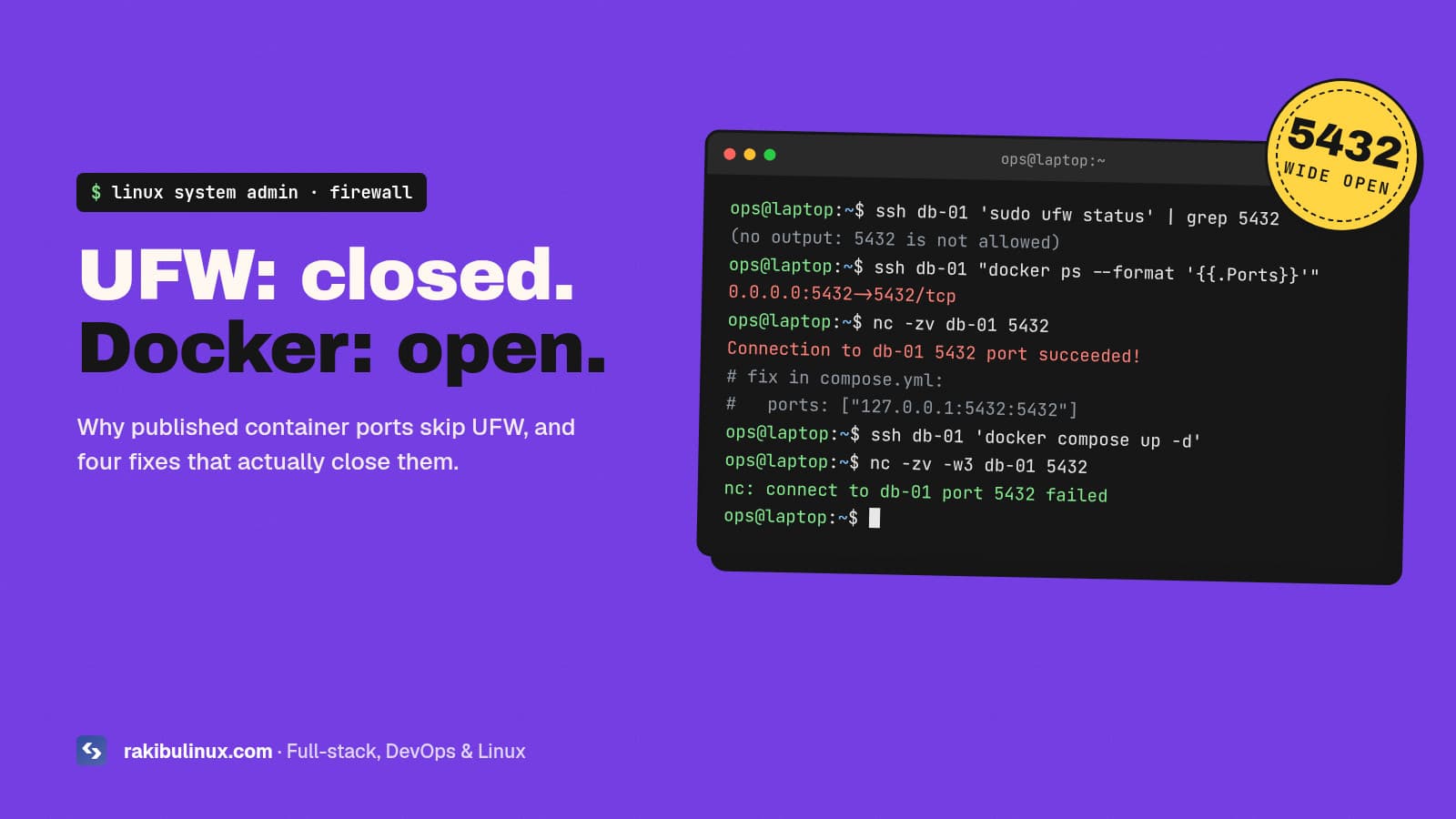
Docker publishes container ports with its own iptables rules, which run before UFW's. Fix it by binding ports to 127.0.0.1 or filtering in DOCKER-USER. This one surprises almost everyone who runs Docker on a VPS. You set up UFW, allow only SSH, HTTP and HTTPS, run ufw status and feel safe. Then you start Postgres or Redis in Docker with -p 5432:5432 , and it's reachable from the whole internet, even though UFW lists no rule for it. Docker's own documentation warns that publishing ports is insecure by default. Here is why it happens, how to check your servers in one minute, and four fixes, starting with the simplest. Key takeaways Published ports skip UFW. Docker rewrites the destination in the nat table and sends the packet through FORWARD , while UFW mostly filters INPUT . By default, -p 5432:5432 listens on all interfaces ( 0.0.0.0 and [::] ). Fix 1 (best): don't publish internal services at all, or publish them on 127.0.0.1 only. Fix 2: set "ip": "127.0.0.1" in daemon.json so localhost becomes the default. Fix 3: filter public traffic in the DOCKER-USER chain. Never set "iptables": false as a fix; it breaks container networking. Why does Docker bypass UFW? UFW is a front end for iptables (on Ubuntu 24.04, iptables itself runs on top of nftables). Its rules live mostly in the INPUT chain, which handles packets addressed to the host itself. When you publish a port, Docker adds a DNAT rule in the nat table's PREROUTING chain. A packet arriving for port 5432 gets its destination rewritten to the container's internal IP before filtering. From then on it isn't addressed to the host any more. It's being routed to another network (the Docker bridge), so it goes through the FORWARD chain, where Docker's own rules accept it. UFW's INPUT rules never see it. Traffic to the host itself passes UFW in the INPUT chain. Traffic to a published container port is rewritten first and routed through FORWARD, where Docker's rules let it in and UFW never gets a say. How to check your server in one minute List what Docker publishes on every interface: docker ps --format 'table {{.Names}}\t{{.Ports}}' | grep -E '0\.0\.0\.0|\[::\]|:::' sudo ss -tlnp | grep docker-proxy Anything showing 0.0.0.0:PORT or [::]:PORT is reachable from outside unless your cloud provider's firewall blocks it. Confirm from a different machine, not from the server itself: nc -zv -w3 your.server.ip 5432 nmap -Pn -p 1-65535 your.server.ip # slower, finds everything Databases, Redis, Elasticsearch, admin panels and internal APIs are the usual findings. Open Redis and Elasticsearch instances are a common way servers get compromised or wiped. Fix 1: Don't publish internal ports (or publish them on localhost) The best fix is not to expose the port at all. Containers on the same Docker network reach each other by service name, so your app container doesn't need Postgres published on the host: # compose.yml services: app: image: my-app ports: - "127.0.0.1:3000:3000" # only Nginx on the host talks to it environment: DATABASE_URL: postgres://app:secret@db:5432/app db: image: postgres:17 # no "ports:" at all. Reachable as db:5432 inside the network volumes: [pgdata:/var/lib/postgresql/data] volumes: pgdata: When the host itself needs the port (Nginx proxying to an app container, or you connecting through an SSH tunnel), publish it on 127.0.0.1 . Then expose only Nginx on 80 and 443, which is the same pattern as my Next.js on a VPS setup . To reach the database from your laptop, use an SSH tunnel instead of opening the port: ssh -N -L 5432:127.0.0.1:5432 you@your.server Docker versions before 28.0.0 had a gap where hosts on the same layer-2 network could still reach ports published on localhost. Another reason to stay up to date. Fix 2: Make localhost the default bind address To protect against someone writing -p 6379:6379 later, change Docker's default host IP for published ports: # /etc/docker/daemon.json { "ip": "127.0.0.1" } sudo systemctl restart docker docker compose up -d --force-recreate # existing containers keep old bindings Now an unqualified -p 6379:6379 binds to localhost, and you have to write 0.0.0.0: on purpose to expose something. This setting covers the default bridge network. For user-defined networks, set com.docker.network.bridge.host_binding_ipv4 on the network or use default-network-opts in daemon.json . Docker's port-publishing docs describe both. Fix 3: Filter in the DOCKER-USER chain Sometimes a container port must be public, but only to some addresses: a database your office connects to, or a metrics endpoint for one monitoring server. Docker leaves an empty DOCKER-USER chain for this, and it runs before Docker's own forwarding rules. Following Docker's documented pattern: # allow replies to established connections sudo iptables -I DOCKER-USER -m conntrack --ctstate RELATED,ESTABLISHED -j ACCEPT # drop new traffic arriving on the public interface unless it comes from the office IP sudo iptables -I DOCKER-USER 2 -i eth0 ! -s 198.51.100.7 -m conntrack --ctstate NEW -j DROP Replace eth0 with your public interface ( ip route get 1.1.1.1 shows it). Rules added with iptables don't survive a reboot, so persist them with iptables-persistent or add them to /etc/ufw/after.rules . If you'd rather keep everything in UFW syntax, the community ufw-docker helper script automates this pattern. Read it before running it as root. Fix 4: Use the cloud firewall as a second layer Hetzner, DigitalOcean, AWS and most providers offer a network firewall that filters traffic before it reaches your VM. Docker can't touch it. Allow only 22 (ideally from your IPs only), 80 and 443 there, and a mistake on the server stays private. It's not a replacement for Fix 1, but it's cheap insurance. What not to do Don't set "iptables": false in daemon.json . Docker docs warn it's not appropriate for most users. Containers lose outbound internet access and port publishing breaks in confusing ways. Don't rely on ufw deny 5432 . It adds an INPUT rule, and Docker traffic doesn't pass through INPUT. Don't switch firewall backends to fix this. Docker 29 added experimental nftables support, but there's no DOCKER-USER equivalent there yet. Stay on the default iptables backend unless you plan to manage nftables rules yourself. Add it to your hardening routine Put a port check into every server review: docker ps for 0.0.0.0 bindings and an external nmap scan. My Ubuntu 24.04 hardening checklist covers the rest of the server. If you run self-hosted tools like Ollama and Open WebUI or self-hosted S3 storage , check those containers first. Their admin ports are exactly what scanners look for. Frequently asked questions Does Docker bypass UFW for all ports? Only for ports you publish with -p or ports: . Container ports that aren't published aren't reachable from outside. Host services such as SSH and Nginx are still filtered by UFW normally. Is binding to 127.0.0.1 enough? For most setups, yes. Only processes on the host can connect. On Docker versions older than 28.0.0, machines on the same local network segment could still reach localhost-published ports, so keep Docker updated. Does this affect Docker on Ubuntu 24.04 specifically? It affects every Linux distribution where Docker manages iptables, including Ubuntu 22.04, 24.04 and Debian. UFW is just the place people notice it, because it gives a false sense of safety. What about Podman? Rootless Podman publishes ports through a user-space proxy rather than kernel NAT rules, so the behaviour is different. Check with an external scan rather than assuming either way. Should I use ufw-docker? It's a reasonable option if you want to manage container access with UFW-style commands. It's a third-party script that edits your firewall rules, so read it first. For most servers, Fix 1 and Fix 2 are enough. Want your servers checked? I audit and harden Linux servers running Docker: exposed ports, firewall rules, SSH, updates, backups and monitoring, with a written report of what I changed. See my Linux system admin services or book a server review .

Read article →
Slopsquatting: Stop AI From Installing Fake npm Packages
DevOpsOct 5, 2026

Slopsquatting: Stop AI From Installing Fake npm Packages

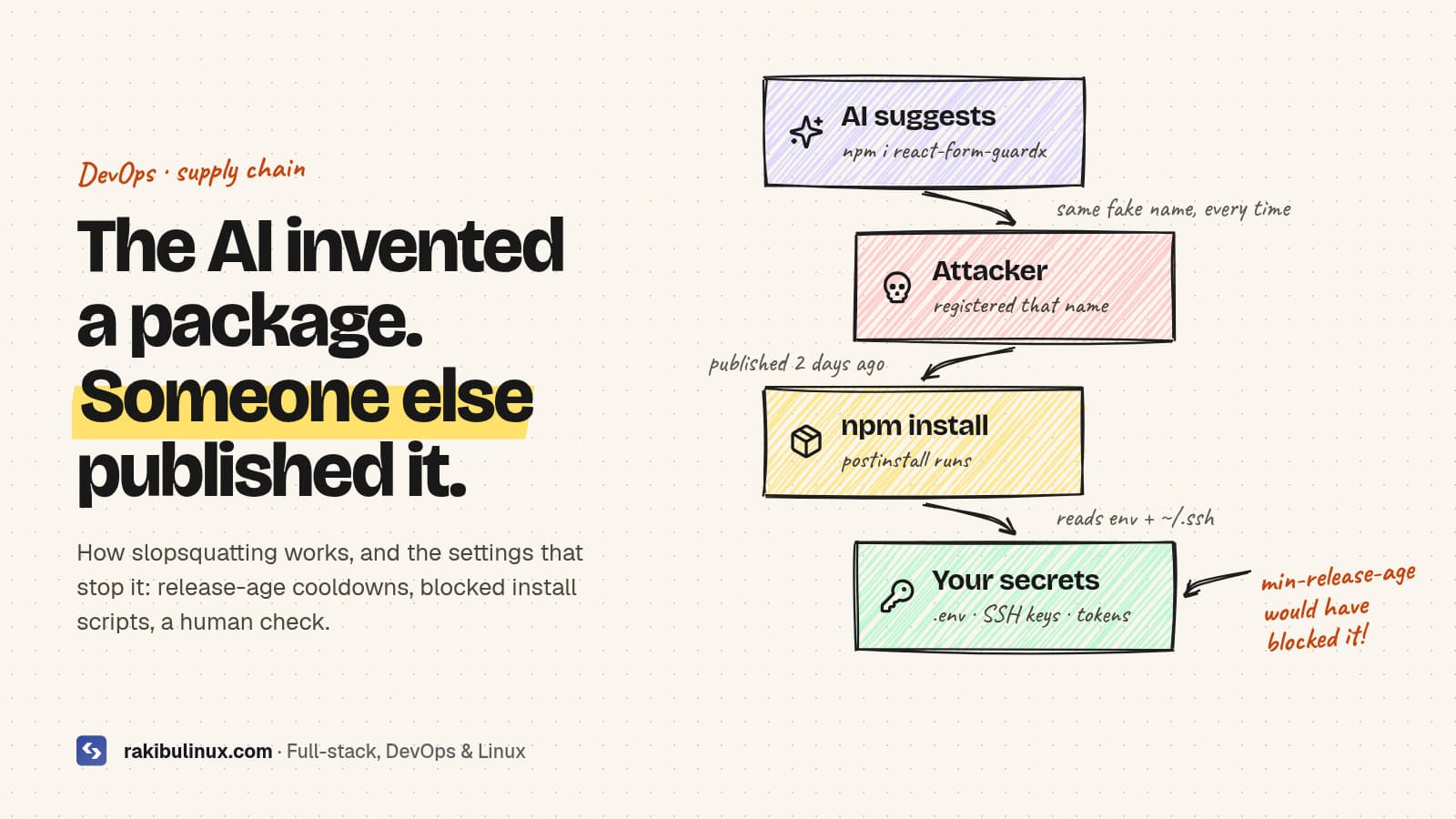
Slopsquatting is when attackers publish packages under names AI tools hallucinate. Stop it with release-age cooldowns, blocked install scripts and name checks. When an AI coding agent writes npm install for a package that doesn't exist, the command just fails. Unless someone has already registered that name and filled it with malware. That's slopsquatting, and it matters more now that agents run install commands themselves. The fixes are mostly config: a few lines in .npmrc or pnpm-workspace.yaml , and a rule in your agent's instructions. Here is how the attack works and a setup that blocks it on any Node project. Key takeaways Models hallucinate package names, and repeat them. In a large 2025 study, 19.7% of AI-generated code samples referenced at least one package that didn't exist, and many fake names came back on every rerun. Repeatable names are what make the attack work. An attacker registers the name once and waits for agents to install it. Release-age cooldowns (npm min-release-age , pnpm minimumReleaseAge ) block brand-new versions, which is where most malicious packages live. Block dependency install scripts. pnpm 10+ does this by default; npm needs ignore-scripts . Never let an agent add a dependency without review. Put the rule in AGENTS.md and enforce it in CI. What is slopsquatting? The name, coined by Python security developer Seth Larson, mixes "AI slop" with typosquatting. Typosquatting relies on people mistyping lodash . Slopsquatting relies on models confidently inventing a plausible package, such as react-form-guardx (a made-up example), which an attacker then publishes. The research behind it is solid. A USENIX Security 2025 paper by Spracklen and colleagues generated 576,000 code samples across 16 models and found: 19.7% of samples included at least one hallucinated package, with 205,474 unique fake names. Open-source models hallucinated far more often (21.7% on average) than commercial ones (5.2%). When the same prompt was rerun ten times, 43% of hallucinated names appeared every time. Newer frontier models hallucinate less, but even a small rate becomes a real risk once agents run thousands of installs a day without a person reading the command. How the attack plays out An attacker prompts popular models with common tasks and collects the package names they invent. They publish those names on npm or PyPI, often with a convincing README and a working-looking API. A developer, or an agent running unattended, installs the package. A postinstall script runs on the developer's machine or in CI and reads environment variables, .env files, SSH keys and cloud tokens. Step 4 happens during install, before any of your code runs. That's why the most useful defences act at install time. Defence 1: Add a release-age cooldown Most malicious packages and hijacked versions are caught and removed within days. If your package manager refuses versions younger than a few days, you skip that window entirely. npm (11.10 or newer; older versions silently ignore the setting), in the project's .npmrc : # refuse versions published less than 7 days ago min-release-age=7 pnpm (10.16 or newer; the value is in minutes, and pnpm 11 defaults to 1440, one day), in pnpm-workspace.yaml : minimumReleaseAge: 10080 # 7 days When you really need a fresh release, such as an urgent security patch, allow that one version explicitly. Check npm --version on every machine and CI runner. A cooldown that's silently ignored gives you false confidence. With a 7-day cooldown, the package manager refuses any version younger than a week. Most malicious uploads are reported and pulled inside that window, so you never install them. Defence 2: Stop install scripts from running Since version 10, pnpm doesn't run dependencies' preinstall / postinstall scripts unless you allow them. Newer pnpm versions use an allowBuilds map for that; older ones use onlyBuiltDependencies . Bun also skips lifecycle scripts for packages that aren't in its trusted list. With npm, turn them off yourself: # .npmrc ignore-scripts=true A few packages with native code genuinely need their build step. Allow them by name after checking them, rather than allowing everything. This one setting turns most install-time malware into a harmless tarball sitting in node_modules . Defence 3: Check every new name before installing Before installing a package an AI suggested, spend thirty seconds on it: npm view react-form-guardx name time.created repository.url maintainers # 404 = doesn't exist (hallucinated). Created last week with no repo = walk away. Does it exist, and is it the package the docs of the library you're using actually mention? How old is it, how many weekly downloads does it have, and does it link to a real repository? Is there a well-known package that already does this? Prefer it. Watch for cross-ecosystem traps too. A name hallucinated for Python may exist on npm as a completely different, possibly malicious, package. Defence 4: Lock down the agent and CI Rules file: add "Never add or upgrade a dependency without asking. Propose the package name and why." to your AGENTS.md or CLAUDE.md . Hooks: in Claude Code, a PreToolUse hook can block npm install <name> -style commands outright, which is stronger than a rule the model might ignore. CI installs from the lockfile only: npm ci or pnpm install --frozen-lockfile . A dependency added without a reviewed lockfile change fails the build. Least-privilege CI secrets: the install step shouldn't see deploy keys. My GitHub Actions deploy guide uses a separate deploy job and a forced-command SSH key for this reason. Review dependency diffs in pull requests the way you review code. A new package in package.json deserves a comment explaining why. What if a bad package already ran? Remove it, delete node_modules and the lockfile entry, and reinstall from a known-good lockfile. Rotate every secret the machine or CI runner could read: .env values, cloud keys, npm and GitHub tokens, SSH keys. Check for persistence: new SSH keys in authorized_keys , cron jobs, shell profile changes, unexpected GitHub workflows. Report the package to the registry so it gets taken down for everyone. Slopsquatting is one item on a longer list. For the rest, see my vibe coding security checklist . Frequently asked questions What is the difference between typosquatting and slopsquatting? Typosquatting targets humans mistyping a real package name. Slopsquatting targets AI tools that invent names that never existed. The defences overlap, but slopsquatting scales with how much code agents install without supervision. Does npm audit catch slopsquatted packages? Not reliably. npm audit reports known vulnerabilities in the advisory database. A new malicious package has no advisory until someone reports it, which is why cooldowns and blocked scripts matter more. What minimum release age should I use? Three to seven days is a common choice. It skips the window when most malicious versions are caught, while keeping you reasonably current. Allow exceptions for urgent security patches. Are paid AI models safe from hallucinating packages? They hallucinate less, but not never. Commercial models averaged about 5% in the 2025 study, and newer models still produce fake names now and then. Verify any package you haven't heard of. Does this affect Python and pip too? Yes. PyPI has the same problem. Use pinned, hash-checked requirements, review new dependencies, and consider tools that delay or vet new releases. Want your pipeline locked down? I harden Node.js supply chains and CI/CD: lockfile-only installs, cooldowns, script allow-lists, least-privilege secrets and agent guardrails. See my DevOps services or ask for a pipeline review .

Read article →