Copy Fail (CVE-2026-31431): Check and Patch Linux
 MD Rakibul Islam RakibFull-stack developer, DevOps & Linux engineer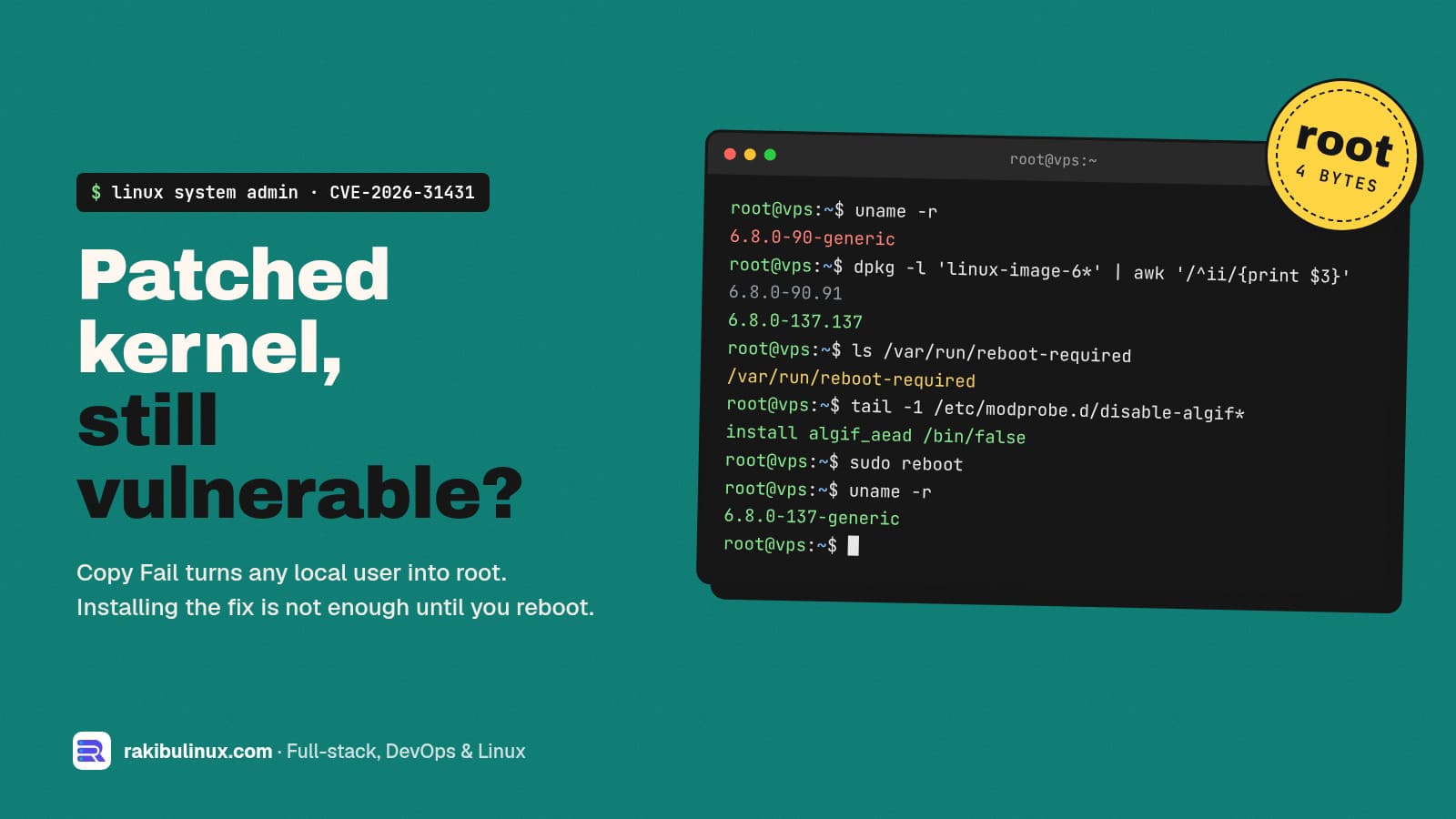
Copy Fail (CVE-2026-31431) lets any local user become root through the algif_aead kernel module. Install the patched kernel and reboot, or block the module now.
Copy Fail went public at the end of April 2026, and CISA added it to its Known Exploited Vulnerabilities catalog on May 1. Months later I still find servers that are exposed, and the reason is almost always the same: the patched kernel was installed by unattended upgrades, but the machine was never rebooted, so it is still running the old one.
On a VPS I look after, uname -r showed a vulnerable 6.8.0-90 kernel while the fixed 6.8.0-137 package sat on disk waiting for a reboot. This guide shows how to check your own servers in two minutes and close the hole properly.
Key takeaways
- What it is: a local privilege escalation in the kernel's
algif_aeadcrypto module (CVSS 7.8). An unprivileged user can write four controlled bytes into the page cache of any file they can read, such as a setuid-root binary, and get root. - Who is affected: kernels built since 2017 on almost every distribution, including Ubuntu 24.04, 22.04 and 20.04. Ubuntu 26.04 is not affected.
- The fix: a kernel update plus a reboot. On Ubuntu 24.04 the generic kernel is fixed from
6.8.0-117.117. - The stopgap:
install algif_aead /bin/falsein/etc/modprobe.d/stops the module from loading. Ubuntu'skmodupdate ships this file for you. - Containers don't save you: the page cache is shared, so a process in a container can affect files on the host.
What is Copy Fail?
Linux exposes kernel crypto to normal programs through AF_ALG sockets. The algif_aead module handles authenticated encryption on those sockets. An optimisation added in 2017 made it work "in place", and that in-place path could write into memory it should only have read. The result is a small, controlled write into the page cache: the kernel's in-memory copy of a file.
That is enough. If an attacker changes four bytes of the cached copy of /usr/bin/su or another setuid program, the next run of that program runs their change as root. The file on disk is untouched, which also makes it hard to spot afterwards. The upstream fix simply reverts the in-place logic so source and destination are separate again.
It is a local bug: the attacker needs to run code on the machine first. On a web server that is easier than it sounds. A vulnerable WordPress plugin, an exposed admin panel, a leaked SSH key for a low-privilege deploy user or a malicious npm package in a build step all give "local" access. Copy Fail turns that small foothold into full control of the server.
Am I affected? Check in two minutes
Run these on each server. The first line is the kernel you are actually running, which is the only one that matters:
uname -r                                   # running kernel
dpkg -l 'linux-image*' | grep ^ii          # installed kernels
ls /var/run/reboot-required 2>/dev/null && echo "REBOOT PENDING"
grep -qE '^algif_aead ' /proc/modules && echo "module LOADED" || echo "module not loaded"
ls /etc/modprobe.d/ | grep -i algif        # mitigation file present?
Compare the running version with Ubuntu's fixed versions for the generic linux package:
- Ubuntu 24.04 (Noble):
6.8.0-117.117or later - Ubuntu 22.04 (Jammy):
5.15.0-179.189or later - Ubuntu 20.04 (Focal):
5.4.0-230.250or later (needs Ubuntu Pro for updates) - Ubuntu 26.04 (Resolute): not affected
Cloud and HWE kernels (-aws, -azure, -gcp, 6.11/6.14 HWE) have their own version numbers. Look yours up on the Ubuntu CVE-2026-31431 page. On Debian, RHEL, Rocky, Alma or Amazon Linux, check your vendor's tracker the same way: find the fixed kernel, then compare it with uname -r, not with what is installed.
How to fix Copy Fail on Ubuntu
Step 1: Install the patched kernel
sudo apt update
sudo apt full-upgrade
full-upgrade (or dist-upgrade) pulls in the new kernel package when the metapackage moves to a new ABI. Plain upgrade can hold it back. If disk space is tight on /boot, clear old kernels first with sudo apt autoremove --purge; a full /boot is a common reason the update silently fails (see fixing "No space left on device").
Step 2: Reboot into it
sudo reboot
# after it comes back
uname -r
This is the step people skip. The kernel is not a normal package: the new one only runs after a reboot. Plan a short maintenance window, make sure your apps start on boot (PM2 with pm2 startup and pm2 save, or a systemd service), and check the site from outside once it is back.
Step 3 (if you can't reboot yet): block the module
Ubuntu's kmod security update ships /etc/modprobe.d/disable-algif_aead.conf, which contains:
install algif_aead /bin/false
A plain blacklist line is not enough, because blacklisting only stops automatic loading by alias; a program can still request the module directly. The install … /bin/false form makes every load attempt fail. On other distributions, or if the file is missing, add it yourself and unload the module if it is already in memory:
echo "install algif_aead /bin/false" | sudo tee /etc/modprobe.d/disable-algif_aead.conf
sudo rmmod algif_aead 2>/dev/null
grep -qE '^algif_aead ' /proc/modules && echo "still loaded" || echo "blocked"
This only works when the code is built as a module. Check with grep CONFIG_CRYPTO_USER_API_AEAD /boot/config-$(uname -r): =m means the block works (that is the Ubuntu default), =y means it is built in and only a new kernel helps.
Blocking the module is safe on almost every server. Very few programs use AF_ALG AEAD sockets; OpenSSL, Node.js, Nginx and Postgres do their own crypto in user space. If something does break, it will say so loudly, and you will know before your users do.
What about containers and shared hosting?
Containers share the host kernel, so a container is exactly as vulnerable as its host, and the bug can cross the container boundary because the page cache is shared. Patching the image does nothing; patch and reboot the host. On managed Kubernetes, that means rolling your node pools to a fixed node image.
If you are on shared hosting or a managed platform, you can't fix the kernel yourself. Check that your provider has published a statement, and ask if they haven't.
Was I already hacked?
Copy Fail modifies the cached copy of a file, not the file on disk, so file-integrity tools that read the disk can miss it, and a reboot clears the cache. Look for what attackers do after they get root: new users in /etc/passwd, unknown keys in /root/.ssh/authorized_keys, new cron jobs or systemd units, and outbound connections you don't recognise. My step-by-step guide for a hacked Linux server covers the full check and when to rebuild instead of clean.
Stop the next one: a patching routine that includes reboots
- Turn on unattended security upgrades (
sudo dpkg-reconfigure -plow unattended-upgrades), so fixes arrive within a day. - Watch for
/var/run/reboot-required. Add it to your monitoring, or setUnattended-Upgrade::Automatic-Reboot "true";with a quietAutomatic-Reboot-Timeif a short nightly blip is acceptable. - Consider Livepatch (free for a few machines with Ubuntu Pro) to shrink the window between fix and reboot. For Copy Fail, Ubuntu's guidance is still to reboot into the fixed kernel.
- Reduce local footholds: separate users per app, no shared deploy accounts, SSH keys only. The Ubuntu 24.04 hardening checklist covers this.
- Review once a month: running kernel, pending reboots, disk, backups. My monthly VPS maintenance checklist is the routine I use.
Frequently asked questions
Is CVE-2026-31431 remotely exploitable?
No, not on its own. The attacker must already run code on the machine as some user. In practice, a web app bug, a weak SSH account or a malicious dependency gives them that, and Copy Fail then turns it into root.
Does apt upgrade fix Copy Fail without a reboot?
No. It installs the fixed kernel, but the old one keeps running until you reboot. Check with uname -r; if it is older than the fixed version, the server is still vulnerable unless the module is blocked.
Is it safe to disable algif_aead?
On almost every web, database and application server, yes. Mainstream software does its crypto in user space and does not use AF_ALG AEAD sockets. Ubuntu's own kmod update disables the module by default until you run a fixed kernel.
Is Ubuntu 26.04 affected by Copy Fail?
No. Ubuntu lists 26.04 (Resolute) as not affected because it ships a kernel that already contains the fix. Upgrading a 24.04 server to 26.04 is one way out, though a kernel update and reboot is much faster.
Are Docker containers affected?
Yes, through the host kernel. Containers don't have their own kernel, so patch and reboot the host. Updating container images doesn't change anything for this bug.
Need your servers checked and patched?
I patch, reboot and verify Linux servers without taking sites down for longer than a restart, and I set up the update and reboot routine so the next CVE is handled the same week. See my Linux system administration service, or send me your server list and I'll tell you which ones are exposed.

Written by
MD Rakibul Islam Rakib
Full-stack developer, DevOps engineer and Linux system administrator with 5+ years of production experience. I deploy, harden and fix servers and web apps for clients worldwide, and everything in this article runs on real servers I manage, including this site.
- CVE-2026-31431
- Copy Fail
- algif_aead
- Linux kernel privilege escalation
- Ubuntu kernel update
- Linux server security