Linux Server Hacked? What to Do in the First Hour
 MD Rakibul Islam RakibFull-stack developer, DevOps & Linux engineer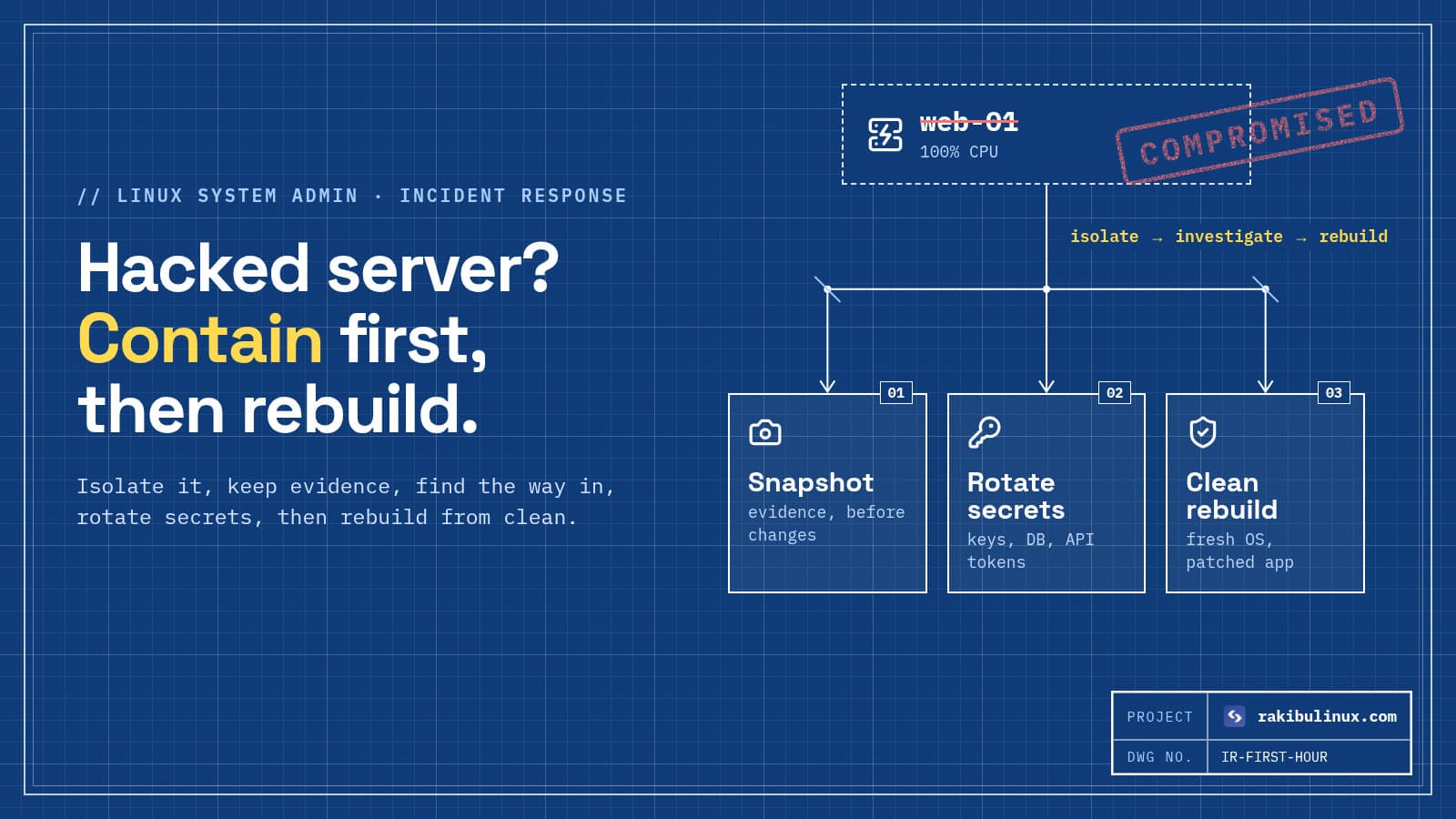
If your Linux server is hacked, isolate it, snapshot it, find how the attacker got in, rotate every secret, then rebuild a fresh server from clean backups.
The worst thing you can do with a hacked server is what most people try first: kill the strange process, delete the suspicious file, and carry on. Attackers almost always leave more than one way back in: a cron job, an SSH key, a systemd service, a modified binary. Whether the attacker installed a crypto miner, a spam sender or defaced the website, the reliable recovery is the same: contain, understand, rotate, rebuild. Here is what to do in the first hour, in order.
Key takeaways
- Don't panic-delete. Contain first, and keep evidence so you can find out how they got in.
- Isolate with the cloud firewall (allow only your IP) rather than powering off, so memory and running processes can still be inspected.
- Assume every secret on the box is stolen: SSH keys, database passwords, API keys,
.envfiles, payment and email credentials. - Rebuild, don't clean. You can't prove a compromised system is clean. Deploy a fresh server and restore data from a backup taken before the break-in.
- Fix the hole before going live, or the new server is compromised within days.
Signs your server has been hacked
- CPU at 100% from a process you don't recognise, often a crypto miner with a random or innocent-looking name.
- Your provider suspends the server or emails you about abuse, port scanning or outgoing spam.
- New user accounts, unknown keys in
authorized_keys, or logins from strange countries inlast. - Spam pages, redirects or injected JavaScript on your website.
- Unknown cron jobs, systemd services or files in
/tmp,/var/tmpor/dev/shm. - Exposed services: an open database, Redis or Docker API reachable from the internet.
Step 1: Contain it (first 10 minutes)
Cut the attacker off without destroying evidence. In your provider's dashboard, apply a cloud firewall that allows only SSH from your own IP and blocks everything else, including outgoing traffic if the panel allows it. This stops the miner talking to its pool, the spam from going out, and the attacker's remote shell, while the server keeps running.
Put up a maintenance page on another server or via your CDN if you need customers to see something. Tell your team not to log in or "fix" things on the box.
Step 2: Snapshot it for evidence
Take a disk snapshot in the provider panel before you change anything. It costs a little and it lets you investigate later at your own pace, or hand it to a specialist. If personal data may have been accessed, you may have legal reporting duties (for example under GDPR), and you'll need to know what was touched.
Step 3: Look for how they got in (and what they left)
Commands on a compromised box can be lied to by a rootkit, so treat what you see as clues, not proof. Still, these usually reveal a lot:
# who logged in, and failed attempts
last -a | head -30
sudo lastb -a | head -20
sudo journalctl -u ssh --since "7 days ago" | grep -E 'Accepted|Invalid' | tail -50

# what is running and listening
ps auxf --sort=-%cpu | head -20
sudo ss -tunap

# persistence: cron, systemd, keys, users
for u in $(cut -d: -f1 /etc/passwd); do sudo crontab -l -u "$u" 2>/dev/null | sed "s/^/$u: /"; done
ls -la /etc/cron.* /var/spool/cron/crontabs 2>/dev/null
systemctl list-units --type=service --state=running
sudo find /etc/systemd /lib/systemd -name '*.service' -mtime -14
sudo find / -name authorized_keys -exec ls -la {} \; 2>/dev/null
awk -F: '$3 == 0' /etc/passwd          # should only print root

# recently changed files and temp dirs
sudo find / -xdev -type f -mtime -3 -not -path '/proc/*' 2>/dev/null | grep -v -E '^/(var/log|var/lib/apt)' | head -50
ls -la /tmp /var/tmp /dev/shm
On Debian and Ubuntu, sudo debsums -c (from the debsums package) lists system files that differ from the packaged versions, which catches replaced binaries. Copy what you find, with timestamps, into a notes file on your laptop.
The most common ways in:
- Weak or leaked SSH password on root or a default user.
- Outdated web app or plugin: WordPress plugins, old frameworks, a forgotten admin panel.
- Exposed services: a database, Redis, Docker API or dashboard open to the internet with no password. Docker-published ports even bypass UFW; see Docker bypasses UFW.
- Leaked secrets: a
.envfile committed to a public repo or served by the web server. - Malicious dependencies pulled into the app, including AI-hallucinated package names (slopsquatting).
Step 4: Rotate every secret
Do this from a clean machine, assuming anything stored on the server was copied:
- SSH keys that were on the server, and any key the server used to reach other systems (deploy keys, Git, backups).
- Database passwords and app user passwords stored in config or
.envfiles. - Third-party API keys: payment, email, SMS, cloud storage, AI providers. Check their dashboards for unusual usage.
- Admin passwords for the website, hosting panel, DNS and registrar, plus session secrets so existing logins are invalidated.
Check other servers that trusted this one. Attackers move sideways using keys they find.
Step 5: Rebuild on a fresh server
Create a new server from a clean OS image, harden it first (my Ubuntu 24.04 hardening checklist: key-only SSH, firewall, automatic security updates, no exposed databases), then:
- Deploy the application from Git, not by copying files from the old server, and update it and its dependencies.
- Restore data from a backup taken before the compromise. Check uploads and database content for injected scripts or rogue admin accounts.
- Close the hole you found in step 3.
- Switch DNS to the new server, then delete the old one once you no longer need it for investigation.
This is where good backups pay off. If you don't have off-server backups, set them up on the new server today with my Linux backup guide.
Step 6: Watch and follow up
- Monitor logins, CPU and outgoing traffic on the new server for a few weeks.
- Ask Google to review the site in Search Console if it was flagged for malware or spam.
- Tell affected users if their data may have been accessed, and meet any legal obligations.
- Write down what happened and what you changed.
Frequently asked questions
How do I know if my Linux server is hacked?
Common signs are unexplained 100% CPU, unknown processes or users, new SSH keys, strange cron jobs or services, logins from unfamiliar IPs, spam on your website, and abuse reports from your provider.
Can I just delete the malware and keep using the server?
It's risky. Attackers usually install several ways back in, and a rootkit can hide files and processes. Rebuilding on a fresh server from clean backups is the only way to be confident it's clean.
Should I shut down a hacked server?
Isolate it with your provider's firewall instead of shutting it down, if you can. That stops the damage while keeping running processes and memory available for investigation. Take a snapshot either way.
What is a crypto miner on my server?
It's malware that uses your CPU to mine cryptocurrency for the attacker. It's one of the most common results of a compromised server, and it often arrives through weak SSH passwords or exposed services.
How do I stop my server from being hacked again?
Use SSH keys only, keep the OS and apps updated, expose only ports 22, 80 and 443, never put databases or admin panels on the public internet, keep secrets out of Git, and monitor the server.
Think your server has been hacked?
I handle compromised Linux servers: containment, finding the entry point, rotating secrets and rebuilding a clean, hardened server with your data restored. See my Linux system admin services or contact me now. Don't wait; every hour gives the attacker more time.

Written by
MD Rakibul Islam Rakib
Full-stack developer, DevOps engineer and Linux system administrator with 5+ years of production experience. I deploy, harden and fix servers and web apps for clients worldwide, and everything in this article runs on real servers I manage, including this site.
- Linux server hacked
- server compromised
- incident response
- crypto miner
- SSH security
- rebuild server
- Ubuntu