Monthly VPS Server Maintenance: What's Included
 MD Rakibul Islam RakibFull-stack developer, DevOps & Linux engineer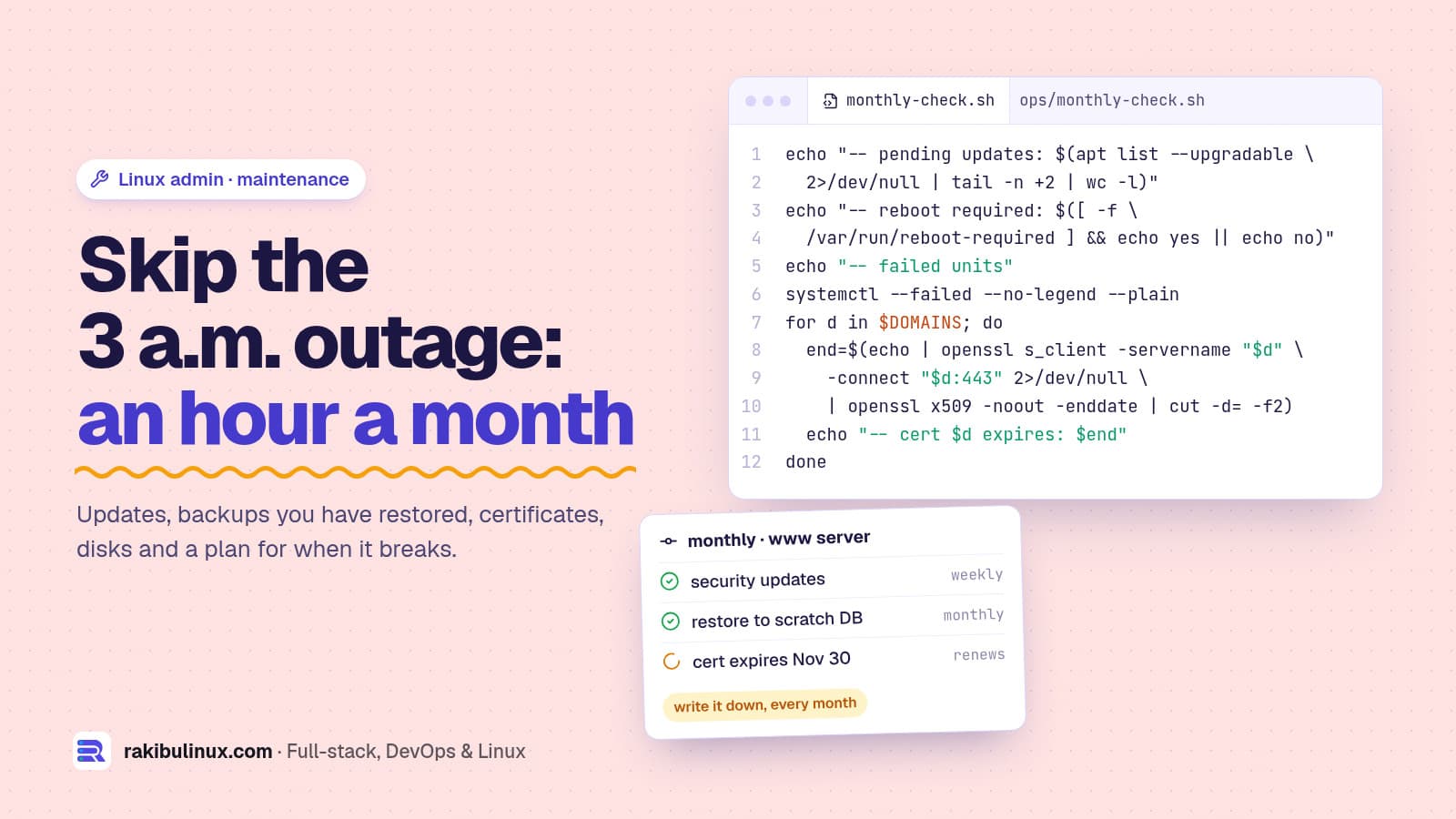
Monthly VPS maintenance means security updates, backups you have test-restored, monitoring, SSL renewals, disk and log checks, and a written plan for outages.
I run my own production server, the one serving this website, which it shares with other sites, and I look after servers for clients. The most useful thing I ever found during a routine check was not a hack or a full disk. It was that the hosting panel's automatic backups didn't include this site's database at all. Nothing was broken, so nobody had noticed. That is what maintenance is for: finding the problem on a quiet Tuesday instead of during an outage. Here is what a proper monthly routine includes, and what it doesn't.
Key takeaways
- Automate the weekly work: security updates, backups to another location, uptime and disk alerts.
- Do the monthly work by hand: reboots for kernel updates, a real restore test, certificate and disk checks, and a look at who can log in.
- A backup you haven't restored is a hope. Restore into a scratch database every month and compare it with production.
- Write things down. A one-page runbook (what runs where, how to restart it, where backups live) turns a 3 a.m. outage into a checklist.
- Agree the boundaries: response times, what counts as an emergency, and what stays the owner's job, like application bugs and domain renewals.
What maintenance is actually for
Nobody buys "maintenance". They buy four outcomes:
- Patched: known security holes are closed within days, not months.
- Recoverable: if the disk dies or someone deletes the wrong table, you can be back by a known time with a known amount of lost data.
- Watched: you hear about problems from an alert, not from a customer.
- Documented: someone other than the person who set it up can fix it.
Everything in the checklist below serves one of those four.
Every week: automated
- Security updates installed automatically with
unattended-upgrades, which Ubuntu enables for the security pocket by default on servers. Check it is still on:systemctl status unattended-upgrades. - Backups of databases and uploaded files, at least daily, copied to a different server or provider. A copy on the same disk dies with the disk.
- Uptime and certificate alerts from outside the server. My Uptime Kuma guide sets this up for free, including SSL expiry warnings.
- Disk alerts at 80%, before logs or uploads fill it and the database stops writing. If it has already happened, see fixing "No space left on device".
Every month: an hour with a checklist
I start with a read-only script that prints everything worth looking at, then work through the list. This is the version I use, tested on Ubuntu; set your own domains and backup folder:
#!/usr/bin/env bash
# monthly-check.sh: read-only health report for one Ubuntu server. Run with sudo.
set -u
DOMAINS="example.com www.example.com"
BACKUP_DIR=/root/backups
echo "== $(hostname) $(date -I)"
echo "-- pending updates: $(apt list --upgradable 2>/dev/null | tail -n +2 | wc -l)"
echo "-- reboot required: $([ -f /var/run/reboot-required ] && echo yes || echo no)"
echo "-- disks over 80%";  df -h --output=target,pcent -x tmpfs -x devtmpfs -x squashfs | awk 'NR>1 && $2+0>=80'
echo "-- inodes over 80%"; df -i -x tmpfs -x devtmpfs -x squashfs | awk 'NR>1 && $5+0>=80 {print $6, $5}'
echo "-- journal: $(journalctl --disk-usage 2>/dev/null | grep -o '[0-9.]*[KMGT]')"
echo "-- failed units";    systemctl --failed --no-legend --plain
echo "-- public TCP ports"; ss -tlnH | awk '$4 !~ /^(127\.|\[::1\]|\[::ffff:127\.)/ {print $4}' | sort -u
for d in $DOMAINS; do
  end=$(echo | openssl s_client -servername "$d" -connect "$d:443" 2>/dev/null | openssl x509 -noout -enddate | cut -d= -f2)
  echo "-- cert $d expires: $end"
done
echo "-- newest backup: $(ls -t "$BACKUP_DIR" 2>/dev/null | head -1)"
echo "-- failed SSH logins, 7 days: $(journalctl -u ssh --since -7d 2>/dev/null | grep -cE 'Failed password|Invalid user')"
Writing it caught a bug of its own: df -i refuses to combine with --output, so the inode line uses plain df -i and awk. Run it with sudo bash monthly-check.sh and save the output with the date. Comparing this month with last month is where trends show up: a journal that grew 5 GB, or a port that wasn't open before.
Then the checklist itself:
- Apply pending updates and reboot if needed. Kernel and core library updates only take effect after a reboot. Schedule it in a quiet hour and tell the client first.
- Restore test. Restore last night's database dump into a scratch database, check that the important tables have the row counts you expect, and open a few uploaded files from the backup copy.
- Certificates. Check expiry dates and that renewal works (
certbot renew --dry-run). This matters more once HSTS is on, because browsers then refuse an expired certificate with no way to click through. When I ran the script for this post, my own certificate showed 30 November 2026, which auto-renewal will handle well before that. - Disk, inodes and logs. Look for anything above 80% and for logs that grow without rotation.
journalctl --vacuum-size=500Mtrims the system journal. - Failed services. Anything in
systemctl --failedneeds a reason, even if the site looks fine. - Open ports. Every public port should have an owner and a reason. A database listening on
0.0.0.0is a finding, not a detail. - Who can log in. Review users with shells, keys in
authorized_keysand sudo rights. Remove the freelancer from two years ago. - Failed logins and bans. A spike in SSH failures is normal internet noise if password login is off. If it isn't off yet, that is this month's job; my Ubuntu hardening checklist covers it.
- Containers and runtimes. Pull updated images for Docker apps and check Node.js, PHP or Python versions against their end-of-life dates.
- Update the runbook with anything that changed.
Every quarter: the bigger checks
- OS support dates. Ubuntu 24.04 gets standard security updates until 2029. Plan major upgrades in a quiet month, not in a panic; my 24.04 to 26.04 upgrade guide shows the process.
- Rebuild drill. Could you rebuild the server from the runbook and backups alone? Try it on a cheap temporary VPS once in a while. It is the only real test of your documentation.
- Rotate secrets that people have seen: database passwords, API keys shared in chat, deploy keys.
- Review the bill. Old snapshots, unused volumes and oversized plans quietly cost money every month.
Backups: what "good" looks like
For a typical small business server I aim for daily database dumps kept for a few weeks, uploaded files synced to another provider, and one copy the server itself can't delete (so ransomware or a bad command on the server can't wipe the backups too).
On my own server, a database dump also runs automatically before every deploy, and copies live both on the server and off it. My Linux backup guide has the commands.
And check what your hosting control panel actually backs up. A panel may only cover the sites it created, not apps you deployed by hand, which is exactly what I found on my own server.
When something breaks: response, not heroics
A maintenance agreement should say, in plain words:
- What counts as urgent: the site is down, checkout fails, or the server looks compromised. A typo on the about page is not urgent.
- How fast someone responds to urgent and to normal requests, and in which time zone.
- How to reach them when it is urgent, which is not the same inbox as invoices.
- What happens first: restore service, then find the cause, then write a short note on what changed so it doesn't happen again.
If you suspect a break-in rather than a crash, don't just reboot and hope. My guide on what to do when a Linux server is hacked covers the first hour.
What maintenance doesn't include
Being clear about this avoids most arguments later. A server maintenance plan normally does not cover:
- Bugs in the application code itself, or new features.
- Content changes on the website.
- Accounts the owner controls: the domain registrar, DNS provider, payment gateway and email provider. Keep the domain on auto-renew, in your own name.
- Problems caused by changes someone else made on the server without telling anyone.
Those can be added, but they are separate work, priced separately.
Frequently asked questions
How often should I update my Linux server?
Security updates should install automatically, every day. Review and apply everything else, and reboot for kernel updates, at least once a month in a planned window.
Is unattended-upgrades safe on a production server?
For the security pocket, yes, and Ubuntu turns it on by default. It rarely breaks anything, and an unpatched internet-facing server is a much bigger risk. Leave non-security upgrades for your monthly window.
How do I know my backups work?
Restore one. Load last night's database dump into a scratch database, check the row counts of your main tables and open some restored files. Do it every month and write down how long it took.
Do I need monitoring if my host already has it?
Host monitoring usually tells you the machine is on, not that your website works. Add an outside check that loads your real pages, watches the SSL certificate and alerts you by email or chat.
Can I do this myself instead of hiring someone?
Yes, if you are comfortable on the command line and you will really do it every month. The commands are the easy part; the hard part is the routine, because a backup that quietly fails in a month you skipped looks exactly like one that works.
Want someone to look after your server?
I maintain Ubuntu servers for small businesses, agencies and SaaS founders: updates, backups with restore tests, monitoring, SSL, hardening and emergency fixes. See my Linux system admin services or tell me about your server and I'll start by reviewing what is running and what is missing.

Written by
MD Rakibul Islam Rakib
Full-stack developer, DevOps engineer and Linux system administrator with 5+ years of production experience. I deploy, harden and fix servers and web apps for clients worldwide, and everything in this article runs on real servers I manage, including this site.
- Linux server maintenance
- VPS maintenance checklist
- Linux server management services
- managed VPS maintenance
- Ubuntu server monitoring
- server backup restore test
- small business server support