Upgrade Ubuntu 24.04 to 26.04 on a Server Safely
 MD Rakibul Islam RakibFull-stack developer, DevOps & Linux engineer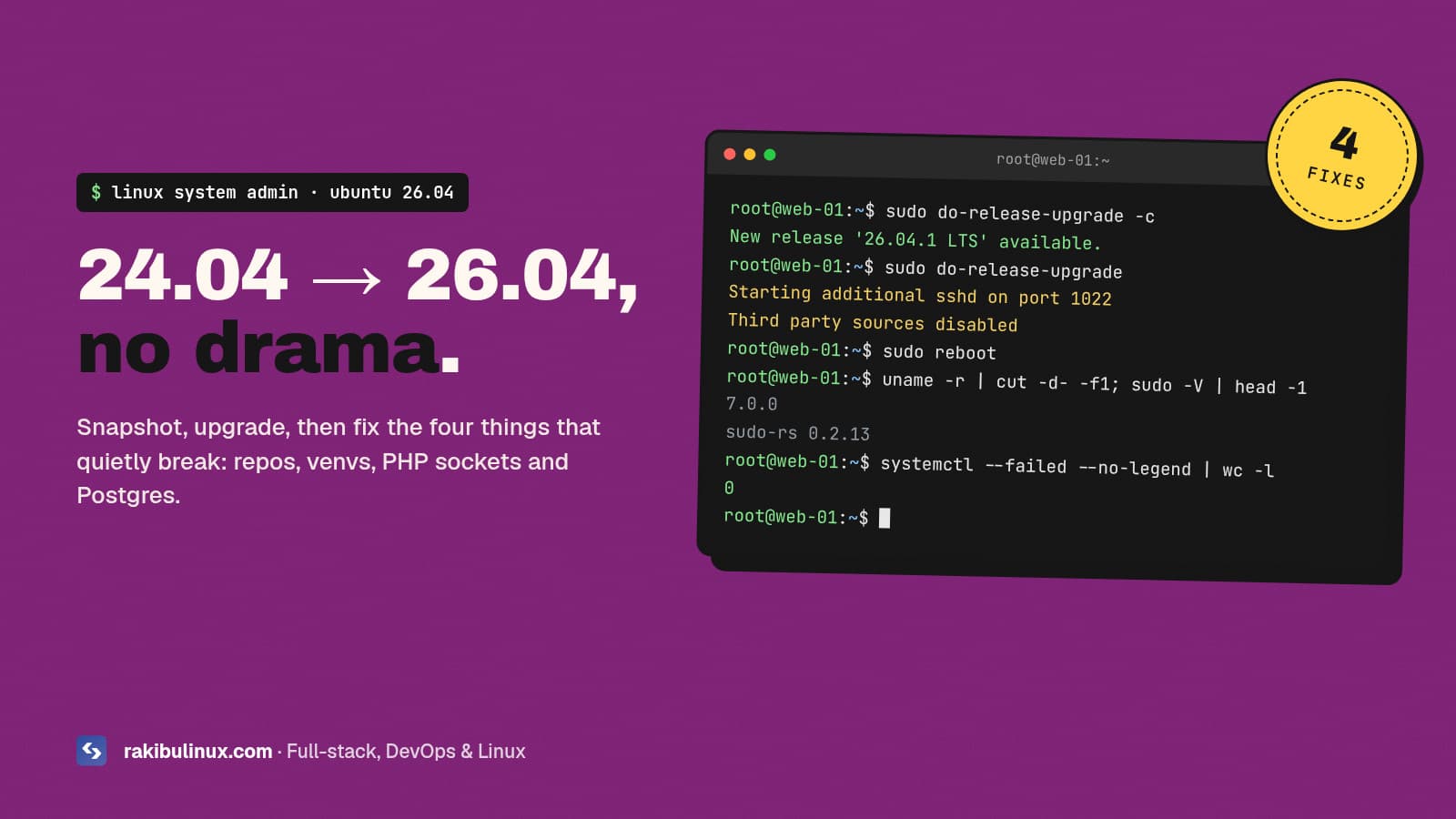
To upgrade Ubuntu 24.04 to 26.04 on a server: snapshot it, run full-upgrade, then do-release-upgrade. After the reboot, re-enable third-party repos and test.
Canonical switched on the 24.04 to 26.04.1 upgrade path on 29 September 2026, so if you run Ubuntu servers, do-release-upgrade now offers "Resolute Raccoon". The command itself is easy. What bites is everything around it: repositories that get switched off, a Rust sudo and Rust coreutils, a new PHP and a new PostgreSQL. My own production box is a 24.04 server shared with other sites, so I'm not treating this as a one-click job, and you shouldn't either. Here's the exact order I use.
Key takeaways
- There's no rush. Ubuntu 24.04 still gets standard security updates until 2029. Upgrade when you have a tested plan, not because a notice appeared.
- Take a snapshot first and make sure you have console access. SSH can drop mid-upgrade, and a snapshot is the only fast undo.
- Third-party repos are disabled during the upgrade (Docker, NodeSource, PostgreSQL PGDG, PPAs) and are not switched back on for you.
- 26.04 swaps in Rust tools:
sudo-rsreplaces sudo and uutils replaces GNU coreutils. Both can be switched back if a script breaks. - Language runtimes jump: Python 3.12 to 3.14, PHP 8.3 to 8.5, PostgreSQL 16 to 18. Plan for venvs, PHP-FPM sockets and a database cluster upgrade.
Should you upgrade right now?
For a server that earns money, my rule is simple: wait for the first point release, then test on a copy. The first point release (26.04.1) is out, so the first half is done. Canonical actually held the upgrade path back for about a month after 26.04.1 shipped on 27 August to fix regressions in the Rust coreutils. That tells you where the risk is.
Good reasons to upgrade soon: you want kernel 7.0 for newer hardware, you need PHP 8.5 or PostgreSQL 18 from the main archive, or you'd rather do it in a quiet month than in a hurry in 2029. Good reasons to wait: a control panel that doesn't list 26.04 as supported yet, vendor repos with no resolute builds, or no way to get a console if SSH dies.
What changes between 24.04 and 26.04 on a server
- Kernel: 6.8 to 7.0.
- sudo: the C sudo is replaced by
sudo-rs. The old one is still installed assudo.ws. - coreutils: GNU coreutils 9.4 is replaced by the Rust uutils implementation.
ls,cp,dateand friends behave the same in normal use, but scripts that parse unusual output can differ. - OpenSSH: 9.6 to 10.2. DSA keys (
ssh-dss) are gone completely, and the post-quantum key exchangemlkem768x25519-sha256is available by default. - Runtimes: Python 3.14, PHP 8.5, PostgreSQL 18, OpenSSL 3.5, systemd 259.
Everything else is the usual "newer versions of everything", which is the point of an LTS jump.
Before you start: the 10-minute prep
1. Snapshot and check the console
Take a provider snapshot (Hetzner, DigitalOcean, Hostinger and AWS all have one) and confirm you can open the web console or VNC. If the upgrade fails half way, you want to restore in minutes, not rebuild from backups. A snapshot is not a backup though; if you don't already have off-server backups of your databases and uploads, set those up first. I wrote about that in my Linux backup guide.
2. Write down what's running
systemctl list-units --type=service --state=running --no-legend > ~/pre-upgrade-services.txt
ls /etc/apt/sources.list.d/ > ~/pre-upgrade-repos.txt
grep -r "ssh-dss" /root/.ssh /home/*/.ssh 2>/dev/null
The service list is your checklist after the reboot. The repo list tells you what you'll need to re-enable. If the grep finds an ssh-dss key, replace it with an Ed25519 key now, or that person is locked out after the upgrade.
3. Save Python environments
Every virtualenv points at python3.12, which 26.04 replaces with 3.14. Freeze them before you start:
/opt/myapp/venv/bin/pip freeze > ~/myapp-requirements.txt
4. Fully update 24.04 and reboot
sudo apt update && sudo apt full-upgrade -y
[ -f /var/run/reboot-required ] && sudo reboot
Then check there's at least 5 GB free on / with df -h /. A full disk mid-upgrade is the worst way this can go. If space is tight, my disk-full guide shows what's safe to clear.
Run the upgrade
First make sure the upgrader is set to LTS releases only. It should say Prompt=lts. Don't change it to normal, or you'll be offered interim releases like 26.10.
grep -v '^#' /etc/update-manager/release-upgrades
sudo do-release-upgrade -c     # should report 26.04.1 LTS
sudo do-release-upgrade
Run it inside tmux or screen so a dropped connection doesn't kill it. When you run it over SSH, the tool starts a second sshd on port 1022 as a fallback. If you use a cloud firewall, open 1022 to your own IP only, for the duration of the upgrade.
You'll get questions about modified config files. My default answer is "keep the local version" for anything I've edited (sshd_config, Nginx, PHP pool files), then I compare against the new .dpkg-dist file afterwards. When it finishes, reboot.
After the reboot: fix the four things that break
1. Re-enable third-party repositories
The upgrader adds Enabled: no to every third-party .sources file and leaves it there. Before switching one back on, check the vendor actually publishes for resolute:
grep -l '^Enabled: no' /etc/apt/sources.list.d/*.sources
curl -sI https://download.docker.com/linux/ubuntu/dists/resolute/Release | head -1
If you get a 200, change Suites: noble to Suites: resolute, delete the Enabled: no line, and run sudo apt update && sudo apt full-upgrade. Old-style .list files don't get the Enabled: no marker, so check those by hand. Until Docker's repo is back, Docker keeps running the version you had, but it won't get updates. If NodeSource is on the list, it's a good moment to plan the Node.js 26 LTS upgrade as well.
2. Rebuild Python virtualenvs
A venv made on 3.12 has its packages in lib/python3.12, and the new interpreter won't look there. Recreate it in place:
sudo python3 -m venv --clear /opt/myapp/venv
sudo /opt/myapp/venv/bin/pip install -r ~/myapp-requirements.txt
3. Point Nginx at the new PHP-FPM socket
If your Nginx config says fastcgi_pass unix:/run/php/php8.3-fpm.sock, PHP sites return 502 after the upgrade, because the running service is now php8.5-fpm. Copy any custom pool settings from /etc/php/8.3/fpm/pool.d/ to the 8.5 folder, update the socket path, then nginx -t && systemctl reload nginx. My Nginx 502 guide covers the other causes if that isn't it. Also test your app on PHP 8.5 before upgrading production; older WordPress plugins are the usual casualties. (Control panels like CloudPanel ship their own PHP builds; check the panel's supported-OS list before you touch anything.)
4. Upgrade the PostgreSQL cluster
The upgrade installs PostgreSQL 18 but leaves your data in the old 16 cluster, which keeps running. Nothing is lost, but you're now on an unsupported package. Take a fresh pg_dump, then:
pg_lsclusters
sudo pg_upgradecluster -m upgrade 16 main
pg_lsclusters                     # 18/main now on 5432, 16/main on a spare port
# test the app, then and only then:
sudo pg_dropcluster 16 main
If pg_lsclusters already shows an empty 18/main before you start, the package created it on install. Remove that empty one first with sudo pg_dropcluster --stop 18 main. Read the version number twice before pressing Enter.
If your PostgreSQL comes from the PGDG repository instead (as on my own server, which already runs 18), this step doesn't apply. Just re-enable that repo.
Verify and clean up
lsb_release -d; uname -r
systemctl --failed
sudo apt autoremove --purge
Compare running services against ~/pre-upgrade-services.txt, load every site, and check logs for an hour. Then take a new snapshot so you have a clean 26.04 restore point.
If a script breaks on sudo-rs or Rust coreutils
Both changes can be rolled back per server while you fix the script:
sudo update-alternatives --set sudo /usr/bin/sudo.ws        # back to C sudo
sudo apt install --allow-remove-essential coreutils-from-gnu coreutils-from-uutils-
Treat these as a temporary escape hatch, not the fix. The defaults are where Ubuntu is going.
Frequently asked questions
Can I upgrade from Ubuntu 22.04 straight to 26.04?
No. Ubuntu doesn't support skipping an LTS release. Upgrade 22.04 to 24.04 first, check everything works, then go to 26.04. For servers this old, a fresh 26.04 install with your apps migrated over is often cleaner.
Is it safer to reinstall instead of upgrading in place?
Often, yes. A new server built from a script, with data moved across, leaves no leftovers and gives you an instant fallback (the old server). I use that approach for important client servers; here's how I move a site to a new server with zero downtime.
How long does the upgrade take?
On a typical small VPS, 20 to 40 minutes plus the reboot, most of it downloading and unpacking packages. Plan a maintenance window of at least an hour so you have time to fix repos and test.
How long is Ubuntu 26.04 supported?
Ubuntu 26.04 LTS gets five years of standard security updates, until April 2031, and up to ten years with Ubuntu Pro's ESM.
What if SSH drops during the upgrade?
If you started it in tmux, it keeps running; reconnect and run tmux attach. If you can't reconnect on port 22, try the fallback sshd on port 1022, or use your provider's web console.
Want someone to do the upgrade for you?
I upgrade and harden Ubuntu servers for clients: snapshot, test copy, upgrade, repo and runtime fixes, and a written report of what changed. See my Linux system admin services, the Ubuntu hardening and audit package, or send me your server details and I'll tell you what the upgrade will involve.

Written by
MD Rakibul Islam Rakib
Full-stack developer, DevOps engineer and Linux system administrator with 5+ years of production experience. I deploy, harden and fix servers and web apps for clients worldwide, and everything in this article runs on real servers I manage, including this site.
- upgrade Ubuntu 24.04 to 26.04
- Ubuntu 26.04 LTS
- do-release-upgrade
- Ubuntu server upgrade
- sudo-rs
- rust coreutils
- PostgreSQL 18 upgrade