Skip to content
All articles
8 min read

Node.js 26 LTS: Upgrade Checklist for Production Apps

MD Rakibul Islam RakibMD Rakibul Islam RakibFull-stack developer, DevOps & Linux engineer
Node.js 26 LTS: Upgrade Checklist for Production Apps

Node.js 26 becomes Active LTS on 28 October 2026 and is supported until April 2029. Upgrade after testing native addons, Corepack, removed APIs and fetch.

Every October one even-numbered Node.js release gets promoted to LTS, and this year it's Node 26. This one matters a bit more than usual: it's the last release under the old "two majors a year" model, and Node 22 has only six months of security fixes left. The API behind this website runs on Node 24 under PM2, so I went through the same list below before moving it. None of it is hard, but a few items fail in ways that look unrelated to Node, which is exactly why they waste an afternoon.

Key takeaways

  • Dates: Node 26 is Active LTS from 28 October 2026 and reaches end of life on 30 April 2029. Node 22 ends on 30 April 2027. Node 20 is already end of life.
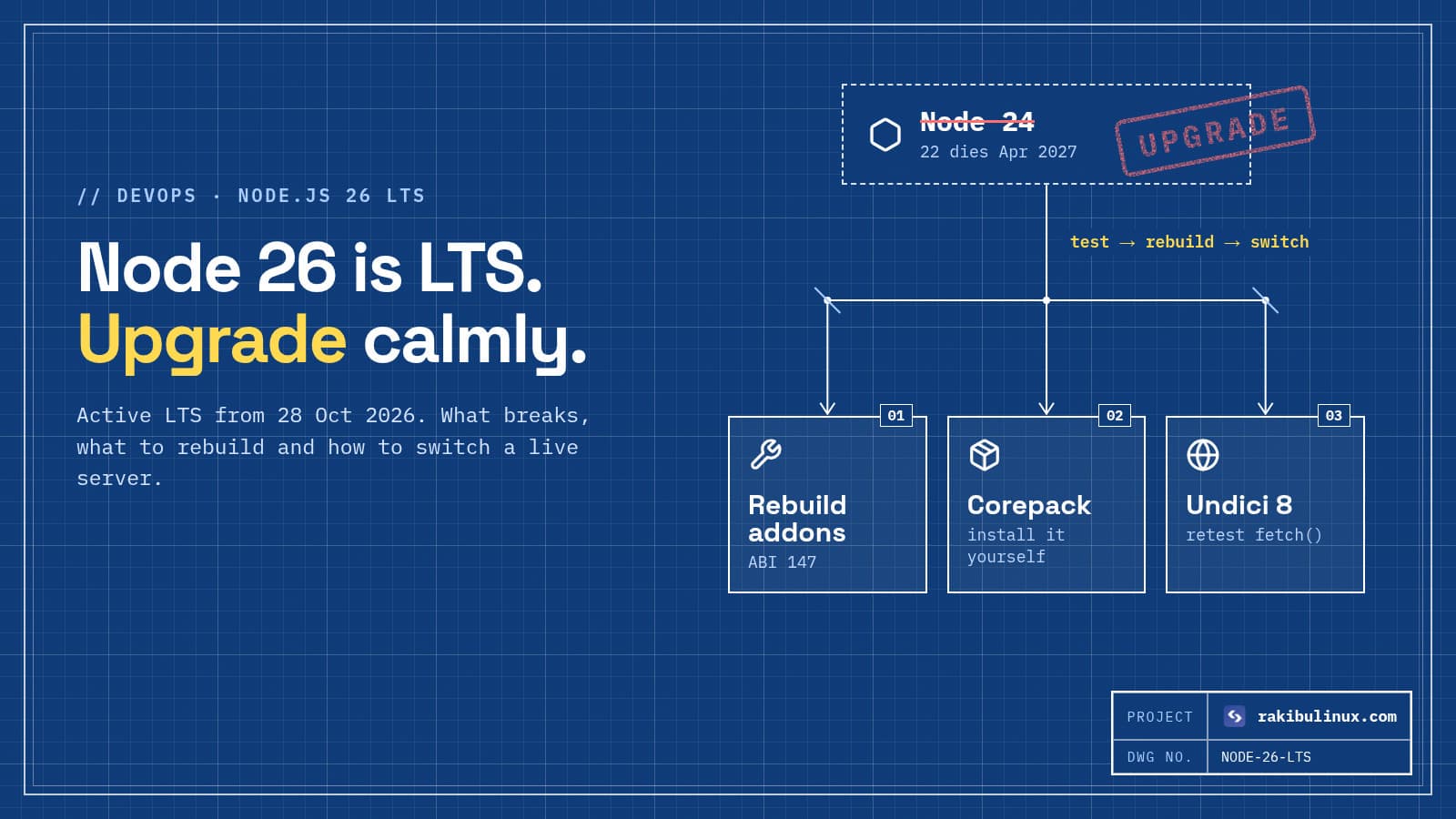
  • Native addons must be rebuilt. NODE_MODULE_VERSION is now 147, so packages like bcrypt, sharp or better-sqlite3 need a fresh install, not a copied node_modules.
  • Corepack isn't bundled anymore (since Node 25). If your CI or Dockerfile runs corepack enable, install it first.
  • A few old APIs are gone: the private _stream_* modules and http.Server.prototype.writeHeader(). Old dependencies can crash on boot.
  • Upgrade like a deploy: build a new release on Node 26, switch to it, keep the old one ready to switch back.

When is Node.js 26 LTS, and how long is it supported?

Node 26 was released on 5 May 2026 as the "Current" line. On 28 October 2026 it becomes Active LTS, which is the point where most teams should treat it as production-ready. It moves to maintenance in October 2027 and gets security fixes until 30 April 2029.

Here's where the other lines stand on that day:

  • Node 24: moves into maintenance, end of life 30 April 2028. Safe to stay on for now.
  • Node 22: already in maintenance, end of life 30 April 2027. Plan your move this winter.
  • Node 20 and 25: end of life. No more security fixes. Move now.
20252026202720282029 Node 22 Node 24 Node 26 28 Oct 2026 Current Active LTS Maintenance → EOL
On 28 October 2026 Node 26 becomes Active LTS and Node 24 drops to maintenance. Node 22 has the least runway left: April 2027.

The release schedule is changing after this

Starting with Node 27, Node.js ships one major release a year instead of two, and every release becomes LTS. Node 27 opens as an alpha in October 2026, becomes Current in April 2027 and LTS in October 2027. For you, nothing changes much: you'll still upgrade to a new LTS each year or two. The odd/even rule just stops mattering.

What breaks when you upgrade to Node 26

Native addons (ABI 147)

Every compiled package is tied to a NODE_MODULE_VERSION. Node 26 uses 147. If you copy node_modules from a Node 24 build, or a Docker layer cache reuses it, you'll see was compiled against a different Node.js version at startup. The fix is a clean install on Node 26:

rm -rf node_modules
npm ci            # or pnpm install --frozen-lockfile / bun install --frozen-lockfile

If a package has no prebuilt binary for Node 26 yet, it falls back to compiling from source, which needs build-essential and Python on the build machine. Check the package's releases before you upgrade production.

Corepack is not included

Node 25 stopped shipping Corepack, so Node 26 doesn't have it either. A Dockerfile or CI step that runs corepack enable to get pnpm or Yarn will fail with "command not found". Install it explicitly, or install the package manager directly. While you're editing the install step anyway, add the protections from my npm supply chain attack checklist.

npm install -g corepack && corepack enable
# or simply
npm install -g pnpm@10

Removed APIs

  • The private stream modules _stream_readable, _stream_writable, _stream_duplex, _stream_transform, _stream_passthrough and _stream_wrap are gone. Your code probably doesn't use them, but a ten-year-old dependency might. Search your lockfile's packages: grep -rl "_stream_" node_modules --include=*.js | head.
  • http.Server.prototype.writeHeader() is removed. Use writeHead().
  • The --experimental-transform-types flag is removed. Plain type stripping still works, so node app.ts runs files that only use erasable TypeScript syntax.
  • module.register() now prints a runtime deprecation warning. Tools that hook the module loader will be noisy until they update.

fetch() runs on Undici 8

Node's built-in fetch() is powered by Undici, which jumped to version 8. For normal API calls you won't notice. If you build headers dynamically or use custom dispatchers or proxy agents, run your integration tests against Node 26 before you trust it.

What you get in return

V8 14.6, the Temporal date and time API enabled by default (finally a sane replacement for Date math), Map.prototype.getOrInsert() and Iterator.concat(). Nothing you have to adopt on day one, but Temporal alone removes the need for a date library in many projects.

How I upgrade a production server to Node 26

The idea is to treat the Node version like any other deploy: build next to the running version, switch, keep a way back. This is how my own GitHub Actions deploys with release folders and auto-rollback work, and the Node upgrade fits straight into it.

1. Test in CI first

Add 26 to your test matrix a week before you touch the server, and pin the version you expect in package.json:

# .github/workflows/test.yml
strategy:
  matrix:
    node: [24, 26]
steps:
  - uses: actions/setup-node@v4
    with:
      node-version: ${{ matrix.node }}
// package.json
"engines": { "node": ">=24" }

2. Install Node 26 next to the old version

I use nvm on servers where several apps live together, because each app can stay on its own version and switching back is one command:

nvm install 26
nvm alias default 26
node -v

If you installed Node from NodeSource, its setup script switches the apt repo to the new major; the old binary is replaced, so take a snapshot first.

3. Build a fresh release and restart PM2 on the new Node

cd /srv/app/releases/new && npm ci && npm run build
pm2 update                  # restarts the PM2 daemon on the new Node
pm2 restart ecosystem.config.js --update-env
pm2 logs --lines 50

Forgetting pm2 update is the classic mistake: the daemon keeps running on the old Node, and your app silently does too. Check with pm2 describe app | grep "node.js version". If anything looks wrong, switch the current symlink back to the previous release, nvm alias default 24, and run pm2 update again.

4. Watch it for a day

Memory use and startup time are the two numbers I compare before and after. If the process starts restarting in a loop, the heap out of memory guide and the EADDRINUSE guide cover the two errors I see most after Node upgrades.

Frequently asked questions

Should I upgrade to Node 26 or stay on Node 24?

Node 24 is supported until April 2028, so there's no emergency. Move to 26 when your dependencies support it and you have a quiet week; new projects should start on 26. If you're on Node 22 or older, upgrade now, and going straight to 26 saves you one extra upgrade.

Can I skip from Node 20 or 22 straight to 26?

Yes. Node has no requirement to go through each version. Read the breaking-change notes for every major in between, run your tests and do a clean install. Jumping several majors at once just means a longer list to check.

Do I need to rebuild node_modules after upgrading Node?

Yes, if any dependency has a native addon. The safest habit is to never reuse node_modules across Node majors: delete it and run a clean install from the lockfile.

Does Bun or Deno change any of this?

If your app actually runs on Bun or Deno, the Node release schedule doesn't apply to the runtime. But build tools often still run on Node in CI, so the Corepack and native-addon notes can still affect your pipeline.

Is Node.js 26 stable enough for production?

From Active LTS on 28 October 2026, yes; that's what the label means. Many teams wait for the first few LTS patch releases. That's sensible, as long as "wait" has an end date.

Need a hand with the upgrade?

I upgrade Node.js apps and servers for clients: dependency audit, CI matrix, clean rebuild and a deploy with rollback ready. Have a look at my DevOps services or the CI/CD with auto rollback package, or tell me what you're running and I'll tell you what the upgrade involves.

MD Rakibul Islam Rakib

Written by

MD Rakibul Islam Rakib

Full-stack developer, DevOps engineer and Linux system administrator with 5+ years of production experience. I deploy, harden and fix servers and web apps for clients worldwide, and everything in this article runs on real servers I manage, including this site.

  • Node.js 26 LTS
  • upgrade Node.js 26
  • Node.js release schedule
  • Node 22 end of life
  • NODE_MODULE_VERSION 147
  • Corepack removed
  • PM2 Node upgrade

Keep reading

Google September 2026 Spam Update: Were You Hit?
Website DesignOct 8, 2026

Google September 2026 Spam Update: Were You Hit?

Google's September 2026 spam update began on 24 September. If clicks fell after that date, check which pages dropped and which spam policy they break. Google started rolling out its September 2026 spam update on 24 September at 9:15 a.m. Pacific time, and unlike the usual two-day spam updates, it said this one could take up to two weeks. SEO trackers saw volatility in several waves, the last around 4 to 6 October. If your traffic dropped somewhere in that window, you're probably asking two questions: was it the spam update, and what do I do now? I do technical SEO audits for client sites, and this is the process I follow before anyone changes a single page. Key takeaways Dates matter. The rollout began 24 September 2026. A drop before that date has a different cause. Look at pages, not totals. A spam update usually hits a type of page (thin programmatic pages, a third-party section, hacked spam), not the whole site evenly. No message doesn't mean no problem. Spam updates are algorithmic. Search Console's Manual actions report only covers penalties a person applied. Recovery takes months. Google says its systems learn "over a period of months" that a site now complies. Ranking value from bought links doesn't come back. AI isn't the issue; scale without value is. Using AI tools doesn't break Google's rules. Publishing lots of pages mainly to rank does. What was the September 2026 spam update? It's the fourth spam update of 2026, after March, June and August. Google described it only as a spam update that "applies globally and to all languages", without naming a target. That's normal: spam updates improve SpamBrain, Google's automated spam detection, across all its spam policies at once. Two things set this one apart. The rollout window was two weeks instead of the usual couple of days, and it landed in waves, so some sites dropped on 25 September and others only in early October. And there was no core update running at the same time (the last one started in May), which makes diagnosis cleaner than usual. The official place to check whether it has finished is the Google Search Status Dashboard . How to tell if the spam update hit your site 1. Line up the dates in Search Console Open Performance, then Search results. Set the date to compare the 28 days before 24 September with the period since. Look at clicks and impressions, not average position; position averages hide what's actually happening. Example data: the whole site's total can look like a modest dip, while one page type (here, near-duplicate city pages) loses most of its clicks in steps that match the rollout waves. Always break the drop down by page. 2. Break the drop down by page Switch to the Pages tab with the comparison still on, and sort by the difference in clicks. Group what you see. Is it one folder ( /locations/ , /tags/ , /coupons/ )? One template? Pages a partner publishes on your domain? A spam hit almost always has a pattern. A drop spread evenly across every page points somewhere else. 3. Rule out the boring causes first Before you blame Google, spend ten minutes on these. I've seen each one mistaken for a penalty: A deploy that added noindex , broke canonicals or changed URLs without redirects. The site being slow or down when Googlebot visited (check Settings, then Crawl stats). Analytics or consent banner changes that cut tracked visits, while Search Console clicks stayed flat. Seasonality: compare with the same weeks last year. If pages show up as "Crawled, currently not indexed", that's a different problem with a different fix, which I covered in this indexing guide . 4. Check Manual actions and Security issues Both are in the Search Console menu. A manual action is a human penalty with a reconsideration request process. A security issue means Google found hacked content or malware. Neither is what the spam update does, but if either shows anything, deal with it first. Which spam policies usually cause a drop? Google's spam policies list more than a dozen behaviours. On real business sites, these are the ones I actually find: Scaled content abuse. Many pages made mainly to rank rather than to help: a page per city with only the city name swapped, thousands of auto-generated "best X in Y" pages, rewritten copies of other sites. Whether a person or a tool produced them doesn't matter; the scale and the lack of value do. Site reputation abuse. Third-party content hosted on your domain to borrow its rankings, like a coupon or casino section run by a partner that has nothing to do with your business. Expired domain abuse. Buying an old domain with good history and filling it with unrelated content. Link spam. Paid links, link exchanges, mass guest posts with keyword anchors. Google is clear that ranking value gained from these doesn't come back after you remove them. Hacked content. Not your fault, but still your problem. Attackers inject thousands of spam pages (pharma or "Japanese keyword" hacks are common) into vulnerable sites. Search for site:yourdomain.com plus words like "viagra" or "casino". If you find any, my hacked server guide covers cleanup. How to recover from a spam update Remove or fix the pages that break the policy. For thin programmatic pages, either merge them into a few genuinely useful pages and 301 the rest, or delete them (a 404 or 410 is fine). Don't just add noindex and wait; removing the problem is cleaner. Improve what's left. Pages should show first-hand experience: real photos, real prices, real steps you've done, a named author. That's what separates helpful content from the scaled kind. Clean up links you control. Stop buying links. You don't need to disavow random spam pointing at you; Google ignores most of it. Be patient. There's no "recovered" button. Google says improvements can help as its systems learn over a period of months. Sites often see movement at the next spam or core update. Whatever you do, don't panic-delete good content or rewrite every page in a week. That causes more damage than the update. How I write content that doesn't get hit People ask me whether using AI to write will get them penalised. Google's own guidance answers it: using AI tools isn't against its rules; using automation to mass-produce pages mainly to manipulate rankings is. In practice I follow a few rules on this blog and on client sites. Every post answers one real question. Every version number, date and price is checked against the official source before it goes live. Each post includes something only someone who has done the work would know. And I publish fewer, better pages instead of many thin ones. If you want to be quoted by AI answers too, the same rules apply; I wrote about that in getting cited by ChatGPT and AI Overviews . Frequently asked questions When did the Google September 2026 spam update finish? Google said the rollout could take up to two weeks from 24 September 2026. Trackers saw the last big wave around 4 to 6 October. Google marks the update as complete on its Search Status Dashboard; check there for the official end date. Will Google tell me if my site was hit? No. Spam updates are algorithmic, so there's no message. You only get a notice in Search Console for a manual action or a security issue. How long does it take to recover from a spam update? Usually months, not weeks. Google says its systems need time to learn that a site now complies with its policies. Fix the problems properly once, then keep publishing useful pages. Does AI-generated content get penalised by Google? Not because it's AI-generated. Google targets scaled content abuse: many pages made mainly to rank, by any method. AI content that's checked, accurate and genuinely useful is treated like any other content. Should I use the disavow tool after a spam update? Only if you bought links or took part in link schemes and can't get them removed. For random spammy links you didn't ask for, Google already ignores most of them, and disavowing good links by mistake can hurt. Need a second pair of eyes? I run technical SEO audits that separate real penalties from tracking bugs and broken deploys, then fix what's actually wrong. See my website design and SEO services , the technical SEO audit package , or send me your Search Console screenshot and I'll tell you what I see.

Read article →
Next.js Security Updates 2026: Which Version Is Safe?
Web DevelopmentOct 8, 2026

Next.js Security Updates 2026: Which Version Is Safe?

Upgrade Next.js to 16.3.8 or later (or 15.5.27 on the 15.x line). Older 16.x versions have unpatched critical bugs, including remote code execution. Next.js shipped three security releases between 25 August and 30 September 2026. Two of them fix critical remote code execution bugs, and none of the fixes were backported to the 16.2 line. If your app is self-hosted on a VPS or in Docker and you haven't touched package.json since the summer, you're almost certainly running a vulnerable version. I build and host Next.js apps for clients, so I've been through this list on several projects this month. Here's what each release fixed, which version to move to, and how to upgrade without breaking the site. Key takeaways Safe minimum today: Next.js 16.3.8 or 16.4.0 , or 15.5.27 if you're still on 15.x. Every 16.2.x release is affected by the August image optimization RCE. The 16.2 line gets no more patches, so the fix is to move to 16.3 or later. Self-hosted apps carry the most risk. Some bugs (image optimizer SSRF, Draft Mode leak) don't affect apps on managed platforms, but every one of them affects your own server. Two more fixes are coming. Next.js said on 30 September that one critical and one high issue are waiting on upstream fixes. Plan for another upgrade soon. Use the official advisories as your source of truth, not blog summaries (including this one) when versions change. Which Next.js versions are vulnerable? 25 August: image optimization RCE (critical) A bug in libheif , which sharp uses to decode AVIF images, could lead to unauthenticated remote code execution through the Image Optimization API ( /_next/image ). It affects every 16.x release before 16.3.3 and 15.x before 15.5.24 . The patch disables AVIF optimization until the upstream fix has propagated. A second critical bug in the same release allowed remote code execution on Windows-hosted servers. This is the one that matters most for typical self-hosted sites, because next/image is on nearly every page and the endpoint is public by design. 22 September: next/og ImageResponse RCE (critical) CVE-2026-94545 (CVSS 9.5) affects >=16.2.0 <16.3.6 . If you generate Open Graph images with the Node.js version of ImageResponse from next/og and put user-supplied text into the SVG content, attributes or styles, an attacker could run code on your server. The Edge runtime version isn't affected. Next.js 15.x isn't affected either; 15.5.26 only adds hardening. 30 September: seven more fixes (one high, five medium, one low) High: server-side request forgery in Image Optimization. An attacker-controlled URL on an allowed remote host could make your server request private IP ranges. Medium: two cache poisoning bugs in SSG and ISR pages (one could swap content between users), a Draft Mode content leak through use cache , a cache leak in nested use cache functions, and an information leak in App Router metadata image routes. Low: information disclosure from the development server's MCP endpoint. Only matters if your dev server is reachable by others. The fixed versions are 16.3.8 and 15.5.27 . On 16.2.x all three groups of bugs apply. 16.3.3 fixes the AVIF RCE, 16.3.6 the next/og RCE, and 16.3.8 the seven issues from 30 September. Jump straight to the newest patched release. How to check which version you're running Check the installed version, not the range in package.json . A caret range like ^16.2.0 says nothing about what's actually in your lockfile or on the server: npm ls next # npm pnpm why next # pnpm grep '"next@' bun.lock | head -1 # bun On the server, check the release that's actually running, not your laptop. With a release-folder setup like mine, that's cat /srv/app/current/node_modules/next/package.json | grep '"version"' . How to upgrade a self-hosted Next.js app safely 1. Upgrade on a branch and read the build output git switch -c chore/next-security npm install next@latest eslint-config-next@latest npm run build From 16.2 to 16.3 or 16.4 is a minor upgrade, so it should be routine. If you're coming from 15.x, read my notes on the middleware to proxy.ts rename and images that stop loading after the 16 upgrade first, because those are the two things that break most often. If you're stuck on 15.x for now, npm install next@15.5.27 gets you the patched 15 line. 2. Test the parts these bugs touch Click through pages with next/image , any route that generates OG images, ISR pages after a revalidation, and Draft Mode if you use a CMS preview. Note that since the August patch, AVIF source images are no longer optimized, so check that those still look right. 3. Deploy with a way back Ship it the way you ship any release: build a new folder, switch traffic, keep the old one. My GitHub Actions deploy with auto rollback does exactly this and runs a health check before it switches. If the build runs out of memory on a small VPS, see fixing "heap out of memory" in next build . 4. If you can't upgrade today Image optimizer: keep images.remotePatterns as tight as possible (exact hostnames and paths, no wildcards), and consider images.unoptimized: true temporarily if you can live without resizing. OG images: don't put user-controlled text into Node.js ImageResponse output until you've upgraded. Dev server: never expose next dev to the internet. These reduce risk; they don't replace the upgrade. How to stay ahead of the next one Next.js now publishes advance notice a few days before scheduled security releases on its blog. Three habits keep you ahead: Turn on Dependabot or Renovate security updates so a pull request appears the day an advisory is published. Watch the Next.js repository's security advisories on GitHub (Watch, then Custom, then Security alerts). Keep the runtime current too. Node.js 26 becomes LTS on 28 October; here's my Node.js 26 upgrade checklist . Upgrade on a schedule. Apps that stay within one minor of the latest get security patches as a one-line change. Apps three minors behind get a migration project in the middle of an incident. Next.js 16.4 also adds an experimental.agentUpgrade option whose default 'security' policy reminds you during next dev and next build when an upgrade fixes a known vulnerability in your version. It's worth turning on. Frequently asked questions Is my app on Vercel or Netlify affected? Managed platforms block some of these at their own layer. Netlify, for example, says the image optimizer SSRF, the Draft Mode leak and the dev MCP issue don't affect apps it hosts. The cache poisoning and RCE fixes are still in the framework, so upgrade anyway; it's the only fix that works everywhere. Is Next.js 16.2 still supported? Not with security fixes. The 16.x patches landed on the 16.3 line (16.3.3, 16.3.6, 16.3.8), and 16.2's last release was in July. Move to the newest 16.3 or 16.4 release. Do I need 16.4, or is 16.3.8 enough? For security, 16.3.8 covers everything published so far. 16.4 adds features and React 19.3. Pick whichever you can test fastest, then keep up with patch releases on that line. How do I know if someone exploited this on my server? Look for unexpected processes, new cron jobs or SSH keys, outbound connections from the Node process, and odd requests to /_next/image in your Nginx logs. If anything looks wrong, follow my "Linux server hacked" checklist and rotate your secrets. What are the two pending fixes? Next.js hasn't published details; it said one critical and one high issue were waiting on upstream coordination. Watch the official blog and advisories, and be ready to upgrade again within days of the release. Want this handled for you? I upgrade and patch Next.js apps, fix whatever the upgrade breaks, and deploy with rollback ready. See my web development services and the React, Next.js and Node.js bug-fix package , or send me your repo and I'll tell you which version you're on and what the upgrade involves.

Read article →
npm Supply Chain Attacks 2026: Check, Clean, Protect
DevOpsOct 8, 2026

npm Supply Chain Attacks 2026: Check, Clean, Protect

To survive npm supply chain attacks: check your lockfile for bad versions, rotate any exposed secrets, block install scripts and add a release-age cooldown. 2026 has been a rough year for npm. In March a hijacked maintainer account pushed backdoored versions of axios , a library with over 100 million weekly downloads. In July the @asyncapi packages were compromised. In August the self-spreading "Shai-Hulud" worm came back through keyv and related packages, stealing tokens and using them to infect more packages. If you build anything with JavaScript, the question isn't whether this affects your ecosystem; it's whether one of these versions ever ran on your laptop, your CI or your server. This post is the checklist I use to answer that, and the setup I recommend so the next one doesn't matter. Key takeaways The attacks run at install time. A postinstall script executes the moment you run npm install , before your code ever imports anything. Check lockfiles, not package.json. The bad versions usually arrive as a transitive dependency or a caret range update. If a bad version ran, assume every secret on that machine leaked: npm and GitHub tokens, cloud keys, SSH keys, .env files. Two settings block most of this: skip dependency install scripts and refuse versions younger than a few days. Keep secrets out of the install step in CI , and publish your own packages with trusted publishing instead of long-lived tokens. How these attacks actually work The pattern is nearly always the same. An attacker gets publish rights to a popular package, usually by phishing a maintainer or stealing a token. They publish a new patch version that adds one small dependency with a lifecycle script. In the axios case that dependency was plain-crypto-js ; its postinstall script downloaded a remote access trojan for macOS, Windows or Linux. Anyone whose install resolved axios@1.14.1 or axios@0.30.4 ran it. Worms like Shai-Hulud go one step further: the payload searches the machine for npm and GitHub tokens, then uses them to publish infected versions of your packages. That's how one compromise turns into hundreds. The detail that makes defence possible: the poisoned axios versions were live for about three hours before npm removed them. Most of these attacks are caught quickly. The damage comes from everyone who installed during that window. Step 1: Check if a bad version reached you Search every lockfile you have, including old branches and deployed release folders, for the package and version named in the advisory. For axios: npm ls axios plain-crypto-js grep -rn "plain-crypto-js\|axios@1.14.1\|axios@0.30.4" \ --include=package-lock.json --include=pnpm-lock.yaml --include=yarn.lock --include=bun.lock . Then check the places a lockfile doesn't cover: CI logs from the attack window (did a job run npm install without a lockfile?), Docker images built that day, and developer laptops. A node_modules/plain-crypto-js folder anywhere is a positive hit. The official advisories list the exact versions and indicators: CISA for axios , and the CSA advisory for the keyv wave . Step 2: If you were hit, clean up in this order Isolate the machine. Take the CI runner or server off the network, or at least stop deploys from it. Rotate secrets from a clean machine. npm tokens, GitHub tokens and deploy keys first (they're how worms spread), then cloud keys, database passwords, SSH keys and anything in .env files the machine could read. Check what was done with them. Look at your npm account for versions you didn't publish, and at GitHub for new repos, workflows or deploy keys you didn't add. Rebuild, don't clean. A RAT can persist. Reinstall laptops and rebuild servers and runners from scratch. For servers, my "Linux server hacked" guide walks through it. Pin to a known-good version and commit the lockfile: for axios that's 1.14.0 or 0.30.3 . Step 3: Stop the next one Block dependency install scripts Almost every npm attack this year needed a lifecycle script to run. Turn them off: # .npmrc (project or ~/.npmrc) ignore-scripts=true pnpm 10 and later already skip dependency build scripts unless you approve them, and Bun only runs them for packages on its trusted list. With npm, a few packages genuinely need their script; run those steps yourself (for example npx prisma generate ), or use npm rebuild <package> for that one package. One npm quirk: with ignore-scripts , your own pre / post scripts are skipped too, so call them explicitly in CI. Add a release-age cooldown If installs ignore any version younger than a few days, a three-hour attack window never reaches you. All the major package managers support this now, but each uses a different unit: # .npmrc (npm 11.10+, days) min-release-age=7 # pnpm-workspace.yaml (pnpm 10.16+, minutes) minimumReleaseAge: 10080 # bunfig.toml (seconds) [install] minimumReleaseAge = 604800 The trade-off is that urgent security patches also wait. Every tool has an exclude list for that; use it on purpose for the one package you need, not as a habit. I covered the same settings from the AI-agent angle in slopsquatting: AI-hallucinated npm packages . The poisoned axios versions were online for about three hours. An install with a seven-day release-age cooldown could never have picked them, because they were gone long before they were old enough. Keep secrets away from installs in CI Your CI job that runs npm ci shouldn't be able to see deploy keys or cloud credentials. Give the workflow read-only permissions, install and test in one job with no secrets, and only pass secrets to a separate deploy job that runs after tests pass: permissions: contents: read jobs: test: runs-on: ubuntu-latest steps: - uses: actions/checkout@v4 - uses: actions/setup-node@v4 with: { node-version: 24 } - run: npm ci --ignore-scripts - run: npm audit signatures - run: npm test deploy: needs: test runs-on: ubuntu-latest environment: production # secrets live here, not in the test job steps: - run: echo "deploy with secrets.DEPLOY_SSH_KEY here" npm ci installs exactly what the lockfile says and fails if it doesn't match package.json , so nothing "floats" to a fresh version mid-build. npm audit signatures checks registry signatures and provenance attestations for what you installed. This is the same split I use in my GitHub Actions deploy with auto rollback . If you publish packages: drop long-lived tokens npm revoked all classic tokens in December 2025, and granular write tokens now expire within 90 days. The better option is trusted publishing: npm trusts a specific GitHub Actions workflow through OIDC, so there's no token to steal at all. Configure the trusted publisher in the package settings on npmjs.com, give the workflow id-token: write , and use npm 11.5.1 or newer. Turn on two-factor authentication for every maintainer account too; the axios incident started with a compromised maintainer account. Frequently asked questions Does running npm audit protect me from supply chain attacks? Not really. npm audit reports known vulnerabilities after they're published in an advisory. A freshly poisoned version has no advisory yet during the hours it does damage. Cooldowns and blocked install scripts work before anyone knows. Will ignore-scripts break my project? Usually not. Most popular native packages now ship prebuilt binaries as optional dependencies. When something does need its script, the error tells you which package; run its step explicitly or rebuild just that package. Is pnpm or Bun safer than npm? Their defaults are safer, because they don't run dependency install scripts unless you allow them. With the two npm settings above, npm gets most of the same protection. The package manager matters less than whether you actually set it up. How do I know which versions were malicious? Use the official advisory for each incident (CISA, the package's GitHub security advisory, or your security vendor's write-up). They list exact versions, file hashes and domains to block. Do I need to rotate secrets if the bad version was only in my lockfile? If it was in a lockfile that was installed anywhere, yes, for that machine. If it only appeared in a lockfile diff that was never installed, you're fine, but delete the branch. Want your pipeline locked down? I set up CI/CD pipelines that keep secrets out of install steps, verify dependencies and deploy with automatic rollback, and I help clean up after an incident. See my DevOps services , the CI/CD pipeline package , or get in touch if you think a bad package already reached you.

Read article →