EADDRINUSE: Address Already in Use? Find Who Owns the Port
 MD Rakibul Islam RakibFull-stack developer, DevOps & Linux engineer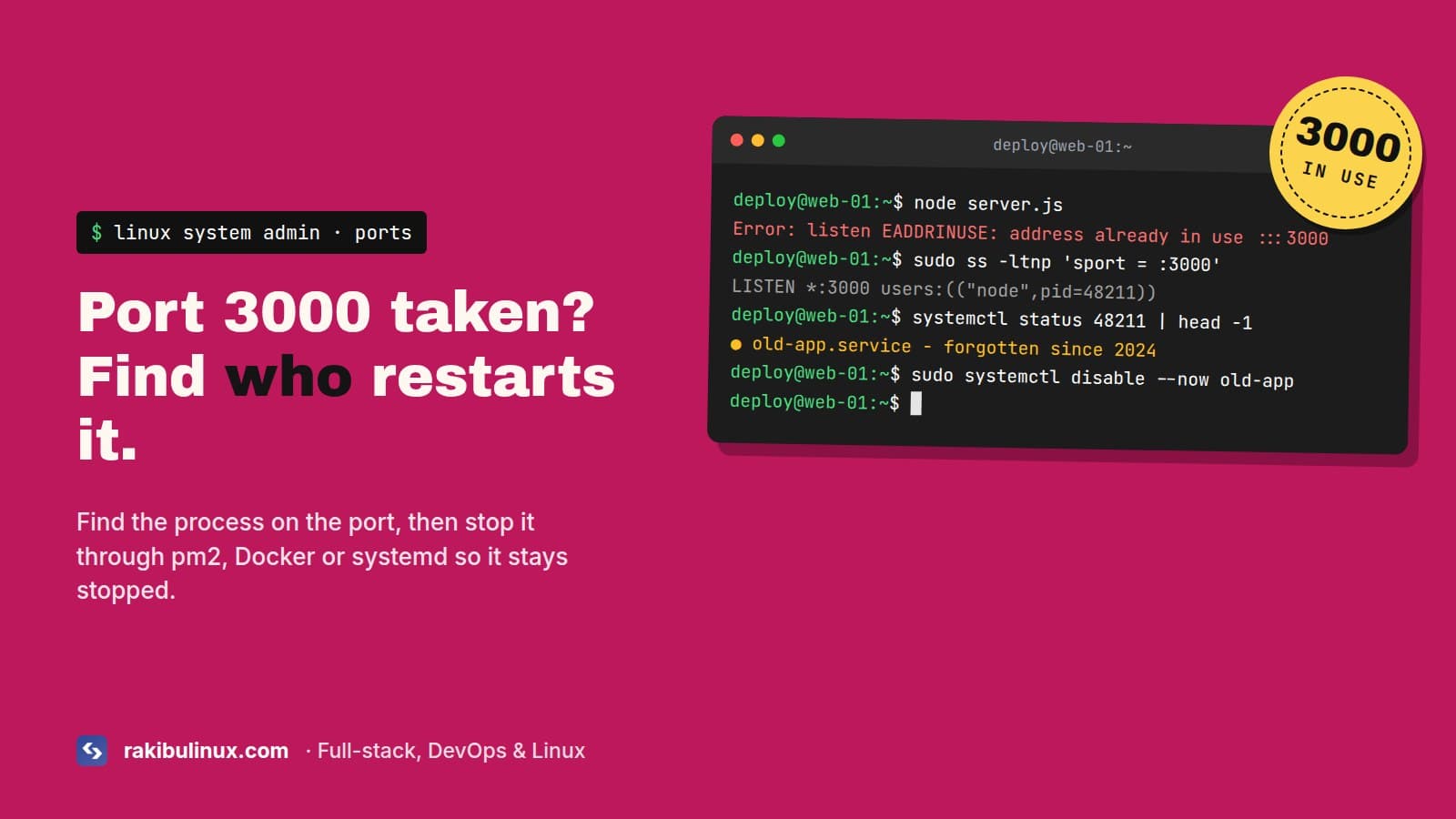
EADDRINUSE means another process already listens on that port. Find it with ss -ltnp, then stop it through pm2, Docker or systemd so it stays stopped.
Killing the process is the answer you'll find everywhere, and it works for about five minutes. On servers, the port is often taken by something that restarts itself: pm2 bringing back an app someone thought they'd stopped, a Docker container with restart: always, or a systemd service nobody remembers creating. So the useful question isn't "how do I kill it" but "what is it, and who keeps starting it".
The error
node:net:1940
    const ex = new UVExceptionWithHostPort(err, 'listen', address, port);
               ^
Error: listen EADDRINUSE: address already in use :::3000
    at Server.setupListenHandle [as _listen2] (node:net:1940:16)
  code: 'EADDRINUSE',
  errno: -98,
  syscall: 'listen',
  address: '::',
  port: 3000
Next.js says it more politely: ⚠ Port 3000 is in use, trying 3001 instead. That looks harmless in development, but in production it means your app is now on a port Nginx doesn't proxy to, and the site returns 502.
Key takeaways
sudo ss -ltnp 'sport = :3000'shows the process ID and name holding the port.- Check pm2, Docker and systemd before you kill anything, or the process restarts.
- A dev server suspended with Ctrl+Z still holds its port. Ctrl+C stops it; Ctrl+Z only pauses it.
- On macOS, port 5000 and 7000 are taken by AirPlay Receiver.
- Handle
SIGTERMin your app, so restarts release the port cleanly.
Step 1: Find what's on the port
sudo ss -ltnp 'sport = :3000'
State   Recv-Q  Send-Q  Local Address:Port  Peer Address:Port  Process
LISTEN  0       511     *:3000              *:*                users:(("next-server (v1",pid=48211,fd=21))
Use sudo, or you won't see processes owned by other users and the Process column stays empty. lsof -i :3000 works too if it's installed. Then find out what that PID really is and who started it:
ps -o pid,ppid,user,etime,cmd -p 48211
ps -o pid,cmd -p $(ps -o ppid= -p 48211)    # its parent
The parent is the useful part. PM2 v6...: God Daemon means pm2 owns it. containerd-shim or docker-proxy means Docker. PID 1 (systemd) means a service or an orphaned process. A bash or zsh means someone's terminal.
Step 2: Stop it the right way
It's pm2
pm2 list
pm2 stop web          # or pm2 delete web if it shouldn't exist
The classic mistake: the app runs under pm2, and then someone SSHes in and runs npm start by hand to "test something". Or two pm2 apps with different names both use port 3000, one crashes in a loop, and pm2 restarts it forever. Look for a restart counter in pm2 list that keeps going up. That loop also explains a lot of mystery 502 errors. My 502 Bad Gateway guide covers what Nginx sees in that situation.
It's Docker
docker ps --format '{{.Names}}\t{{.Ports}}' | grep 3000
docker compose down          # in that project's folder
A container publishing 3000:3000 holds the port on the host, even if the app inside has crashed. With restart: unless-stopped it comes back after you kill it, and after every reboot.
It's a systemd service
systemctl status 48211         # shows which unit owns the PID
sudo systemctl disable --now old-app.service
Typing a PID into systemctl status is a trick I use all the time. It tells you the unit name directly.
It's an old terminal session
If you pressed Ctrl+Z instead of Ctrl+C, the dev server is suspended, not stopped, and still holds the port. In that terminal, jobs lists it and fg brings it back so you can Ctrl+C it. If the terminal is gone, stop it by PID:
kill 48211            # SIGTERM, lets it clean up
sleep 2; kill -9 48211 2>/dev/null   # only if it ignored SIGTERM
Or in one go: sudo fuser -k 3000/tcp. Use that when you're sure nothing will restart it.
macOS: port 5000 is AirPlay
On macOS Monterey and later, the AirPlay Receiver listens on ports 5000 and 7000. A Flask or Express app on 5000 fails with EADDRINUSE on a fresh Mac, and lsof shows ControlCenter. Either turn off AirPlay Receiver in System Settings, under General, AirDrop & Handoff, or use a different port. I just use another port.
It happens on every restart (nodemon, tsx watch)
Your watcher starts the new process before the old one has released the port. Usually the old one doesn't exit on SIGTERM because something keeps the event loop alive: an open database pool, a Redis client, a setInterval. Close the server on shutdown:
const server = app.listen(PORT);

for (const sig of ["SIGTERM", "SIGINT"]) {
  process.on(sig, () => {
    server.close(() => process.exit(0));
    setTimeout(() => process.exit(1), 10_000).unref();  // don't hang forever
  });
}
In NestJS, call app.enableShutdownHooks() in main.ts and close your connections in onModuleDestroy. pm2 also benefits: pm2 reload sends SIGINT and waits kill_timeout (1.6 seconds by default) before force-killing.
It happens in tests
Every Jest test file that imports your server.js calls listen(3000), and test files run in parallel. Export the app without listening, and only call listen() in the entry file. Supertest takes the app directly and picks a free port on its own:
// app.ts: export const app = express(); ... no listen here
// server.ts: app.listen(process.env.PORT ?? 3000);
// test: await request(app).get("/health").expect(200);
Use PORT from the environment
Hard-coded ports are why two apps on one server end up fighting. Read process.env.PORT, write each app's port in its env file or pm2 ecosystem file, and keep a short list in the server's README of which app owns which port. Bind internal apps to 127.0.0.1 instead of all interfaces, so only Nginx can reach them.
:::3000, 0.0.0.0 and localhost
The :::3000 in the error means Node tried to listen on every IPv6 address, which on Linux also covers IPv4. So an app bound to 127.0.0.1:3000 and another trying :::3000 still collide. That part is expected.
The related surprise is the opposite case: no error, but Nginx can't reach the app. Since Node 17, localhost can resolve to the IPv6 address ::1 first. An app listening on 127.0.0.1 and an Nginx config that proxies to http://localhost:3000 may not meet. Use the same explicit address on both sides, for example app.listen(3000, "127.0.0.1") and proxy_pass http://127.0.0.1:3000.
Frequently asked questions
How do I find which process is using port 3000 on Linux?
Run sudo ss -ltnp 'sport = :3000' or sudo lsof -i :3000. Both show the PID and process name. Use sudo to see processes of other users.
How do I kill the process on port 3000?
sudo fuser -k 3000/tcp or kill <pid>. But check first whether pm2, Docker or systemd started it, or it restarts within seconds. Stop it through whatever manages it.
Why does EADDRINUSE come back after I kill the process?
A process manager restarts it. Check pm2 list, docker ps and systemctl status <pid>, and stop or disable it there.
Why is port 5000 in use on my Mac?
macOS AirPlay Receiver listens on ports 5000 and 7000. Turn it off in System Settings or run your app on another port.
Apps fighting over your server?
I sort out servers where apps, pm2, Docker and old services step on each other, and set them up so restarts are clean. Book my emergency Linux server fix, see my Linux system admin services, or contact me with the output of ss -ltnp.

Written by
MD Rakibul Islam Rakib
Full-stack developer, DevOps engineer and Linux system administrator with 5+ years of production experience. I deploy, harden and fix servers and web apps for clients worldwide, and everything in this article runs on real servers I manage, including this site.
- eaddrinuse
- address already in use
- port 3000 in use
- kill process on port linux
- pm2 port in use