MySQL to PostgreSQL Migration Without Losing Data
 MD Rakibul Islam RakibFull-stack developer, DevOps & Linux engineer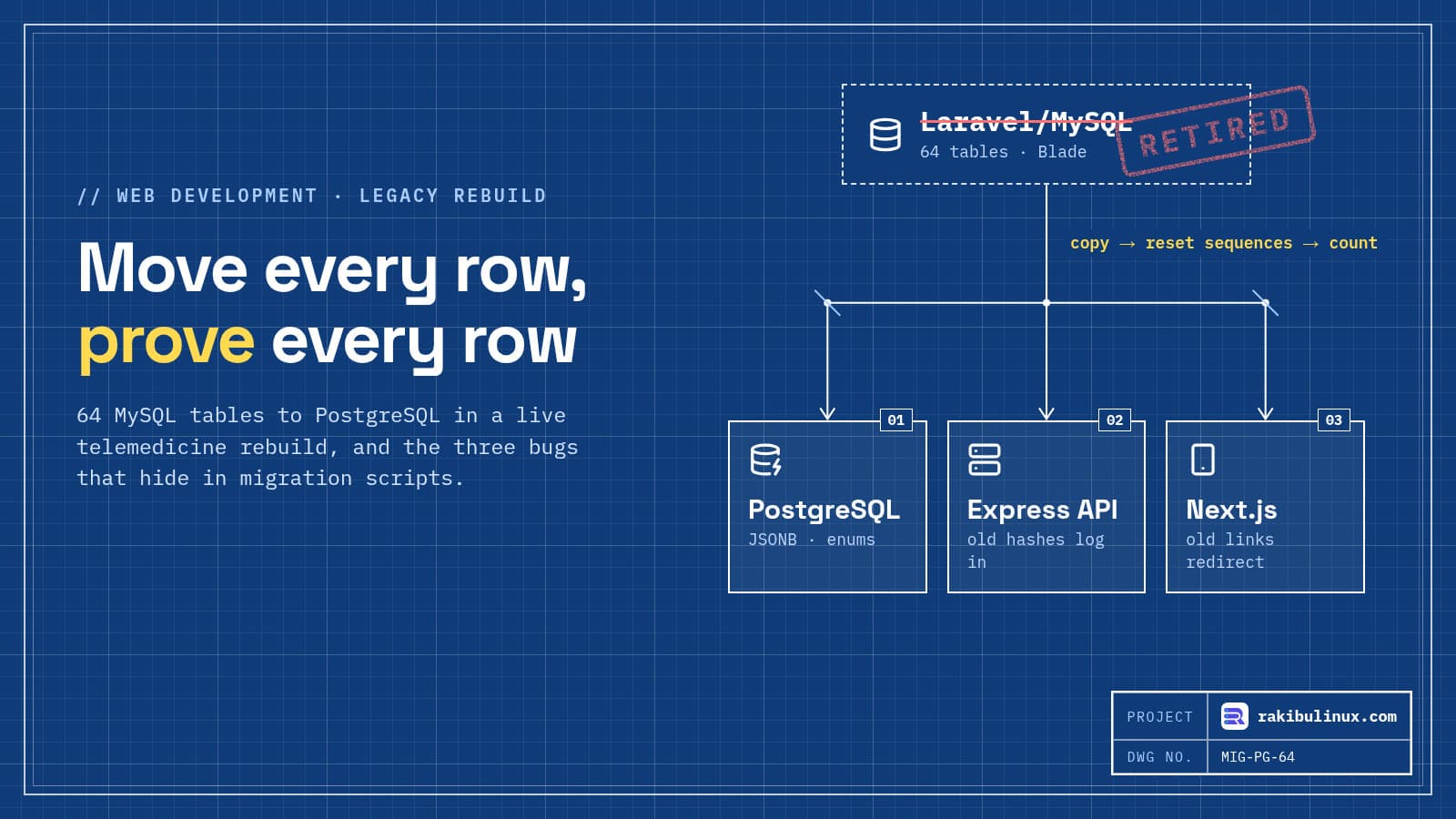
To move MySQL to PostgreSQL without losing data, copy in one controlled run, reset every sequence, keep old password hashes working and compare row counts.
In September 2026 I rebuilt MedicsBD, a live telemedicine platform, from Laravel and MySQL to Next.js, an Express API and PostgreSQL. All 64 tables moved, nobody had to reset their password, and old links still work. My first copy script had a bug that silently emptied tables it had already loaded, and only the final count check caught it. There are two more traps in the same place. For this post I rebuilt those bugs on fresh MySQL 8.4 and PostgreSQL 17 containers on 10 October 2026, so you can see the exact output.
Key takeaways
- Truncate once, before loading anything. A
TRUNCATE ... CASCADEper table can wipe tables you already loaded. In my test it emptied the appointments table without a single error. - Reset every sequence after copying ids. Otherwise the first new sign-up fails with a duplicate key error.
- Laravel
$2y$hashes need care in Node. The nativebcryptpackage returnedfalsefor a correct password until I swapped the prefix to$2b$. - Count every table after the whole load, not table by table, and fail the run on any mismatch.
- Keep the old world working: old URLs, printed QR codes and the old mobile app's API.
Why rebuild at all?
The old MedicsBD was a working Laravel app: Blade templates, jQuery, Jitsi for video and a MySQL database that had grown to 64 tables. It was slow to change and couldn't support a proper mobile app. The new stack is one API for the website and the Android and iOS apps, on PostgreSQL, which brought JSONB for flexible settings, real enums and trigram search for medicine names.
If your app works and changes rarely, don't rebuild it for fashion. Rebuild when the old code is stopping the business from doing something, like a mobile app, a new payment flow or a team that can't safely change it.
The plan I used
- Inventory the old system. Every table, every route, every role, every scheduled job and every place a URL is printed (emails, SMS, PDFs, QR codes).
- Build the new schema from the old one, then clean it up: tinyint flags become booleans, JSON text becomes JSONB, a key-value
user_metastable becomes one JSONB column on users, and framework-only tables (jobs, failed jobs, password resets) are left behind. - Write one re-runnable copy script that reads MySQL and writes PostgreSQL, with conversions in code where you can test them.
- Rehearse it on a copy of production as many times as it takes to run clean.
- Cut over: put the old app in read-only mode, run the script one last time, check the counts, switch DNS or the proxy, and keep the old server untouched for rollback.
Bug 1: TRUNCATE CASCADE ate a table I had already loaded
For a bulk load you usually turn foreign key checks off (SET session_replication_role = replica in PostgreSQL) so table order doesn't matter. To make the script re-runnable, my first version truncated each table right before loading it, with CASCADE because of the foreign keys.
The problem: with checks off, tables load in whatever order you list them. When the loop reached users and ran TRUNCATE users CASCADE, PostgreSQL also emptied every table that references users, including appointments, which was already loaded. Here is the reproduction, loading in alphabetical order:
--- naive
users         mysql=3 pg=3
appointments  mysql=4 pg=0  <-- MISMATCH
new signup: duplicate key value violates unique constraint "users_pkey"
No error was thrown. The only thing that noticed was the count check. The fix is one statement before the loop:
await db.query(`SET session_replication_role = replica`);
await db.query(`TRUNCATE ${tables.join(', ')} RESTART IDENTITY CASCADE`); // once, up front
for (const t of tables) await copy(t);
await db.query(`SET session_replication_role = DEFAULT`);
Note that session_replication_role needs superuser rights, and that while it is set, PostgreSQL doesn't check your foreign keys at all. That is why the count check, and a few spot checks of related records, are not optional.
Bug 2: the first new sign-up fails
The last line of the naive output is the second trap. When you insert rows with their old ids, PostgreSQL's serial or identity sequence doesn't move. The next normal insert asks the sequence for id 1, which already exists. The migration looks perfect, and then the first new customer can't register.
for (const t of tables) {
  await db.query(
    `SELECT setval(pg_get_serial_sequence($1, 'id'), COALESCE((SELECT MAX(id) FROM ${t}), 0) + 1, false)`,
    [t],
  );
}
With both fixes the same run gives:
--- fixed
users         mysql=3 pg=3
appointments  mysql=4 pg=4
new signup: ok
MySQL can leave gaps in auto-increment ids after deletes, and that's fine. Keep the old ids exactly as they were, because other tables, URLs and printed codes refer to them.
Bug 3 (almost): old passwords that silently fail
Laravel stores bcrypt hashes with a $2y$ prefix. It's the same algorithm as $2a$/$2b$, just PHP's label. I tested one real Laravel-style hash for the password "secret" against both common Node libraries:
bcryptjs 3.0.3, $2y$ as-is:  true
bcrypt 6.0.0,   $2y$ as-is:  false   (no error, just false)
bcrypt 6.0.0,   $2y$ → $2b$: true
A false with no error is the dangerous kind: every existing user gets "wrong password" and your support inbox fills up. The fix is one line at login, with a test that uses a real hash from the old database:
// Laravel hashes are $2y$; node's bcrypt only accepts $2a$/$2b$, same algorithm
const ok = await bcrypt.compare(plain, hash.replace(/^\$2y\$/, '$2b$'));
That kept every MedicsBD user signing in with their existing password. Rehash to $2b$ on the next successful login if you want the old format gone over time.
Conversions worth doing in code
TINYINT(1)toboolean: MySQL hands you 0/1; PostgreSQL wants true/false.- JSON stored as text: parse and re-serialise into
jsonb, and keep the raw string if parsing fails rather than dropping it. - Key-value tables into JSONB: MedicsBD's
user_metasrows became onemetaobject per user, leaving out keys for removed features. - Legacy values: old code accepted both
userandpatientas the same role. The script maps the alias so the new code only knows one. - Notifications with full URLs: stored links pointed at old paths on the old domain. The script rewrote them to the new app's routes.
- Status strings stay exactly as they were. Reports, filters and the old mobile app depend on them.
Keep the old world working after cutover
- Redirect every old URL people may have saved or printed: doctor profile links, share cards, store listing pages, old admin and patient paths.
- Printed QR codes must still resolve. MedicsBD prescriptions carry a verification QR code; codes printed by the old system still verify on the new one.
- Old mobile app versions keep signing in. I rebuilt the old app's API with the same responses, so people who never update aren't locked out.
- Uploaded files moved to S3-compatible storage with the same relative paths, so stored references didn't change. My RustFS upload guide covers the storage side.
Before switching I also wrote 90 API tests of role against endpoint and loaded every page as every role. That turned up real problems unrelated to the data: discount codes anyone could list, sandbox payment settings that would have stayed on in production, and reports that put early-morning Dhaka visits on the previous day because of time zones.
Cutover checklist
- Take a fresh backup of the old database and files, and confirm it restores.
- Put the old app into maintenance or read-only mode so no new writes arrive.
- Run the migration script with truncate-once, sequence reset and the count check; it must exit 0.
- Log in as a real old user of each role, place a test booking, and check a few old URLs.
- Switch traffic. Keep the old server and database untouched for a rollback window.
- Watch error logs and sign-in failures closely for the first days.
Moving to a new server at the same time? My guide to migrating a website with zero downtime covers DNS and proxy switching.
Frequently asked questions
Should I use pgloader to move MySQL to PostgreSQL?
pgloader is great for copying a schema and data quickly, and I planned to use it. In the end I wrote a small Node script, because I needed conversions pgloader doesn't know about, like flattening key-value tables into JSONB and rewriting stored links. Either way, add your own count check and sequence reset.
Will users have to reset their passwords after leaving Laravel?
No. Laravel's $2y$ bcrypt hashes verify in Node after swapping the prefix to $2b$ (with the native bcrypt package) or as-is with bcryptjs. Test it with a real hash from your database before cutover.
How do I know no data was lost?
Compare row counts for every table after the whole load finishes, fail the run on any mismatch, then spot-check records that link tables together, such as a user's appointments and payments. Counts alone don't prove contents, so also check a few sums, like total payments.
How long does a database migration like this take?
The copy itself may take minutes. The work is in the script, the conversions and the rehearsals on a copy of production. Plan for several rehearsal runs before the real cutover.
Can I rebuild the app but keep MySQL?
Yes. A rewrite and a database change are separate decisions. Change the database only if you need something PostgreSQL does better, as MedicsBD did with JSONB and trigram search.
Stuck on an old PHP or Laravel app?
I rebuild legacy apps on modern stacks and move the data without losing a row: Laravel, WordPress and custom PHP to Next.js and Node.js, with mobile apps on the same API. See my web development services or tell me about your app.

Written by
MD Rakibul Islam Rakib
Full-stack developer, DevOps engineer and Linux system administrator with 5+ years of production experience. I deploy, harden and fix servers and web apps for clients worldwide, and everything in this article runs on real servers I manage, including this site.
- MySQL to PostgreSQL migration
- Laravel to Node.js migration
- migrate legacy PHP app
- PostgreSQL sequence reset
- Laravel bcrypt 2y Node
- zero data loss migration
- rebuild legacy web app