Docker Logs Filling Up the Disk? Rotate Them Properly
 MD Rakibul Islam RakibFull-stack developer, DevOps & Linux engineer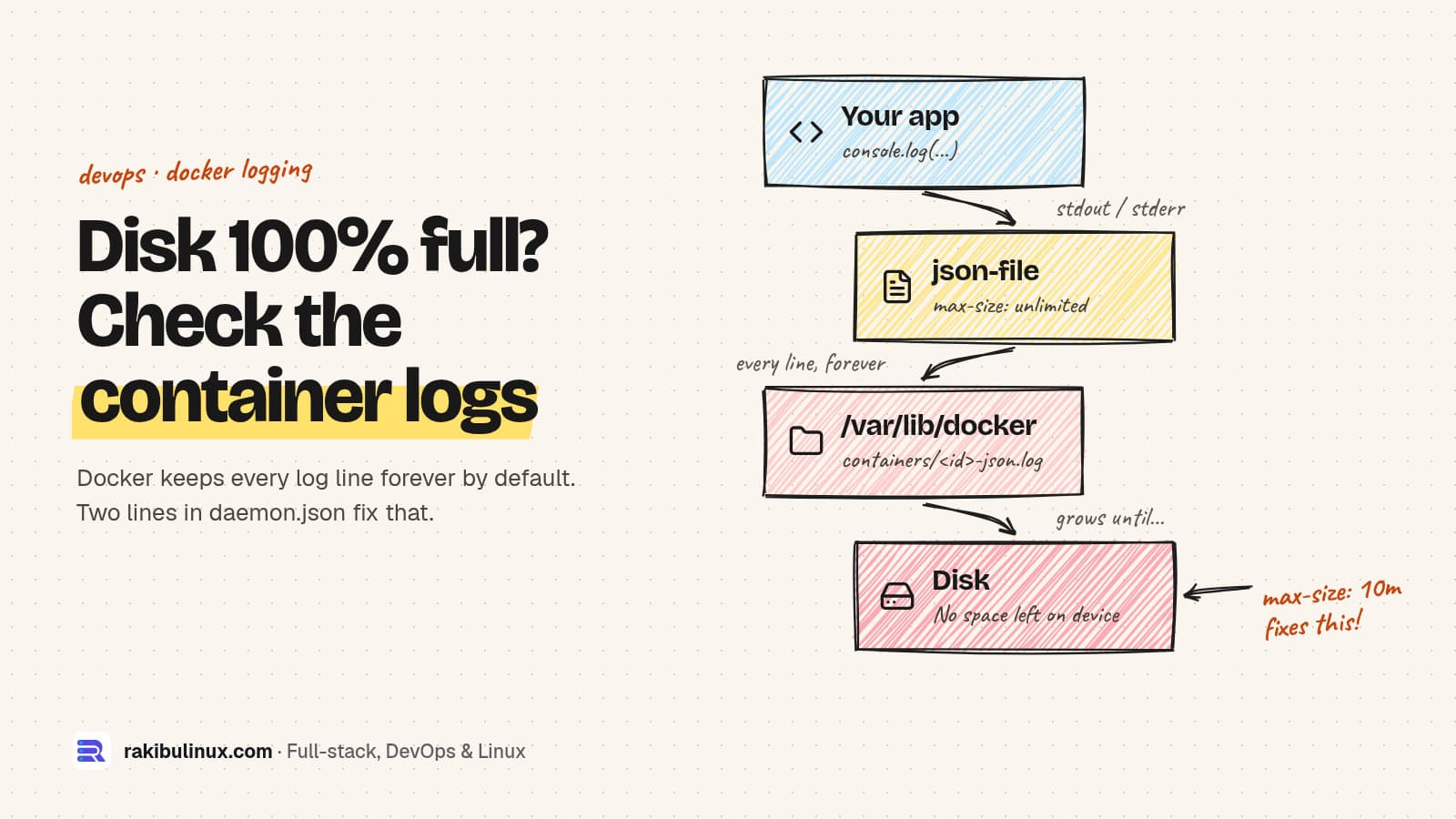
Docker's default json-file log driver never rotates, so container logs grow until the disk is full. Set max-size and max-file in daemon.json and recreate.
"No space left on device" on a Docker host is very often not images or volumes. It's a single -json.log file under /var/lib/docker/containers that has been collecting every line a chatty container ever printed. docker system df doesn't show it, docker system prune doesn't remove it, and it keeps growing while the container runs. Here is how to find it, free the space safely, and set up rotation so it never happens again.
Key takeaways
- The cause: the default
json-filedriver hasmax-sizeunlimited and keeps one file. Nothing is ever rotated. - Find it:
sudo du -h /var/lib/docker/containers/*/*-json.log | sort -h | tail. - Permanent fix: set
"log-opts": {"max-size": "10m", "max-file": "3"}in/etc/docker/daemon.json, or switch to thelocaldriver, which rotates and compresses by default. - The catch: logging settings only apply to containers created after the change. Existing containers must be recreated.
- Emergency space: truncating the log file frees space immediately, but it's a stopgap, not a fix.
Step 1: Confirm it's the logs
df -h /var/lib/docker
sudo du -sh /var/lib/docker/* 2>/dev/null | sort -h | tail -5
sudo du -h /var/lib/docker/containers/*/*-json.log 2>/dev/null | sort -h | tail -5
If containers is the biggest directory and one or two -json.log files are gigabytes, you've found it. To map the long container ID in the path to a name:
docker ps -a --no-trunc --format '{{.ID}} {{.Names}}' | grep <first-12-chars-of-id>
# or the other way round
docker inspect --format '{{.LogPath}}' api
If the disk is full of something else (images, build cache, old kernels, journald), my general guide to "No space left on device" on Linux walks through each one.
Why Docker logs grow forever
Everything a container writes to stdout and stderr goes to its logging driver. On Linux the default driver is json-file, which writes each line as JSON to /var/lib/docker/containers/<id>/<id>-json.log. Its defaults are max-size: -1 (unlimited) and max-file: 1, so the file only shrinks when the container is removed. Restarting the container doesn't help; neither does pruning images.
A Node.js API logging every request, an Nginx container with access logs on stdout, or an app stuck in an error loop can write gigabytes a day. On a small VPS that's a full disk within a week, and when the disk fills, the database usually goes down first.
Step 2: Free space right now (emergency)
If the server is down because the disk is full, truncate the biggest log to zero. The container keeps running and keeps writing to the same file:
sudo truncate -s 0 "$(docker inspect --format '{{.LogPath}}' api)"
df -h /var/lib/docker
Don't rm the file: the Docker daemon still holds it open, so the space isn't released until the container restarts, and docker logs may break for that container. Docker's documentation discourages touching log files from outside, so treat truncation as a one-time rescue. Save the last lines first if you need them for debugging: docker logs --tail 5000 api > /root/api-last.log.
Step 3: Turn on log rotation for every new container
Edit (or create) /etc/docker/daemon.json. Option A keeps the json-file driver and adds limits:
{
  "log-driver": "json-file",
  "log-opts": {
    "max-size": "10m",
    "max-file": "3"
  }
}
Option B switches to the local driver, which Docker's docs recommend because it rotates and uses a more efficient format. Its defaults are 20 MB per file and 5 files, and it compresses rotated files, so it uses less disk for the same history:
{
  "log-driver": "local",
  "log-opts": {
    "max-size": "10m"
  }
}
Both keep docker logs and docker compose logs working. Note that numbers are written as strings ("3", not 3); Docker's docs require strings there, and an invalid file stops the daemon from starting. Validate before restarting:
sudo dockerd --validate --config-file=/etc/docker/daemon.json
sudo systemctl restart docker
docker info --format '{{.LoggingDriver}}'
Restarting the daemon restarts containers that have a restart policy. Do it in a quiet moment, or enable "live-restore": true in the same file first so containers keep running across daemon restarts.
Step 4: Recreate existing containers
This is the step everyone misses. Logging options are fixed when a container is created. After changing daemon.json, your existing containers still use unlimited json-file logs until they are recreated (not just restarted):
cd /srv/app
docker compose up -d --force-recreate

# check one container
docker inspect --format '{{.HostConfig.LogConfig}}' api
# {local map[max-size:10m]}
Volumes and named data survive recreation, but anything written only inside the container's filesystem doesn't. That's normal for well-built images; if your app keeps uploads or state inside the container, fix that first. I covered this and other Compose settings in the Docker Compose production checklist.
Per-service limits in Docker Compose
To set limits in the project itself, so they travel with the repository and apply on any host, add a logging block per service. A YAML anchor saves repeating it:
x-logging: &default-logging
  driver: json-file
  options:
    max-size: "10m"
    max-file: "3"

services:
  api:
    image: ghcr.io/acme/api:latest
    logging: *default-logging
  nginx:
    image: nginx:1.29
    logging: *default-logging
Settings in Compose override the daemon default for that service. I set both: the daemon default protects against containers someone starts by hand, the Compose block documents intent.
Log less, keep what matters
- Lower the log level in production. Debug logging per request is the most common reason a log grows by gigabytes.
- Don't double-log. If Nginx in front of your app already writes access logs, the app doesn't need to log every request too.
- Ship logs off the box if you need history. Rotation caps local disk use; a log service or Loki keeps searchable history elsewhere. With Docker 20.10 and newer, "dual logging" keeps
docker logsworking even with remote drivers. - Watch error loops. A container in a crash loop can write fast. My guide to a container that keeps restarting shows how to stop it.
- Alert on disk usage. Alert at 80% so you never meet a full disk in production. Uptime Kuma or your provider's monitoring can do it.
Frequently asked questions
Where are Docker container logs stored?
With the default json-file driver on Linux, in /var/lib/docker/containers/<container-id>/<container-id>-json.log. Run docker inspect --format '{{.LogPath}}' <name> to get the exact path for one container. On Docker Desktop, the files live inside its Linux VM.
Does docker system prune delete container logs?
Only for containers it removes, because logs are deleted with their container. Logs of running containers are never touched by prune, and docker system df doesn't count them.
Why didn't my daemon.json log settings work?
Either the daemon wasn't restarted, the JSON is invalid (numbers must be quoted strings), or the containers weren't recreated. Logging options apply only to containers created after the change; use docker compose up -d --force-recreate.
What is a good max-size for Docker logs?
For most web apps, 10 MB per file with 3 files is plenty for docker logs debugging. Keep longer history in a central log system rather than on the server's disk.
Is the local logging driver better than json-file?
For most servers, yes. It rotates and compresses by default and Docker recommends it. Use json-file only when a tool reads the JSON files directly, such as some log shippers.
Want your Docker hosts set up to stay healthy?
I set up Docker servers with log rotation, disk alerts, backups and firewall rules from day one, and clean up the ones that are already full. See my DevOps service, or tell me what's filling your disk.

Written by
MD Rakibul Islam Rakib
Full-stack developer, DevOps engineer and Linux system administrator with 5+ years of production experience. I deploy, harden and fix servers and web apps for clients worldwide, and everything in this article runs on real servers I manage, including this site.
- Docker logs filling disk
- docker log rotation
- json-file max-size
- docker daemon.json
- docker local logging driver
- disk full
- DevOps