WordPress to Next.js Migration Without Losing SEO
 MD Rakibul Islam RakibFull-stack developer, DevOps & Linux engineer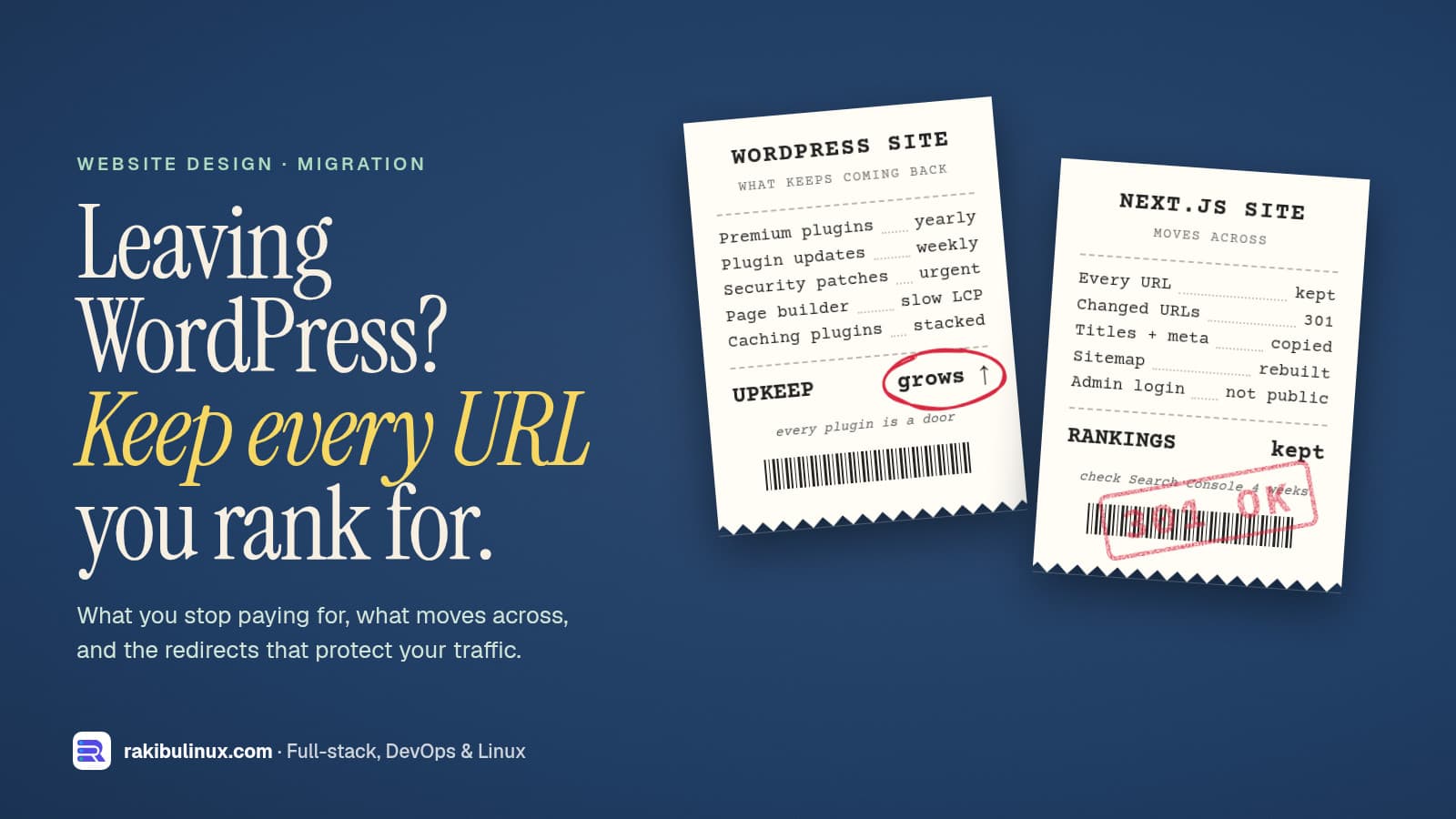
Moving WordPress to Next.js makes a site faster and safer, but only if you keep every URL, redirect old ones with 301s and carry over titles and meta tags.
Business owners usually ask me about this after one of three things: the WordPress site got hacked, it fails Core Web Vitals no matter how many caching plugins they add, or the plugin and hosting bills keep growing. Next.js fixes all three well. This site is a Next.js 16 app, and I've rebuilt WordPress sites this way. But a migration done carelessly can wipe out years of Google rankings in a week. This guide covers when it's worth it, the two ways to do it, and the SEO steps that keep your traffic.
Key takeaways
- Migrate for a reason: speed, security, custom features or cost. If your team lives in the WordPress editor and the site is fine, a headless setup or a tune-up may be better.
- Two paths: headless (keep WordPress as the editor, Next.js as the website) or full move (content goes into Markdown, a headless CMS or your own database).
- Crawl the old site first and keep a list of every URL. That list is your redirect map and your checklist.
- Keep URLs identical where you can. Where they must change, add one 301 redirect per old URL, never a blanket redirect to the homepage.
- Carry over titles, meta descriptions, alt text and structured data, then watch Search Console for a few weeks.
Is it worth moving off WordPress?
Good reasons to migrate:
- Speed. A Next.js site sends pre-rendered HTML and only the JavaScript a page needs. Page-builder themes often load large CSS and script bundles on every page. Faster pages help rankings and conversions; see my guides on fixing slow LCP and INP.
- Security. Most WordPress hacks I've cleaned up came through an outdated plugin or theme. A Next.js site has no public admin login and no plugin folder to attack.
- Custom features. Booking, dashboards, customer portals and integrations are normal code in Next.js, not a stack of plugins fighting each other.
- Running costs. No premium plugin licences to renew, and a fast site runs on a small VPS. My hosting cost comparison shows the options.
Reasons to wait: non-technical editors who rely on the WordPress editor daily, a WooCommerce shop with many extensions you'd have to replace, or a site that already performs well. Changing technology doesn't fix weak content or an unclear offer.
Path 1: Headless WordPress
WordPress stays where your team writes, and Next.js becomes the public website. Next.js reads posts and pages from the built-in REST API (/wp-json/wp/v2/posts) or from the WPGraphQL plugin:
// app/blog/[slug]/page.tsx
import { notFound } from 'next/navigation';

const WP = 'https://cms.example.com/wp-json/wp/v2';

export default async function Post({ params }: { params: Promise<{ slug: string }> }) {
  const { slug } = await params;
  const res = await fetch(`${WP}/posts?slug=${slug}&_embed`, { next: { revalidate: 300 } });
  const [post] = await res.json();
  if (!post) notFound();
  return <article dangerouslySetInnerHTML={{ __html: post.content.rendered }} />;
}
Editors keep their workflow, and the slow, plugin-heavy front end disappears. Move WordPress to a subdomain such as cms.example.com, block it from search engines, and protect its login. The catch: you now run two systems, and page-builder layouts don't come across, because Next.js renders the content, not the builder.
Path 2: Full migration
Export the content once and switch WordPress off. Content goes into Markdown or MDX files in the repo (great for small, developer-run sites), a headless CMS such as Sanity, Strapi or Payload, or your own database with an admin dashboard, which is how this site works. Pull everything through the REST API with a script, convert the HTML, download the media, and keep each post's slug, date, title, excerpt and SEO fields. You end up with one system, fewer moving parts, and nothing left to patch every week.
The SEO checklist that protects your rankings
1. Inventory every URL before you touch anything
Export the old site's URLs from three places: the XML sitemap (Yoast and Rank Math put it at /sitemap_index.xml; core WordPress at /wp-sitemap.xml), a crawl with a tool like Screaming Frog, and Search Console's Pages and Performance reports. Mark the pages that get traffic or backlinks. Those must not break.
2. Keep the same URLs
Next.js routes can match almost any WordPress structure. If posts lived at /my-post/, use an app/[slug]/page.tsx route. If you want cleaner URLs, change them on purpose and redirect, not by accident. Watch trailing slashes: WordPress adds them, Next.js doesn't by default. Set trailingSlash: true in next.config.ts if you keep the old style.
3. Redirect what changes
// next.config.ts
export default {
  async redirects() {
    return [
      { source: '/:year(\\d{4})/:month(\\d{2})/:slug', destination: '/blog/:slug', permanent: true },
      { source: '/category/:cat', destination: '/blog?topic=:cat', permanent: true },
      { source: '/feed', destination: '/rss.xml', permanent: true },
    ];
  },
};
permanent: true sends a 308, which search engines treat like a 301. For hundreds of one-off URLs, keep them in a map file or do them in Nginx. Never redirect everything to the homepage. Google treats that as a soft 404 and drops the rankings anyway.
4. Carry over the SEO data
Export the title and meta description from your SEO plugin for every page, and set them with generateMetadata. Keep image alt text, canonical tags, Open Graph images, and structured data such as Article, FAQ, Product and LocalBusiness. Generate a sitemap with app/sitemap.ts and a robots.ts.
5. Don't forget the hidden features
Contact forms (and their spam protection and email delivery, see emails going to spam), the search box, comments, RSS, analytics, cookie consent and newsletter embeds. List every plugin and decide what replaces each one.
6. Launch, then watch
Switch DNS when traffic is lowest, keep the old server running for a few days, then submit the new sitemap and test key URLs in Search Console. Crawl the old URL list against the new site and expect a 200 or a single 301 for every one, never a 404 or a redirect chain. My zero-downtime migration guide covers the DNS cutover, and redesign without losing SEO has the full checklist.
Frequently asked questions
Is Next.js better than WordPress for SEO?
Next.js makes it easier to build fast pages with clean HTML, which helps Core Web Vitals. But rankings come from content, links and technical basics. A well-optimised WordPress site can outrank a careless Next.js one, so the migration must preserve URLs and metadata.
Will I lose rankings when moving from WordPress to Next.js?
Not if you keep URLs the same or 301-redirect every changed one, keep titles and meta descriptions, and keep the content. A short wobble for a few weeks is normal while Google recrawls. Big drops come from missing redirects.
Can I keep using WordPress as a CMS with Next.js?
Yes. That's headless WordPress: editors use the normal admin, and Next.js reads content through the REST API or WPGraphQL and renders the public site. Keep the WordPress admin off the public domain and updated.
How long does a WordPress to Next.js migration take?
A small business site of 10 to 30 pages is usually a few weeks including design, content transfer, redirects and testing. Large blogs, multilingual sites and WooCommerce shops take longer because there's more content and functionality to rebuild.
What about WooCommerce?
You can run WooCommerce headless or move to a commerce platform with an API, but checkout, payments, shipping and extensions all need to be rebuilt or replaced. Plan and price that part separately; it's usually most of the work.
Thinking about leaving WordPress?
I rebuild WordPress sites in Next.js with every URL, redirect and meta tag carried over, so you get the speed without losing your Google traffic. See my business website design and development service, all website design services, or send me your site for an honest opinion on whether it's worth it.

Written by
MD Rakibul Islam Rakib
Full-stack developer, DevOps engineer and Linux system administrator with 5+ years of production experience. I deploy, harden and fix servers and web apps for clients worldwide, and everything in this article runs on real servers I manage, including this site.
- WordPress to Next.js
- headless WordPress
- website migration SEO
- 301 redirects
- Next.js 16
- WPGraphQL
- Core Web Vitals