VPS Disaster Recovery: A Plan You Have Actually Tested
 MD Rakibul Islam RakibFull-stack developer, DevOps & Linux engineer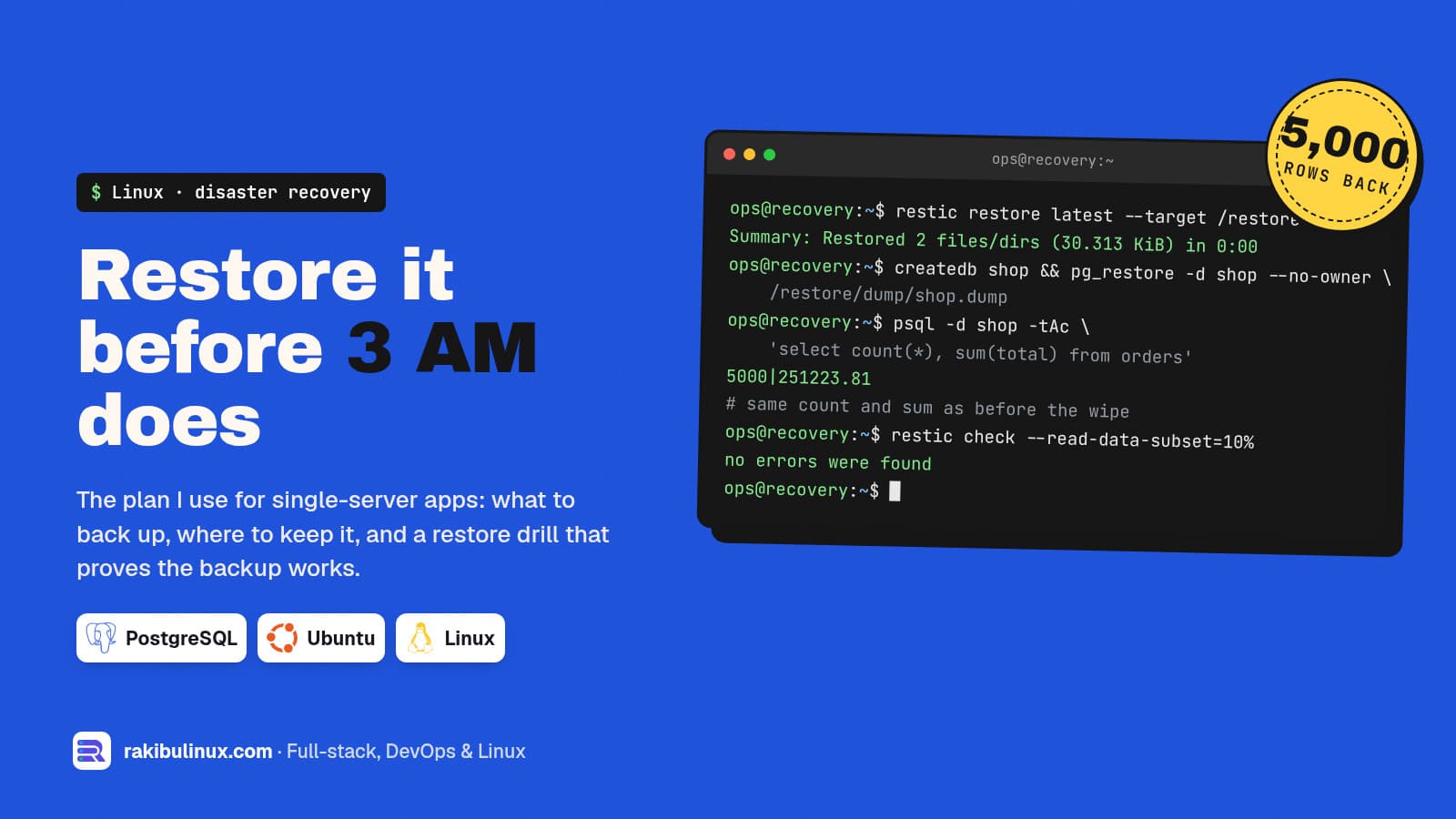
A VPS disaster recovery plan is offsite backups, a written runbook and a restore you have actually tested. Without the test, you only hope the backup works.
Servers rarely fail at a convenient time. The disk fills during a traffic spike, an update breaks the database, the provider loses the host, or someone runs the wrong command. For a business on one VPS, the question is never whether that night comes. The question is how long the site stays down and how much data is gone when it does. I run this website and several client apps on single servers, so this is the plan I actually use, plus a restore drill I ran for this post with restic 0.19.1 and PostgreSQL 17.
Key takeaways
- Decide two numbers first: how much data you can lose (RPO) and how long you can be down (RTO). They decide how often to back up and how much to automate.
- Back up data, not just the disk: database dumps, uploaded files, config and secrets, each restorable on its own.
- Keep a copy somewhere else. A snapshot in the same provider account doesn't help when the account or the provider is the problem.
- Restore on a schedule. In my drill, the database came back with the same 5,000 rows and the same total. That number is what lets you sleep.
- Write the runbook before you need it, in plain steps someone else could follow.
Why most small-business backups fail
I have seen the same three gaps again and again, including on my own server:
- The backup doesn't cover what you think. On my production server the hosting panel ran its own scheduled backups, and I assumed they covered this site. They didn't: they backed up the panel's own sites, not the app in
/srv. I only found out by checking what the backup files contained. - Files and database drift apart. I once found 5 images referenced in the database that were missing on disk. They came back from git history, but only by luck. Uploads need their own backup, taken close to the database dump.
- Nobody has ever restored. A backup job that says "success" every night tells you a file was written. It doesn't tell you the file can rebuild your database.
Step 1: set your RPO and RTO
RPO (recovery point objective) is how much recent data you can afford to lose. Daily dumps mean up to a day of orders gone. RTO (recovery time objective) is how long you can be offline before it really hurts. A brochure site can live with a day. A shop in its busy season can't live with an hour.
Write both down with the business owner. "Nightly backups, restore within four hours" is a fine plan for many small businesses, as long as everyone agreed to it beforehand rather than discovering it at 3 AM.
Step 2: list what a rebuild needs
- Database: a logical dump (
pg_dump -Fcfor PostgreSQL,mysqldump --single-transactionfor MySQL). Dumps restore onto a different server and version, which disk images often can't. - Uploaded files: the uploads folder or the S3-compatible bucket. If they live on the same VPS, they are part of the backup.
- Secrets and config:
.envfiles, Nginx site configs, systemd units or the PM2 ecosystem file, crontab, firewall rules. Encrypt these. - The app itself is in git. Note the commit that is live, so you rebuild the same version.
- DNS and certificates: note who controls DNS and how to issue certificates again. Let's Encrypt can reissue in minutes.
Step 3: back up offsite with restic
I like restic for this job: encrypted, deduplicated, and it can write to local disks, SFTP or any S3-compatible bucket. A nightly job dumps the database and backs up the dump plus uploads and config:
#!/usr/bin/env bash
set -euo pipefail
export RESTIC_REPOSITORY=s3:https://s3.example.com/backups-app
export RESTIC_PASSWORD_FILE=/root/.restic-pass   # also stored in your password manager

pg_dump -Fc -U app app > /var/backups/app/db.dump
restic backup /var/backups/app /srv/app/shared/uploads /etc/nginx/sites-available --tag nightly
restic forget --keep-daily 7 --keep-weekly 4 --keep-monthly 6 --prune
When you create the repository, restic prints a warning worth reading twice: losing the password means the data is irrecoverably lost. Keep the password in a password manager, not only on the server you are trying to recover. In my test, a wrong password failed cleanly:
Fatal: wrong password or no key found
The bucket should belong to a different provider or at least a different account from the server. Give the server credentials that can write new backups but not delete old ones (bucket versioning or object lock), so an attacker on the server can't wipe your history too.
Step 4: the restore drill
Here is the drill I ran for this post, in containers so it is safe to repeat. A database with 5,000 orders, backed up, then destroyed, then restored on a fresh server.
# before: record what "correct" looks like
psql -d shop -tAc "select count(*), sum(total) from orders"
5000|251223.81

# back up
pg_dump -Fc shop > dump/shop.dump
restic backup /dump --tag db
snapshot 37467ada saved

# disaster: database server and dump file deleted

# restore on a new server
restic restore latest --target /restore
Summary: Restored 2 files/dirs (30.313 KiB) in 0:00
createdb shop
pg_restore -d shop --no-owner /restore/dump/shop.dump
psql -d shop -tAc "select count(*), sum(total) from orders"
5000|251223.81
Same count, same sum. That is the check that matters: not "the restore command finished", but "the data I expected is there". Pick two or three numbers that mean something for your business, such as orders, users and the latest order date, and compare them every time.
A tiny test database restores in under a second. Yours won't. Time a real restore once, because that number, plus setting up a new server, is your true RTO. If it is longer than the business accepted in step 1, fix the plan now: a pre-built server image, a standby database, or a smaller dataset to restore first.
Also let restic check the stored data itself now and then. restic check --read-data-subset=10% reads a sample of the actual backup data and verifies it; in my test it reported no errors were found.
Step 5: write the 3 AM runbook
Keep it in a place you can reach when the server is down (not only on the server). Mine has these sections:
- Who to call and who decides. Phone numbers, the provider's support link, who can approve spending on a new server.
- Where things are. Backup bucket, password manager entry, DNS provider, the git repository and the live commit.
- Rebuild steps. Create the server, run the hardening and setup script, restore config, restore database, restore uploads, deploy the app, issue certificates.
- Checks. The business numbers, a test login, a test order or form, and the logs.
- Switch traffic. Point DNS or the floating IP to the new server, and keep the old one off until you know what happened.
Most of this is a script once you have done it twice. My Ubuntu hardening checklist and server migration guide cover the setup steps.
Step 6: know it is down before your customers do
A backup tells you how to recover. Monitoring tells you when. An external uptime check (I use Uptime Kuma) on the home page and a health endpoint, plus an alert when the nightly backup didn't run, covers most of it. Disk usage alerts catch the most common cause of a sudden outage: a full disk.
What I do on my own server
Before every deploy of this website's API, the deploy script takes a pg_dump, and the last 30 are kept. Releases live in their own folders with a current symlink, so a bad deploy rolls back automatically when the health check fails. Uploads moved to S3-compatible storage with a copy-only migration, and every server change starts with a fresh backup copied off the server. None of it is fancy. It just covers the three gaps above.
Frequently asked questions
Are my VPS provider's snapshots enough?
They are a good extra layer, but not a full plan. They usually live in the same provider account, may be taken while the database is mid-write, and restore the whole disk only. Keep database dumps and files offsite as well.
How often should I test a restore?
At least every few months, and after any big change to the app or database. Put it in your maintenance routine so it actually happens.
What is the 3-2-1 backup rule?
Keep three copies of your data, on two different kinds of storage, with one copy offsite. For a single VPS that usually means the live data, a local dump and an encrypted copy with another provider.
Is restic better than rsync for backups?
For offsite backups, usually yes: restic encrypts, keeps many versions with deduplication and checks its own data. rsync copies the current state, so a deleted or corrupted file can overwrite your only good copy.
How much data could I lose with nightly backups?
Up to one day, which is your RPO. If that is too much, back up more often, stream database changes with WAL archiving, or run a standby replica.
Want a recovery plan you can trust?
I set up offsite backups, restore drills, monitoring and a written runbook for single-server apps, and run them as part of monthly maintenance. See my Linux server administration services or contact me for a fixed-price backup audit.

Written by
MD Rakibul Islam Rakib
Full-stack developer, DevOps engineer and Linux system administrator with 5+ years of production experience. I deploy, harden and fix servers and web apps for clients worldwide, and everything in this article runs on real servers I manage, including this site.
- vps disaster recovery plan
- test backup restore
- restic backup postgresql
- server down at night
- rpo rto small business
- offsite backup linux
- backup runbook