Fix CLS in Next.js: Stop Pages Jumping While They Load
 MD Rakibul Islam RakibFull-stack developer, DevOps & Linux engineer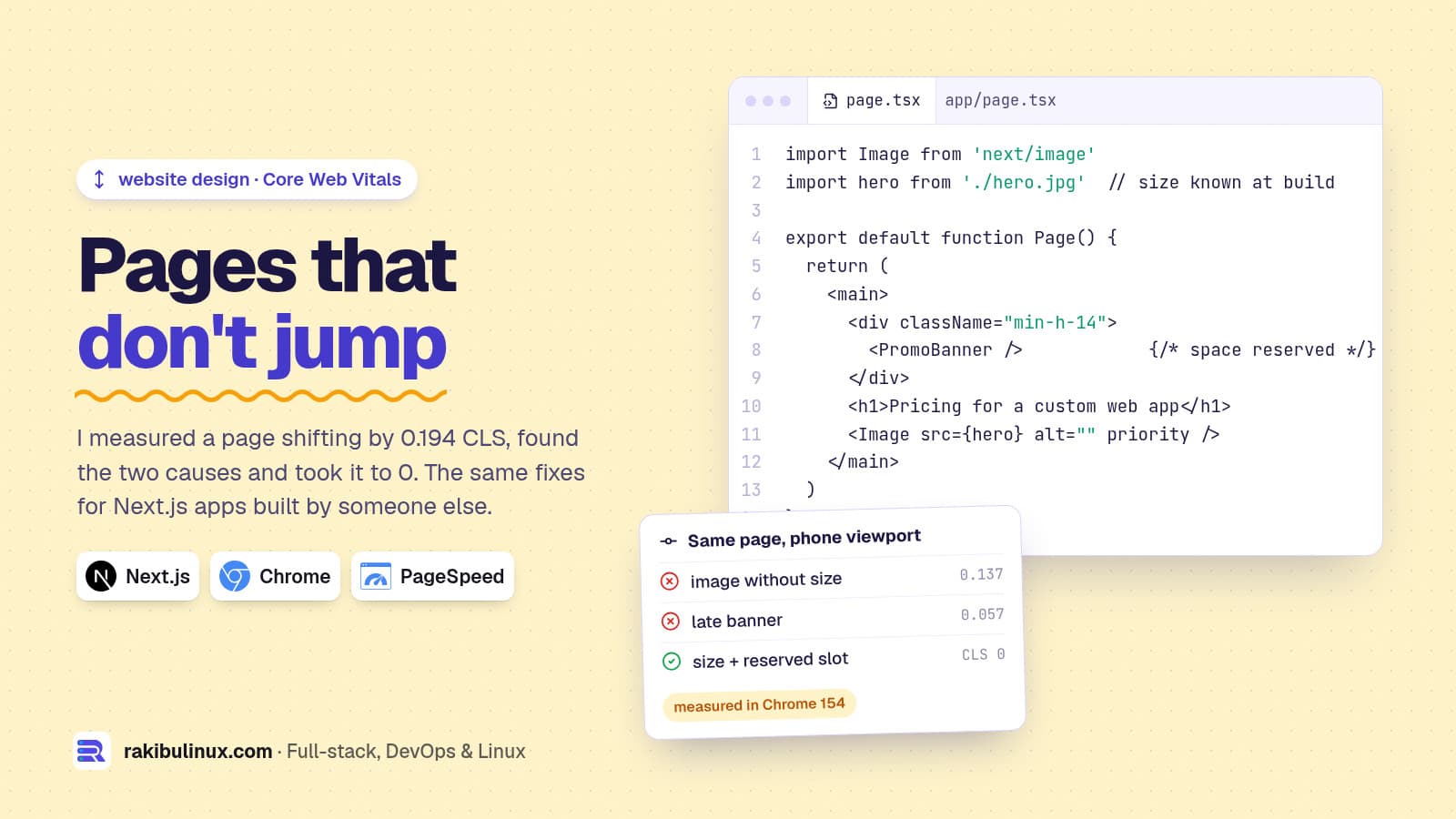
To fix CLS in Next.js, give every image a size, reserve space for anything that loads late, use next/font, and never insert content above what the reader sees.
Cumulative Layout Shift measures how much a page jumps while someone is reading it. Google counts a CLS of 0.1 or less as good and above 0.25 as poor, judged at the 75th percentile of real visits. When I take over a Next.js site another team built, CLS problems are the most common Core Web Vitals issue I find, and also the easiest to fix for good. For this post I built a small test page with the two causes I see most, measured it in Chrome 154 at phone size, fixed it, and measured again.
Key takeaways
- My test page scored 0.194 ("needs improvement"): 0.137 from an image without a size and 0.057 from a banner inserted after load. After the fixes: 0.
- Images need dimensions. With
next/image, passwidthandheight, import the file statically, or usefillinside a sized box. - Reserve space for late content: banners, cookie bars, ads, embeds and client-only widgets.
next/fontlimits font-swap shifts by generating a size-adjusted fallback (adjustFontFallbackis on by default).- Debug with attribution. The element that moved is not always the cause; look at what appeared above it.
How is CLS measured?
Each time a visible element moves without the user asking, the browser records a layout shift. Its score depends on how much of the screen moved and how far. Shifts are grouped into windows: shifts less than 1 second apart join the same window, up to 5 seconds long, and CLS is the worst window during the visit.
Shifts within 500 ms of a tap, click or key press don't count, because the user expected something to change. Scrolling doesn't count as input. That is why an accordion that opens on click is fine, but a "Load more" result that pushes content while the user scrolls is not.
The test: a page with two common mistakes
The page had a heading, a hero image with no width or height, a paragraph, and a promo banner inserted by JavaScript 1.2 seconds after load at the top of the page. The image was delayed by 800 ms to simulate a normal network. I recorded shifts with a PerformanceObserver:
new PerformanceObserver((list) => {
  for (const e of list.getEntries()) {
    if (!e.hadRecentInput) console.log(e.value.toFixed(3), e.sources.map((s) => s.node?.nodeName));
  }
}).observe({ type: 'layout-shift', buffered: true });
Result at a 412 px wide viewport:
/broken {"cls":0.194,"shifts":[{"v":0.137,"src":["P"]},{"v":0.057,"src":["P","IMG","H1"]}]}
/fixed  {"cls":0,"shifts":[]}
Notice the sources. The first shift lists only the paragraph, because the paragraph is what moved when the image loaded and took up space. The image itself didn't shift; it appeared. When you debug, look at what was inserted or resized above the element that moved.
I ran the same page through the web-vitals library (version 6.2.3) with attribution, which is what I put on client sites to collect real data:
{"value":0.194,"rating":"needs-improvement","target":"html>body>p","largest":0.137}
Fix 1: give every image a size
Without a size, the browser reserves no space until the image file arrives. In my test, adding width="1200" height="600" plus height:auto in CSS was enough: the browser computes the aspect ratio before downloading anything. In Next.js, next/image handles this for you if you let it:
import Image from 'next/image'
import hero from './hero.jpg'          // static import: width and height read at build

<Image src={hero} alt="Team at work" priority />

// remote image: give the intrinsic size
<Image src={post.coverUrl} alt="" width={1600} height={900} />

// unknown size: fill a box that has its own size
<div className="relative aspect-video">
  <Image src={url} alt="" fill className="object-cover" />
</div>
The fill mistake I see most on inherited sites: fill on an image whose parent has no height, so the box is zero high until something else stretches it. Give the parent an aspect ratio or a fixed height. Also check plain <img> tags rendered from a CMS or rich text; they often have no dimensions at all.
Fix 2: reserve space for content that arrives late
The banner in my test cost 0.057 because it was inserted at the top of the page after the content had rendered. The fix was one CSS rule: a slot with min-height: 56px that exists from the first paint, so the banner fills space that was already there.
The usual suspects on Next.js sites:
- Cookie and promo bars inserted at the top. Reserve the space, or overlay them at the bottom with
position: fixed, which doesn't move other content. - Client-only components loaded with
dynamic(..., { ssr: false }). Give theirloadingplaceholder the same size as the real thing. - Suspense fallbacks that are shorter than the content they become. A skeleton should match the final height.
- Embeds and ads (YouTube, maps, social posts). Wrap them in a box with a fixed aspect ratio.
- "Logged in" UI that swaps after the session loads. Render a same-sized placeholder on the server.
Fix 3: load fonts with next/font
When a web font replaces the fallback font, lines can change length and push text around. next/font self-hosts the font, preloads it and, by default, generates a fallback with adjusted metrics so the swap barely moves anything. The Next.js docs list display defaulting to 'swap' and adjustFontFallback defaulting to true for Google fonts.
import { Inter } from 'next/font/google'
const inter = Inter({ subsets: ['latin'], display: 'swap' })

export default function RootLayout({ children }: { children: React.ReactNode }) {
  return <html lang="en" className={inter.className}><body>{children}</body></html>
}
On sites built by other teams I often find the font loaded twice: once through next/font and once through a <link> to Google Fonts in the layout or a CSS @import. Remove the second one.
Fix 4: animate with transform, not layout
Animations that change top, height or margin move other elements and can count as shifts. Animations with transform and opacity don't move anything else. If a menu or toast slides in, slide it with transform: translateY().
How do I find layout shifts on a real Next.js site?
- Field data first. PageSpeed Insights shows real-user CLS for the URL and the whole site from the Chrome UX Report, if the site has enough traffic. Search Console's Core Web Vitals report groups slow URLs.
- Reproduce in Chrome DevTools. Record in the Performance panel at a phone size with network throttling. Layout shifts appear in their own track, and clicking one highlights the element that moved.
- Collect attribution from real users. Next.js exposes
useReportWebVitalsfromnext/web-vitals; for the element names, use theweb-vitals/attributionbuild and sendlargestShiftTargetto your analytics.
'use client'
import { onCLS } from 'web-vitals/attribution'
import { useEffect } from 'react'

export function CLSReporter() {
  useEffect(() => onCLS((m) => {
    navigator.sendBeacon('/api/vitals', JSON.stringify({
      value: m.value, target: m.attribution.largestShiftTarget, page: location.pathname,
    }))
  }), [])
  return null
}
Remember that field data is a 28-day rolling window. After you ship a fix, lab tests show it at once, but Search Console takes weeks to catch up. My guides on fixing slow LCP and fixing INP cover the other two Core Web Vitals.
Frequently asked questions
What is a good CLS score?
0.1 or less, measured at the 75th percentile of page loads. Between 0.1 and 0.25 needs improvement, and above 0.25 is poor.
Does next/image prevent layout shift automatically?
Only when it knows the size. A static import or explicit width and height reserve the space. With fill, the parent element must have its own size, or the image box can still collapse and then grow.
Why is my CLS good in Lighthouse but poor in Search Console?
Lighthouse only measures the initial load in a lab. Real users scroll, open menus and wait for late content, and shifts during the whole visit count. Use field data and attribution to find shifts that only happen after load.
Do layout shifts after a click count?
Not if they happen within 500 ms of a tap, click or key press. Scrolling doesn't count as input, so content that shifts while the user scrolls is still counted.
Does CLS affect SEO?
CLS is one of the Core Web Vitals Google uses as a page experience signal. Content relevance matters far more, but a jumping page also loses clicks and trust, which affects conversions directly.
Is your Next.js site jumping?
I audit and fix Core Web Vitals on Next.js sites, including ones built by other teams, and verify the result with real-user data. See my website design services or send me your URL for a fixed-price performance fix.

Written by
MD Rakibul Islam Rakib
Full-stack developer, DevOps engineer and Linux system administrator with 5+ years of production experience. I deploy, harden and fix servers and web apps for clients worldwide, and everything in this article runs on real servers I manage, including this site.
- fix cls nextjs
- cumulative layout shift
- core web vitals nextjs
- next/image layout shift
- next/font cls
- web-vitals attribution
- page speed seo