Fix Accessibility Issues in Next.js: An axe-core Walkthrough
 MD Rakibul Islam RakibFull-stack developer, DevOps & Linux engineer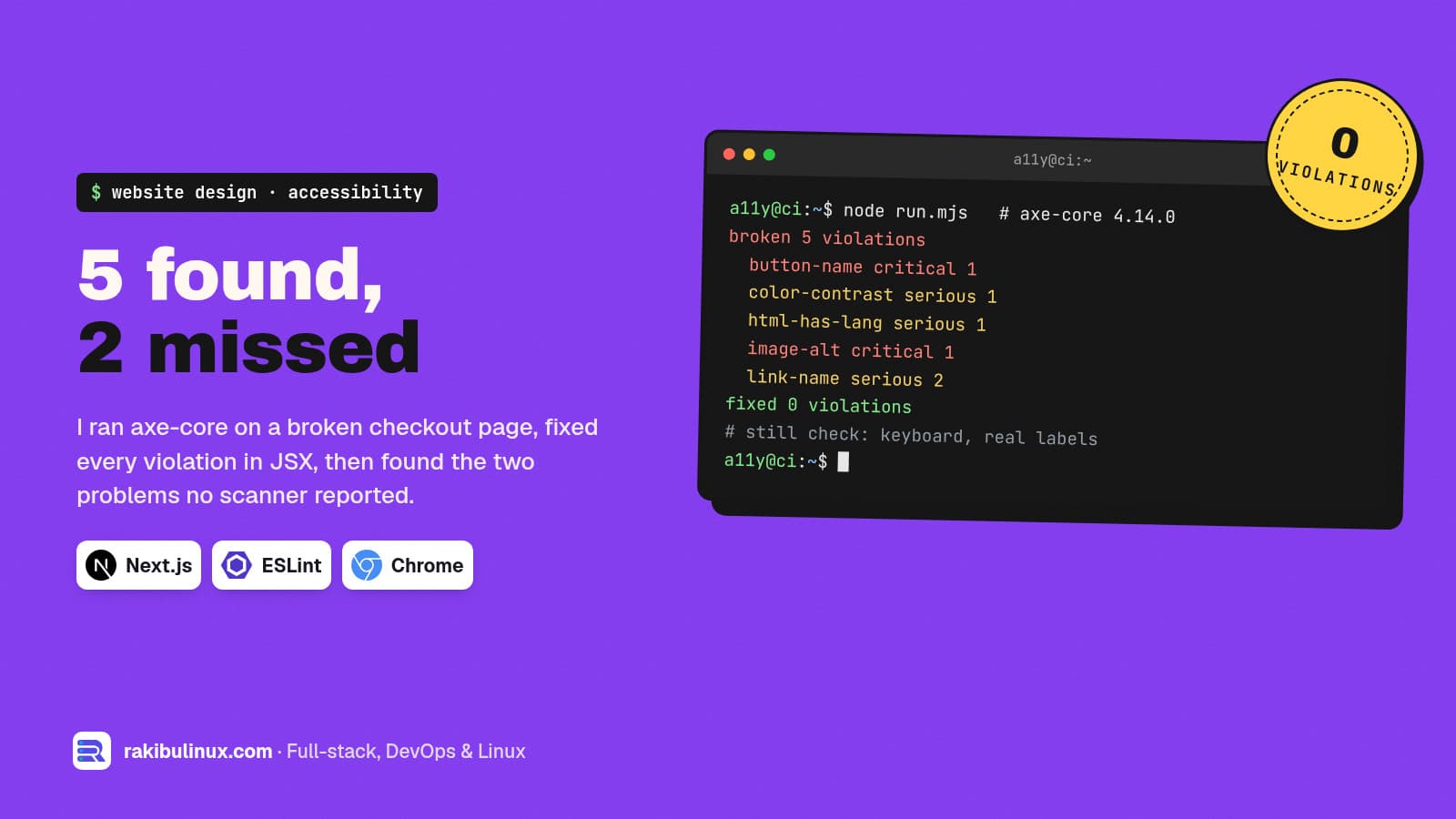
To fix accessibility in Next.js, run axe-core on every key page, fix what it reports in your JSX, then test by keyboard, because scanners miss real problems.
Since the European Accessibility Act started applying in June 2025, I get more requests to "make the site accessible" from businesses selling into the EU. My EAA checklist covers what the law asks for. This post is the hands-on part: the fixes in React and Next.js code. To keep it honest, I built a small checkout page with the mistakes I find most often on inherited sites, scanned it with axe-core 4.14.0 in Chrome, fixed it, and scanned again. Then I checked what the scanner didn't catch.
Key takeaways
- axe found 5 violation types on my broken page: a button with no name, low contrast, no
lang, an image with no alt and two links with no text. After the fixes: 0. - axe missed two real problems on the same page: a field labelled only by its placeholder, and a "Pay now"
<div>that a keyboard can't reach. - Next.js's ESLint config enables only 6 accessibility rules from jsx-a11y, as warnings. It is a start, not a check.
- Use real elements.
<button>,<a href>and<label>give you keyboard and screen reader support for free. - Test with a keyboard on every release. It takes five minutes and finds what tools don't.
The test page
A header with a logo link and an icon-only menu button, then a checkout form: an email field, a grey "free returns" note, a "Pay now" control and a terms link. I loaded it in headless Chrome with Puppeteer, injected axe-core and ran the WCAG 2.0, 2.1 and 2.2 A/AA rules plus axe's best practices:
await page.addScriptTag({ content: fs.readFileSync('node_modules/axe-core/axe.min.js', 'utf8') })
const r = await page.evaluate(() =>
  axe.run(document, { runOnly: ['wcag2a', 'wcag2aa', 'wcag21aa', 'wcag22aa', 'best-practice'] }))
for (const v of r.violations) console.log(v.id, v.impact, v.nodes.length, '-', v.help)
broken 5 violations
  button-name critical 1 - Buttons must have discernible text
  color-contrast serious 1 - Elements must meet minimum color contrast ratio thresholds
  html-has-lang serious 1 - <html> element must have a lang attribute
  image-alt critical 1 - Images must have alternative text
  link-name serious 2 - Links must have discernible text
fixed 0 violations
Fix 1: set the page language
Screen readers pick their pronunciation from lang. In the App Router, it goes on the <html> element in the root layout:
// app/layout.tsx
export default function RootLayout({ children }: { children: React.ReactNode }) {
  return <html lang="en"><body>{children}</body></html>
}
For a multilingual site, set it per locale (for example from the [locale] segment) and mark short passages in another language with their own lang.
Fix 2: give images and icon buttons a name
The logo link contained only an image without alt, which caused both image-alt and one of the link-name violations. The menu button contained only an SVG, so it had no name at all.
<Link href="/">
  <Image src="/logo.png" alt="Acme home" width={120} height={32} />
</Link>

<button type="button" aria-label="Open menu" aria-expanded={open} onClick={toggle}>
  <MenuIcon aria-hidden="true" />
</button>
The rule for alt: describe what the image does, not what it looks like. A logo that links home says "Acme home". A decorative image gets alt="" so screen readers skip it. With icon libraries like lucide-react, hide the icon and name the button.
Fix 3: links need text
The terms link was an empty <a href="/terms"></a> that relied on a background image, so assistive tech announced just "link". Give every link text that makes sense out of context. "Terms of sale" works; "click here" doesn't.
Fix 4: contrast
The grey note used #a3a3a3 on white, a contrast ratio of about 2.5:1. WCAG AA asks for 4.5:1 for normal text. Darkening it to #525252 gives about 7.8:1. Light grey "subtle" text is the most common failure I find on modern designs, and it usually lives in one design token, so one change fixes the whole site. The indigo button with white text in my test was fine at about 6.3:1.
What axe didn't catch
A label that disappears
The email field had only placeholder="Email". axe accepted it, because a placeholder does give the field an accessible name. But the hint vanishes as soon as someone starts typing, it is usually low contrast, and people with memory or attention difficulties lose track of what the field was. Use a visible label:
<label htmlFor="email">Email</label>
<input id="email" type="email" autoComplete="email" required />
autoComplete helps everyone fill the form faster, and WCAG asks for it on fields that collect the user's own details.
A "button" that a keyboard can't reach
"Pay now" was a styled <div onClick>. It looks like a button and works with a mouse. With a keyboard, Tab jumps straight past it, so a keyboard user can't pay. axe reported nothing, because a div with a click handler isn't a rule violation it can see. Replace it with <button type="button"> (or type="submit" inside a form). You get focus, Enter and Space handling and the right role without writing any of it.
That is the general lesson. Automated tools catch a share of accessibility problems, not all of them. Treat a clean scan as the minimum, then test by hand.
What Next.js's ESLint config checks
I looked inside eslint-config-next 16.4.0. It turns on six rules from eslint-plugin-jsx-a11y, all as warnings: alt-text, aria-props, aria-proptypes, aria-unsupported-elements, role-has-required-aria-props and role-supports-aria-props. Useful, but it wouldn't flag the clickable div or the placeholder label. To get more, add the plugin's recommended set to eslint.config.mjs; rules like click-events-have-key-events and no-static-element-interactions catch the div pattern at build time.
The five-minute keyboard test
- Put the mouse away. Press Tab from the top of the page.
- Can you always see where focus is? If not, your CSS removed the focus outline; bring it back with
:focus-visiblestyles. - Does focus reach every link, button and field, in a sensible order?
- Can you open and close the menu, dialogs and dropdowns, and does Escape close them?
- Can you complete the main task, like booking or paying, without the mouse?
Add a "Skip to content" link as the first focusable element so keyboard users don't tab through the whole navigation on every page.
Put axe in your CI
Once the main pages are clean, keep them clean. @axe-core/playwright (4.13.0 at the time of writing) runs the same engine inside Playwright tests, so a pull request that adds an unlabelled button fails before it ships. Scan the pages that make money first: home, product or service pages, checkout and sign-up.
Frequently asked questions
Does axe-core find all accessibility issues?
No. It reliably finds issues a program can detect, such as missing names, missing language and low contrast. In my test it missed a clickable div that keyboards can't reach and a placeholder used as the only label. Combine it with keyboard and screen reader checks.
Is Next.js accessible by default?
Next.js gives you good building blocks: next/image requires an alt prop, and the router announces page changes to screen readers. Your components still decide most of the result, especially forms, menus and dialogs.
What contrast ratio does WCAG require?
For WCAG 2.2 level AA, normal text needs at least 4.5:1 against its background, and large text (about 24 px, or 18.5 px bold) needs 3:1. Icons and input borders need 3:1 as well.
Do accessibility overlays fix these problems?
No. Overlays can't turn a div into a real button or write meaningful alt text. Fix the code itself; my EAA checklist explains why overlays don't help with compliance.
How long does an accessibility fix take for a typical site?
Many sites share a handful of components, so fixing the button, form field, link and colour tokens once fixes most pages. A focused audit plus fixes for a small business site is usually days of work, not months.
Need your site checked?
I audit React and Next.js sites with axe, keyboard and screen reader tests, then fix the components themselves, not with an overlay. See my website design services, read about fixing layout shift too, or send me your URL for a fixed-price accessibility audit.

Written by
MD Rakibul Islam Rakib
Full-stack developer, DevOps engineer and Linux system administrator with 5+ years of production experience. I deploy, harden and fix servers and web apps for clients worldwide, and everything in this article runs on real servers I manage, including this site.
- nextjs accessibility
- axe-core
- fix accessibility issues
- wcag 2.2 aa
- european accessibility act
- jsx-a11y
- accessible react components