Self-Host Umami Analytics with Docker in 2026
 MD Rakibul Islam RakibFull-stack developer, DevOps & Linux engineer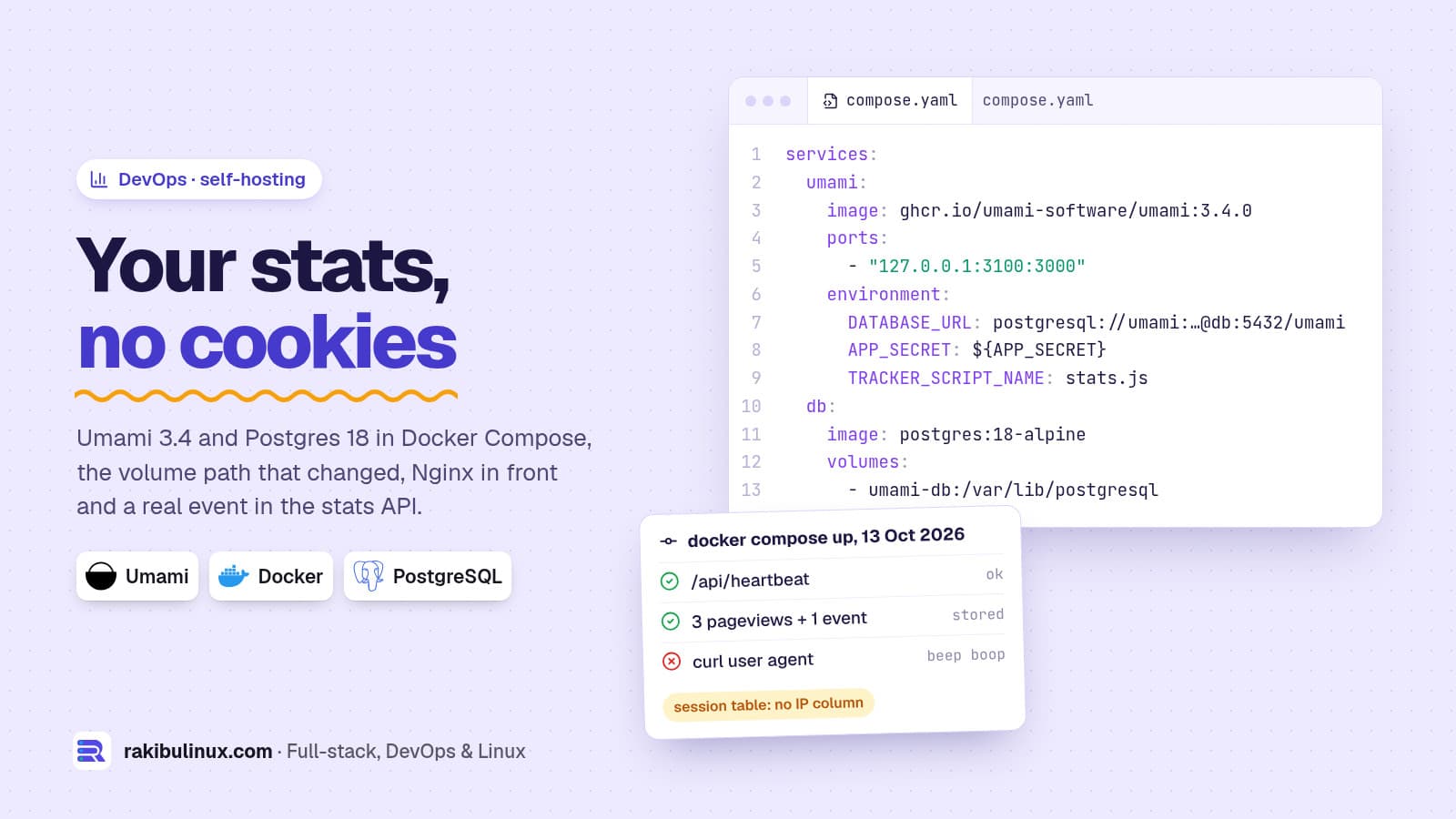
To self-host Umami, run its Docker image with PostgreSQL behind Nginx, then add a script tag. You get cookie-free analytics, and the data stays on your server.
Several of my clients in Germany want to know how many people reach their partner or contact page, but they don't want Google Analytics, a consent banner in front of every visit, or visitor data on someone else's servers. Umami covers what a small business actually looks at: pages, referrers, countries, devices and custom events such as "partner form submitted". I set it up from scratch with Docker Compose on 13 October 2026 (Umami 3.4.0, PostgreSQL 18) and sent it real events. The outputs below are from that run, including the one error the official example walks you into.
Key takeaways
- Pin the version. The official compose file uses
umami:latest; pinghcr.io/umami-software/umami:3.4.0so updates happen when you choose. - Postgres 18 images store data in a new path. Mount
/var/lib/postgresql, not/var/lib/postgresql/data, or the database refuses to start. - Bind to 127.0.0.1 and put Nginx with HTTPS in front. Tell Umami which header holds the real visitor IP.
- No cookies, no IP in the database. The tracker script sets no cookies, and the session table has no IP column.
- Rename the script with
TRACKER_SCRIPT_NAMEso common ad-block lists don't drop it.
What you need
A small Ubuntu VPS with Docker and the Compose plugin, a subdomain such as stats.example.com pointing to it, and Nginx with Certbot for HTTPS. Umami is a Next.js app; the container logged "Next.js 16.3.4, Ready" on start. It runs comfortably next to other sites on a 2 GB server. If you're setting up the server itself, my Ubuntu server hardening checklist covers the basics first, and note that Docker can bypass UFW if you publish ports on all interfaces.
Step 1: secrets in an .env file
mkdir -p /opt/umami && cd /opt/umami
cat > .env <<EOF
POSTGRES_PASSWORD=$(openssl rand -hex 24)
APP_SECRET=$(openssl rand -hex 32)
TWO_FACTOR_ENCRYPTION_KEY=$(openssl rand -hex 32)
EOF
chmod 600 .env
APP_SECRET signs login tokens. TWO_FACTOR_ENCRYPTION_KEY is a 64-character hex string Umami uses to encrypt two-factor secrets; the official compose file ships placeholders for both, and you don't want those on a public server.
Step 2: the compose file
services:
  umami:
    image: ghcr.io/umami-software/umami:3.4.0
    ports:
      - "127.0.0.1:3100:3000"          # only Nginx on this host can reach it
    environment:
      DATABASE_URL: postgresql://umami:${POSTGRES_PASSWORD}@db:5432/umami
      APP_SECRET: ${APP_SECRET}
      TWO_FACTOR_ENCRYPTION_KEY: ${TWO_FACTOR_ENCRYPTION_KEY}
      TRACKER_SCRIPT_NAME: stats.js     # served as /stats.js
      DISABLE_TELEMETRY: 1
      CLIENT_IP_HEADER: X-Real-IP
    depends_on:
      db:
        condition: service_healthy
    init: true
    restart: unless-stopped
  db:
    image: postgres:18-alpine
    environment:
      POSTGRES_DB: umami
      POSTGRES_USER: umami
      POSTGRES_PASSWORD: ${POSTGRES_PASSWORD}
    volumes:
      - umami-db:/var/lib/postgresql
    restart: unless-stopped
    healthcheck:
      test: ["CMD-SHELL", "pg_isready -U umami -d umami"]
      interval: 5s
      timeout: 5s
      retries: 10
volumes:
  umami-db:
docker compose up -d
curl -s localhost:3100/api/heartbeat
{"ok":true}
Changes from the official example and why: the version is pinned; the port listens on localhost only; the database is Postgres 18 instead of the example's postgres:15-alpine; telemetry is off; and the tracker has a neutral name.
The Postgres 18 volume path changed
If you take the official file and only bump the database image to 18, keeping the classic mount path, the database container stops with this:
Error: in 18+, these Docker images are configured to store database data in a
       format which is compatible with "pg_ctlcluster" (specifically, using
       major-version-specific directory names).
       ...
       Counter to that, there appears to be PostgreSQL data in:
         /var/lib/postgresql/data (unused mount/volume)
From version 18 the official images keep data in /var/lib/postgresql/18/docker, so you mount the parent /var/lib/postgresql. Don't "fix" an existing Umami database by changing the image tag: a major version jump needs a real upgrade with pg_upgrade or a dump and restore. I wrote up the PostgreSQL major upgrade for native installs; for a small Umami database, pg_dump from the old container and restore into the new one is simplest.
Step 3: Nginx in front
server {
    server_name stats.example.com;
    location / {
        proxy_pass http://127.0.0.1:3100;
        proxy_set_header Host $host;
        proxy_set_header X-Real-IP $remote_addr;
        proxy_set_header X-Forwarded-For $proxy_add_x_forwarded_for;
        proxy_set_header X-Forwarded-Proto $scheme;
    }
    listen 80;
}
Then sudo certbot --nginx -d stats.example.com adds HTTPS. X-Real-IP matters because Umami reads the visitor's IP for the country lookup and to build an anonymous session ID. Without it, every visitor looks like 127.0.0.1. If your site sits behind Cloudflare, use CLIENT_IP_HEADER: CF-Connecting-IP instead.
Log in at https://stats.example.com with the default admin / umami and change that password immediately. It's the first thing a scanner will try.
Step 4: add the website and the script
In the dashboard, add a website with its domain and copy its ID. Then add one tag to your site's <head>:
<script defer src="https://stats.example.com/stats.js"
        data-website-id="69404a4d-e1f6-49b2-a1ee-d36f529f12a2"></script>
The script is small (4,773 bytes in my run). Custom events need no code at all, just an attribute on the element:
<button type="submit" data-umami-event="partner-form-submitted"
        data-umami-event-plan="Enterprise">Anfrage senden</button>
Or from JavaScript after a successful submit: umami.track('partner-form-submitted', { plan: 'Enterprise' }). One event per form step tells you exactly where people give up; I use that in multi-step forms.
What I checked after setup
I created a site through the API, sent three pageviews and one custom event with a normal browser user agent, then one with curl/8 as the user agent. Umami answered the bot request with {"beep":"boop"} and didn't count it. The stats API then returned:
{"pageviews":3,"visitors":3,"visits":3,"bounces":3,"totaltime":0, ...}
[{"x":"partner-form-submitted","y":1}]
Then the privacy part, straight from the database and the script:
$ psql -c "select column_name from information_schema.columns where table_name='session'"
website_id, created_at, session_id, device, screen, language, country, region, city,
distinct_id, browser, os
$ grep -o "cookie\|localStorage" stats.js | sort | uniq -c
      1 localStorage
No IP column. The script never touches cookies; its single localStorage use reads a key named umami.disabled, an opt-out switch you can set in your own browser so your visits aren't counted. The anonymous session ID is a hash that includes a salt, which rotates monthly by default (SALT_ROTATION), so a visitor can't be followed across months. Whether that makes your setup consent-free under German law is a question for your lawyer, but it's about as privacy-friendly as analytics gets; my GDPR website checklist for Germany shows how to check what else your site loads.
Backups and updates
# nightly backup, keep 14 days
docker compose exec -T db pg_dump -U umami -Fc umami > /root/backups/umami-$(date +%F).dump
find /root/backups -name 'umami-*.dump' -mtime +14 -delete
Copy the dumps off the server, and test a restore once (my VPS restore drill shows how). To update Umami, read its release notes, change the image tag, and run docker compose pull && docker compose up -d. Umami runs its own database migrations on start, so take a backup right before.
Frequently asked questions
Is Umami really free?
The self-hosted version is open source and free; you pay only for your server. Umami also sells a hosted cloud version if you'd rather not run it yourself.
Does Umami need a cookie banner?
Umami sets no cookies and stores no IP addresses, which is why many sites run it without a consent banner. German law on consent-free analytics isn't fully settled, so get your setup checked if you want to be certain.
Can I use MySQL instead of PostgreSQL?
Check the current Umami documentation for supported databases before you choose. PostgreSQL is what the official Docker setup uses, and it's what I run.
Will ad blockers block Umami?
Some block the default script.js path on known analytics hosts. Serving it from your own subdomain under a neutral name with TRACKER_SCRIPT_NAME avoids most lists; respect visitors who block it anyway.
How much server does Umami need?
For small and medium business sites, a share of a small VPS is enough. Postgres does most of the work, so watch disk usage as months of events accumulate.
Want analytics you own?
I set up self-hosted tools such as Umami, uptime monitoring and backups on your own server, secured and documented. See my DevOps services or tell me what you want to measure.

Written by
MD Rakibul Islam Rakib
Full-stack developer, DevOps engineer and Linux system administrator with 5+ years of production experience. I deploy, harden and fix servers and web apps for clients worldwide, and everything in this article runs on real servers I manage, including this site.
- self-host Umami
- Umami Docker Compose
- Google Analytics alternative
- cookie-free analytics
- GDPR analytics
- Umami PostgreSQL 18
- privacy-friendly analytics