Multilingual Next.js Site: hreflang Done Right
 MD Rakibul Islam RakibFull-stack developer, DevOps & Linux engineer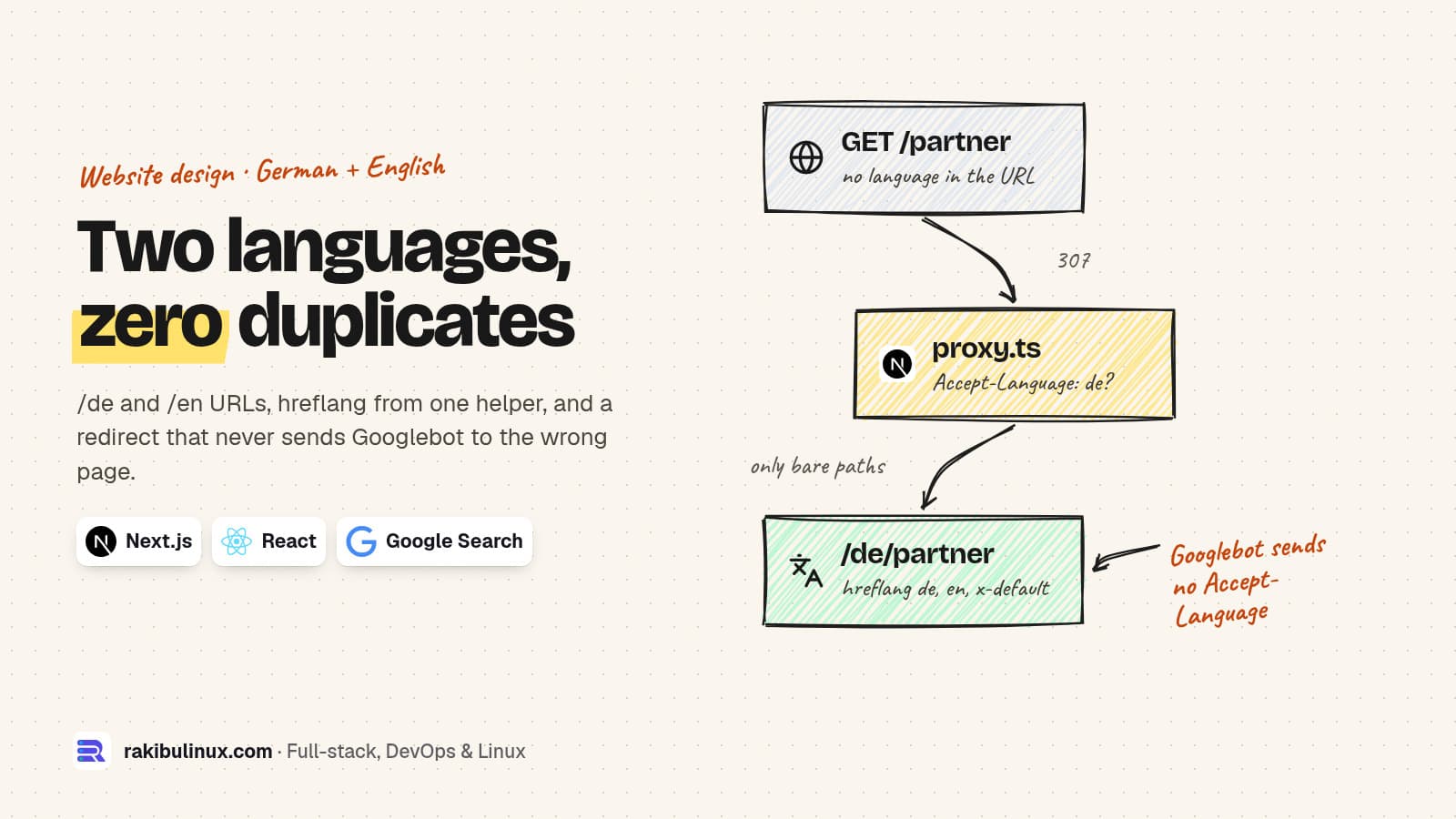
For a multilingual Next.js site, give each language its own URL like /de and /en, link the versions with hreflang plus x-default, and redirect only bare paths.
Most of my European clients need at least two languages: German and English for NETME in Munich, and this site has Arabic versions of its service pages next to the English ones. The first version of NETME's website guessed the language from the browser on the first visit and remembered the choice. That's nice for people and risky for Google, which mostly crawls without a language preference. Below is the setup I use instead, built and tested on Next.js 16.4.0 with React 19.3.0 on 13 October 2026. The curl output is from that build.
Key takeaways
- One URL per language. Google recommends separate URLs over cookies or browser settings, so
/de/partnerand/en/partner. - hreflang on every version, each listing all versions including itself, plus
x-default. Next.js renders it fromalternates.languages. - Never redirect a URL that already has a language. Only
/partner(no language) may redirect byAccept-Language. - Googlebot sends no
Accept-Languageheader, so your default language is what it gets on bare URLs. Choose it on purpose. - Add a visible language switch with normal links. Google's guidance says let users choose; it also helps crawlers find every version.
Why automatic language detection hurts SEO
Google's page on multi-regional and multilingual sites is direct about it: avoid automatically redirecting users from one language version to another, and use different URLs for each language instead of cookies or browser settings. Its page on locale-adaptive sites adds the technical reason: Googlebot's default crawling comes from US IP addresses and "sends HTTP requests without setting Accept-Language". If your /partner page shows German or English depending on the visitor, Google indexes whichever one it happens to see, and the other language never ranks.
So the rule is: every language version has a stable URL that always returns that language, no matter who asks.
Step 1: routes per language
With the App Router, put a [lang] segment at the top and prebuild both languages:
// app/i18n.ts
export const locales = ['de', 'en'] as const;
export type Locale = (typeof locales)[number];
export const defaultLocale: Locale = 'de';
export const site = 'https://www.example.com';

// one place that knows every language version of a path
export function alternates(lang: Locale, path: string) {
  return {
    canonical: `${site}/${lang}${path}`,
    languages: {
      de: `${site}/de${path}`,
      en: `${site}/en${path}`,
      'x-default': `${site}/de${path}`,
    },
  };
}
// app/[lang]/layout.tsx
import { notFound } from 'next/navigation';
import { locales, type Locale } from '../i18n';

export function generateStaticParams() {
  return locales.map((lang) => ({ lang }));
}

export default async function Layout({ children, params }: LayoutProps<'/[lang]'>) {
  const { lang } = await params;
  if (!locales.includes(lang as Locale)) notFound();
  return <html lang={lang}><body>{children}</body></html>;
}
The lang attribute on <html> matters for screen readers and browser translation, not only for SEO. LayoutProps and PageProps are the global route helpers Next.js 16 generates, so params is typed and awaited.
Step 2: hreflang through generateMetadata
// app/[lang]/partner/page.tsx
import type { Metadata } from 'next';
import { alternates, type Locale } from '../../i18n';

const t = {
  de: { title: 'Partner werden', h1: 'Werde NETME-Partner' },
  en: { title: 'Become a partner', h1: 'Become a NETME partner' },
};

export async function generateMetadata({ params }: PageProps<'/[lang]/partner'>): Promise<Metadata> {
  const lang = (await params).lang as Locale;
  return { title: t[lang].title, alternates: alternates(lang, '/partner') };
}

export default async function Page({ params }: PageProps<'/[lang]/partner'>) {
  const lang = (await params).lang as Locale;
  return <h1>{t[lang].h1}</h1>;
}
After next build, both pages are static (● /de/partner, ● /en/partner), and the German page's head contains:
<html lang="de"
<title>Partner werden</title>
<link rel="canonical" href="https://www.example.com/de/partner"/>
<link rel="alternate" hrefLang="de" href="https://www.example.com/de/partner"/>
<link rel="alternate" hrefLang="en" href="https://www.example.com/en/partner"/>
<link rel="alternate" hrefLang="x-default" href="https://www.example.com/de/partner"/>
Three rules that break most hand-written hreflang:
- Each page canonicalises to itself, never to the other language. A German page with a canonical pointing to English tells Google to drop the German one.
- The set is identical on every version, including a link to the page itself. Building it in one helper makes that automatic.
- Absolute URLs with your real, canonical host (www or not, https).
Step 3: redirect only bare paths
People will still type or share example.com/partner. Send them to a language, but only when the URL has none. In Next.js 16 this lives in proxy.ts, the file that replaced middleware.ts (more in my post on the middleware to proxy change):
// proxy.ts
import { NextResponse, type NextRequest } from 'next/server';
import { locales, defaultLocale } from './app/i18n';

// only bare paths get redirected; /de/... and /en/... are never touched
export function proxy(req: NextRequest) {
  const { pathname } = req.nextUrl;
  if (locales.some((l) => pathname === `/${l}` || pathname.startsWith(`/${l}/`))) return;
  const header = req.headers.get('accept-language') ?? '';
  const lang = header.toLowerCase().startsWith('en') ? 'en' : defaultLocale;
  return NextResponse.redirect(new URL(`/${lang}${pathname}`, req.url), 307);
}

export const config = { matcher: ['/((?!_next|favicon.ico|.*\\..*).*)'] };
What it did in my test:
AL=''                -> 307 /de/partner     (Googlebot's case)
AL='en-US,en;q=0.9'  -> 307 /en/partner
AL='de-DE,de;q=0.9'  -> 307 /de/partner
AL='fr-FR'           -> 307 /de/partner
/en/partner AL=de    -> 200                 (never moved)
The last line is the important one: a German browser that opens an English link gets English. The parser is deliberately simple (it only looks at the first language); for many languages, parse the quality values properly. One quirk I found: an unsupported prefix such as /fr/partner gets redirected to /de/fr/partner, which then 404s. A 404 is the right end result, but if you have old French URLs, add real redirects for them.
Step 4: the sitemap and the language switch
Next.js sitemaps accept the same language map per URL, so you don't need to write XML by hand:
// app/sitemap.ts
import type { MetadataRoute } from 'next';
import { alternates } from './i18n';

export default function sitemap(): MetadataRoute.Sitemap {
  return ['/partner', '/ads'].flatMap((path) =>
    (['de', 'en'] as const).map((lang) => ({
      url: `https://www.example.com/${lang}${path}`,
      alternates: { languages: alternates(lang, path).languages },
    })),
  );
}
The built /sitemap.xml lists every language version with its alternates:
<url>
<loc>https://www.example.com/de/partner</loc>
<xhtml:link rel="alternate" hreflang="de" href="https://www.example.com/de/partner" />
<xhtml:link rel="alternate" hreflang="en" href="https://www.example.com/en/partner" />
<xhtml:link rel="alternate" hreflang="x-default" href="https://www.example.com/de/partner" />
</url>
Then put a plain link to the other language on every page, such as DE / EN in the header pointing to the same page in the other language, not the home page. NETME's prototype already had that switch; it just needed to link to the matching page.
Translate the content, not just the words
hreflang only helps if both versions are worth ranking. Write the German page for German searchers: they search "Partner werden", "Werbung für Cafés", "Steuernummer", not literal translations of your English keywords. Translate titles and meta descriptions too; a German page with an English title tag looks careless in results. And keep the copy long enough on both versions. A short English page next to a full German one looks thin on its own.
Frequently asked questions
What is x-default in hreflang?
It tells Google which version to show people whose language matches none of your versions, for example a French speaker on a German and English site. Point it at your main language or at a language selection page.
Should I use subdirectories, subdomains or separate domains for languages?
For most businesses, subdirectories (/de/, /en/) are simplest: one domain, one certificate, one deploy, and all links build the same domain's authority. Country domains make sense when you run separate businesses per country.
Can I remember the user's language in a cookie?
Yes, for redirecting bare URLs to the language a person chose before. Just never let the cookie change what a language-specific URL like /en/partner returns.
Does Next.js still have the built-in i18n config?
The i18n option in next.config belongs to the Pages Router. With the App Router, you use a [lang] segment and proxy.ts as shown here.
How do I check my hreflang is right?
Fetch each language version with curl and confirm that all show the same set of alternate links and a self-referencing canonical. Search Console's indexing reports will also show if Google picked a different canonical than you set.
Going multilingual?
I build multilingual Next.js websites with proper URLs, hreflang, translated metadata and sitemaps, for German, English and Arabic audiences. See my website design services or tell me which languages you need. Still on a React SPA? Start with why Google sees an empty page.

Written by
MD Rakibul Islam Rakib
Full-stack developer, DevOps engineer and Linux system administrator with 5+ years of production experience. I deploy, harden and fix servers and web apps for clients worldwide, and everything in this article runs on real servers I manage, including this site.
- Next.js hreflang
- multilingual website SEO
- Next.js i18n
- x-default
- German English website
- Accept-Language redirect
- Next.js 16 proxy