React SPA SEO: Why Google Sees an Empty Page
 MD Rakibul Islam RakibFull-stack developer, DevOps & Linux engineer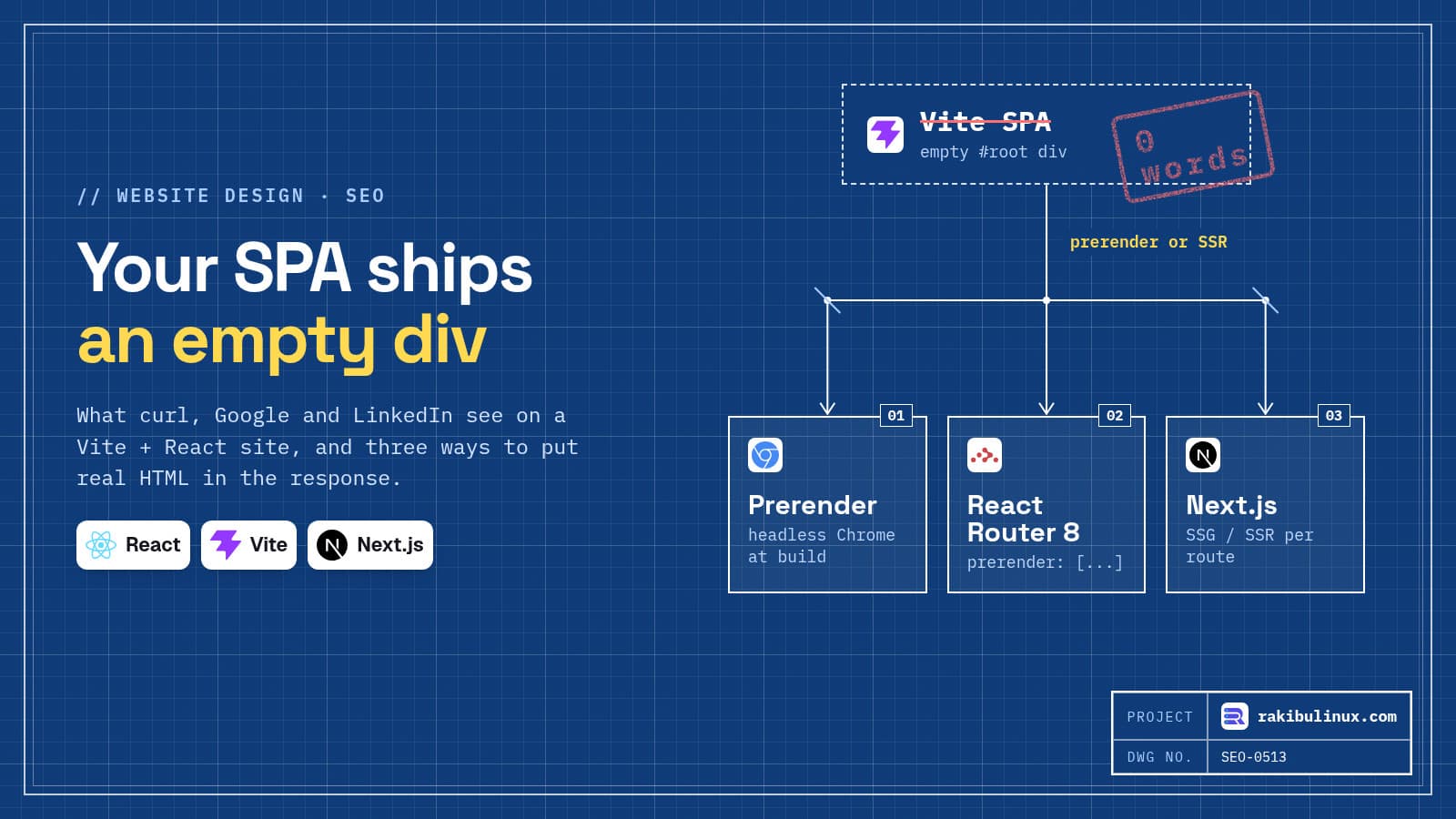
A Vite React SPA sends an empty <div id="root"> to every crawler. Prerender your public routes or move them to SSR so the HTML holds real text.
The new NETME website is a Vite + React app with ten pages in German and English. Its own README lists "SEO: server-side rendering or static generation later" as an open point before launch, and that is the right instinct. I rebuilt the same setup as a small demo on 13 October 2026 (Vite 8.3.4, React 19.3.0, React Router 8.4.0) and looked at what a crawler actually receives. The answer is: almost nothing.
Key takeaways
- The HTML response of a SPA has no content.
curlfound the page heading 0 times; Chrome found it after running the JavaScript. - Google can render JavaScript, later. Pages wait in a render queue. Most other bots, including social previews, don't run JavaScript at all.
- Prerendering at build time fixes public pages with a tiny script and no framework change. My first version had two bugs worth knowing about.
- React 19 renders
<title>and<meta>from components, but remove the static<title>fromindex.htmlor you ship two. - For sites that live on search traffic, a framework with server rendering (Next.js, or React Router in framework mode) is the long-term answer.
What a crawler receives from a Vite SPA
This is the complete dist/index.html after npm run build for a page whose visible heading is "Become a partner":
<!doctype html>
<html lang="en">
  <head>
    <meta charset="UTF-8" />
    <link rel="icon" type="image/svg+xml" href="/favicon.svg" />
    <meta name="viewport" content="width=device-width, initial-scale=1.0" />
    <title>app</title>
    <script type="module" crossorigin src="/assets/index-DrZgySbs.js"></script>
    <link rel="stylesheet" crossorigin href="/assets/index-nqMpL4T3.css">
  </head>
  <body>
    <div id="root"></div>
  </body>
</html>
Every route gets this same file. Then compare what the raw response contains with what a browser shows after JavaScript:
$ curl -s localhost:18083/partner | grep -c "Become a partner"
0
$ google-chrome --headless=new --dump-dom http://localhost:18083/partner | grep -o '<div id="root">.*</div>'
<div id="root"><main><h1>Become a partner</h1><p>List your café and reach people nearby.</p></main></div>
The title is "app" on every URL, there is no description, and the body is one empty div.
But Google renders JavaScript, doesn't it?
It does. Google's own documentation describes three phases: crawl, render, index. Pages that need JavaScript go into a render queue where, in Google's words, a page may stay a few seconds "but it can take longer than that". The same page also says server-side rendering or prerendering is "still a great idea because it makes your website faster for users and crawlers, and not all bots can run JavaScript".
That last part costs real money for a business site:
- Link previews: when a café owner shares your partner page on LinkedIn or WhatsApp, the preview is built from the raw HTML. With a SPA it says "app" with no image.
- AI answer engines and many SEO tools read the HTML response. An empty div means no text to quote. (My guide on getting cited by ChatGPT and AI Overviews covers what they look for.)
- Every URL looks the same until rendering happens, including URLs that don't exist, which Google can treat as soft 404s.
Fix 1: per-route titles with React 19
React 19 lets you render <title> and <meta> anywhere in a component, and moves them into <head>. No helmet library is needed:
function Partner() {
  return (
    <main>
      <title>Become a partner | Demo</title>
      <meta name="description" content="List your café on the app and reach people nearby." />
      <h1>Become a partner</h1>
      <p>List your café and reach people nearby.</p>
    </main>
  );
}
On its own this only helps after JavaScript runs. Combined with prerendering it puts the right title in the HTML file. One catch I hit: React adds its title but doesn't remove the one already in index.html. My first build had both:
<title>Meet people at cafés near you | Demo</title>
<title>app</title>
Delete the <title> line from index.html once every route sets its own.
Fix 2: prerender public routes at build time
For a marketing site with a known list of pages, you can save the rendered HTML of each route right after vite build, using the Chrome that's already on your build machine:
// prerender.mjs - run after `vite build`
import { execFileSync, spawn } from 'node:child_process';
import { mkdirSync, writeFileSync } from 'node:fs';

const routes = ['/', '/partner'];
const server = spawn('npx', ['vite', 'preview', '--port', '4999', '--strictPort'], { stdio: 'ignore' });
await new Promise((r) => setTimeout(r, 1500));
const pages = [];
try {
  // render every route first, so no route is served an already-prerendered file
  for (const route of routes) {
    const html = execFileSync('google-chrome', ['--headless=new', '--disable-gpu',
      '--virtual-time-budget=5000', '--dump-dom', `http://localhost:4999${route}`],
      { encoding: 'utf8' });
    pages.push([route, '<!doctype html>\n' + html]);
  }
} finally { server.kill(); }
for (const [route, html] of pages) {
  mkdirSync(`dist${route}`, { recursive: true });
  writeFileSync(`dist${route}/index.html`, html);
}
Run it as "build": "vite build && node prerender.mjs". The result:
/ <title>Meet people at cafés near you | Demo</title>
/partner <title>Become a partner | Demo</title>
Two mistakes from my first attempt, both easy to repeat:
- The port was taken. I used Vite's default preview port 4173, where another project was already running, and happily saved that site's HTML.
--strictPortmakes Vite fail instead of picking a different port. - Order matters. My first version wrote
dist/index.htmlfor/and then rendered/partner. The preview server falls back toindex.htmlfor unknown paths, so/partnerbooted from the already-prerendered home page and ended up with the home page's title. Render everything first, write files after.
Serve the prerendered files from Nginx
The files now sit at dist/partner/index.html. Point Nginx at them before it falls back to the SPA shell:
location / {
    try_files $uri $uri/index.html /index.html;
}
Use $uri/index.html, not just $uri/: with $uri/, Nginx answered /partner with a 301 redirect to /partner/ in my test, which adds a hop to every page and splits your URLs in two. The full Nginx setup, including the hashed asset rules, is in fixing React Router 404 on refresh in Nginx.
Fix 3: move public pages to a framework with SSR
Prerendering is right for a fixed set of pages. When content comes from an API (blog posts, venues, job listings), you want HTML generated per URL. Two options that keep React:
- React Router in framework mode. If you already use React Router, its config in
@react-router/dev8.4 acceptsssr: falsewith aprerenderlist (or a function that returns paths), or full server rendering. I checked the option in the package's types; I didn't migrate the demo to framework mode for this post. - Next.js. Static pages at build time, server rendering per request, and metadata APIs for titles, canonicals and hreflang. This website runs on it; my guide to deploying Next.js 16 on a VPS shows the setup.
Keep logged-in areas (dashboards, admin panels) as a SPA. Search engines never see them, and a SPA is simpler there.
Frequently asked questions
Can a React single-page app rank on Google?
It can, because Google renders JavaScript, but slower and with less certainty than a page whose HTML already has the content. Other crawlers, link previews and many AI tools only see the empty shell, so public pages should be prerendered or server-rendered.
Is dynamic rendering still a good idea?
Google describes dynamic rendering (serving bots a different, prerendered version) as a workaround, not a long-term solution. Prerendering the same HTML for everyone at build time is simpler and avoids any doubt about cloaking.
Do I need react-helmet with React 19?
No. React 19 hoists <title>, <meta> and <link> elements from components into the head on its own. Remove the static title from index.html so you don't end up with two.
Should a SPA use hash URLs like /#/partner?
No. Google's JavaScript SEO guide recommends the History API for routing, because fragment URLs can't be resolved reliably as separate pages. React Router's BrowserRouter already uses the History API.
What about pages that don't exist?
A SPA fallback answers every unknown URL with status 200. Google suggests either redirecting to a URL that returns a real 404 or adding <meta name="robots" content="noindex"> on your "not found" view.
Is your React site invisible to Google?
I audit and fix React and Next.js sites for search: prerendering, server rendering, metadata, sitemaps and hreflang for multilingual sites. See my website design services or send me your URL and I'll check what crawlers actually get.

Written by
MD Rakibul Islam Rakib
Full-stack developer, DevOps engineer and Linux system administrator with 5+ years of production experience. I deploy, harden and fix servers and web apps for clients worldwide, and everything in this article runs on real servers I manage, including this site.
- React SPA SEO
- Vite React SEO
- prerender React
- client-side rendering SEO
- React 19 title tag
- JavaScript SEO
- Open Graph SPA