Upgrade PostgreSQL 14 to 18 on Ubuntu Safely
 MD Rakibul Islam RakibFull-stack developer, DevOps & Linux engineer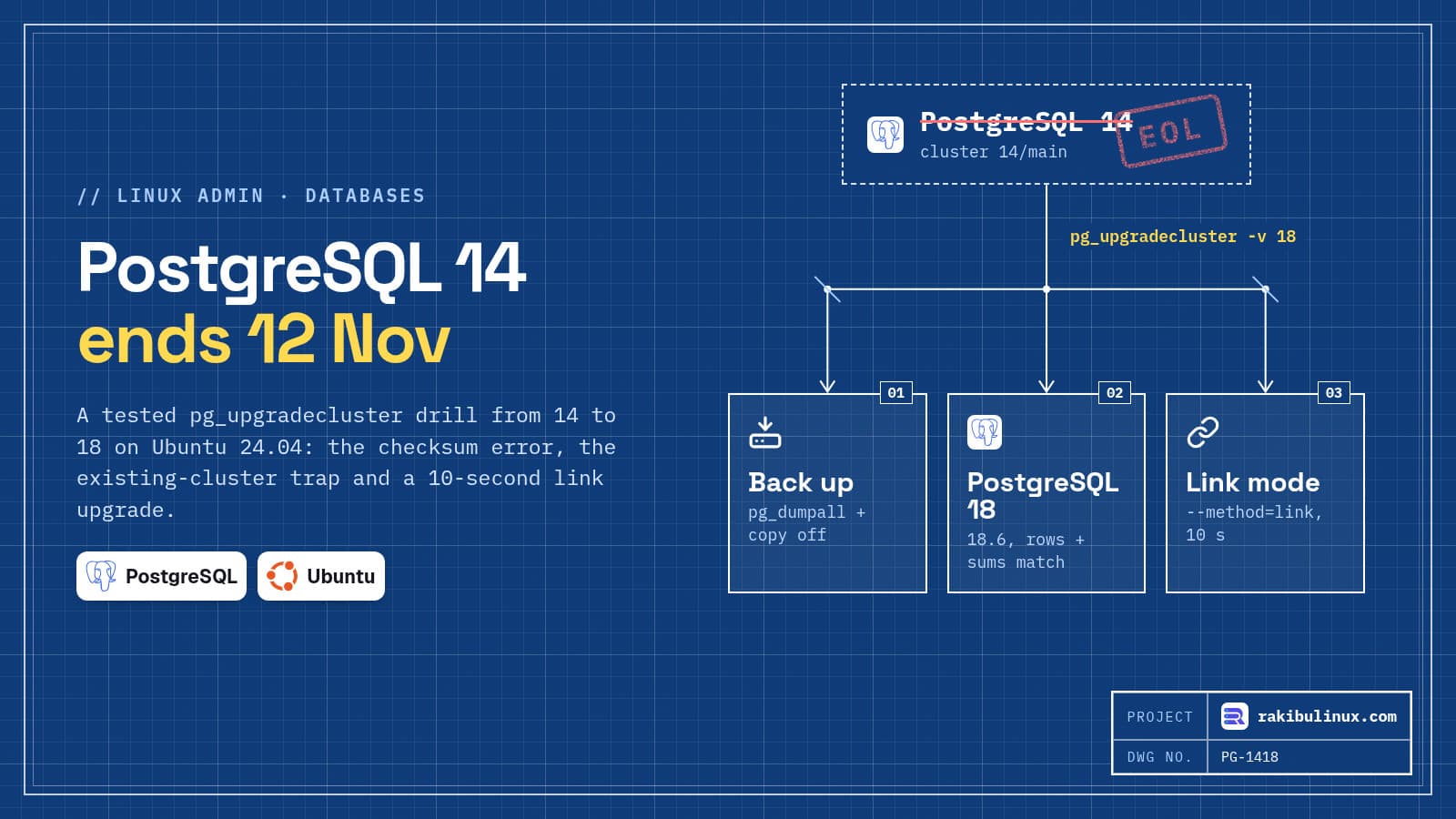
PostgreSQL 14 reaches end of life on 12 November 2026. On Ubuntu, back up, then run pg_upgradecluster -v 18 14 main to move straight to PostgreSQL 18.
After that date, 14 gets no more security fixes. Many client servers I take over still run 14 because it came with an older Ubuntu release and "it works". This website's own database runs PostgreSQL 18 on Ubuntu 24.04. Before writing this, I ran the whole upgrade as a drill in fresh ubuntu:24.04 containers on 13 October 2026, with packages from the official PostgreSQL apt repository (postgresql-common 293, PostgreSQL 18.6): once from 17 with a full copy and once from 14 with hard links. The commands and outputs below are copied from those runs.
Key takeaways
- Supported versions today: 15, 16, 17 and 18. Version 14 ends on 12 November 2026, version 15 in November 2027.
- You can skip versions. One
pg_upgradeclusterrun took a 14 cluster straight to 18, with matching row counts and sums. - PostgreSQL 18 turns data checksums on by default. A raw
pg_upgradeinto a fresh 18 cluster fails on that; Ubuntu's wrapper handles it for you. --method=linkis fast (about 10 seconds in my test) but the old cluster can't be started afterwards. Have a backup first.- The default method is dump and restore, which is slow on big databases but leaves the old cluster untouched.
Which PostgreSQL versions are still supported?
According to postgresql.org's versioning policy, each major version gets five years of fixes:
- 18: released 25 September 2025, supported until 14 November 2030 (current minor 18.6)
- 17: until 8 November 2029
- 16: until 9 November 2028
- 15: until 11 November 2027
- 14: final release on 12 November 2026
PostgreSQL 19 is in beta at the time of writing. If you're on 14 or 15, go to 18 now rather than waiting for 19.
Step 0: back up and check what you have
pg_lsclusters
sudo -u postgres pg_dumpall | gzip > /root/pg-before-upgrade-$(date +%F).sql.gz
sudo -u postgres psql -d shop -Atc 'select count(*), sum(total) from orders' > /root/before.txt
df -h /var/lib/postgresql
Copy the dump off the server. The count-and-sum line is my sanity check for after the upgrade; pick one or two important tables of your own. Check the disk too: the default method and --method=upgrade need room for a second copy of the data. With the drill database (one table, 50,000 orders) that was nothing; with a 200 GB database it decides which method you can use. If you don't test restores yet, start with my VPS disaster recovery drill.
Also note the extensions you use (\dx in psql). Each one must be installed for the new version too, for example postgresql-18-pgvector if you use pgvector. A missing extension library is a classic upgrade failure.
Step 1: install PostgreSQL 18 next to 14
Ubuntu 24.04's own repository ships PostgreSQL 16. For 18, add the official PostgreSQL apt repository with the script that comes with postgresql-common, then install the new version:
sudo apt install -y postgresql-common
sudo /usr/share/postgresql-common/pgdg/apt.postgresql.org.sh
sudo apt install -y postgresql-18
pg_lsclusters
Ver Cluster Port Status Owner    Data directory              Log file
14  main    5432 online postgres /var/lib/postgresql/14/main /var/log/postgresql/postgresql-14-main.log
Your apps keep running on 14 the whole time. In my drill, installing 18 next to an existing cluster did not create an empty 18/main. If one was created on your server (for example by an earlier attempt), the upgrade refuses to run:
Error: target cluster 18/main already exists
Only if that 18 cluster is empty and unused, remove it with sudo pg_dropcluster 18 main --stop. Check with pg_lsclusters and psql -p 5433 -l first.
Step 2: the data checksum trap
PostgreSQL 18 changed initdb to enable data checksums by default. Clusters created by older versions on Ubuntu usually have them off. pg_upgrade requires both sides to match, so if you create a new 18 cluster yourself and run pg_upgrade by hand, it stops right after the version check:
Performing Consistency Checks
-----------------------------
Checking cluster versions                                     ok

old cluster does not use data checksums but the new one does
Failure, exiting
Ubuntu's pg_upgradecluster solves it: in the upgrade and link methods it creates the new cluster with --no-data-checksums when the old one has none. You can see it in its output:
/usr/lib/postgresql/18/bin/initdb -D /var/lib/postgresql/18/main --auth-local peer
  --auth-host scram-sha-256 --no-instructions --encoding UTF8 --lc-collate C.UTF-8
  --lc-ctype C.UTF-8 --no-data-checksums
Data page checksums are disabled.
If you want checksums on, the dump method can create the new cluster with them (--data-checksums), at the cost of a full dump and restore.
Step 3: choose a method and run it
pg_upgradecluster has four methods:
dump(the default): pg_dump into the new cluster. Slowest, needs no space tricks, old cluster stays intact. Fine for small databases.upgrade: runspg_upgradeand copies the data files. Fast, needs free space for a second copy, old cluster stays usable.link:pg_upgrade --link, hard links instead of copies. Fastest and almost no extra space, but once the new cluster has started, the old one must not be started again.clone: uses file cloning on filesystems that support it, such as Btrfs or XFS with reflinks.
Plan a short maintenance window: stop the apps that write to the database (for example pm2 stop all), then:
time sudo pg_upgradecluster -v 18 --method=link 14 main
/usr/lib/postgresql/18/bin/pg_upgrade -b /usr/lib/postgresql/14/bin -B /usr/lib/postgresql/18/bin
  -p 5432 -P 5433 -d /etc/postgresql/14/main -D /etc/postgresql/18/main --link
...
Because "link" mode was used, the old cluster cannot be safely
started once the new cluster has been started.
Linking user relation files                                   ok
...
Upgrade Complete
...
real    0m10.108s
When it finishes, the new cluster has taken over the old port and the old one is parked:
Ver Cluster Port Status Owner    Data directory              Log file
14  main    5433 down   postgres /var/lib/postgresql/14/main /var/log/postgresql/postgresql-14-main.log
18  main    5432 online postgres /var/lib/postgresql/18/main /var/log/postgresql/postgresql-18-main.log
Your apps' connection strings don't change, because 18 now listens on 5432. My 17 to 18 drill with the copying upgrade method took 9.9 seconds for the same small database; on real data, copy time grows with size and link time mostly doesn't.
Step 4: verify, then clean up
sudo -u postgres psql -d shop -Atc 'select count(*), sum(total) from orders' > /root/after.txt
diff /root/before.txt /root/after.txt && echo MATCH
sudo -u postgres psql -Atc 'select version()'
MATCH
PostgreSQL 18.6 (Ubuntu 18.6-1.pgdg24.04+2) on x86_64-pc-linux-gnu, ...
Then the follow-ups the tools ask for:
- Extensions: pg_upgrade reported "Your installation contains extensions that should be updated" and wrote an
update_extensions.sqlinto the log folder it names (/var/log/postgresql/pg_upgradecluster-14-18-main.*). Run it with psql as postgres. - Statistics: PostgreSQL 18's pg_upgrade keeps most planner statistics, which avoids the slow-queries-after-upgrade period older versions had.
pg_upgradeclusteralso ranvacuumdb --analyze-in-stagesby itself. Watch slow queries for a day anyway (my guide to fixing slow Prisma and PostgreSQL queries helps there). - Start your apps, test the important flows, and keep the old cluster for a few days. When you're sure:
sudo pg_dropcluster 14 main, thensudo apt remove postgresql-14.
With the copying upgrade method, rolling back is simple: stop 18, change the ports back and start 14. With link, your rollback is the dump from step 0. That's why the backup is not optional.
Frequently asked questions
Can I upgrade from PostgreSQL 14 straight to 18?
Yes. pg_upgrade supports jumping several major versions in one step. My drill went from 14 to 18 directly, and the data matched afterwards.
How long is the downtime?
With the link method it's mostly the time to stop and start services, about 10 seconds for the run itself in my test. With the dump method it grows with database size, from minutes to hours. For near-zero downtime on large databases, logical replication into a new 18 server is the next step up.
What happens if I stay on 14 after November 2026?
It keeps running, but security and bug fixes stop. Any vulnerability found afterwards stays open on your server, and managed database providers apply their own end-of-support rules.
Does Ubuntu 24.04 have PostgreSQL 18 in its own repository?
No, Ubuntu 24.04 ships PostgreSQL 16. Use the official PostgreSQL apt repository (the apt.postgresql.org.sh script) for 17 and 18.
Should I upgrade Ubuntu and PostgreSQL at the same time?
No. Do one change at a time so you know what caused a problem. Upgrade PostgreSQL first with the PostgreSQL repository, and the OS later (see my Ubuntu 24.04 to 26.04 server upgrade guide).
Want it done without the risk?
I upgrade PostgreSQL on production servers with a tested backup, a rehearsal on a copy of your data, and a rollback plan written down before anything changes. See my Linux server administration services or tell me what version you're on.

Written by
MD Rakibul Islam Rakib
Full-stack developer, DevOps engineer and Linux system administrator with 5+ years of production experience. I deploy, harden and fix servers and web apps for clients worldwide, and everything in this article runs on real servers I manage, including this site.
- upgrade PostgreSQL 14 to 18
- pg_upgradecluster
- pg_upgrade Ubuntu
- PostgreSQL 14 end of life
- PostgreSQL 18
- data checksums pg_upgrade
- PostgreSQL major upgrade