Multi-Step Forms in React with Zod: A 2026 Guide
 MD Rakibul Islam RakibFull-stack developer, DevOps & Linux engineer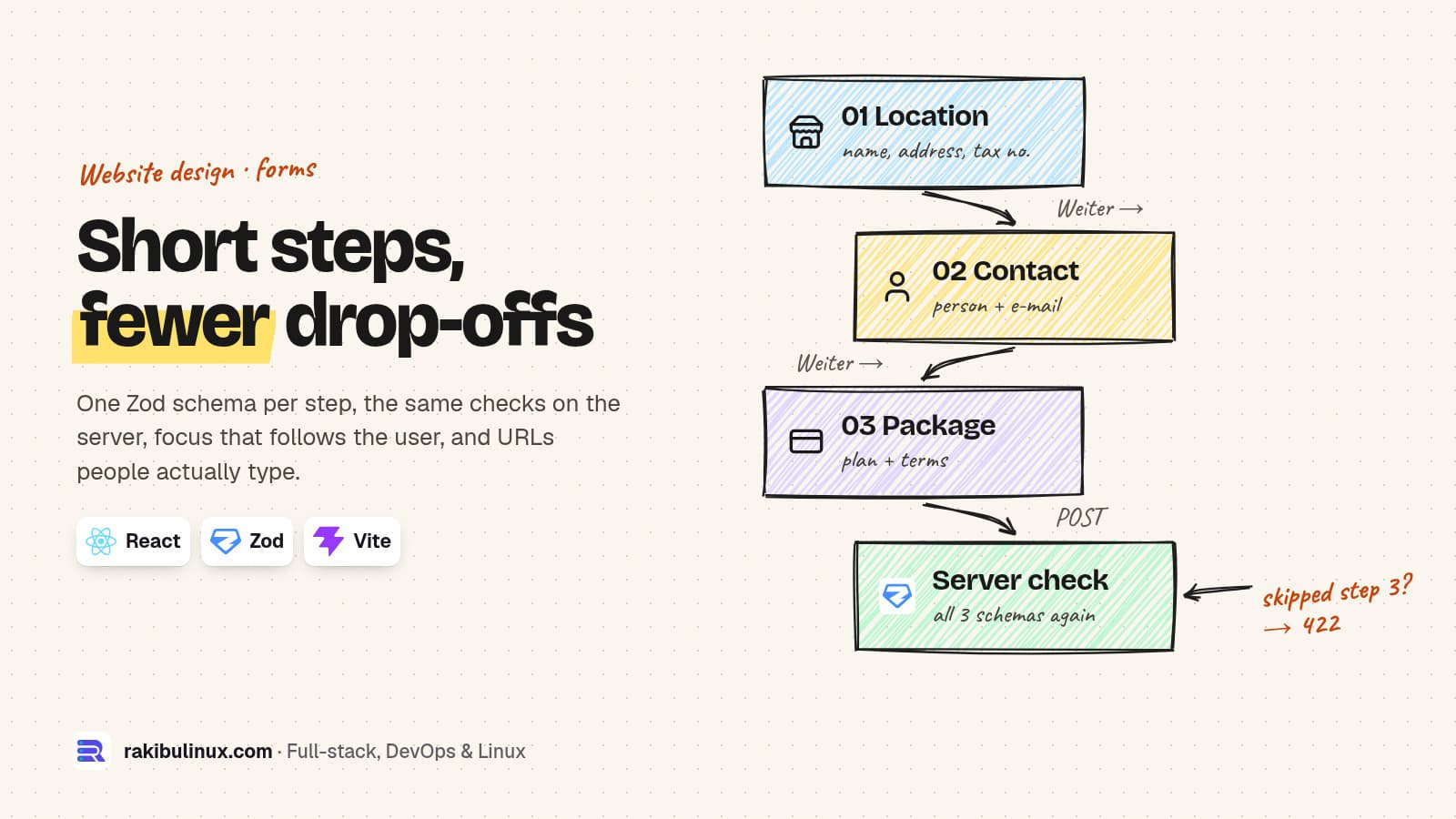
A good multi-step form in React uses one Zod schema per step, checks every step again on the server, and moves keyboard focus to each new step's heading.
The partner sign-up I'm building for NETME has three steps: the venue (name, address, category, tax number, website), the contact person, then the package and payment. It started as a design prototype with "Weiter" and "Zurück" buttons that only changed what was visible. The prototype's own README listed what was missing before launch: real form state, server-side validation, accessibility and error messages. This guide is that list, done. The code was built with Vite 8.3 and React 19.3, and the schemas run on Zod 4.6.7.
Key takeaways
- One schema per step, one combined schema for the server. The browser checks each step for speed; the server checks everything because the browser can be skipped.
- Normalise before you validate. People type
www.beispiel.de, nothttps://. Add the protocol, then validate. - Move focus to the new step's heading. Otherwise keyboard and screen-reader users are left on a button that no longer exists.
- Write error messages in the form's language. Zod's defaults are English ("Invalid URL"), which looks broken on a German page.
- Measure where people leave. A step that loses half your visitors is a design problem you can only see with data.
When is a multi-step form worth it?
Splitting a form doesn't make it shorter. It makes each screen ask for one kind of thing, and it lets you put the easy questions first. For NETME, the venue's name and address are easy, so they go first. Payment details come last, after the person has already invested two steps. A form with five fields should stay on one page. A form with twelve fields across three topics (business, person, payment) reads better as three short steps with a visible "Schritt 1 von 3" and a progress bar.
Group fields by what the user knows, not by your database tables. "Steuernummer oder USt-IdNr." belongs with the business, even if your API stores it in a separate tax table.
Step 1: one Zod schema per step
// schema.js (shared by the browser and the server)
import { z } from 'zod';

export const company = z.object({
  name: z.string().trim().min(2, 'Bitte den Namen der Location angeben'),
  address: z.string().trim().min(8, 'Straße, Hausnummer, PLZ und Ort'),
  category: z.enum(['cafe', 'bar', 'restaurant', 'other'], { error: 'Bitte wählen' }),
  taxId: z.string().trim()
    .regex(/^(DE\d{9}|\d{2,3}\/?\d{3}\/?\d{4,5})$/, 'Steuernummer oder USt-IdNr. prüfen'),
  website,                 // const website = ... (next section), declared above this object
});
export const contact = z.object({
  person: z.string().trim().min(2),
  email: z.email('Bitte eine gültige E-Mail angeben'),
  phone: z.string().trim().min(6).optional().or(z.literal('')),
});
export const plan = z.object({
  plan: z.enum(['starter', 'business', 'enterprise']),
  terms: z.literal(true, { error: 'Bitte die Partnervereinbarung akzeptieren' }),
});

export const steps = [company, contact, plan];
// the server checks all three at once, whatever the browser claims
export const partnerRequest = company.extend(contact.shape).extend(plan.shape);
Two Zod 4 details are worth knowing. Custom messages now use { error: '...' } (the old message option is deprecated), and format checks such as z.email() and z.url() are top-level functions. The tax-number regex only checks the shape; whether a USt-IdNr. really exists is a network call to VIES, explained in my guide to validating EU VAT numbers in Node.js.
Step 2: accept the website the way people type it
The NETME form's placeholder says www.beispiel.de, so that is what people type. A plain z.url() rejects it, because it has no protocol. That's a validation error the user can't understand. Add the protocol first, then validate:
const website = z.preprocess(
  (v) => (typeof v === 'string' && v.trim() && !/^https?:\/\//i.test(v.trim())
    ? `https://${v.trim()}` : v),
  z.url({ protocol: /^https?$/, hostname: z.regexes.domain,
          error: 'Bitte eine Website wie beispiel.de angeben' })
    .optional().or(z.literal('')),
);
What it does with real input:
"www.beispiel.de"          "https://www.beispiel.de"
"beispiel.de"              "https://beispiel.de"
"https://beispiel.de/menu" "https://beispiel.de/menu"
""                         ""
"javascript:alert(1)"      "Bitte eine Website wie beispiel.de angeben"
"not a site"               "Bitte eine Website wie beispiel.de angeben"
"http://localhost"         "Bitte eine Website wie beispiel.de angeben"
The protocol and hostname options matter: without them, javascript: links and internal hostnames can pass a URL check and later end up as a clickable link in your admin panel.
Step 3: the step logic in React
No form library is needed for three steps. Keep all values in one object, validate the current step on "Weiter", and keep the cleaned values Zod returns:
import { useRef, useState } from 'react';
import { z } from 'zod';
import { steps } from './schema.js';

const titles = ['Erzähl uns von deiner Location.', 'Wer ist dein Ansprechpartner?', 'Paket und Zahlung'];

export default function PartnerForm({ renderStep }) {
  const [step, setStep] = useState(0);
  const [values, setValues] = useState({});
  const [errors, setErrors] = useState({});
  const heading = useRef(null);

  function goTo(next) {
    setStep(next);
    // after React renders the new step: move focus, scroll below the sticky header
    requestAnimationFrame(() => {
      heading.current?.focus();
      heading.current?.scrollIntoView({ block: 'start', behavior: 'smooth' });
    });
  }

  async function onNext(e) {
    e.preventDefault();
    const result = steps[step].safeParse(values);
    if (!result.success) {
      setErrors(z.flattenError(result.error).fieldErrors);
      return;
    }
    setErrors({});
    setValues((v) => ({ ...v, ...result.data }));
    if (step < steps.length - 1) return goTo(step + 1);
    const res = await fetch('/api/partner-requests', {
      method: 'POST',
      headers: { 'content-type': 'application/json' },
      body: JSON.stringify({ ...values, ...result.data }),
    });
    if (res.status === 422) setErrors((await res.json()).fieldErrors);
  }

  return (
    <form onSubmit={onNext} noValidate>
      <p aria-live="polite">Schritt {step + 1} von {steps.length}</p>
      <h2 ref={heading} tabIndex={-1} style={{ scrollMarginTop: 96 }}>{titles[step]}</h2>
      {renderStep(step, values, setValues, errors)}
      <button type="button" disabled={step === 0} onClick={() => goTo(step - 1)}>← Zurück</button>
      <button type="submit">{step < steps.length - 1 ? 'Weiter →' : 'Anfrage senden'}</button>
    </form>
  );
}
The details that make it feel finished:
- Focus on the heading, not the first input.
tabIndex={-1}makes theh2focusable from code. A screen reader then reads "Wer ist dein Ansprechpartner?" and the user tabs into the step. Jumping straight into an input skips the context. scroll-margin-topstops the heading from hiding under a sticky navigation bar. The NETME prototype had exactly that bug: after "Weiter" the new step started behind the header.- "Zurück" keeps everything. Values live above the steps, so going back never clears what was typed.
- One form element and a submit button, so Enter works and mobile keyboards show "Go".
Step 4: validate everything again on the server
Step-by-step checks in the browser are for the user's comfort. Anyone can send the final POST with curl and skip step 3. I tested exactly that: a request with company and contact fields but no terms:
false {"terms":["Bitte die Partnervereinbarung akzeptieren"]}
The server route is short, because the schema already exists:
import { z } from 'zod';
import { partnerRequest } from './schema.js';

app.post('/api/partner-requests', async (req, res) => {
  const result = partnerRequest.safeParse(req.body);
  if (!result.success) return res.status(422).json(z.flattenError(result.error));
  const id = await savePartnerRequest(result.data);   // only cleaned data reaches the DB
  res.status(201).json({ id });
});
Use result.data, never req.body, after validation: it has the trimmed strings and the normalised website, and any extra fields an attacker added are dropped. Add spam protection to this route too; my post on stopping form spam with Turnstile, reCAPTCHA or a honeypot shows the server check.
Step 5: payment as the last step
On NETME the third step collects card details, but the venue is only charged after the team approves the request. The form shows a confirmation page with a short timeline: form completed, payment details saved, team reviewing, decision by e-mail. That honest timeline cuts "did it work?" emails. The payment part, a Stripe SetupIntent and a charge on approval, is in save a card now, charge after approval.
Step 6: find the step where people quit
Send one analytics event per step ("partner-step-2-viewed") and one on success. With Umami that's a data-umami-event attribute or a one-line umami.track() call, and no cookie banner is needed for it (setup in self-hosting Umami analytics). If step 1 to step 2 loses most people, the business questions are too hard or too early. If step 3 loses them, it's usually the price or the payment form.
Frequently asked questions
Should I use React Hook Form for a multi-step form?
For three steps and a dozen fields, plain state plus Zod is enough and easier to read. React Hook Form starts to pay off with many fields, field arrays or heavy re-render costs; it works with the same Zod schemas through its resolver package.
Should each step be its own URL?
It helps when steps are long or users come back later, because the back button and analytics then work per step. For a short form, keep one URL and manage the step in state, but make sure the browser back button doesn't drop the user out of the form unexpectedly.
Can I save a half-finished form?
Yes, but think about what you store. Keeping non-sensitive fields in sessionStorage survives an accidental reload. Never put payment details or tax numbers in localStorage; if you need "continue later", save a draft on the server behind a link sent by e-mail.
Why show errors only after "Weiter" and not while typing?
Errors that appear while someone is still typing feel like being told off. Validate the step on "Weiter", then re-validate a field as it changes once it has shown an error, so the message disappears as soon as it's fixed.
Do I need the same validation on the server if I use TypeScript?
Yes. TypeScript types vanish at runtime, and the request body is whatever the sender chose to send. The shared Zod schema gives you both: types for your code and real checks at the API.
Need a form that converts?
I design and build sign-up flows, quote forms and partner onboarding for businesses, from the first field to the admin panel that reviews them. See my website design services or send me the form you have now and I'll tell you where people drop off.

Written by
MD Rakibul Islam Rakib
Full-stack developer, DevOps engineer and Linux system administrator with 5+ years of production experience. I deploy, harden and fix servers and web apps for clients worldwide, and everything in this article runs on real servers I manage, including this site.
- multi-step form React
- Zod validation
- form wizard
- React form accessibility
- lead form design
- server-side validation
- Zod 4