Validate EU VAT Numbers with VIES in Node.js
 MD Rakibul Islam RakibFull-stack developer, DevOps & Linux engineer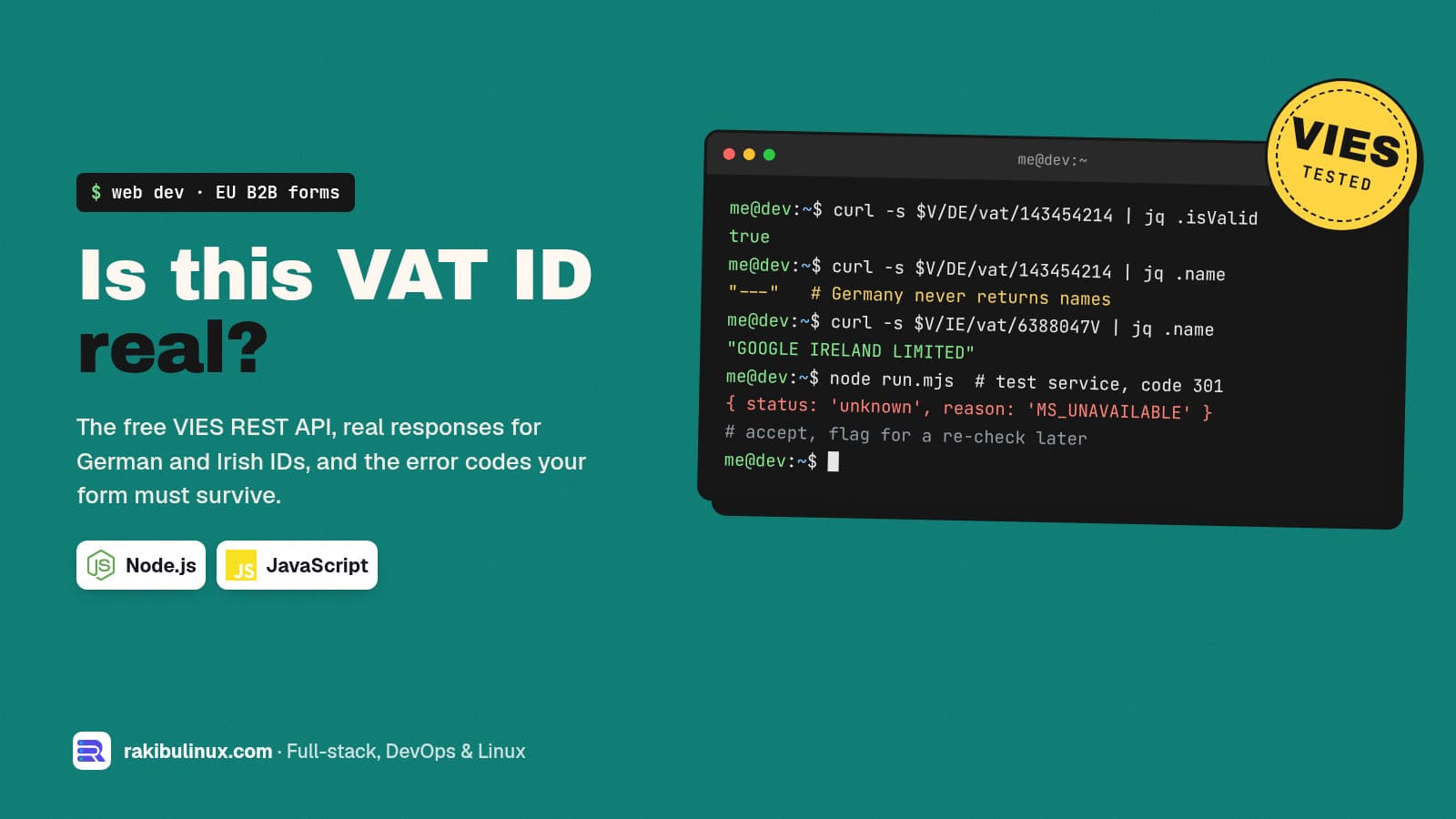
To validate an EU VAT number in Node.js, call the free VIES REST API from the European Commission, then treat "service down" as unknown, never as invalid.
The partner form I'm building for NETME asks German cafés and bars for a "Steuernummer oder USt-IdNr." and warns them not to type their personal tax ID. That one field produces more support emails than the rest of the form, because people mix up the three German numbers and VIES itself is down more often than you'd expect. Everything below was run against the live VIES service on 13 October 2026, and the responses are copied from my terminal.
Key takeaways
- VIES has a REST API now.
POST /check-vat-numbertakes JSON, needs no key, and answers in about a second. - Germany never returns a company name. A valid German ID comes back with
"name": "---", so you can't match it against the form. - Only the USt-IdNr. can be checked online. A German Steuernummer has no public validation API; check its shape and move on.
- Errors are not "invalid".
MS_UNAVAILABLE,TIMEOUTand the rate-limit codes mean "try later". Don't block a paying customer on them. - Use the test service (
/check-vat-test-service) to trigger every error on purpose before launch.
Steuernummer, USt-IdNr. or Steuer-ID?
If your customers are in Germany, explain the difference next to the field, in their language. They are three different numbers:
- USt-IdNr. (Umsatzsteuer-Identifikationsnummer): the EU VAT ID,
DEplus 9 digits. Issued by the Federal Central Tax Office (BZSt) to businesses that trade across EU borders. This is the one VIES can check. - Steuernummer: the business tax number from the local tax office. Its format differs by federal state, often written with slashes like
143/123/45678. Many small cafés have only this one. There is no public API to verify it. - Steuer-ID (steuerliche Identifikationsnummer): the personal 11-digit tax ID every resident gets. It belongs to a person, not the business, and you should not collect it in a B2B form. That's why the NETME form says so in small print under the field.
So the form accepts either a USt-IdNr. or a Steuernummer, checks the USt-IdNr. against VIES, and only checks the shape of a Steuernummer.
The VIES REST API in one curl
There are two ways to ask. A simple GET per country:
curl -s https://ec.europa.eu/taxation_customs/vies/rest-api/ms/DE/vat/143454214
{
  "isValid" : true,
  "requestDate" : "2026-10-13T16:22:42.171Z",
  "userError" : "VALID",
  "name" : "---",
  "address" : "---",
  ...
}
And a POST that takes JSON and returns valid instead of isValid:
curl -s -X POST -H 'content-type: application/json' \
  https://ec.europa.eu/taxation_customs/vies/rest-api/check-vat-number \
  -d '{"countryCode":"DE","vatNumber":"143454214"}'
Note what's missing. DE143454214 is a real, registered German VAT ID, and VIES confirms it but returns --- for name and address. Germany doesn't share that data through VIES. An Irish ID behaves differently:
curl -s https://ec.europa.eu/taxation_customs/vies/rest-api/ms/IE/vat/6388047V
"isValid" : true,
"name" : "GOOGLE IRELAND LIMITED",
"address" : "3RD FLOOR, GORDON HOUSE, BARROW STREET, DUBLIN 4",
So "match the company name against VIES" works for some countries and not others. Design for valid / invalid / unknown, and treat a name as a bonus.
A small Node.js module with no dependencies
Node 18 and newer has fetch built in, so this needs no package. First, clean and pre-check the input. People paste DE 143 454 214, de143454214 or forget the prefix.
// vat.mjs
const FORMATS = {
  DE: /^\d{9}$/,              // DE + 9 digits
  AT: /^U\d{8}$/,             // ATU + 8 digits
  FR: /^[0-9A-Z]{2}\d{9}$/,
  NL: /^\d{9}B\d{2}$/,
  IE: /^\d{7}[A-Z]{1,2}$|^\d[A-Z+*]\d{5}[A-Z]$/,
};

export function parseVatId(input) {
  const raw = input.toUpperCase().replace(/[\s.\-]/g, '');
  const country = raw.slice(0, 2) === 'GR' ? 'EL' : raw.slice(0, 2); // VIES uses EL for Greece
  const number = raw.slice(2);
  const format = FORMATS[country];
  if (!format) return { ok: false, reason: 'UNSUPPORTED_COUNTRY' };
  if (!format.test(number)) return { ok: false, reason: 'BAD_FORMAT' };
  return { ok: true, country, number };
}
Add the other member states you sell to. The format check saves a network call and gives the user an instant message for an obvious typo. Then the VIES call, with a timeout and a clear split between "the ID is invalid" and "we couldn't find out":
const RETRYABLE = new Set(['SERVICE_UNAVAILABLE', 'MS_UNAVAILABLE', 'TIMEOUT',
  'GLOBAL_MAX_CONCURRENT_REQ', 'GLOBAL_MAX_CONCURRENT_REQ_TIME',
  'MS_MAX_CONCURRENT_REQ', 'MS_MAX_CONCURRENT_REQ_TIME']);

export async function checkVat(country, number, { test = false } = {}) {
  const url = 'https://ec.europa.eu/taxation_customs/vies/rest-api/' +
    (test ? 'check-vat-test-service' : 'check-vat-number');
  let text;
  try {
    const res = await fetch(url, {
      method: 'POST',
      headers: { 'content-type': 'application/json' },
      body: JSON.stringify({ countryCode: country, vatNumber: number }),
      signal: AbortSignal.timeout(15_000),
    });
    text = await res.text();
  } catch (err) {
    return { status: 'unknown', reason: err.name };          // network or timeout
  }
  let data;
  try { data = JSON.parse(text); } catch { return { status: 'unknown', reason: 'EMPTY_RESPONSE' }; }
  const error = data.errorWrappers?.[0]?.error;
  if (error) return { status: RETRYABLE.has(error) ? 'unknown' : 'error', reason: error };
  return {
    status: data.valid ? 'valid' : 'invalid',
    name: data.name === '---' ? null : data.name,
    address: data.address === '---' ? null : data.address,
    checkedAt: data.requestDate,
  };
}
The EMPTY_RESPONSE branch is there for a reason. While testing I fired three GET requests back to back and all three came back with an empty body that wasn't JSON. A few seconds later the same requests worked. Your code must not crash or say "invalid" when that happens.
What I got from the live service
DE 143 454 214   {"ok":true,"country":"DE","number":"143454214"}
DE12345          {"ok":false,"reason":"BAD_FORMAT"}
12345678         {"ok":false,"reason":"UNSUPPORTED_COUNTRY"}
DE143454214 {"status":"valid","name":null,"address":null,"checkedAt":"2026-10-13T16:24:03.256Z"}
IE6388047V  {"status":"valid","name":"GOOGLE IRELAND LIMITED","address":"3RD FLOOR, ..."}
DE123456789 {"status":"invalid","name":null,"address":null,"checkedAt":"2026-10-13T16:24:07.262Z"}
Test every error before launch
VIES has a test endpoint that returns fixed answers for special numbers, so you can see each failure without waiting for a real outage. I looped through them; here is what came back:
100: valid, name "John Doe"
200: valid: false
201: INVALID_INPUT
202: INVALID_REQUESTER_INFO
300: SERVICE_UNAVAILABLE
301: MS_UNAVAILABLE
302: TIMEOUT
400: VAT_BLOCKED
401: IP_BLOCKED
500: GLOBAL_MAX_CONCURRENT_REQ
501: GLOBAL_MAX_CONCURRENT_REQ_TIME
600: MS_MAX_CONCURRENT_REQ
601: MS_MAX_CONCURRENT_REQ_TIME
The errors come back as {"actionSucceed": false, "errorWrappers": [{"error": "MS_UNAVAILABLE"}]}, which is why the module reads errorWrappers[0].error. MS_UNAVAILABLE means one country's own system is down; VIES only forwards your question to it. That happens for scheduled maintenance, sometimes for hours, so you'll meet it in production.
What to do with "unknown"
Blocking a sign-up because a government server is down loses you a customer for nothing. What I do instead:
- Invalid: show "This VAT number isn't registered. Please check it, or enter your Steuernummer instead" and keep the form open.
- Unknown: accept the form, store
vat_status = 'unknown', and re-check from a background job. With BullMQ this is a delayed job with retries (see background jobs in NestJS with BullMQ). - Valid: store the result with
checkedAt. Save the date and the response, because if you invoice without VAT under the reverse-charge rules, you want proof that you checked.
In an approval flow like NETME's, "unknown" simply shows up as a yellow badge in the admin's review queue. The reviewer sees it before they approve and charge the saved card (how that part works is in charging a saved card after approval with Stripe).
Do you need a qualified confirmation from the BZSt?
VIES gives you a yes or no. German businesses that sell tax-free to companies in other EU countries can also ask the Federal Central Tax Office (BZSt) to confirm a foreign VAT ID together with the company name and address, a "qualifizierte Bestätigungsanfrage". The BZSt replaced its old XML-RPC interface with a REST API in 2025. Whether you need it depends on your invoicing, so ask your tax advisor. For a sign-up form, VIES is the right first check.
Frequently asked questions
Is the VIES API free, and does it need an API key?
Yes, it's free and needs no key or registration. It is rate-limited, and the limit codes (GLOBAL_MAX_CONCURRENT_REQ and friends) are your signal to slow down. Cache results and don't re-check the same ID on every page load.
Why does VIES return "---" for the company name?
Some member states, Germany among them, don't share trader names and addresses through VIES. The ID is still confirmed as valid or invalid. Countries such as Ireland do return the registered name.
Can I validate a German Steuernummer through an API?
Not publicly. Check that it looks like a tax number, store it, and let your team verify it during review if needed. Only the USt-IdNr. can be checked through VIES.
Should I still use the old SOAP service?
For a new Node.js project the REST API is the simpler choice: plain JSON, no XML library and the same data.
What if a customer's VAT ID becomes invalid later?
Re-check stored IDs before important events such as a new invoice period or a plan upgrade. A short background job with a weekly run is enough for most businesses.
Want this in your sign-up or checkout?
I build B2B sign-up forms, checkout flows and admin review panels for EU businesses, including VAT checks, invoices and payments. See my web development services or send me your form and I'll tell you what it needs.

Written by
MD Rakibul Islam Rakib
Full-stack developer, DevOps engineer and Linux system administrator with 5+ years of production experience. I deploy, harden and fix servers and web apps for clients worldwide, and everything in this article runs on real servers I manage, including this site.
- VIES API
- validate EU VAT number
- VIES REST API Node.js
- USt-IdNr prüfen
- VAT ID validation
- B2B checkout EU
- reverse charge