NestJS Background Jobs with BullMQ: A Production Guide
 MD Rakibul Islam RakibFull-stack developer, DevOps & Linux engineer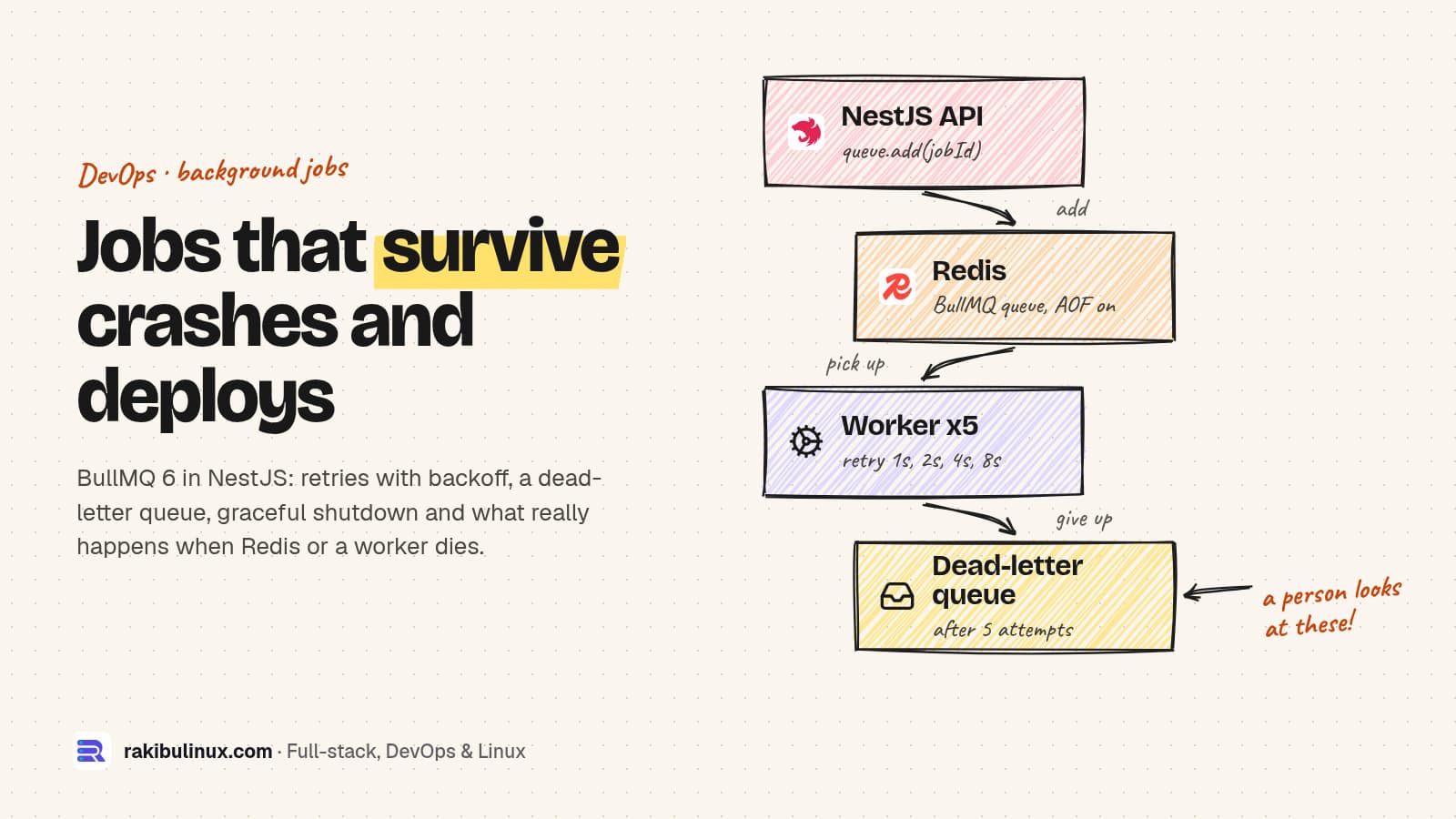
For production BullMQ in NestJS, give jobs retries with backoff and a stable jobId, close workers on SIGTERM, and plan for crashed workers and Redis outages.
Emails, PDF reports, image resizing, webhook deliveries and AI calls don't belong in the HTTP request. On a warehouse system I built, background jobs run on pg-boss so the client doesn't have to run Redis at all. When a NestJS project already has Redis or needs its throughput, BullMQ is the usual choice, and @nestjs/bullmq is the official integration. I tested everything below on 11 October 2026 with NestJS 11, @nestjs/bullmq 12.0.0, BullMQ 6.3.12 and Redis 8.10, including killing workers and stopping Redis on purpose. The timings are from those runs.
Key takeaways
- Install
ioredisyourself. BullMQ 6 treats Redis clients as optional peer dependencies, and without one it fails with "could not load the optional 'ioredis' package". - Give every job a stable
jobIdso a retried request can't enqueue the same work twice. Don't use:in it; BullMQ rejects that. - Retries with exponential backoff, then a dead-letter queue. My failing job ran 5 times, 1, 2, 4 and 8 seconds apart, then landed where a person can see it.
- Graceful shutdown works only if the process manager waits. PM2 force-kills after 1.6 seconds by default.
- A crashed worker's job is not lost, but it is late. With default settings, my job was picked up again 61 and 91 seconds after the crash.
Setup
npm i @nestjs/bullmq bullmq ioredis
Redis needs two settings from BullMQ's production guide: maxmemory-policy noeviction, because Redis evicting a queue key breaks the queue, and AOF persistence (appendonly yes) so jobs survive a Redis restart. The redis:8 Docker image I used had noeviction by default but appendonly no, so check both on your server, especially on managed Redis.
Register the queue with retry defaults
@Module({
  imports: [
    BullModule.forRoot({ connection: { host: '127.0.0.1', port: 6379 } }),
    BullModule.registerQueue(
      {
        name: 'email',
        defaultJobOptions: {
          attempts: 5,
          backoff: { type: 'exponential', delay: 1000 },   // 1 s, 2 s, 4 s, 8 s
          removeOnComplete: { count: 1000 },
          removeOnFail: { count: 5000 },
        },
      },
      { name: 'email-dead' },
    ),
  ],
  controllers: [SignupController],
  providers: [EmailProcessor],
})
export class AppModule {}
removeOnComplete and removeOnFail cap how many finished jobs Redis keeps. Without them every job ever run stays in memory.
Enqueue idempotently
@Post('signup')
async signup(@Body() body: { userId: string; email: string }) {
  // jobId makes the enqueue idempotent: a retried request can't send two welcome emails.
  const job = await this.email.add('welcome', { to: body.email }, { jobId: `welcome-${body.userId}` });
  return { queued: job.id };
}
I first wrote welcome:${userId}, and every request failed with Custom Id cannot contain :, because BullMQ uses colons in its Redis keys. With a dash, posting the same signup twice returned the same job ID and left one job in the queue.
The worker, with a dead-letter queue
@Processor('email', { concurrency: 5 })
export class EmailProcessor extends WorkerHost {
  private readonly log = new Logger('email');

  constructor(
    @InjectQueue('email-dead') private readonly dead: Queue,
    private readonly mailer: MailService,   // your SMTP or email API client
  ) {
    super();
  }

  async process(job: Job<EmailJob>) {
    await this.mailer.send(job.data);   // throw to retry
    return { sent: true };
  }

  @OnWorkerEvent('failed')
  async onFailed(job: Job<EmailJob> | undefined, err: Error) {
    if (!job) return;
    if (job.attemptsMade < (job.opts.attempts ?? 1)) return;   // BullMQ will retry it
    // Out of retries: park it where a person will look, with the reason.
    await this.dead.add('dead', { queue: 'email', jobId: job.id, data: job.data, error: err.message });
    this.log.error(`gave up on ${job.id} after ${job.attemptsMade} attempts: ${err.message}`);
  }
}
BullMQ has no built-in dead-letter queue. Failed jobs stay in the queue's failed list until removeOnFail trims them. A separate queue that someone watches, or that sends an alert, is a simple pattern that keeps the reason with the data.
What the test run showed
20 jobs x 200 ms, concurrency 5          -> done in 946 ms
same signup posted twice                 -> 1 job (welcome-u1)
flaky job, fails twice                   -> completed, attemptsMade 3
broken job, always fails                 -> attempts at 0 s, 1.2 s, 3.4 s, 7.7 s, 15.9 s
                                         -> gave up after 5 attempts: SMTP 421: try again later
dead job data: {"queue":"email","jobId":"welcome-broken","data":{...},"error":"SMTP 421: try again later"}
Graceful shutdown on deploys
const app = await NestFactory.create(AppModule);
app.enableShutdownHooks();   // SIGTERM -> worker.close() -> running jobs finish first
await app.listen(3000);
@nestjs/bullmq closes its workers in onApplicationShutdown, and BullMQ's worker.close() waits for active jobs. Nest only runs those hooks when enableShutdownHooks() is on. In my test a 5-second job was running when I sent SIGTERM; the process waited about 4 seconds, the job finished as completed, then the process exited.
The catch is your process manager. PM2 sends SIGINT and, by default, force-kills with SIGKILL after 1.6 seconds, so that 5-second job would have been killed halfway. Set kill_timeout in your PM2 ecosystem file to longer than your longest normal job. Docker's stop waits 10 seconds by default; raise it with stop_grace_period in Compose if needed. My PM2 troubleshooting guide covers the rest of the PM2 setup.
When a worker crashes
I started a 5-second job and killed the worker with SIGKILL after one second, then started a new worker. The job sat in active with nobody working on it. BullMQ's stalled-job check found it, moved it back to the queue and the new worker completed it. It took 61 seconds after the crash in one run and 91 seconds in another.
The delay comes from the defaults I read in the BullMQ 6.3.12 source: lockDuration 30,000 ms, stalledInterval 30,000 ms and maxStalledCount 1. The lock has to expire, and the stalled checker runs every 30 seconds. A stall doesn't count as an attempt (attemptsMade stayed 0 until the rerun), but with maxStalledCount: 1 a second stall fails the job permanently with "job stalled more than allowable limit". Make sure jobs are safe to run twice, because a stalled job really does start again from the beginning.
When Redis goes down
With the app running, I stopped the Redis container. The app logged a stream of connect ECONNREFUSED errors (64 lines in 15 seconds), and POST /signup didn't fail: it hung, with no response after 15 seconds, because ioredis held the command until it could reconnect. When I started Redis again, that held job was added, the worker reconnected and new jobs were processed about 4 seconds later.
So nothing was lost, but users would have stared at a spinner. Put a timeout around queue.add() in request handlers and answer 503 if it trips. The stable jobId then protects you when the client retries and the original command also lands. Monitor Redis like the database it is; my Uptime Kuma guide can watch the port.
A dashboard with Bull Board
BullBoardModule.forRoot({ route: '/queues', adapter: ExpressAdapter }),   // put auth in front of this
BullBoardModule.forFeature(
  { name: 'email', adapter: BullMQAdapter },
  { name: 'email-dead', adapter: BullMQAdapter },
),
With @bull-board/nestjs 9.10.4, /queues answered 200. Bull Board lists jobs by state and lets you retry or remove them from the browser. Those actions change production data, so protect the route with your admin auth or serve it only on an internal port.
Frequently asked questions
How do I retry failed jobs in BullMQ?
Set attempts and a backoff in the job or queue options, and throw from process() on failure. BullMQ schedules the retry; with exponential backoff and a 1-second delay my retries ran 1, 2, 4 and 8 seconds apart.
Does BullMQ have a dead-letter queue?
Not as a built-in feature. Jobs that run out of attempts go to the queue's failed set. A common pattern, used here, is to copy them to a separate queue in the failed event when attemptsMade reaches attempts, and alert on it.
What happens to running jobs when I deploy?
With enableShutdownHooks(), Nest closes the workers and BullMQ waits for active jobs to finish. That only helps if your process manager waits long enough, so raise PM2's kill_timeout or Docker's grace period above your longest job.
Why is my BullMQ job stuck in active?
Usually the worker died or blocked the event loop so it couldn't renew its lock. BullMQ's stalled check moves it back after the lock expires; with default settings that took 61 to 91 seconds in my tests. Long CPU-heavy work should run in a sandboxed processor so the lock keeps renewing.
Should I use BullMQ or a Postgres-based queue?
If you already run Redis or need high throughput, BullMQ is a strong default for NestJS. If PostgreSQL is your only datastore and the volume is moderate, a Postgres queue like pg-boss saves you running and backing up another service.
Need reliable background processing?
I design and run job queues for Node.js backends: retries, alerts, dashboards and deploys that don't drop work. See my DevOps services or tell me what your app does in the background.

Written by
MD Rakibul Islam Rakib
Full-stack developer, DevOps engineer and Linux system administrator with 5+ years of production experience. I deploy, harden and fix servers and web apps for clients worldwide, and everything in this article runs on real servers I manage, including this site.
- NestJS BullMQ production guide
- BullMQ retry failed jobs
- NestJS Redis queue
- BullMQ dead letter queue
- Node.js background job queue
- BullMQ stalled jobs
- Bull Board