Scale Socket.IO Across Servers with Redis and Nginx
 MD Rakibul Islam RakibFull-stack developer, DevOps & Linux engineer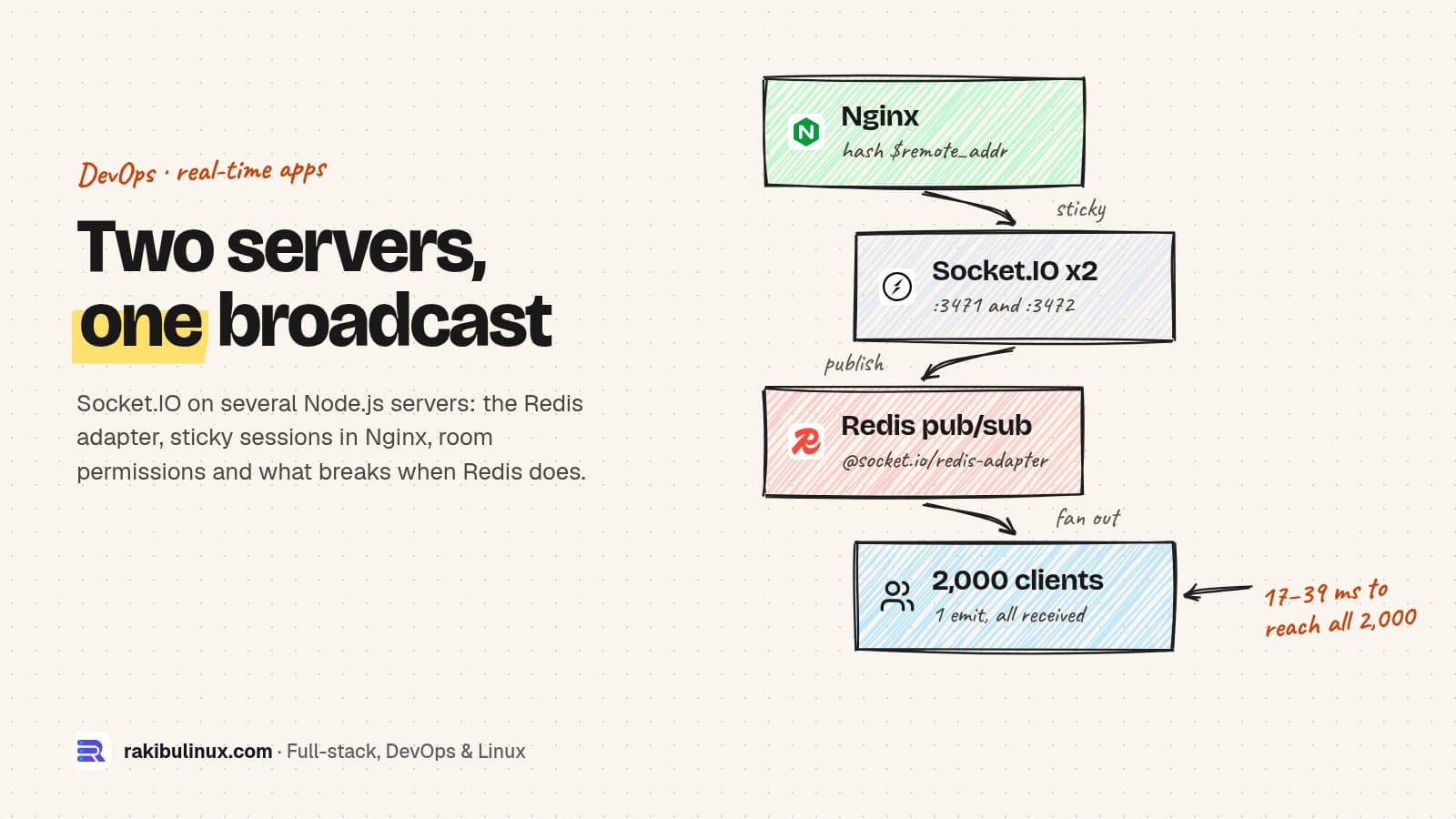
To scale Socket.IO across servers, add the Redis adapter so broadcasts reach every instance, and use sticky sessions in Nginx or WebSocket-only clients.
The API behind this website has a Socket.IO chat module, and the usual path for real-time features looks like this: it works on one server, then you add a second instance for capacity or zero-downtime deploys, and half your users stop getting live updates. I rebuilt that situation on 11 October 2026 with Socket.IO 4.8.4, @socket.io/redis-adapter 8.3.0, Redis 8 and Nginx, two Node.js servers on one machine, and recorded what broke and what fixed it. If your problem is a connection that fails behind Nginx even with one server, start with my WebSocket connection failed guide instead.
Key takeaways
- Without an adapter, each server only reaches its own clients. In my test, a user on the second server never got the update.
- The Redis adapter publishes every broadcast to the other servers. With it, one emit reached 2,000 clients across two servers in 17 to 39 ms on my machine.
- HTTP long-polling needs sticky sessions. Behind round-robin Nginx, only 4 of 20 clients stayed connected.
hash $remote_addr consistentor WebSocket-only transport fixed it. - Redis down means local-only delivery, not an outage. Cross-server messages sent during the outage are lost, not queued.
- Authorize rooms on the server. The server picks the tenant room from the verified token; clients can't join another tenant's room.
The problem: rooms live in each server's memory
Socket.IO keeps its list of connected sockets and rooms in the memory of each process. io.to('tenant:acme').emit(...) on server A only reaches sockets connected to server A. I connected Alice to server 1 and Bob to server 2, both in tenant acme, and Eve from another tenant to server 2, then sent an order update through server 1:
no adapter  : alice(3471) ["order-42-shipped@3471"]  bob(3472) []  eve(3472, globex) []
redis adapter: alice(3471) ["order-42-shipped@3471"]  bob(3472) ["order-42-shipped@3471"]  eve(3472, globex) []
Add the Redis adapter
npm i socket.io @socket.io/redis-adapter ioredis
import { createServer } from 'node:http';
import { Server } from 'socket.io';
import { createAdapter } from '@socket.io/redis-adapter';
import { Redis } from 'ioredis';

const pubClient = new Redis(process.env.REDIS_URL);
const subClient = pubClient.duplicate();
pubClient.on('error', (e) => console.error('redis pub:', e.message));
subClient.on('error', (e) => console.error('redis sub:', e.message));

const httpServer = createServer();
const io = new Server(httpServer, { adapter: createAdapter(pubClient, subClient) });
According to the Socket.IO docs, every packet sent to more than one client is delivered to matching local clients and published to a Redis channel, where the other servers pick it up. The subscriber needs its own connection, hence duplicate(). Attach error handlers: without them, a Redis hiccup becomes an unhandled error event.
Authenticate once, authorize every room
io.use((socket, next) => {
  const user = verifyToken(socket.handshake.auth.token);   // your JWT check
  if (!user) return next(new Error('unauthorized'));
  socket.data.user = user;
  next();
});

io.on('connection', (socket) => {
  const { tenantId } = socket.data.user;
  socket.join(`tenant:${tenantId}`);   // the server picks rooms from verified data

  // Clients may ask for extra rooms, but only inside their own tenant.
  socket.on('join', (room, ack) => {
    if (typeof room !== 'string' || !room.startsWith(`tenant:${tenantId}:`)) return ack?.({ ok: false, error: 'forbidden' });
    socket.join(room);
    ack?.({ ok: true });
  });
});
unknown token -> unauthorized
eve joins tenant:acme:orders -> {"ok":false,"error":"forbidden"}
alice joins tenant:acme:orders -> {"ok":true}
A room name is not a secret. If clients can join any room by name, anyone can listen to anyone's updates. Joining rooms on connection also means a reconnect, to whichever server, rebuilds the right rooms automatically.
Sticky sessions in Nginx
By default the client starts with HTTP long-polling and upgrades to WebSocket. Long-polling is a series of HTTP requests that must all reach the server holding the session. Behind plain round-robin they don't:
round robin, default transports          connected after 3 s: 4/20 {"xhr post error":8,"disconnected":8}
round robin, websocket only              connected after 3 s: 20/20 {}
hash $remote_addr, default transports    connected after 3 s: 20/20 {}
upstream realtime {
  hash $remote_addr consistent;    # same client IP -> same server
  server 127.0.0.1:3471;
  server 127.0.0.1:3472;
}
location /socket.io/ {
  proxy_pass http://realtime;
  proxy_http_version 1.1;
  proxy_set_header Upgrade $http_upgrade;
  proxy_set_header Connection $connection_upgrade;   # from a map on $http_upgrade
  proxy_set_header Host $host;
}
The other option is io(url, { transports: ['websocket'] }) on the client. The multiple-nodes docs confirm that WebSocket-only needs no sticky sessions, because there is only one long-lived connection. You lose the long-polling fallback for networks that block WebSockets, which is rare today but does happen on some corporate proxies. One caution about IP hashing: if a CDN or another proxy sits in front of Nginx, $remote_addr is that proxy's address and everyone lands on one server.
What happens when Redis goes down
redis down: alice ["during-outage@3471"]  bob []
redis back: bob receives cross-server again after 1213 ms
Clients stayed connected and local delivery kept working, exactly as the docs describe. Bob simply missed the message sent during the outage, and once Redis came back ioredis reconnected and cross-server delivery resumed in about a second. The pub/sub adapter doesn't store messages, so treat Socket.IO events as "something changed, refresh" signals and keep the real data in your database. Socket.IO's connection state recovery, which replays missed events to a reconnecting client, is not supported by this adapter; the docs list the Redis Streams adapter as compatible.
Load test: 2,000 clients, one emit
connected 2000 of 2000
broadcast 1: 2000/2000 clients received in 39 ms
broadcast 2: 2000/2000 clients received in 17 ms
broadcast 3: 2000/2000 clients received in 18 ms
All 2,000 WebSocket clients, the two servers and Redis ran on the same machine, so there's no network latency in these numbers. They show the adapter path works under a realistic fan-out, not what your production latency will be. Measure from the client side on your own infrastructure before promising "real time" to customers.
Production checklist
- Run instances with PM2 cluster mode or containers, and give Nginx an upstream for them. My PM2 and Nginx deploy guide covers the base setup.
- Raise
proxy_read_timeoutabove Socket.IO's ping interval plus timeout (25 s + 20 s by default) so Nginx doesn't cut idle connections. - Monitor Redis and alert on adapter errors; a silent Redis outage looks like "some users don't get updates".
- If you already run BullMQ, keep queues and pub/sub on separate Redis connections; see my BullMQ production guide.
Frequently asked questions
Do I need the Redis adapter for Socket.IO?
Only when you run more than one Socket.IO server process, including PM2 cluster mode. With one process, the built-in in-memory adapter is enough.
Why do I get "xhr post error" or "Session ID unknown" behind a load balancer?
Long-polling requests from one client are landing on different servers. Enable sticky sessions, for example hash $remote_addr consistent in Nginx, or force the WebSocket transport on the client.
Are messages lost if Redis restarts?
Messages broadcast while Redis is unreachable are delivered only to clients on the sending server; the rest never get them. In my test cross-server delivery resumed about a second after Redis came back. Design clients to refetch state after reconnecting.
Can users join any Socket.IO room?
Only if your server lets them. Rooms have no built-in access control, so check every join request against the authenticated user, as in the tenant check above.
Redis adapter or Redis Streams adapter?
The pub/sub adapter is the long-standing default and fine when events are "refresh" signals. The Streams adapter supports connection state recovery, which matters when clients must not miss events during short disconnections.
Building a real-time product?
I build and scale real-time features on Node.js: live dashboards, notifications, chat and tracking, with load balancing, Redis and monitoring set up properly. See my DevOps services or tell me what needs to update live.

Written by
MD Rakibul Islam Rakib
Full-stack developer, DevOps engineer and Linux system administrator with 5+ years of production experience. I deploy, harden and fix servers and web apps for clients worldwide, and everything in this article runs on real servers I manage, including this site.
- Socket.IO Redis adapter scaling
- Socket.IO horizontal scaling
- Socket.IO sticky sessions Nginx
- Node.js real time application architecture
- Socket.IO rooms authorization
- WebSocket load balancing