NestJS Rate Limiting per User and Plan with Redis
 MD Rakibul Islam RakibFull-stack developer, DevOps & Linux engineer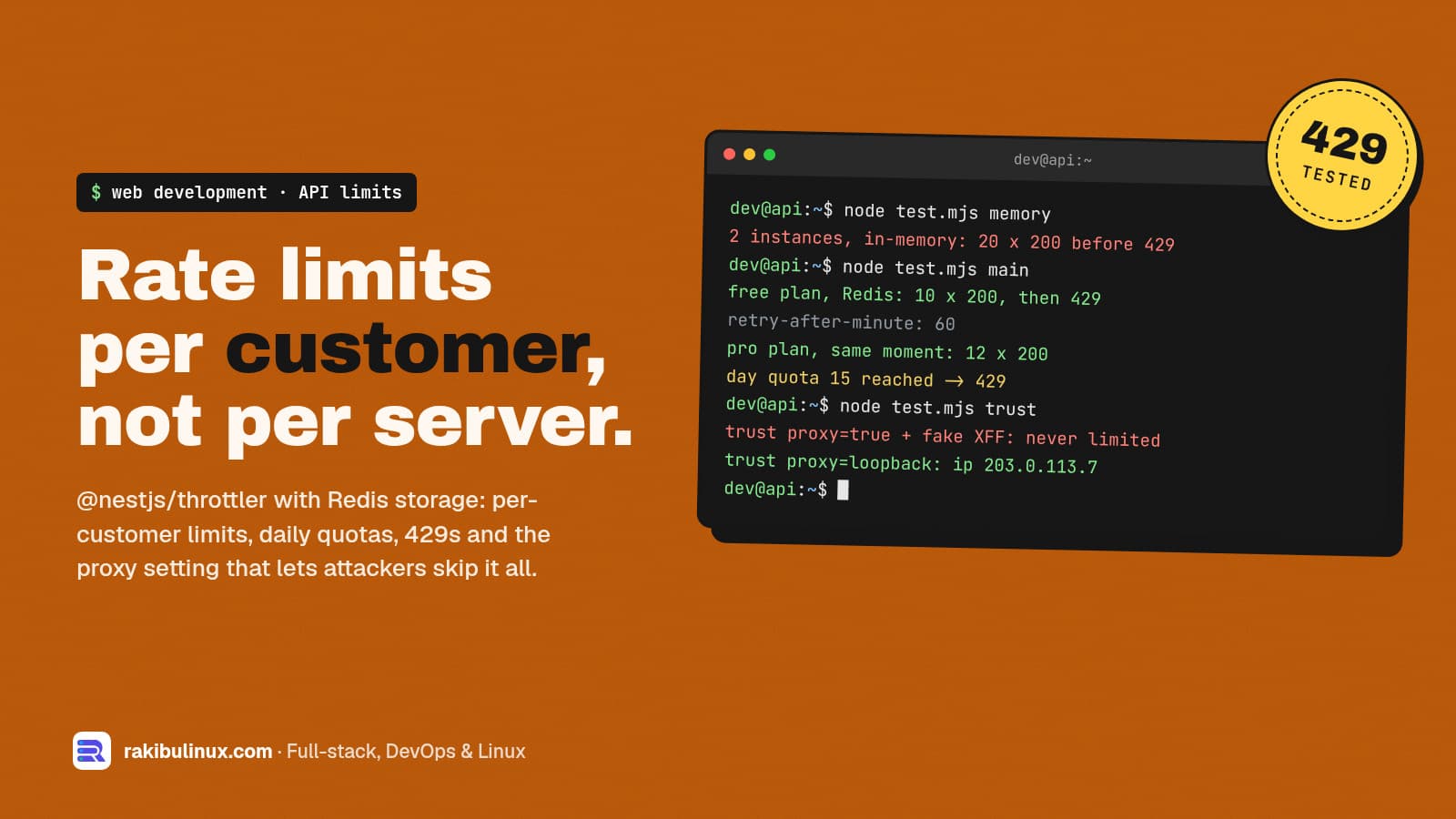
For per-user rate limits in NestJS, track each request by customer ID instead of IP, let the limit depend on the plan, and store counters in Redis.
A single global limit like "100 requests per minute per IP" breaks the moment you sell API access. A whole office behind one IP shares one bucket, a paying customer gets the same limit as a stranger, and a second server instance quietly doubles everyone's allowance. I built per-plan limits and daily quotas with @nestjs/throttler 6.7.1 and @nest-lab/throttler-storage-redis 1.2.0 on NestJS 11, then tested them on 11 October 2026 across two app instances, behind a simulated proxy and with a spoofed header. All output below is from those runs.
Key takeaways
- The throttler's
limitcan be a function of the request, so one config gives each plan its own limit. - Track signed-in requests by account (
tenant:acme) and anonymous ones by IP. - In-memory storage multiplies your limit by your instance count. Two instances let 20 requests through a limit of 10. Redis storage held it at exactly 10.
trust proxy: truemakes IP limits useless. A client that sends a fakeX-Forwarded-Forwas never limited. Trust only your own proxy.- Two named throttlers give you a rate limit and a quota: per minute against bursts, per day against overuse.
Install
npm i @nestjs/throttler @nest-lab/throttler-storage-redis ioredis
The NestJS docs point to a community Redis storage for multi-server setups; @nest-lab/throttler-storage-redis is the one I used. One thing to check before upgrading: its 1.2.0 release lists NestJS up to 11 as peer dependencies, while @nestjs/throttler 6.7.1 already allows NestJS 12.
Per-plan limits and a daily quota
type Plan = 'anon' | 'free' | 'pro';
const PLANS: Record<Plan, { perMinute: number; perDay: number }> = {
  anon: { perMinute: 5, perDay: 200 },
  free: { perMinute: 10, perDay: 15 },      // tiny quota so the test can hit it
  pro: { perMinute: 100, perDay: 50_000 },
};

const planOf = (ctx: ExecutionContext): Plan => ctx.switchToHttp().getRequest().user?.plan ?? 'anon';

@Module({
  imports: [
    ThrottlerModule.forRoot({
      throttlers: [
        { name: 'minute', ttl: minutes(1), limit: (ctx) => PLANS[planOf(ctx)].perMinute },
        { name: 'day', ttl: hours(24), limit: (ctx) => PLANS[planOf(ctx)].perDay },
      ],
      // One bucket per customer account when signed in, per IP otherwise.
      getTracker: (req) => (req.user ? `tenant:${req.user.tenantId}` : `ip:${req.ip}`),
      // Shared counters, so 3 app instances don't each allow the full limit.
      storage: new ThrottlerStorageRedisService(new Redis(process.env.REDIS_URL)),
    }),
  ],
  providers: [{ provide: APP_GUARD, useClass: ThrottlerGuard }],
})
export class AppModule {}
In 6.7.1 the option types declare limit, ttl and blockDuration as Resolvable: a number, or a function that receives the ExecutionContext. That's how the plan, read from req.user, picks the limit. Your auth must set req.user before the throttler runs: do it in middleware (Nest runs middleware before guards, which is what my test did), or make sure your auth guard runs before the throttler guard.
Use the account or tenant ID as the tracker, not the user ID, if your plans are per company. Otherwise a customer with ten users gets ten times the limit they paid for.
What the client sees
headers: x-ratelimit-limit-day: 15 | x-ratelimit-limit-minute: 10 | x-ratelimit-remaining-day: 14
         x-ratelimit-remaining-minute: 9 | x-ratelimit-reset-day: 86400 | x-ratelimit-reset-minute: 60
free plan, 2 instances, Redis storage (1 already sent): 200 200 200 200 200 200 200 200 200 429 429
429 headers: retry-after-minute: 60 | body: {"statusCode":429,"message":"ThrottlerException: Too Many Requests"}
pro plan, same moment:                               200 200 200 200 200 200 200 200 200 200 200 200
The headers carry the throttler name as a suffix. The guard skips the suffix only for a throttler named default, so with two named throttlers your clients get retry-after-minute, not the standard Retry-After header that many HTTP client libraries read automatically. Document the header names, or name your most important throttler default.
Why Redis storage, not memory
The default storage keeps counters in each process. I started two instances and alternated requests between them, as a round-robin load balancer would:
free plan, 2 instances, in-memory storage: 200 x 20, then 429 429 429 429
Twenty requests passed a limit of ten. With PM2 cluster mode or several containers this is the default behaviour, and it's easy to miss because each instance logs exactly the limit you configured.
Behind Nginx: trust only your proxy
Behind Nginx every request arrives from 127.0.0.1, so without proxy settings all anonymous visitors share one bucket. The NestJS docs say to enable trust proxy on the Express adapter. The value you pick is a security decision:
const app = await NestFactory.create<NestExpressApplication>(AppModule);
app.set('trust proxy', 'loopback');   // only trust your own Nginx on this machine
Nginx's proxy_set_header X-Forwarded-For $proxy_add_x_forwarded_for; appends the real client address to whatever the client sent. With 'loopback', Express reads the header from the right and stops at the first untrusted address. I sent X-Forwarded-For: 1.2.3.4, 203.0.113.7, as if a client had faked the first entry and Nginx had appended the second:
trust proxy=loopback -> {"ip":"203.0.113.7","ips":["203.0.113.7"]}
trust proxy=true     -> {"ip":"1.2.3.4","ips":["1.2.3.4","203.0.113.7"]}
trust proxy=true, attacker rotates fake first XFF entry: 200 200 200 200 200 200 200 200 200 200 200 200
With true, the attacker picks their own IP for every request and the anonymous limit never triggers. If Cloudflare sits in front of Nginx, the address Nginx sees is Cloudflare's; restore the visitor IP in Nginx with the real_ip module and Cloudflare's published ranges first (see my Cloudflare VPS checklist).
How the daily quota behaved
free plan after 1 min (day quota 15, 10 used):  200 200 200 200 200 429
day 429 headers: retry-after-day: 86400
Requests rejected by the minute limit didn't count against the day quota: throttlers run in order and the first one that blocks ends the check. Ten successful requests in the first minute plus five after it reached exactly fifteen. A throttler window starts at the first request and lasts the ttl, so it's not a calendar day. For billing-grade usage ("10,000 API calls per month, then charge per call") record usage in your database instead, where it can be audited and reported.
Frequently asked questions
How do I rate limit per user in NestJS?
Override the tracker with getTracker so it returns the user or account ID for authenticated requests and the IP otherwise. Make sure your auth guard runs before the throttler so req.user is set.
Can different plans have different limits?
Yes. In @nestjs/throttler 6.x, limit and ttl accept a function of the execution context, so you can return a number based on the plan on req.user. Use @SkipThrottle() for internal routes like health checks.
Do I need Redis for rate limiting?
Only if you run more than one instance of the app. With one process, in-memory storage is fine. With PM2 cluster mode, several containers or several servers, counters must be shared or each instance allows the full limit.
Which status code and headers should a rate-limited API return?
HTTP 429 Too Many Requests, with a header telling the client when to retry. @nestjs/throttler sends Retry-After for a throttler named default and Retry-After-<name> for named ones, plus X-RateLimit-Limit, -Remaining and -Reset.
Why are all my users rate limited together?
Your app is behind a proxy and sees every request from the proxy's IP. Set Express's trust proxy to your proxy only, such as 'loopback' when Nginx runs on the same server, and never to true on an app reachable without the proxy.
Selling access to an API?
I build SaaS backends with per-plan limits, usage tracking and billing that holds up across multiple servers. Pair this with tenant isolation in PostgreSQL and you have the core of a B2B API. See my web development services or tell me about your API.

Written by
MD Rakibul Islam Rakib
Full-stack developer, DevOps engineer and Linux system administrator with 5+ years of production experience. I deploy, harden and fix servers and web apps for clients worldwide, and everything in this article runs on real servers I manage, including this site.
- NestJS Redis rate limiting per user
- NestJS throttler Redis
- SaaS API usage limits
- per user rate limiting Node.js
- multi tenant API quotas
- HTTP 429
- trust proxy