Migrate Firestore to PostgreSQL Without Losing Data
 MD Rakibul Islam RakibFull-stack developer, DevOps & Linux engineer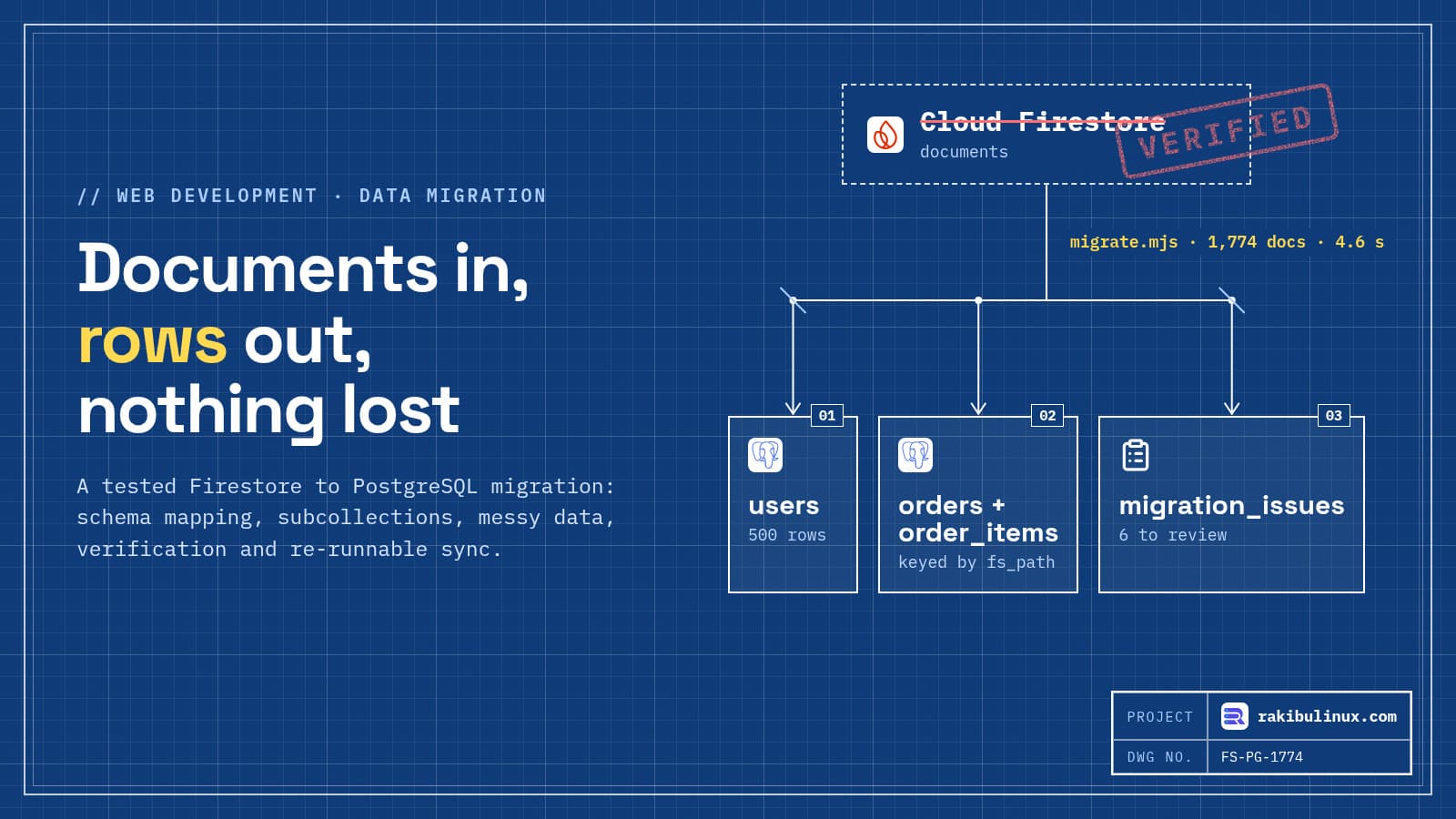
To migrate Firestore to PostgreSQL safely, map documents to tables, copy them with a re-runnable script that logs bad records, then verify counts and totals.
Most apps outgrow Firestore for the same reasons: reports that need joins, transactions across many documents, or a team that thinks in SQL. The export is the easy part. The hard part is the data nobody remembers writing: the total saved as a string in 2022, the field one old app version added, the order pointing at a product that no longer exists.
I've migrated a live platform's data from MySQL to PostgreSQL before (written up in my MySQL to PostgreSQL guide), and the rules are the same. On 11 October 2026 I tested this Firestore version end to end with the Firestore emulator (firebase-tools 15.33.0), firebase-admin 14.5.0 and PostgreSQL 18, using 500 users, 1,254 orders in subcollections and four deliberately messy documents.
Key takeaways
- Subcollection document IDs aren't globally unique. Two users each had an order called
order-1. Key rows by the full document path, not the ID. - Never crash on bad data, never drop it silently. Fix what's unambiguous, flag what's odd, reject what can't load, and log all three in a table.
- Firestore has no tombstones. A re-run only sees documents that exist; find deletions by comparing ID sets, and apply them only when you say so.
- Verify with independent numbers. Counts and money totals from Firestore's own aggregations must reconcile with PostgreSQL, and every difference must be explained.
- Make the script re-runnable. The same script does the rehearsal, the bulk copy and the final sync at cutover.
Step 1: map documents to tables
The source looked like a typical Firebase app: users/{uid} with a nested address map and a tags array, users/{uid}/orders/{orderId} with an items array whose entries hold a DocumentReference to products/{id}. The mapping rules I use:
- Nested maps you query on become columns (
address.city→city). - Arrays of objects become child tables (
items→order_items). - Arrays of strings can stay arrays (
text[]). - References become foreign keys.
- Unknown fields go into a
jsonbcolumn, so nothing is lost while you decide.
CREATE TABLE users (
  id         text PRIMARY KEY,               -- Firestore document ID, kept as is
  name       text NOT NULL,
  email      text UNIQUE,                    -- nullable: one real user had none
  city       text,
  zip        text,
  tags       text[] NOT NULL DEFAULT '{}',
  created_at timestamptz NOT NULL,
  extra      jsonb NOT NULL DEFAULT '{}',    -- undocumented fields land here, not in the bin
  fs_update_time timestamptz NOT NULL        -- Firestore's updateTime, for incremental sync
);

CREATE TABLE orders (
  id         bigserial PRIMARY KEY,
  fs_path    text NOT NULL UNIQUE,           -- users/u-0003/orders/order-1: the only truly unique key
  user_id    text NOT NULL REFERENCES users(id),
  status     text NOT NULL CHECK (status IN ('paid', 'shipped', 'refunded')),
  total      numeric(12,2) NOT NULL,
  created_at timestamptz NOT NULL,
  fs_update_time timestamptz NOT NULL
);

CREATE TABLE order_items (
  order_id   bigint NOT NULL REFERENCES orders(id) ON DELETE CASCADE,
  line       int NOT NULL,
  product_id text NOT NULL REFERENCES products(id),
  qty        int NOT NULL CHECK (qty > 0),
  unit_price numeric(12,2) NOT NULL,
  PRIMARY KEY (order_id, line)
);

CREATE TABLE migration_issues (
  fs_path  text NOT NULL,
  severity text NOT NULL CHECK (severity IN ('fixed', 'flagged', 'rejected')),
  issue    text NOT NULL,
  seen_at  timestamptz NOT NULL DEFAULT now()
);
Keeping Firestore's document IDs as primary keys means every URL, log line and support ticket that mentions u-0042 still points at the same record. The constraints (NOT NULL, CHECK, foreign keys) are your validation: the database refuses data that breaks them, and the script logs why.
Step 2: read everything, page by page
import { getFirestore, FieldPath, Timestamp } from 'firebase-admin/firestore';

// Read a collection or collection group in pages, ordered by document path.
async function* pages(query, size = 300) {
  let last;
  for (;;) {
    let q = query.orderBy(FieldPath.documentId()).limit(size);
    if (last) q = q.startAfter(last);
    const snap = await q.get();
    if (snap.empty) return;
    yield snap.docs;
    last = snap.docs.at(-1);
  }
}
collectionGroup('orders') reads every user's orders in one query, and the parent user is doc.ref.parent.parent.id. Paging keeps memory flat on large collections. Remember that Firestore bills per document read, so every full pass over production costs one read per document.
Step 3: fix, flag or reject each document
class Reject extends Error {}
const convert = (issues) => ({
  date(v, field) {
    if (v instanceof Timestamp) return v.toDate();
    if (typeof v === 'string' && !Number.isNaN(Date.parse(v))) { issues.push(['fixed', `${field} was a string "${v}"`]); return new Date(v); }
    throw new Reject(`${field} is not a date: ${JSON.stringify(v)}`);
  },
  money(v, field) {
    if (typeof v === 'number' && Number.isFinite(v)) return v.toFixed(2);
    if (typeof v === 'string' && /^\d+(\.\d+)?$/.test(v)) { issues.push(['fixed', `${field} was a string "${v}"`]); return Number(v).toFixed(2); }
    throw new Reject(`${field} is not a number: ${JSON.stringify(v)}`);
  },
});

// Each document runs inside a SAVEPOINT, so one bad document can't abort the batch.
for (const doc of docs) {
  const issues = [];
  await client.query('SAVEPOINT doc');
  try {
    await writeOrder(client, doc, issues);
    await client.query('RELEASE SAVEPOINT doc');
  } catch (err) {
    await client.query('ROLLBACK TO SAVEPOINT doc');
    issues.push(['rejected', err instanceof Reject ? err.message : `postgres: ${err.message}`]);
  }
  await logIssues(client, doc.ref.path, issues);
}
The order writer upserts by fs_path and only touches rows whose Firestore updateTime is newer than what PostgreSQL has, then replaces the order's items in the same transaction:
INSERT INTO orders (fs_path, user_id, status, total, created_at, fs_update_time)
VALUES ($1, $2, $3, $4, $5, $6)
ON CONFLICT (fs_path) DO UPDATE SET status = EXCLUDED.status, total = EXCLUDED.total,
  created_at = EXCLUDED.created_at, fs_update_time = EXCLUDED.fs_update_time
WHERE orders.fs_update_time < EXCLUDED.fs_update_time
RETURNING id;   -- no row back = unchanged since the last run
The first run
{"read":1774,"written":1773,"unchanged":0,"rejected":1,"fixed":2,"flagged":3}   real 0m4.610s

 severity |              fs_path              | issue
----------+-----------------------------------+------------------------------------------------------------
 fixed    | users/u-0003/orders/order-1       | total was a string "60.32"
 fixed    | users/u-0004/orders/order-1       | createdAt was a string "2025-06-02T10:00:00Z"
 flagged  | users/u-0005/orders/bad-total     | items add up to 91.92, total says 101.92; kept the total
 flagged  | users/u-0007                      | no email
 flagged  | users/u-0012                      | unknown fields kept in extra: legacyPoints
 rejected | users/u-0006/orders/ghost-product | postgres: ... violates foreign key constraint "order_items_product_id_fkey"
Every messy document I planted was caught, and each kind was handled differently. The order with an item sum that doesn't match its total keeps the stored total, because that's what the customer was charged, but a person should look at it. The order pointing at a deleted product was refused by the foreign key; someone has to decide whether to restore the product or drop the order. 4.6 seconds was against a local emulator; production adds network time and read costs.
Step 4: verify with Firestore's own numbers
users   firestore 500  postgres 500  rejected 0  OK
orders  firestore 1254  postgres 1253  rejected 1  OK
totals  firestore sum 286546.75  postgres sum 286597.08
order IDs used under more than one user: order-1 x2
Counts come from Firestore's count() aggregation and money from its sum(), so the check doesn't reuse the migration's own code. Counts matched once rejected documents were included. The totals differed by 50.33, and that difference has to be explained, not waved away. It was: Firestore's sum() skipped the order whose total is a string (60.32) and included the rejected order (9.99). 286,546.75 − 9.99 + 60.32 = 286,597.08, exactly the PostgreSQL total. When the numbers reconcile to the cent, you can sign off.
The last line is why orders uses fs_path as its unique key. If I had used the Firestore document ID as the primary key, the second order-1 would have overwritten the first one, under a different customer, and the counts would still have looked almost right.
Step 5: incremental sync and deletions
I renamed one user, added one and deleted one order in Firestore, then ran the same script twice:
changed u-0010, added u-0501, deleted users/u-0020/orders/0ptngLRaoz5RtlCCX1Nh
-- re-run (report deletes only)
{"read":1774,"written":2,"unchanged":1771,"rejected":1,...,"deletedAtSource":{"orders":1,"users":0,"applied":false}}
-- re-run with --apply-deletes
{"read":1774,"written":0,"unchanged":1773,"rejected":1,...,"deletedAtSource":{"orders":1,"users":0,"applied":true}}
Only the two changed documents were written. Deletions are found by comparing the paths seen in this pass with what PostgreSQL holds, and they're reported until you pass --apply-deletes. A bug that makes the script read fewer documents than it should must not wipe production rows.
Step 6: cutover and rollback plan
I tested the script, not a production cutover, so treat this as the plan I'd follow:
- Rehearse against a copy of production data and time it. Fix or decide every
rejectedandflaggedissue. - Bulk copy while the app still runs on Firestore. Repeat incremental runs until a pass takes minutes, not hours.
- Freeze writes (maintenance mode or a read-only flag), run the final incremental sync with
--apply-deletes, and run the verification. - Switch the app's data layer to PostgreSQL and reopen writes.
- Keep Firestore untouched as the rollback for a few days. Rolling back after new writes in PostgreSQL means copying them back, so decide in advance how long rollback stays possible.
What about Firebase Authentication?
Moving data doesn't force you to move logins. The low-risk option is to keep Firebase Auth and verify its ID tokens in your new backend with firebase-admin. If you also leave Auth, firebase auth:export exports accounts with password hashes. Firebase's docs say most projects use SCRYPT, a modified version of scrypt, and that the hash parameters (signer key, salt separator, rounds, memory cost) are shown in the Firebase console; treat them as secrets.
Your new login code must verify that modified scrypt on first sign-in and re-hash with your own algorithm. Firebase published its implementation as firebase/scrypt on GitHub (now archived), and community ports exist for Node.js.
Frequently asked questions
How long does a Firestore to PostgreSQL migration take?
The copy itself is quick: 1,774 documents took 4.6 seconds locally, and real projects are limited by read throughput and network. Most of the time goes into schema design, cleaning up issues and rewriting the app's queries, so plan in weeks for a real app, not hours.
Can I keep the same document IDs in PostgreSQL?
Yes, use them as text primary keys for top-level collections. For subcollections, the ID is only unique under its parent, so store the full path or a composite key (parent ID plus document ID).
How do I handle nested objects and arrays?
Turn maps you filter on into columns, arrays of objects into child tables, and simple string arrays into PostgreSQL arrays. Anything you haven't decided on can go into a jsonb column so it isn't lost.
Can I migrate without downtime?
Nearly. Copy in bulk while the app runs, sync incrementally, then freeze writes for the final sync and switch. The freeze lasts as long as the last incremental pass plus verification. Zero downtime needs dual writes from the app, which adds its own risks.
Is PostgreSQL a good Firestore alternative for SaaS?
For relational data, reporting, multi-document transactions and tenant isolation, usually yes. Firestore remains strong for offline-first mobile sync and realtime listeners, which you'd rebuild with something like Socket.IO or a Postgres-backed realtime service.
Planning a move off Firebase?
I migrate production data between databases with rehearsals, verification reports and a rollback plan, and rebuild the backend around PostgreSQL. If you also need tenant isolation afterwards, see my PostgreSQL RLS guide. See my web development services or tell me about your Firebase app.

Written by
MD Rakibul Islam Rakib
Full-stack developer, DevOps engineer and Linux system administrator with 5+ years of production experience. I deploy, harden and fix servers and web apps for clients worldwide, and everything in this article runs on real servers I manage, including this site.
- Firestore to PostgreSQL migration
- Firebase migration to PostgreSQL
- Firestore relational database migration
- Firebase to SQL migration plan
- Firestore alternative for SaaS
- data migration