Next.js "Module Not Found: Can't Resolve": 6 Fixes
 MD Rakibul Islam RakibFull-stack developer, DevOps & Linux engineer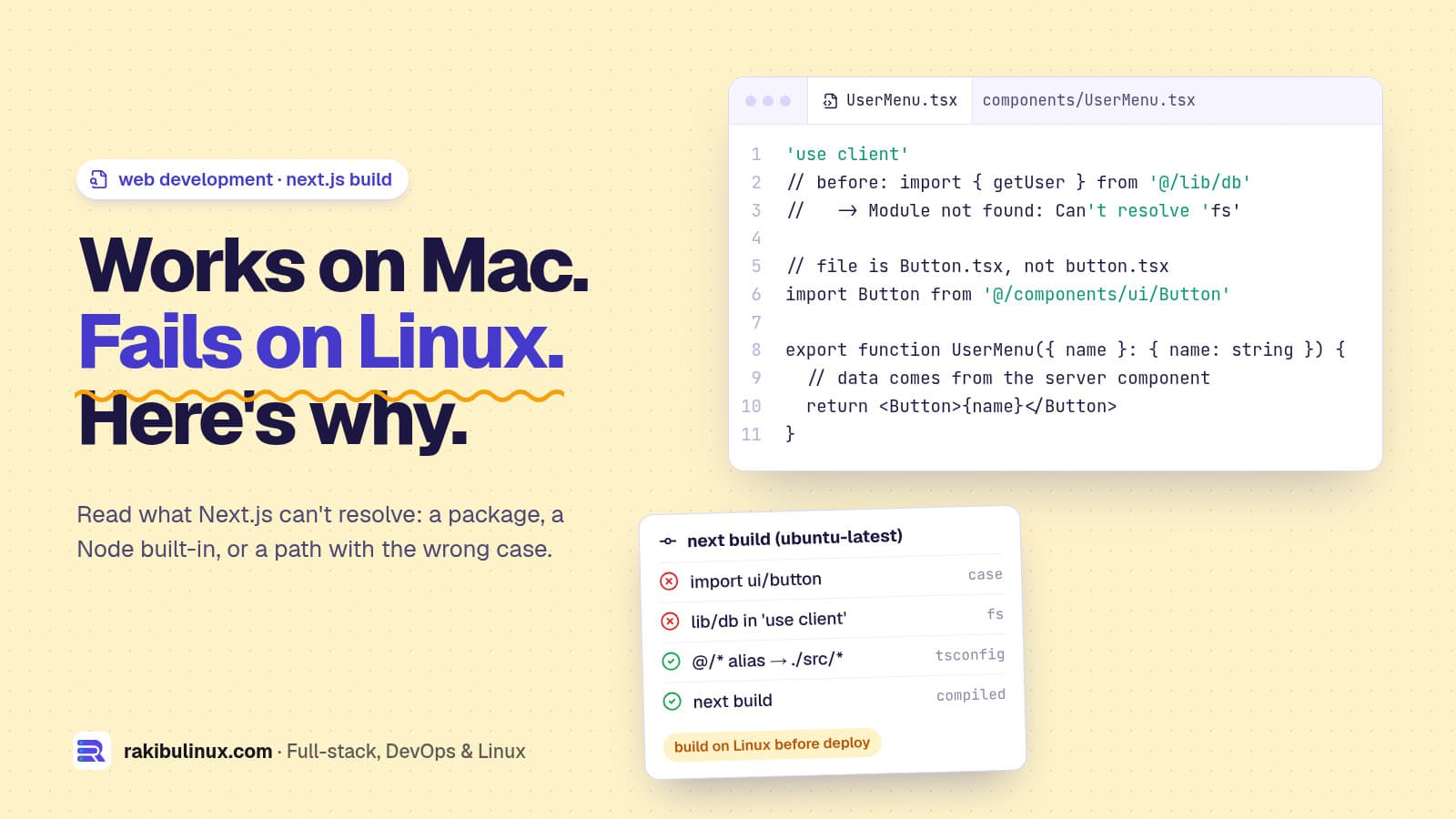
Next.js "Module not found: Can't resolve" means the bundler can't find an import: a missing package, wrong path or letter case, or server code in the client.
This error has a habit of showing up at the worst moment: the app runs fine on your Mac, then the build fails on the Linux server or in CI. Or it appears right after you add 'use client' to a component. I build and deploy Next.js 16 apps on Linux servers, this site included, and almost every "Can't resolve" I've hit fell into one of the six causes below. The error message itself tells you which one if you know how to read it.
Key takeaways
- Read what it can't resolve. A package name (
'framer-motion'), a Node built-in ('fs','child_process') and a local path ('@/components/Button') each have a different fix. - Works on Mac, fails on Linux almost always means letter case. Linux file systems are case-sensitive; macOS and Windows usually aren't.
Can't resolve 'fs'means server-only code is being bundled for the browser. Move it, don't polyfill it.- Check the import trace. Next.js prints the chain of files that led to the bad import. The fix is often in the middle of that chain.
- Clear the cache last, not first:
rm -rf .nextfixes stale builds, not real path errors.
The error
Module not found: Can't resolve '@/components/ui/Button'
  ./app/page.tsx (3:1)

Import trace for requested module:
./app/page.tsx
In Next.js 16 Turbopack is the default bundler for both next dev and next build, so the wording can differ a little from older webpack output, but it always names the import and the file it came from.
Cause 1: The package isn't installed (where the build runs)
Module not found: Can't resolve 'framer-motion'
Check it's in package.json and actually installed:
grep framer-motion package.json
ls node_modules/framer-motion > /dev/null && echo installed
npm install framer-motion    # or: bun add / pnpm add / yarn add
If it works locally but not on the server or in CI, look at how dependencies are installed there:
- Installed as a devDependency while the server runs
npm ci --omit=dev. Anything imported by app code at build time belongs independencies. - The lock file wasn't committed, or it's for a different package manager, so CI installed something else. Commit one lock file and use the matching
ci/--frozen-lockfileinstall. - A monorepo where the package lives in another workspace. Install it in the app's workspace, and add internal packages to
transpilePackagesinnext.config.tsif they ship TypeScript.
If the install itself fails with a peer-dependency error, see npm ERESOLVE unable to resolve dependency tree.
Cause 2: Letter case (works on Mac, fails on Linux)
import Button from '@/components/ui/button' // file is Button.tsx
macOS and Windows treat button and Button as the same file. Linux, Docker and every CI runner don't. Make the import match the file name exactly. Renaming only the case is tricky because git on macOS often doesn't notice it. Use git mv through a temporary name:
git mv components/ui/button.tsx components/ui/Button.tmp.tsx
git mv components/ui/Button.tmp.tsx components/ui/Button.tsx
git ls-files components/ui    # confirm what git actually stores
Then search the codebase for every import of the old spelling. To catch this before CI does, turn on forceConsistentCasingInFileNames in tsconfig.json (it's on by default in new projects).
Cause 3: Path alias not configured
Imports like @/components/... only work if tsconfig.json (or jsconfig.json) defines the alias, and it must match where your code lives:
{
  "compilerOptions": {
    "paths": { "@/*": ["./src/*"] }
  }
}
If your code is in src/ but the alias says "./*", every @/ import breaks. Next.js reads these paths automatically, so you don't need a bundler alias as well. After editing tsconfig.json, restart the dev server.
Cause 4: Can't resolve 'fs', 'path' or 'child_process'
Module not found: Can't resolve 'fs'
Import trace for requested module:
./lib/db.ts
./components/UserMenu.tsx      <- has 'use client'
Node built-ins don't exist in the browser. This error means something that touches the file system, the database or secrets was imported, directly or through another file, into a component that runs in the browser. Follow the import trace to the 'use client' file. The fix is structural:
- Fetch the data in a server component and pass the result to the client component as props.
- Or move the logic into a Server Action or route handler and call that from the client.
- Add
import 'server-only'at the top of server modules likelib/db.ts. Next.js then fails with a clear message whenever a client file imports them.
Don't paper over it with a browser fallback for fs. If a third-party package needs one only for an unused code path, Turbopack supports a conditional alias in next.config.ts: turbopack: { resolveAlias: { fs: { browser: './empty.ts' } } }. Use it for libraries, not for your own code.
Cause 5: Package exports and ESM-only packages
Module not found: Can't resolve 'some-lib/dist/utils'
Modern packages declare a public exports map in their package.json, and deep imports into files that aren't listed are refused. Import from the documented entry point instead. Check what's exported with cat node_modules/some-lib/package.json. This often appears after a major version upgrade, when a library moved files or became ESM-only. Read its changelog for the new import path.
For heavy server-side packages (database drivers, native modules, PDF or image libraries), listing them in serverExternalPackages tells Next.js to load them with Node at runtime instead of bundling them. That avoids many resolve errors from their internals.
Cause 6: Stale cache or half-finished install
When the import is correct and the file exists, clear the build cache and reinstall cleanly:
rm -rf .next node_modules
npm ci            # or: bun install --frozen-lockfile
npm run build
On low-memory servers a build can also die halfway and leave odd errors behind. If you see heap errors, read JavaScript heap out of memory during next build.
Prevent it in CI
- Build on Linux before you deploy. A GitHub Actions job running
next buildon Ubuntu catches case and dependency errors before users do. My deploy pipeline with auto-rollback builds first and never swaps in a failed release. - Use the frozen lock file install everywhere, so every machine gets the same packages.
- Mark server modules with
server-only, so client imports fail fast with a readable message.
Upgrading to Next.js 16 and seeing other breakages? See middleware renamed to proxy and images not loading after the upgrade.
Frequently asked questions
How do I fix "Module not found: Can't resolve" in Next.js?
Look at what it can't resolve. Install a missing package in dependencies, fix the path or letter case of a local import, check your @/* alias in tsconfig.json, or move server-only code out of client components.
Why does my Next.js build work locally but fail on Vercel or Linux?
Usually letter case: an import says button but the file is Button.tsx. Your Mac ignores the difference and Linux doesn't. The other common cause is a package installed locally but missing from package.json or the lock file.
What does "Can't resolve 'fs'" mean in Next.js?
Code that uses Node's file system ended up in the browser bundle, almost always through a component marked 'use client'. Keep that code in server components, Server Actions or route handlers, and pass only data to the client.
Does Turbopack cause Module not found errors?
Turbopack resolves imports the same way for correct code. Projects that relied on custom webpack aliases or fallbacks need the equivalent under turbopack.resolveAlias, because Next.js 16 builds with Turbopack by default.
Will deleting node_modules fix it?
Only if the install was broken or the cache is stale. If the import path, letter case or alias is wrong, a clean install gives you the same error again, so check those first.
Build failing and the deadline is close?
I fix broken Next.js, React and Node.js builds, upgrades and deploys, usually the same day. See my React and Next.js bug fixing service, all web development services, or send me the full error and import trace.

Written by
MD Rakibul Islam Rakib
Full-stack developer, DevOps engineer and Linux system administrator with 5+ years of production experience. I deploy, harden and fix servers and web apps for clients worldwide, and everything in this article runs on real servers I manage, including this site.
- Module not found: Can't resolve
- Next.js 16
- Can't resolve 'fs'
- tsconfig paths
- Turbopack
- case sensitive imports
- server-only