Stripe Usage-Based Billing in Node.js: 2026 Guide
 MD Rakibul Islam RakibFull-stack developer, DevOps & Linux engineer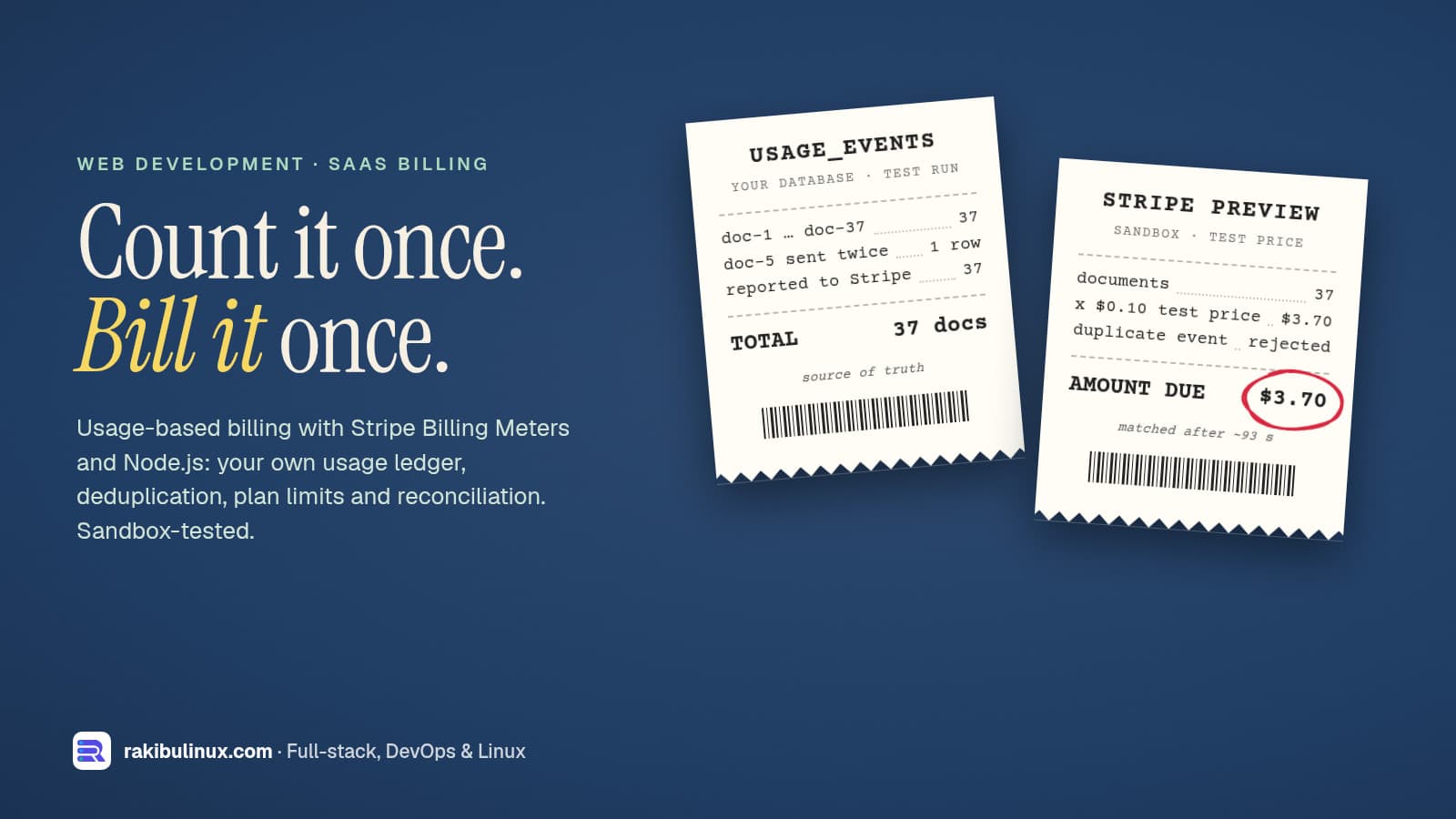
For Stripe usage-based billing in Node.js, record usage in your own database, send it to a Billing Meter with a stable identifier, then reconcile totals.
AI products, API platforms and document tools often charge per use: per document processed, per API call, per thousand tokens. The Stripe part is a few API calls. The hard parts are making sure a retried request isn't billed twice, showing customers their usage before the invoice, and proving your numbers match Stripe's. I built that on 11 October 2026 with stripe-node 23.0.0 (API version 2026-09-30.endive) and PostgreSQL, then ran it against a Stripe sandbox. Everything below is from that run; no real money moved.
Key takeaways
- Check which Stripe product fits first. Stripe's own guide now marks Billing Meters "Not Recommended" for new integrations and points to Metronome. Billing Meters remain fully supported and fit simple pay-as-you-go.
- Your database is the source of truth. A usage table with a unique key per unit of work stopped a retried request from being billed twice.
- Send each row with its ID as the meter event
identifier. Stripe rejected the re-sent event: "An event already exists with identifier …". - Stripe's totals arrive later. My meter summary matched our 37 documents about 93 seconds after reporting started. Show customers your own numbers.
- Reconcile before invoices finalize. Compare your totals with Stripe's meter summaries for every customer.
Billing Meters or Metronome?
When I checked Stripe's documentation for this post, the Billing Meters implementation guide opened with a "Not Recommended" box: unless you maintain an existing Billing Meters integration, use Metronome, which Stripe calls its primary usage-based billing platform. Stripe's comparison page also says it will keep fully supporting basic usage-based billing for existing users, and that it works best for pay-as-you-go pricing. Metronome adds prepaid credits with real-time burndown, enterprise commits and minimums, ramp schedules and dimensional pricing; the same page lists gaps such as no Connect support and limited Checkout support.
My rule of thumb: pure pay-as-you-go ("$0.10 per document, billed monthly") on Billing Meters is fine, especially if you need Connect or Checkout. Prepaid credits, enterprise contracts or real-time balances point to Metronome. I tested Billing Meters here; Metronome needs a separate signup, so I'm not covering its API. Either way, the parts in your own app below stay the same.
Step 1: a usage ledger in your database
CREATE TABLE usage_events (
  id                 uuid PRIMARY KEY DEFAULT gen_random_uuid(),   -- sent to Stripe as the meter event identifier
  tenant_id          text NOT NULL,
  stripe_customer_id text NOT NULL,
  idempotency_key    text NOT NULL UNIQUE,     -- e.g. the document ID we processed; a retry can't bill twice
  quantity           integer NOT NULL CHECK (quantity > 0),
  occurred_at        timestamptz NOT NULL DEFAULT now(),
  reported_at        timestamptz                -- NULL until Stripe accepted it
);
CREATE INDEX usage_unreported ON usage_events (occurred_at) WHERE reported_at IS NULL;
// Record usage in the same transaction as the work it bills for.
export async function recordUsage(client, { tenantId, stripeCustomerId, idempotencyKey, quantity }) {
  const r = await client.query(
    `INSERT INTO usage_events (tenant_id, stripe_customer_id, idempotency_key, quantity)
     VALUES ($1, $2, $3, $4) ON CONFLICT (idempotency_key) DO NOTHING`,
    [tenantId, stripeCustomerId, idempotencyKey, quantity]);
  return r.rowCount === 1;   // false = this work was already billed
}
doc-1001 first insert: true | same doc retried: false
doc-1002, 20 concurrent calls -> billed 1 time(s)
Pick an idempotency key that names the work, not the request: the document ID, the AI job ID, the API request ID your gateway assigns. Writing the usage row in the same transaction as the work means a crash can't leave you with work done and not billed, or billed and not done. It's the same pattern I use for processing Stripe webhooks exactly once.
Step 2: plan limits from your own numbers
const PLAN_LIMITS = { starter: 1000, growth: 20000 };   // documents per billing period

export async function assertWithinPlan(tenantId, plan, periodStart, quantity) {
  const { rows } = await db.query(
    'SELECT coalesce(sum(quantity), 0)::int AS used FROM usage_events WHERE tenant_id = $1 AND occurred_at >= $2',
    [tenantId, periodStart]);
  const used = rows[0].used;
  if (used + quantity > PLAN_LIMITS[plan]) throw new Error(`plan limit: ${used} + ${quantity} > ${PLAN_LIMITS[plan]}`);
  return used;
}
used this period: 1000
starter plan, 1 more document -> plan limit: 1000 + 1 > 1000
growth plan, 1 more document -> used so far 1000
This check and the insert are separate statements, so two simultaneous requests can both pass at 999. For a hard cap, take a per-tenant lock first (SELECT pg_advisory_xact_lock(hashtext($1)) inside the transaction); for soft limits, a small overage is usually acceptable. The same query powers the customer's "you've used 642 of 1,000 documents" bar, which is always current. Stripe's isn't, as you'll see below. For request rates rather than monthly quotas, see my per-plan rate limiting guide.
Step 3: create the meter, price and subscription
const meter = await stripe.billing.meters.create({
  display_name: 'Documents processed',
  event_name: 'documents_processed',
  default_aggregation: { formula: 'sum' },
  customer_mapping: { type: 'by_id', event_payload_key: 'stripe_customer_id' },
  value_settings: { event_payload_key: 'value' },
});
const price = await stripe.prices.create({
  currency: 'usd', unit_amount: 10, billing_scheme: 'per_unit',     // $0.10 per document
  recurring: { interval: 'month', usage_type: 'metered', meter: meter.id },
  product_data: { name: 'Documents' },
});
const sub = await stripe.subscriptions.create({ customer: customerId, items: [{ price: price.id }] });
These are one-off setup calls; most teams create the meter and price once in the Dashboard and keep their IDs in config. In my sandbox I used collection_method: 'send_invoice' on the subscription so no test card was needed.
Step 4: report usage with a stable identifier
// A worker sends unreported rows to Stripe. Safe to run on several machines and to retry.
export async function reportToStripe(batchSize = 100) {
  const client = await db.connect();
  try {
    await client.query('BEGIN');
    const { rows } = await client.query(
      `SELECT id, stripe_customer_id, quantity, occurred_at FROM usage_events
        WHERE reported_at IS NULL ORDER BY occurred_at LIMIT $1 FOR UPDATE SKIP LOCKED`, [batchSize]);
    for (const row of rows) {
      await stripe.billing.meterEvents.create({
        event_name: 'documents_processed',
        identifier: row.id,                                   // Stripe dedupes on this
        timestamp: Math.floor(row.occurred_at.getTime() / 1000),
        payload: { stripe_customer_id: row.stripe_customer_id, value: String(row.quantity) },
      });
      await client.query('UPDATE usage_events SET reported_at = now() WHERE id = $1', [row.id]);
    }
    await client.query('COMMIT');
  } catch (err) {
    await client.query('COMMIT');   // keep rows already marked; the failed one is retried next run
    throw err;
  } finally {
    client.release();
  }
}
Run it every minute from a job queue (my BullMQ production guide covers the worker side). The dangerous moment is a crash after Stripe accepted the event but before reported_at was saved: the next run sends the same row again. I simulated exactly that by re-sending the first row's ID:
re-send same identifier -> An event already exists with identifier 9d173bb3-f787-4d8b-8d86-e8f64ffab33a.
Stripe refused the duplicate at request time, so treat that error as "already reported" and mark the row. One limit to know: stripe-node's type docs say Stripe enforces identifier uniqueness "within a rolling period of at least 24 hours". It protects against quick retries, not against re-sending last month's rows, which is one more reason your table is the record. Stripe also accepts event timestamps only from the past 35 days up to 5 minutes in the future, and its docs warn that usage arriving after an invoice finalizes may not be billed.
Step 5: reconcile your totals with Stripe's
const summaries = await stripe.billing.meters.listEventSummaries(meterId, {
  customer: customerId,
  start_time: periodStart,   // Unix seconds
  end_time: periodEnd,
});
const theirs = summaries.data.reduce((sum, s) => sum + s.aggregated_value, 0);
usage rows: 37
reported: 37
reconcile: ours 37, stripe 37, 93 s after reporting started
stripe summary 30 s later: 37
invoice preview: 37 × blogtest documents (at $0.10 / month) | amount_due 3.7 usd
Stripe's docs say meter events are processed asynchronously, so summaries and upcoming invoices may lag recent events. In my run the summary matched after about a minute and a half, including the time it took to send the 37 events. Run a reconciliation job daily and again shortly before each customer's period ends; alert on any customer where the numbers differ after a grace period. The invoice preview (stripe.invoices.createPreview({ subscription })) is the final check of what the customer will actually pay.
A note on how I ran this: the sandbox calls went through the Stripe CLI, which uses the same endpoints and parameters as the stripe-node code shown here. I confirmed every SDK method above exists in stripe@23.0.0. Afterwards I cancelled the test subscription, deactivated the meter, archived the price and product and deleted the test customer. Meter events can't be deleted; Stripe's meter event adjustments API can cancel them.
Frequently asked questions
Should I use Stripe Billing Meters or Metronome in 2026?
Stripe recommends Metronome for new usage-based integrations and keeps fully supporting Billing Meters for existing users. Simple pay-as-you-go pricing works on Billing Meters; prepaid credits, enterprise commitments and real-time balances are Metronome territory. Check Stripe's comparison page, because the feature gaps change.
How do I stop Stripe from billing usage twice?
Deduplicate in your own database with a unique key per unit of work, and send each usage row with its ID as the meter event identifier. Stripe rejected a re-sent identifier in my test, but it only promises uniqueness for a rolling window of at least 24 hours.
Can customers see their usage in real time with Stripe?
Not reliably from Stripe's meter totals, which lag because events are processed asynchronously. Show usage from your own usage table, and use Stripe's summaries for reconciliation.
Should I send one meter event per action or batch them?
One per unit of work is simplest and keeps identifiers meaningful. At high volume, pre-aggregate (for example per customer per minute) or use Stripe's v2 meter event streams; Stripe documents a separate live-mode limit of 1,000 meter event calls per second per account.
What happens if usage is reported late?
Stripe accepts events with timestamps up to 35 days old, but usage that arrives after an invoice is finalized may appear in summaries without being added to that invoice. Report frequently and reconcile before period end.
Adding usage-based pricing to your SaaS?
I build billing backends for SaaS and AI products: usage ledgers, plan limits, Stripe integration and reconciliation reports that finance can trust. See my web development services or tell me how you want to charge.

Written by
MD Rakibul Islam Rakib
Full-stack developer, DevOps engineer and Linux system administrator with 5+ years of production experience. I deploy, harden and fix servers and web apps for clients worldwide, and everything in this article runs on real servers I manage, including this site.
- Stripe usage-based billing Node.js
- Stripe billing meters Node.js
- usage-based pricing implementation
- SaaS credit system backend
- AI SaaS usage metering
- Stripe Metronome