Self-Host LiveKit on a VPS: Setup, TURN and Tokens
 MD Rakibul Islam RakibFull-stack developer, DevOps & Linux engineer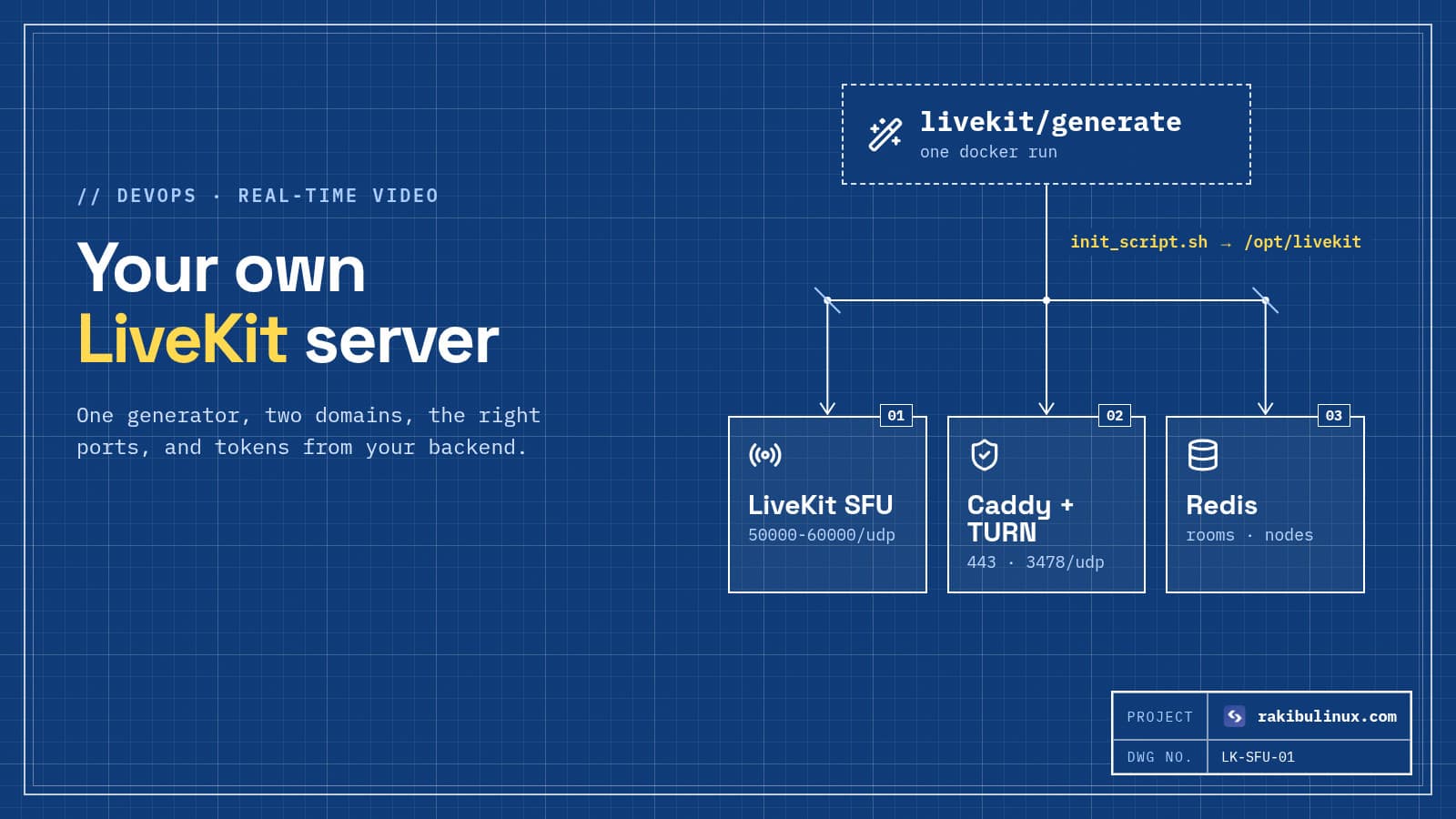
To self-host LiveKit, point two domains at a VPS, run the livekit/generate Docker image, install what it creates and open the WebRTC UDP port range.
LiveKit is the media server I reach for when a client wants video, audio or voice AI inside their own product rather than a ready-made meeting app. It is open source (Apache 2.0), it scales well, and its SDKs cover web, iOS, Android, Flutter and React Native. LiveKit Cloud is the easy hosted option; self-hosting makes sense when you need data on your own servers, a fixed monthly bill, or a region the cloud doesn't serve. This is how I deploy it on a single VPS, plus how it compares with Jitsi, which I have run for clients for years.
Key takeaways
- LiveKit is infrastructure, not an app. You build your own interface with its SDKs, or start from the open-source example meeting app.
- The generator does most of the work:
livekit/generatewrites the LiveKit config, Caddy for TLS, Redis and a Docker Compose file. - You need two domains: one for LiveKit itself and one for its built-in TURN server, both pointing at the server.
- Open the UDP range. Media flows over 50000-60000/udp; without it, calls fall back to TCP or TURN and quality suffers.
- Your backend signs access tokens with the API key and secret. Never put the secret in a browser or mobile app.
LiveKit or Jitsi?
I get this question on almost every video project, so here is the short version:
- Pick Jitsi Meet when you want a complete meeting product today: rooms, chat, screen sharing, recording with Jibri and phone dial-in with Jigasi, all in a ready web app. See my Jitsi Meet with JWT and Jibri guide.
- Pick LiveKit when video is a feature inside your own product: telehealth, online classes in your LMS, live shopping, support calls, or voice AI agents that talk to users in real time. You design the interface; LiveKit moves the media.
- Both are SFUs: each participant uploads one stream and the server forwards it to the others. Both self-host on Linux with Docker.
What you need
- A VPS with a public IP and no other web server on ports 80 and 443 (Caddy takes them). LiveKit's docs recommend compute-optimised instances, because capacity is limited by CPU and bandwidth, not memory.
- Two DNS A records:
livekit.example.comandlivekit-turn.example.com, both pointing to the server IP. - Docker on your own machine to run the config generator.
- A hardened Ubuntu 24.04 server. My hardening checklist covers SSH and firewall basics.
Step 1: Generate the configuration
Run the generator on your laptop or on the server, in an empty folder:
docker pull livekit/generate
docker run --rm -it -v$PWD:/output livekit/generate
It asks for your two domains and a few options, then writes a folder with:
livekit.yaml: the LiveKit server config, including your generated API key and secret,caddy.yaml: Caddy, which gets Let's Encrypt certificates and terminates TLS,redis.confanddocker-compose.yaml,init_script.shor acloud_initfile that installs everything on a fresh server.
Save the API key and secret in your password manager. Your backend needs them to create tokens.
Step 2: Install on the server
If your provider supports cloud-init, paste the generated cloud-init file into the server's user data when you create it. Otherwise copy the init script to the server and run it:
scp init_script.sh root@203.0.113.40:
ssh root@203.0.113.40 'chmod +x init_script.sh && ./init_script.sh'
The script installs Docker, puts the configuration in /opt/livekit and registers a systemd service called livekit-docker:
systemctl status livekit-docker --no-pager
cd /opt/livekit && docker compose logs -f livekit
LiveKit runs with host networking, which its docs recommend for performance. Keep that in mind for the firewall: the ports are on the host directly.
Step 3: Open the firewall
sudo ufw allow 80/tcp            # certificate issuance
sudo ufw allow 443/tcp           # HTTPS, WebSocket signalling, TURN/TLS
sudo ufw allow 7881/tcp          # WebRTC over TCP
sudo ufw allow 3478/udp          # TURN/UDP
sudo ufw allow 50000:60000/udp   # WebRTC media
Check your cloud provider's firewall or security group too. A closed UDP range is the most common reason a self-hosted LiveKit "connects but shows no video".
Step 4: Test it with the LiveKit CLI
curl -sSL https://get.livekit.io/cli | bash

export LIVEKIT_URL=wss://livekit.example.com
export LIVEKIT_API_KEY=APIxxxxxxxx
export LIVEKIT_API_SECRET=your-secret

lk token create --join --room test-room --identity rakib
lk load-test --room test-room --video-publishers 8
The token command prints a JWT you can paste into LiveKit's example web app to join from a browser. The load test adds simulated publishers so you can watch CPU and bandwidth on the server (htop, nload) before real users arrive. Raise the publisher count until the server struggles, then size your production server with headroom.
Step 5: Issue tokens from your backend
In your app, users log in to your backend, which returns a short-lived LiveKit token. With the official Node.js server SDK:
import { AccessToken } from "livekit-server-sdk";

export async function livekitToken(userId: string, room: string) {
  const at = new AccessToken(process.env.LIVEKIT_API_KEY, process.env.LIVEKIT_API_SECRET, {
    identity: userId,
    ttl: "1h",
  });
  at.addGrant({ roomJoin: true, room, canPublish: true, canSubscribe: true });
  return at.toJwt();
}
The grant decides what a user can do. For a webinar, give viewers canPublish: false. Check that the user is allowed in that room before you sign anything; the token is the only lock on the door.
Recording, streaming and voice AI
- Egress records rooms or single tracks to MP4 and object storage, or streams them to RTMP. It is a separate service that needs Redis and plenty of CPU, so I run it on its own server. If you need S3-compatible storage on your own hardware, see my self-hosted S3 alternatives.
- Ingress brings RTMP or WHIP streams (for example from OBS) into a room.
- SIP connects phone calls to rooms.
- Agents: LiveKit's agents framework joins rooms as an AI participant that listens and talks back. Your self-hosted server works with it the same way as LiveKit Cloud.
Scaling beyond one server
One node handles a lot, but when you need more, add nodes that share the same Redis. LiveKit uses Redis to know which node hosts each room, so a room stays on one node and new rooms spread across the cluster. Put the nodes in the same region as your users; latency matters more than raw server size for real-time media.
Troubleshooting
- Connects, but no audio or video: the UDP range or 7881/tcp is blocked, at the host or at the cloud firewall.
- Certificate errors: one of the two DNS records doesn't point to the server, or port 80 is closed, so Caddy can't get a certificate. Check
docker compose logs caddy. - "invalid token" / 401: the token was signed with a different key pair than the one in
livekit.yaml, or it expired. - Choppy video at scale: CPU or bandwidth is maxed. Use the load test numbers to size up, or add a second node.
Frequently asked questions
Is LiveKit free to self-host?
Yes. The LiveKit server is open source under the Apache 2.0 licence. You pay for your servers and bandwidth; LiveKit Cloud is the paid managed option.
Do I need a TURN server for LiveKit?
LiveKit has a TURN server built in, and the generated config turns it on with its own domain. It lets users behind strict corporate firewalls connect over port 443.
Can LiveKit replace Zoom or Google Meet?
It can power your own Zoom-like product, but you build the interface. If you want a finished meeting app without development, self-hosted Jitsi Meet is the faster route.
Does self-hosted LiveKit work with voice AI agents?
Yes. The agents framework connects to any LiveKit server with a URL, API key and secret, so you can run AI voice assistants against your own deployment.
How big a server do I need?
It depends on how many people publish video and at what quality. Start with a compute-optimised VPS, run lk load-test with numbers close to your real rooms, and keep headroom.
Want LiveKit running for your product?
I deploy and maintain self-hosted LiveKit with TURN, Egress recording, token services in your backend, monitoring and scaling, and I build the web app around it. See my DevOps services or tell me what you are building.

Written by
MD Rakibul Islam Rakib
Full-stack developer, DevOps engineer and Linux system administrator with 5+ years of production experience. I deploy, harden and fix servers and web apps for clients worldwide, and everything in this article runs on real servers I manage, including this site.
- LiveKit
- self-host LiveKit
- WebRTC SFU
- LiveKit vs Jitsi
- TURN server
- video API
- voice AI