Postgres "Password Authentication Failed": Fixes
 MD Rakibul Islam RakibFull-stack developer, DevOps & Linux engineer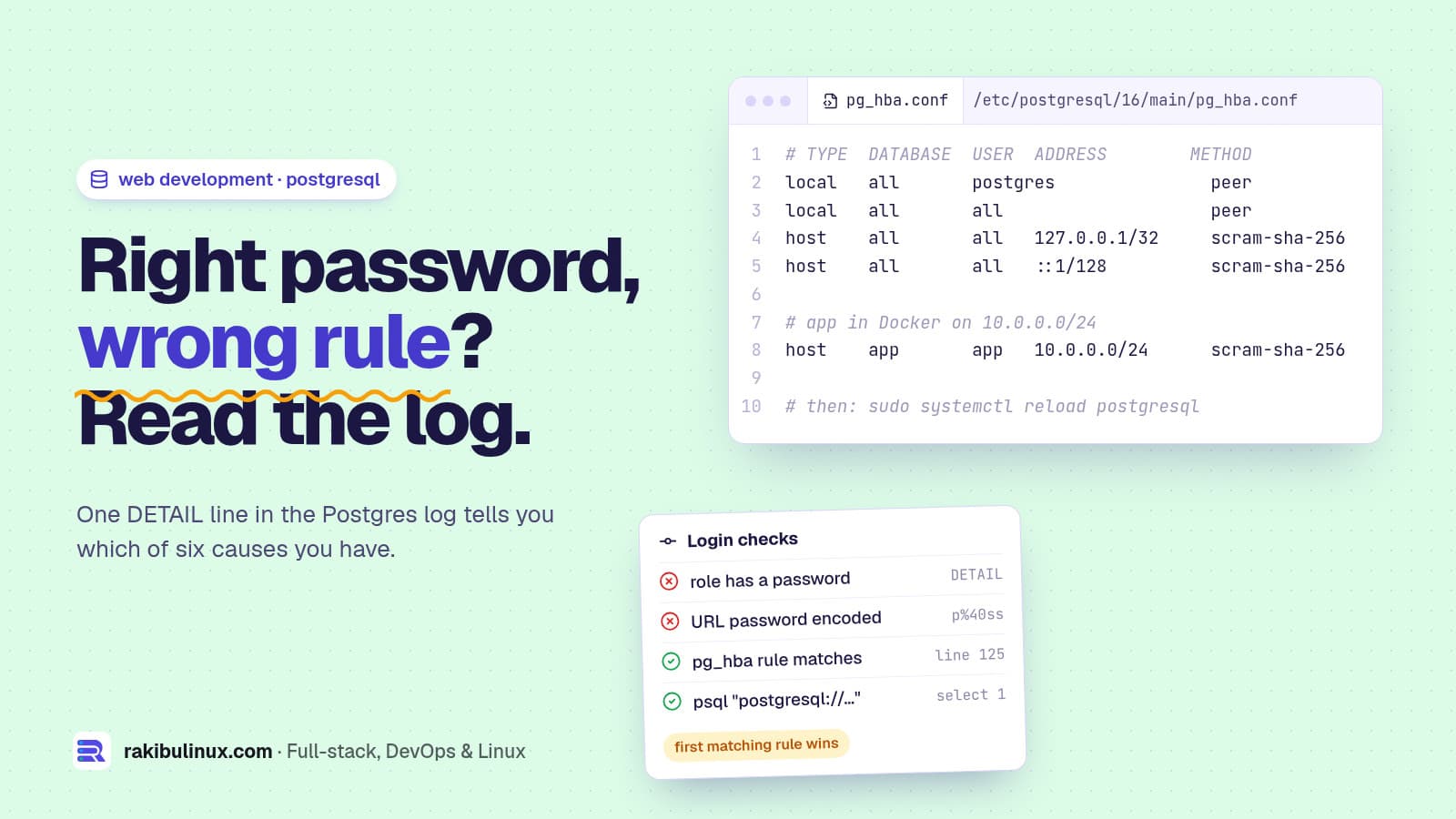
"Password authentication failed for user" means Postgres rejected the login: a wrong password, a user without one, or a pg_hba.conf rule that doesn't match.
This error stops a deploy cold. The app can't reach its data, migrations won't run, and the message gives you almost nothing to work with. I run PostgreSQL behind the NestJS and Prisma API that powers this site, and I've chased this error on fresh VPS installs, in Docker Compose stacks and after password changes. It always comes down to one of six things, and the Postgres server log tells you which. Here is the order I check them in.
Key takeaways
- Check the server log, not only the app's error. Postgres logs a
DETAILline that says whether the user has no password, the password didn't match, or nopg_hba.confrule matched. - A fresh install has no password for
postgres. Local logins use "peer" authentication. Set a password before connecting over TCP. - Special characters in a URL password (
@ : / # %) must be percent-encoded inDATABASE_URL, or the client sends the wrong password. - Docker ignores
POSTGRES_PASSWORDafter the first start. The password lives in the data volume. - Peer authentication failed is a different error with a different fix: connect with
-h 127.0.0.1or change the rule.
The error and its cousins
FATAL:  password authentication failed for user "app"
FATAL:  Peer authentication failed for user "postgres"
FATAL:  no pg_hba.conf entry for host "172.18.0.5", user "app", database "app", no encryption
Prisma shows the first one as P1000: Authentication failed against database server; node-postgres, Django and Rails show the Postgres text directly. The fixes are the same.
Step 1: Read the Postgres log
The client only gets a short message on purpose, so attackers learn nothing. The server log has the detail:
sudo tail -n 30 /var/log/postgresql/postgresql-*-main.log     # Ubuntu / Debian
docker compose logs db --tail 30                               # Docker
FATAL:  password authentication failed for user "app"
DETAIL:  User "app" has no password assigned.
DETAIL:  Connection matched file "/etc/postgresql/16/main/pg_hba.conf" line 125: "host all all 127.0.0.1/32 scram-sha-256"
"has no password assigned", "Password does not match", and "Role does not exist" each point to a different cause below. The second DETAIL line tells you which pg_hba.conf rule handled the login, which saves a lot of guessing.
Cause 1: The user has no password (fresh install)
On Ubuntu and Debian, the postgres superuser is created without a password and logs in locally through "peer" authentication: your Linux username must match the database role. So this works:
sudo -u postgres psql
but any TCP login, which is what your app uses, fails. Create a dedicated user and database for the app instead of using postgres:
sudo -u postgres psql
CREATE ROLE app WITH LOGIN PASSWORD 'use-a-long-random-password';
CREATE DATABASE app OWNER app;
\q
Generate the password with openssl rand -hex 24. Hex has no characters that need escaping in a URL, which avoids cause 3.
Cause 2: The password really is wrong
Test the exact credentials from the app's environment, from the same machine the app runs on:
psql "postgresql://app:THE_PASSWORD@127.0.0.1:5432/app" -c 'select 1'
If this fails too, reset it and update the app's .env in the same step:
sudo -u postgres psql -c "ALTER ROLE app WITH PASSWORD 'new-password';"
Then restart the app so it reads the new value. A Node process under PM2 keeps the old environment until you run pm2 restart app --update-env.
Cause 3: Special characters in DATABASE_URL
This one wastes hours. If the password contains @, :, /, #, ? or %, the URL parser splits it in the wrong place and the client sends only part of the password. Percent-encode it:
node -e 'console.log(encodeURIComponent(process.argv[1]))' 'p@ss:w/rd#1'
# p%40ss%3Aw%2Frd%231
DATABASE_URL="postgresql://app:p%40ss%3Aw%2Frd%231@127.0.0.1:5432/app"
Also watch for quotes and trailing spaces copied into .env, and a $ that your shell or Docker Compose tries to expand. In Compose, write a literal dollar sign as $$.
Cause 4: Docker kept the old password
The official postgres image reads POSTGRES_PASSWORD only when it initialises an empty data folder. Change the variable later and nothing happens, because the password is already stored in the volume. Either change it inside the database:
docker compose exec db psql -U postgres -c "ALTER ROLE postgres WITH PASSWORD 'new-password';"
or, only on a throwaway dev database, remove the volume and start fresh with docker compose down -v. Never run down -v on production: it deletes the data. My Docker Compose production checklist covers volumes and backups.
Inside Compose, the app must connect to the service name, not localhost: postgresql://app:pw@db:5432/app. With localhost you get a connection error instead, which my P1001 guide covers.
Cause 5: pg_hba.conf doesn't allow the connection
"no pg_hba.conf entry for host" means no rule matched at all. "Peer authentication failed" means a local rule with peer matched a socket login. Find the file and read the active rules:
sudo -u postgres psql -c 'SHOW hba_file;'
sudo grep -vE '^\s*(#|$)' /etc/postgresql/16/main/pg_hba.conf
For an app on the same server, connecting over TCP with 127.0.0.1 already matches the default scram-sha-256 rule. For an app in Docker or on another server, add a narrow rule for its network, not 0.0.0.0/0:
host app app 10.0.0.0/24 scram-sha-256
Then reload: sudo systemctl reload postgresql. Rules are checked top to bottom, so put specific ones above broad ones.
Cause 6: md5 vs scram-sha-256
Since PostgreSQL 14 the default is password_encryption = scram-sha-256. A password set years ago may still be stored as an MD5 hash. If a rule demands scram-sha-256, that old hash can't be used and the login fails even with the right password. Set the password again on a current server and it's stored as SCRAM. Very old client libraries that don't support SCRAM need upgrading; every current Node, Python and PHP driver does.
Lock it down while you're here
- One role per app, owning only its database. Don't run apps as
postgres. - Keep port 5432 closed to the internet. Connect remote tools through an SSH tunnel. My Ubuntu hardening checklist includes the firewall rules.
- Watch connection counts once auth works. The next common error is "too many clients already".
Frequently asked questions
What is the default password for the postgres user?
There isn't one. On Ubuntu and Debian the postgres role has no password and logs in locally through peer authentication. Run sudo -u postgres psql and set one with ALTER ROLE if you need TCP logins.
What's the difference between peer and password authentication?
Peer authentication trusts the Linux user that connects through the local socket and requires it to match the database role name. Password authentication (scram-sha-256 or md5) checks a password and is what apps use over TCP.
Why does psql work but my app gets "password authentication failed"?
psql probably connects through the Unix socket with peer authentication, while the app connects over TCP with a password. Test the app's exact URL with psql "postgresql://..." to reproduce what the app sees.
Do I need to restart Postgres after editing pg_hba.conf?
No, a reload is enough: sudo systemctl reload postgresql or SELECT pg_reload_conf();. Changing listen_addresses in postgresql.conf is different and needs a full restart.
How do I fix Prisma P1000 authentication failed?
P1000 is this same Postgres error reported by Prisma. Check the server log's DETAIL line, test the URL with psql, and percent-encode special characters in the password inside DATABASE_URL.
Stuck on a database that won't connect?
I build and fix Node.js and NestJS backends on PostgreSQL, from first connection to production pooling and backups. See my backend API development service, all web development services, or send me the log line and I'll tell you what's wrong.

Written by
MD Rakibul Islam Rakib
Full-stack developer, DevOps engineer and Linux system administrator with 5+ years of production experience. I deploy, harden and fix servers and web apps for clients worldwide, and everything in this article runs on real servers I manage, including this site.
- password authentication failed for user
- PostgreSQL
- pg_hba.conf
- Peer authentication failed
- DATABASE_URL
- Prisma P1000
- Docker Postgres