Linux OOM Killer Killed Your App? Find and Fix It
 MD Rakibul Islam RakibFull-stack developer, DevOps & Linux engineer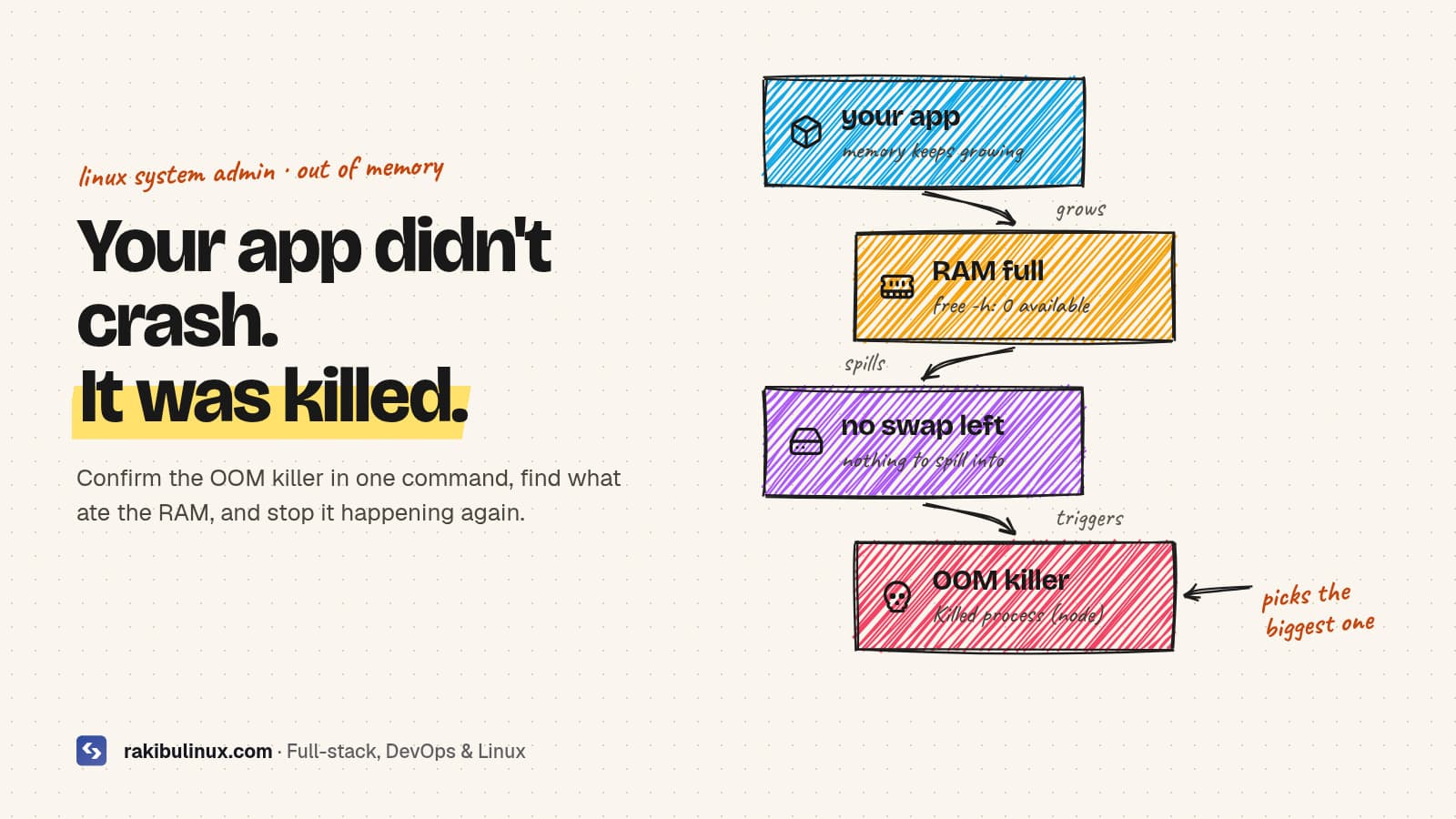
If your app dies with no error, the Linux OOM killer probably ended it. Run journalctl -k | grep -i "killed process" to confirm, then add swap and cap memory.
The symptom is confusing: the app stops, there's no stack trace, the app log just ends, and Nginx starts returning 502s. Often it happens at the busiest time of day, or during a deploy. The reason is that the kernel ran out of memory and picked a process to kill so the whole server wouldn't freeze. Your app, usually the biggest process on a small VPS, was the pick. My own sites run a Next.js frontend and a NestJS API on one Ubuntu server, and this is the checklist I use to confirm it and keep it from happening.
Key takeaways
- Confirm it in the kernel log:
journalctl -k | grep -i -E 'killed process|out of memory'. The app's own log won't show it. - The OOM killer picks the process with the highest score, which is mostly the one using the most memory. That's why it's usually your app or database.
- Add swap on small VPSs. It turns a sudden kill into a slowdown you can see and fix.
- Cap memory where it grows: Node's
--max-old-space-size, PM2'smax_memory_restart, Docker or systemd memory limits. - Don't build on a tiny production server.
next buildornpm installon a 1-2 GB box is a classic trigger. Build in CI.
Step 1: Confirm the OOM killer did it
sudo journalctl -k --since "24 hours ago" | grep -i -E 'killed process|out of memory|oom-kill'
# or, if the journal isn't persistent:
sudo dmesg -T | grep -i -E 'killed process|out of memory'
A hit looks like this (example):
Out of memory: Killed process 4321 (node) total-vm:2412344kB, anon-rss:1489012kB, ...
The name in brackets is what died, and anon-rss is roughly how much RAM it was using. If you see Memory cgroup out of memory instead, a container or systemd memory limit was hit rather than the whole server. In Docker that shows up as exit code 137 with OOMKilled: true; my post on containers that keep restarting covers that side.
Step 2: See where the memory goes
free -h
ps aux --sort=-%mem | head -n 10
systemd-cgtop -m        # memory per service
pm2 monit               # if you use PM2
Look at the available column in free -h, not free. Linux uses spare RAM as disk cache, so "free" is always low on a healthy server. If available sits near zero and swap is 0B or full, you have your answer.
Then ask what grew. A process that climbs steadily for hours is a leak. One that spikes is a heavy request: image processing, a big export, a query that loads a whole table into memory, or a build.
Step 3: Get the site back
Restart the app (pm2 restart app, systemctl restart app or docker compose up -d) and check Nginx stops returning 502s. If it was killed without a process manager to bring it back, set one up now: PM2 with pm2 startup and pm2 save, or Restart=always in a systemd unit. Then fix the cause, or it will happen again at the next peak.
Step 4: Add swap (if you have none)
Many VPS images ship with no swap. A modest swap file gives the kernel somewhere to put idle pages and buys time before anything is killed:
sudo fallocate -l 2G /swapfile
sudo chmod 600 /swapfile
sudo mkswap /swapfile
sudo swapon /swapfile
echo '/swapfile none swap sw 0 0' | sudo tee -a /etc/fstab
# prefer RAM, use swap as a safety net
echo 'vm.swappiness=10' | sudo tee /etc/sysctl.d/99-swappiness.conf
sudo sysctl --system
Check disk space first (df -h /); a swap file on a nearly full disk causes a different outage, see "No space left on device". Swap is a safety net, not more RAM. If the server lives in swap all day, it needs a bigger plan or a smaller app.
Step 5: Cap memory where it grows
Node.js and PM2
Node's heap limit stops one process from taking everything, and PM2 restarts it cleanly before the kernel has to step in:
// ecosystem.config.js
module.exports = {
  apps: [{
    name: "web",
    script: "node_modules/next/dist/bin/next",
    args: "start -p 3000",
    node_args: "--max-old-space-size=768",
    max_memory_restart: "900M",
  }],
};
A restart at 900 MB is a quick, logged blip; an OOM kill is an outage with no explanation. Keep the restart threshold above the heap limit so the heap limit catches normal growth first. If it restarts every hour, you've confirmed a leak and the restart buys you time to find it.
Docker and systemd
# docker-compose.yml
services:
  api:
    mem_limit: 768m

# systemd: sudo systemctl edit app
[Service]
MemoryHigh=700M
MemoryMax=800M
A limit means only that container or service is killed, not whatever the kernel picks across the whole server.
Databases
Postgres and MySQL are sized at startup. On a small shared server, check shared_buffers and work_mem (Postgres) or innodb_buffer_pool_size (MySQL). A buffer pool tuned for a dedicated 8 GB server will starve everything else on a 2 GB VPS. Each extra database connection also costs memory, another reason not to run hundreds of them (see Postgres "too many clients").
Step 6: Stop building on the production server
Installing dependencies and building a Next.js app can briefly use more memory than the running site. On a 1-2 GB server that alone triggers the OOM killer, and it can take the live site with it. Build in CI and ship the finished release, as in my GitHub Actions deploy with auto-rollback and the Next.js on a VPS guide.
Protect the processes that must survive
You can tell the kernel to avoid certain services. In a systemd unit, OOMScoreAdjust=-500 makes it a much less likely target. Use it sparingly, for things like the database. Setting everything to "never kill" just means the kernel has nothing left to pick and the whole server hangs.
Frequently asked questions
How do I know if the OOM killer killed my process?
Search the kernel log with journalctl -k or dmesg -T for "Killed process" or "Out of memory". The line names the process, its PID and how much memory it used when it was killed.
Why does the OOM killer pick my app and not something else?
It kills the process with the highest OOM score, which mostly follows how much memory a process uses. On a small server the main app or the database is usually the largest process, so it's the first target.
How much swap should a VPS have?
For a small web server, 1-2 GB of swap is a sensible safety net, with swappiness set low so RAM is preferred. Swap should absorb short spikes; if it's in constant use, the server needs more RAM or the app needs less.
Is it safe to disable the OOM killer?
No. Without it, a server that runs out of memory can freeze completely and need a hard reboot. Set memory limits and protect key services instead.
Why does my server run out of memory during deploys?
Installing packages and building the app use a lot of memory on top of the running site. Build in CI or on a separate machine and copy the finished build to the server.
Server running out of memory?
I find what's eating the RAM on Linux servers, fix the leak or the config, and set up limits, swap and alerts so the next spike doesn't take the site down. See my Linux system admin services or contact me now with the "Killed process" line from your kernel log.

Written by
MD Rakibul Islam Rakib
Full-stack developer, DevOps engineer and Linux system administrator with 5+ years of production experience. I deploy, harden and fix servers and web apps for clients worldwide, and everything in this article runs on real servers I manage, including this site.
- Linux OOM killer
- out of memory killed process
- add swap Ubuntu
- Node.js memory limit
- PM2 max memory restart
- Linux server