Laravel to Next.js Rewrite: Keep Old Links and Apps Working
 MD Rakibul Islam RakibFull-stack developer, DevOps & Linux engineer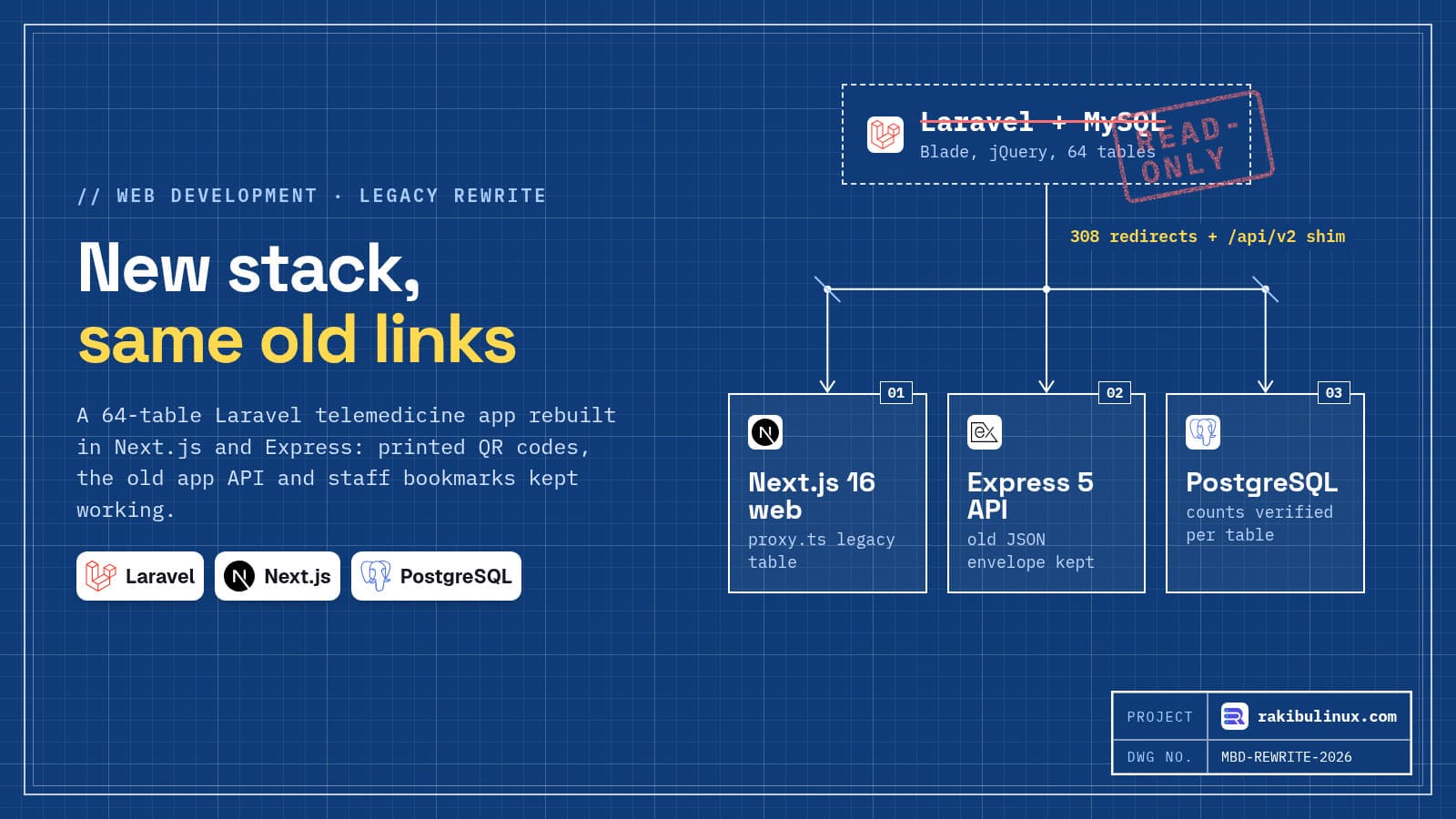
Rewrite a Laravel app in Next.js safely: build beside the old app, keep every old URL and API answering, and switch only after a parity check.
In September 2026 I rebuilt MedicsBD, a telemedicine platform in Bangladesh, from Laravel to Next.js 16, an Express 5 API and PostgreSQL. The old app had 64 MySQL tables, Blade templates, jQuery and a store app that talked to its JSON API. The data move has its own post. This one is about the part founders worry about most: what happens to the people and devices already using the old system on the day you switch.
Key takeaways
- List every way the old app is reached before writing new code: printed QR codes, SMS links, the mobile app's API, bookmarks, search results.
- Redirect old URLs with one table, first match wins, permanent 308s. Test it like code.
- Keep the old API's shape for apps already installed on phones. You can't force everyone to update on cutover day.
- Use the old feature list as the acceptance test. Parity first, improvements second.
- Make rollback boring: the old app stays deployable and its database read-only for 30 days.
Rewrite or refactor: how I decided
A rewrite is the expensive option, so it needs a reason you can say in one sentence. For MedicsBD it was this: the business needed a proper Android and iOS app, real-time calls and notifications, and the Laravel code made every change slow. A single API serving the website and the phone apps was the goal, and the old code base was not going to get there in small steps.
If your app works and the pain is a few slow pages or an old PHP version, upgrade it in place instead. A rewrite pays off when the product has to do something the old architecture can't, not when the code just looks old.
Step 1: inventory everything that points at the old app
The new screens are the easy part to list. The hard part is everything outside your code that holds an old address. For MedicsBD that list was:
- Printed QR codes on doctor share cards and on prescriptions, which patients show at pharmacies. You can't reprint those.
- The app API: Laravel's
/api/v2, 26 routes with their own login tokens, which a published store app or a third-party client could still be calling. - A public doctors feed (
/api/v3) used by the WordPress site. - Links in SMS and email already sitting in people's phones: video call links, password resets, verification links.
- Staff bookmarks like
/admin/doctors, typed every day by the clinic team. - Store listing links to the privacy and support pages, which app reviewers check.
Most of this is invisible if you only read the routes file. Read the web server's access logs for a few weeks too, and ask the people who run the business what they print, send and bookmark.
Step 2: one redirect table for old URLs
I put all old web URLs in one ordered table inside the Next.js proxy.ts (the file that replaced middleware in Next.js 16). First match wins, and every hit gets a permanent 308 redirect, so browsers and Google learn the new address. Here is a short slice of the real table:
// Laravel URLs still in the wild: printed QR codes, SMS links, bookmarks.
const LEGACY: [RegExp, string][] = [
  [/^\/p\/doctor\/(\d+)$/, '/doctors/$1'],
  [/^\/share-card\/(\d+)(?:\/pdf)?$/, '/doctors/$1/share'],
  [/^\/pages\/(privacy|terms|disclaimer|contact)$/, '/$1'],
  [/^\/common\/video\/(\d+)\/call$/, '/call/$1'],
  [/^\/password\/reset(?:\/.*)?$/, '/forgot-password'],
  [/^\/admin\/(doctor|patient|agent)s$/, '/users?tab=$1'],
];

function legacy(pathname: string) {
  for (const [re, to] of LEGACY) if (re.test(pathname)) return pathname.replace(re, to);
  return null;
}
In the proxy, a match becomes NextResponse.redirect(url, 308), and query strings from the target (like ?tab=doctor) are merged into the URL. Run against a few old addresses, the table gives:
/p/doctor/42               -> /doctors/42
/share-card/42/pdf         -> /doctors/42/share
/pages/privacy/            -> /privacy
/common/video/9917/call    -> /call/9917
/password/reset/abc123     -> /forgot-password
/admin/doctors             -> /users?tab=doctor
/doctors/42                -> (no rule, served by new app)
Strip the trailing slash before matching, as the last line in the list above shows (/pages/privacy/ still works). Some redirects depend on who is signed in. Laravel put staff and doctors under one /admin prefix, while the new app gives a regular doctor their own /doctor area, so the proxy checks the role before choosing the target.
Step 3: keep the old API for installed apps
Web pages can redirect. A mobile app can't follow a redirect into a different JSON format. People don't update apps on your schedule, so the old version will call the old endpoints for months.
I ported Laravel's /api/v2 (the app API with its own login tokens) and /api/v3 (the public doctors feed) as a small legacy module in the new Express API. It answers with Laravel's exact envelope, { status, code, data, message }, and the same validation error shape, "The given data was invalid." with an errors object. Under the hood it calls the same services as the new API, so there is one set of business rules, not two.
Old login tokens are checked against the account's current status and a revocation list on every request. A shim must not become a back door that skips the new security rules.
Porting is also a chance to close old holes without changing the contract. The old public feed returned reviewers' email addresses and phone numbers; the new one keeps the same fields people actually use and drops the personal ones. The old API accepted requests from every origin; the new one only allows the sites that need it.
Step 4: QR codes and IDs that must never change
Anything printed or shared outside the app needs a stable identifier. On MedicsBD each prescription PDF has a QR code that anyone can scan to check it is genuine. Codes printed by the Laravel system still verify on the new one: the migration kept every record's ID, and the new verify route builds the hash with the same formula and the old app's key. The same goes for the appointment code format, which old links and SMS messages contain.
If you renumber IDs during a rewrite, every printed and shared link breaks at once. Keep the IDs, and reset the database sequences after the import so new rows don't collide with them.
Step 5: parity check, then cutover
The old project already had a testing guide that listed every feature. I used it as the acceptance list: walk every section on the new system before switching. Next came a security pass: rate limits, upload validation and a role-by-endpoint check. The cutover plan was short on purpose:
- Build the new system side by side while Laravel keeps serving users.
- Freeze writes on the old database for a short window and run the migration script, which prints counts per table.
- Compare counts, then point Nginx at the new apps.
- Keep MySQL read-only for 30 days. Rollback means pointing Nginx back, nothing more.
A short write freeze is honest. "Zero downtime" with two databases taking writes at once is how you lose data. For a business-hours app, a planned window late at night is safer.
What I'd tell a founder planning the same move
- Budget time for the compatibility layer. On MedicsBD, the redirect table, the API shim and the QR verification were days of work that no user ever sees, and they are why nobody noticed the switch.
- Don't redesign and re-platform in the same release if you can avoid it. Users and staff need to recognise the screens.
- Write the old system's quirks down as tests before you "fix" them. Some quirks are features someone relies on.
Frequently asked questions
Should I rewrite my Laravel app or upgrade it?
Upgrade in place if the product works and the pain is old versions or a few slow pages. Rewrite when the business needs something the current architecture can't support, like a shared API for web and native mobile apps. Make the reason concrete before you spend the money.
How do I keep SEO when moving from Laravel to Next.js?
Keep the URLs where you can, and send a permanent 301 or 308 redirect from every old URL to its new page where you can't. Keep titles and content on important pages, then watch Search Console for 404s after the switch. My redesign without losing SEO checklist covers the rest.
What happens to users on the old mobile app?
They keep calling the old API. Either keep that API running or port it into the new backend with the same request and response shapes, as I did. Then ship a new app version and retire the old endpoints only after usage drops off.
How long does a Laravel to Next.js rewrite take?
It depends on the number of user roles, integrations and data, not on page count. A small admin app can take a few weeks. MedicsBD, with five roles, payments, video calls and 64 tables, was a full rebuild with a mobile app on top. Get a scoped estimate with milestones.
Stuck on an old PHP app?
I rebuild Laravel and PHP apps on Next.js and Node.js without breaking the links, apps and printed codes your users depend on. See my web development services or send me a short description of your app and I'll tell you whether to rewrite or upgrade.

Written by
MD Rakibul Islam Rakib
Full-stack developer, DevOps engineer and Linux system administrator with 5+ years of production experience. I deploy, harden and fix servers and web apps for clients worldwide, and everything in this article runs on real servers I manage, including this site.
- laravel to next.js migration
- rewrite legacy php app
- laravel rewrite
- legacy url redirects
- strangler migration
- next.js proxy redirects
- cutover plan