Build an AI Voice Receptionist with LiveKit and Node.js
 MD Rakibul Islam RakibFull-stack developer, DevOps & Linux engineer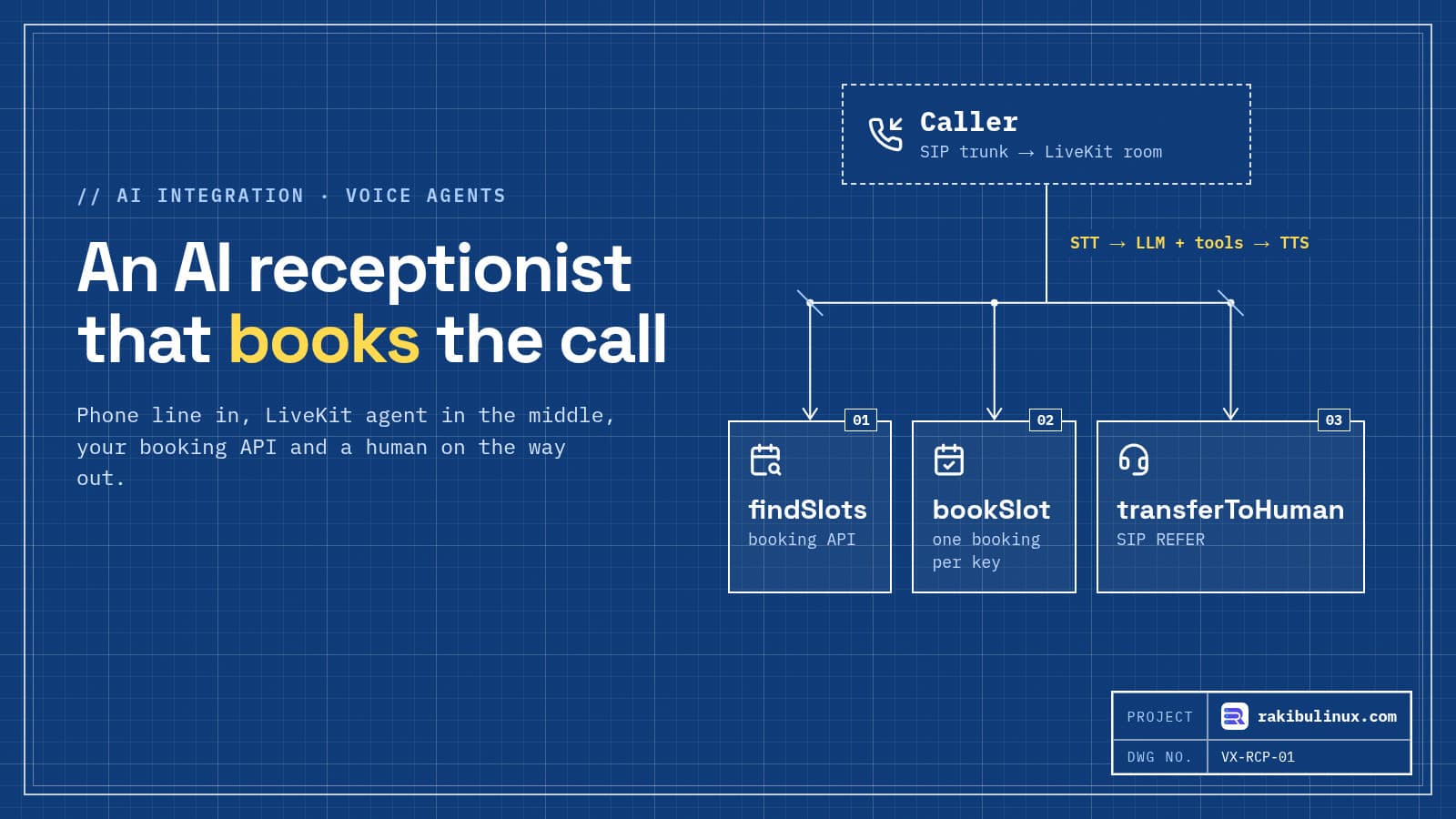
An AI voice receptionist is a LiveKit agent that answers each call, turns speech into text, lets an LLM call your booking API, then speaks the reply.
I built the web dashboard for StarVox, a multi-tenant AI phone agent platform, and I run LiveKit for a telemedicine client. That work taught me that the voice part is the easy half. The hard half is everything a business needs around it: bookings that never double up, a clean hand-off to a person, call logs staff can trust and a bill you can predict. This guide covers both halves, with an agent you can run.
Key takeaways
- The pipeline is STT, LLM and TTS inside a LiveKit room. Phone calls join that room through LiveKit SIP and a trunk from a provider like Twilio or Telnyx.
- Give the agent a few narrow tools (find slots, book, transfer) that call your own backend. Don't let the model talk to your calendar directly.
- Make booking idempotent. Models and networks retry. Key each booking on the call and the slot so a retry can't book twice.
- Always offer a human. A cold transfer is one API call, but your SIP provider must have transfers switched on.
- Price it per minute: telephony, speech-to-text, LLM tokens, text-to-speech and hosting. Check each provider's current price page before you promise a number.
How a phone call reaches your agent
LiveKit is a real-time media server. Your agent is a Node.js worker that joins a room and talks to whoever else is in it. For phone calls, four pieces sit in front of it:
- A phone number and SIP trunk from a provider such as Twilio, Telnyx or Plivo.
- LiveKit SIP, which turns each call into a participant in a room. On LiveKit Cloud it is built in; if you self-host LiveKit, the SIP service is a separate deployment.
- An inbound trunk and a dispatch rule in LiveKit that decide which room a call goes to.
- Agent dispatch: the worker registers with an
agentName, and the rule asks for that agent, so a fresh agent joins every call.
If you want your own LiveKit server instead of the cloud, my LiveKit self-hosting guide covers the VPS, TURN and tokens.
The agent: about 100 lines of TypeScript
This is a complete receptionist for a dental clinic (the name is made up). It finds slots, books one and hands the caller to the front desk. I type-checked it against @livekit/agents 1.9.2, started it against a local LiveKit server and dispatched a job to it by name on 10 October 2026. To take real calls you add your provider keys, a SIP trunk and your booking API.
import { type JobContext, ServerOptions, cli, defineAgent, inference, llm, voice } from '@livekit/agents';
import * as deepgram from '@livekit/agents-plugin-deepgram';
import * as elevenlabs from '@livekit/agents-plugin-elevenlabs';
import * as openai from '@livekit/agents-plugin-openai';
import { SipClient } from 'livekit-server-sdk';
import { fileURLToPath } from 'node:url';
import { z } from 'zod';

type CallData = { room: string; callerIdentity: string; callerNumber: string; callId: string };

const BOOKING_API = process.env.BOOKING_API_URL!; // your backend, not the calendar directly
const FRONT_DESK = process.env.FRONT_DESK_NUMBER!; // e.g. tel:+15551234567

async function api(path: string, init?: RequestInit) {
  const res = await fetch(`${BOOKING_API}${path}`, {
    ...init,
    headers: { 'content-type': 'application/json', authorization: `Bearer ${process.env.BOOKING_API_TOKEN}`, ...init?.headers },
    signal: AbortSignal.timeout(8000), // never leave a caller in silence for long
  });
  if (!res.ok) throw new llm.ToolError(`Booking system error ${res.status}. Apologise and offer a transfer.`);
  return res.json();
}

const findSlots = llm.tool({
  name: 'findSlots',
  description: 'List free appointment slots for a service on a given day.',
  parameters: z.object({
    service: z.enum(['checkup', 'cleaning', 'consultation']),
    date: z.string().describe('Day in YYYY-MM-DD, in the clinic time zone'),
  }),
  execute: async ({ service, date }) => {
    const { slots } = await api(`/slots?service=${service}&date=${date}`);
    if (!slots.length) return 'No free slots that day. Offer the next working day.';
    return slots.map((s: { id: string; label: string }) => `${s.id}: ${s.label}`).join('\n');
  },
});

const bookSlot = llm.tool({
  name: 'bookSlot',
  description: 'Book a slot after the caller has confirmed the time and spelled their name.',
  parameters: z.object({ slotId: z.string(), fullName: z.string() }),
  execute: async ({ slotId, fullName }, { ctx }: llm.ToolOptions<CallData>) => {
    const { callerNumber, callId } = ctx.userData;
    const booking = await api('/bookings', {
      method: 'POST',
      // same call + same slot = same key, so a retried tool call never books twice
      headers: { 'idempotency-key': `${callId}:${slotId}` },
      body: JSON.stringify({ slotId, fullName, phone: callerNumber, source: 'voice-agent' }),
    });
    return `Booked. Reference ${booking.reference}. A confirmation SMS is on its way.`;
  },
});

const transferToHuman = llm.tool({
  name: 'transferToHuman',
  description: 'Transfer to staff when the caller asks for a person, is upset, or has a medical or billing question.',
  execute: async (_, { ctx }: llm.ToolOptions<CallData>) => {
    await ctx.session.say('Of course, connecting you to the front desk now.', { allowInterruptions: false }).waitForPlayout();
    const sip = new SipClient(process.env.LIVEKIT_URL!, process.env.LIVEKIT_API_KEY, process.env.LIVEKIT_API_SECRET);
    await sip.transferSipParticipant(ctx.userData.room, ctx.userData.callerIdentity, FRONT_DESK, { playDialtone: true });
    return 'Transferred.';
  },
});

export default defineAgent({
  entry: async (ctx: JobContext) => {
    await ctx.connect();
    const caller = await ctx.waitForParticipant();

    const session = new voice.AgentSession<CallData>({
      stt: new deepgram.STT({ model: 'nova-3' }),
      llm: new openai.LLM({ model: 'gpt-4.1-mini' }),
      tts: new elevenlabs.TTS(),
      turnHandling: { turnDetection: new inference.TurnDetector() }, // runs on the worker, no cloud call
      userData: {
        room: ctx.room.name!,
        callerIdentity: caller.identity,
        callerNumber: caller.attributes['sip.phoneNumber'] ?? 'unknown',
        callId: caller.attributes['sip.callID'] ?? ctx.room.name!,
      },
    });

    const agent = new voice.Agent<CallData>({
      instructions: `You are the receptionist for Bright Smile Dental. Today is ${new Date().toDateString()}.
Keep every reply under two short sentences: this is a phone call.
You can find slots, book them and transfer to staff. You cannot give medical advice or prices.
Before booking, repeat the day and time back and ask the caller to spell their name.
If a tool fails twice, apologise and transfer.`,
      tools: [findSlots, bookSlot, transferToHuman],
    });

    await session.start({ agent, room: ctx.room });
    session.say('Thanks for calling Bright Smile Dental. This call may be recorded. How can I help?');
  },
});

cli.runApp(new ServerOptions({ agent: fileURLToPath(import.meta.url), agentName: 'receptionist' }));
Install it with npm i @livekit/agents @livekit/agents-plugin-deepgram @livekit/agents-plugin-openai @livekit/agents-plugin-elevenlabs livekit-server-sdk zod. Run npx livekit-agents download-files once to fetch the local turn-detection and voice-activity models, then start the worker with LIVEKIT_URL, LIVEKIT_API_KEY, LIVEKIT_API_SECRET and the provider keys set.
One thing I hit while testing: the text-based turn detector from @livekit/agents-plugin-livekit, which most older tutorials use, is now deprecated. In 1.9.x the replacement is inference.TurnDetector(), which listens to the audio itself and runs on the worker.
Design the tools, not just the prompt
A common mistake is a long, clever prompt and tools that do too much. Flip that:
- Small tools with strict inputs.
findSlotstakes a service from a fixed list and a date. The model can't invent a service you don't offer. - Your backend owns the rules. The tools call your API, which knows opening hours, staff, buffers and holidays. The model never sees calendar credentials.
- Every booking has an idempotency key. The key is the call ID plus the slot. If the model calls
bookSlottwice, or the request times out and is retried, the API returns the first booking instead of making a second. It is the same pattern I use for Stripe webhooks. - Errors tell the model what to say. Throwing
llm.ToolErrorwith "apologise and offer a transfer" gives a graceful sentence instead of an awkward silence. - Timeouts are short. Eight seconds of silence on a phone call feels like forever. If your booking API is slow, fix that before you blame the AI.
Hand the call to a human
A receptionist that can't reach a person will make your customers angry, fast. The transferToHuman tool above does a cold transfer: it asks LiveKit to send a SIP REFER, the provider connects the caller to your front desk number, and the agent leaves the call.
- Your SIP provider must allow it. On a Twilio trunk you have to enable call transfer and PSTN transfer, or the transfer fails.
- For a warm transfer, where the agent briefs a colleague before connecting the caller, LiveKit has a separate workflow. It is worth it for sales lines, overkill for "I'd like to move my appointment".
- Decide when the agent must transfer: the caller asks for a person, sounds upset, asks about medical or billing details, or the same tool fails twice. Put those rules in the tool description and the instructions.
What the business actually needs around the agent
Building the StarVox dashboard against a real backend showed me what owners open every day. None of it is the voice:
- Call history with the recording, a turn-by-turn transcript, a short summary and the details the agent pulled out (date, time, party size, reason for calling).
- A bookings and requests inbox so staff can act on what the agent collected.
- Agent settings in plain language: greeting, what it should do, how it should speak, which number it answers, with a test call button in the browser over LiveKit WebRTC.
- Integrations with delivery logs (webhooks, email, WhatsApp, an ERP), so when a booking doesn't arrive somewhere, someone can see why.
- For outbound calling, a do-not-call list and campaign controls.
If you sell this to several businesses, take the tenant from the login token on the server, never from a value the browser sends. One tenant seeing another's call recordings would end the product.
Consent, privacy and the law
- Say it up front. The greeting above says the call may be recorded. Many places require consent to record, and some require every party to agree. Telling callers they are talking to an AI assistant is good practice and, in some places, a legal requirement.
- Outbound calls are regulated. In the US, the FCC ruled in February 2024 that AI-generated voices count as "artificial" voices under the TCPA, so the consent rules for robocalls apply.
- Keep less data. Store what the business needs, set a retention period for recordings, and keep health or payment details out of transcripts where you can.
- No advice it can't give. A clinic receptionist books appointments; it doesn't triage symptoms. Say so in the instructions and test that it refuses.
I'm not a lawyer, and this isn't legal advice. Check the rules where you and your callers are.
What it costs to run, line by line
I won't quote a per-minute price, because provider prices change often and depend on volume, region and model. Here is what to add up for one minute of conversation:
- Telephony: the phone number's monthly fee plus per-minute inbound charges from your SIP provider.
- Speech-to-text: billed per minute of audio.
- LLM: billed per token. Short instructions and short replies keep it low; a long prompt is paid on every turn.
- Text-to-speech: usually billed per character spoken.
- LiveKit: per-minute on LiveKit Cloud, or a fixed VPS bill if you self-host the media and SIP servers.
- Storage for recordings and transcripts, and your own servers for the booking API and dashboard.
Put the numbers from each provider's current pricing page into a spreadsheet, multiply by expected minutes, and compare it with what missed calls cost the business today. That comparison sells the project better than any demo.
Test it like a real caller before go-live
- Background noise, a speakerphone, a strong accent and a caller who interrupts mid-sentence.
- A slot that gets taken between "here are the options" and "book it".
- The booking API down or slow. The agent should apologise and transfer, not loop.
- "Can I talk to a person?" in five different phrasings.
- Silence, a hang-up mid-booking, and a caller who gives a name that is hard to spell.
The LiveKit Agents repository includes tests for its front-desk example that run the agent's logic against a fake calendar. Copy that idea: test the tools and the rules in code, then do a round of real phone calls.
Frequently asked questions
Can an AI voice agent book appointments in my existing calendar?
Yes. The agent calls a booking API that you control, and that API reads and writes your calendar or scheduling system, such as Google Calendar, Cal.com or an ERP. Keeping that layer in your backend means the AI never holds calendar credentials.
Do I need LiveKit Cloud, or can I self-host?
Both work with the same agent code. LiveKit Cloud is faster to start and includes SIP. Self-hosting gives you a fixed server bill and keeps audio on your infrastructure, but you also deploy and maintain the SIP service.
Which speech and LLM providers should I use?
The code uses Deepgram, OpenAI and ElevenLabs plugins, but LiveKit supports many providers and swapping one is usually a one-line change. Test two or three with your own callers' accents and your own domain words before choosing.
How do I stop the agent from booking the same slot twice?
Send an idempotency key with every booking, built from the call ID and the slot, and enforce it in your database with a unique constraint. Then a retried tool call returns the existing booking instead of creating a new one.
How long does it take to build a production AI receptionist?
A single-business agent with booking and transfer can be live in a few weeks, most of it spent on the booking API, testing and call flows. A multi-tenant platform with dashboards, billing and integrations is a much larger product.
Want an AI receptionist for your business or product?
I build voice agents, the booking APIs behind them and the dashboards staff use every day, on LiveKit Cloud or your own servers. See my AI integration and web development services or describe your call flow and I'll tell you how I'd build it.

Written by
MD Rakibul Islam Rakib
Full-stack developer, DevOps engineer and Linux system administrator with 5+ years of production experience. I deploy, harden and fix servers and web apps for clients worldwide, and everything in this article runs on real servers I manage, including this site.
- AI voice receptionist
- AI voice agent development
- LiveKit Agents Node.js
- AI phone agent
- voice AI appointment booking
- LiveKit SIP
- custom AI receptionist