AI Invoice Processing: OCR, LLM Extraction, Human Approval
 MD Rakibul Islam RakibFull-stack developer, DevOps & Linux engineer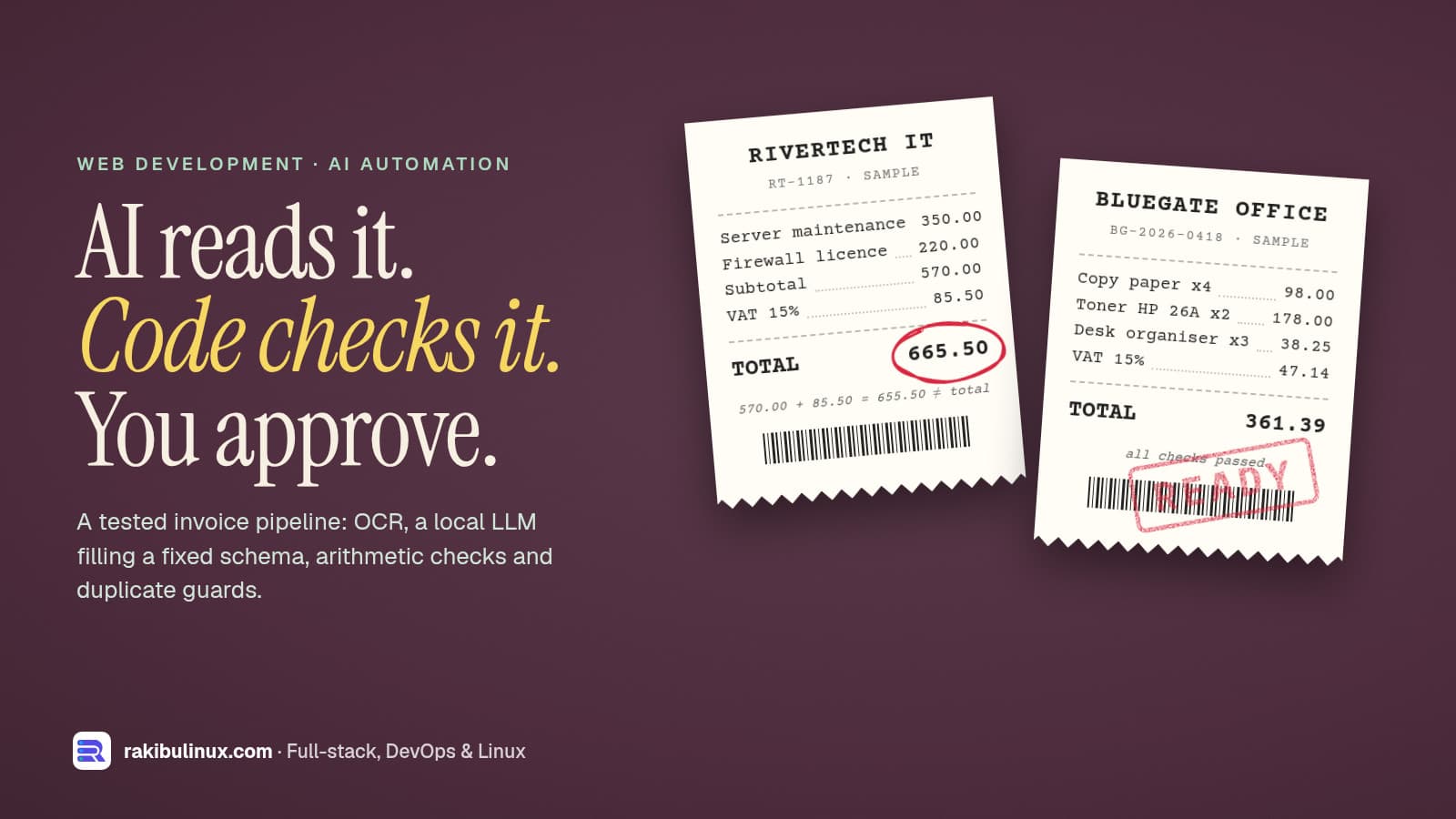
Reliable AI invoice processing is a pipeline: read the text or OCR it, let a model fill a fixed schema, check the numbers in code, then a person approves.
I've fixed money bugs where one payment was counted twice, so I don't trust any system that moves money on a guess. AI is very good at reading a messy invoice and very bad at knowing when it's wrong. The design below gives each job to whoever does it best: the model reads, plain code checks, and a person from finance approves.
I built and tested it on 11 October 2026 with a local model (qwen2.5:7b through Ollama), Tesseract 5.3.4 for scans and PostgreSQL 18, using five sample invoices that I made for the test. All output below is real, including the two mistakes the model made.
Key takeaways
- The model fills a JSON schema; it doesn't decide anything. Approval, duplicates and posting to the books are rules in code and in the database.
- Check the arithmetic. Quantity times price, lines against subtotal, subtotal plus tax against total. A mismatch goes to a person with the exact numbers.
- Everything the model "read" must exist in the document. If the invoice number or total isn't in the source text, the model made it up.
- Stop double payment in the database. A partial unique index makes it impossible to approve the same supplier invoice twice.
- OCR only when needed. Most supplier PDFs have a text layer. Scans go through Tesseract and are always flagged for a closer look.
The pipeline
- Upload. Hash the file; the exact same PDF twice is caught immediately.
- Read.
pdftotextfor digital PDFs,pdftoppmplus Tesseract for scans. - Extract. The model returns supplier, tax ID, invoice number, date, currency, line items and totals as JSON.
- Check. Missing fields, arithmetic, grounding in the source text, dates and possible duplicates.
- Review and approve. Clean invoices are marked
ready, anything flagged isneeds_review, and both need a person to approve. - Export approved invoices to your accounting system.
Step 1: text first, OCR only for scans
function readText(pdf) {
  const text = execFileSync('pdftotext', ['-layout', pdf, '-'], { encoding: 'utf8' });
  if (text.trim().length > 50) return { text, ocr: false };
  const dir = mkdtempSync(join(tmpdir(), 'ocr-'));
  try {
    execFileSync('pdftoppm', ['-r', '300', '-png', pdf, join(dir, 'page')]);
    const pages = readdirSync(dir).sort().map((f) =>
      execFileSync('tesseract', [join(dir, f), 'stdout', '--psm', '4'], { encoding: 'utf8', stdio: ['ignore', 'pipe', 'ignore'] }));
    return { text: pages.join('\n'), ocr: true };
  } finally {
    rmSync(dir, { recursive: true, force: true });
  }
}
Invoices generated by accounting software or emailed as PDFs almost always contain real text, and pdftotext -layout keeps the columns lined up. An image-only scan returns next to nothing, so it's rendered at 300 DPI and read by Tesseract. --psm 4 tells Tesseract to treat the page as one column of text of variable sizes, which suits invoices.
My sample scan was clean, so OCR read every number correctly. Real phone photos won't be that kind, which is why OCR'd invoices are always flagged.
Step 2: the model fills a fixed schema
const SCHEMA = {
  type: 'object',
  properties: {
    supplier_name: { type: 'string' },
    supplier_tax_id: { type: ['string', 'null'], description: 'VAT, GST or tax registration number printed on the invoice' },
    invoice_number: { type: ['string', 'null'] },
    invoice_date: { type: 'string', description: 'YYYY-MM-DD' },
    currency: { type: 'string', description: 'ISO 4217 code, e.g. USD' },
    line_items: { type: 'array', items: { type: 'object',
      properties: { description: { type: 'string' }, quantity: { type: 'number' },
                    unit_price: { type: 'number' }, amount: { type: 'number' } },
      required: ['description', 'quantity', 'unit_price', 'amount'] } },
    subtotal: { type: 'number' }, tax: { type: 'number' }, total: { type: 'number' },
  },
  required: ['supplier_name', 'supplier_tax_id', 'invoice_number', 'invoice_date', 'currency', 'line_items', 'subtotal', 'tax', 'total'],
};

async function extract(text) {
  const res = await fetch(`${OLLAMA}/api/chat`, {
    method: 'POST',
    body: JSON.stringify({
      model: 'qwen2.5:7b', stream: false, format: SCHEMA, options: { temperature: 0 },
      messages: [{ role: 'user', content:
        'Extract this supplier invoice. Copy values exactly as printed; use null when a value is missing. ' +
        `Return JSON matching this schema: ${JSON.stringify(SCHEMA)}\n\nINVOICE TEXT:\n${text}` }],
    }),
  });
  if (!res.ok) throw new Error(`ollama ${res.status}`);
  return JSON.parse((await res.json()).message.content);
}
Ollama's structured outputs take a JSON schema in format, and its docs recommend also putting the schema in the prompt and using temperature 0, as above. The schema guarantees the shape of the answer, not that the values are right. That's what the next step is for.
Step 3: checks a person can verify
const cents = (n) => Math.round(Number(n) * 100);
const digits = (s) => String(s).replace(/[^0-9a-z]/gi, '').toLowerCase();
const blank = (v) => v == null || /^(null|none|n\/a)?$/i.test(String(v).trim());   // models write "null" as text too

function check(inv, text) {
  const issues = [];
  for (const f of ['supplier_name', 'supplier_tax_id', 'invoice_number', 'invoice_date', 'currency', 'total']) {
    if (blank(inv[f])) {
      inv[f] = null;
      issues.push(`missing ${f}`);
    }
  }

  for (const li of inv.line_items ?? [])
    if (Math.abs(cents(li.quantity * li.unit_price) - cents(li.amount)) > 1)
      issues.push(`line "${li.description}": ${li.quantity} x ${li.unit_price} != ${li.amount}`);
  const lineSum = (inv.line_items ?? []).reduce((s, li) => s + cents(li.amount), 0);
  if (lineSum !== cents(inv.subtotal)) issues.push(`lines add up to ${lineSum / 100}, subtotal says ${inv.subtotal}`);
  if (cents(inv.subtotal) + cents(inv.tax) !== cents(inv.total))
    issues.push(`subtotal ${inv.subtotal} + tax ${inv.tax} = ${(cents(inv.subtotal) + cents(inv.tax)) / 100}, total says ${inv.total}`);

  // Anything the model "read" must actually be in the document.
  const page = digits(text);
  for (const [label, value] of [['invoice number', inv.invoice_number], ['tax id', inv.supplier_tax_id], ['total', Number(inv.total).toFixed(2)]])
    if (value && !page.includes(digits(value))) issues.push(`${label} "${value}" not found in the document text`);

  const date = new Date(`${inv.invoice_date}T00:00:00Z`);
  if (Number.isNaN(date.getTime())) issues.push(`unreadable date "${inv.invoice_date}"`);
  else if (date > new Date()) issues.push(`invoice date ${inv.invoice_date} is in the future`);
  return issues;
}
I don't ask the model how confident it is. A score it produces about itself isn't evidence; each rule above is. Money is compared in whole cents, because 0.1 + 0.2 is not 0.3 in JavaScript, and stored as numeric(12,2) in PostgreSQL, never as a float.
Step 4: duplicates and approval in the database
-- The same supplier invoice can never be approved twice, whatever the code does.
CREATE UNIQUE INDEX invoices_no_double_payment
  ON invoices (coalesce(supplier_tax_id, lower(supplier_name)), upper(invoice_number))
  WHERE status IN ('approved', 'exported');
export async function approve(id, user) {
  const { rowCount } = await db.query(
    `UPDATE invoices SET status = 'approved', approved_by = $2, approved_at = now()
      WHERE id = $1 AND status IN ('ready', 'needs_review')
        AND invoice_number IS NOT NULL AND total IS NOT NULL`, [id, user]);   // NULLs would slip past the unique index
  if (!rowCount) throw new Error(`invoice ${id} is not ready to approve`);
}
Suppliers resend invoices all the time: a reminder, a "copy", the same PDF from a second person. The file hash only catches byte-identical files. The index catches the same supplier and invoice number however it arrived, and it only applies to approved rows, so a rejected duplicate doesn't block anything. It's the same idea I use for processing Stripe webhooks exactly once: let the database enforce "once", not application code that checks first.
The test run
Five sample invoices: a clean one (A), the same invoice re-sent as a "COPY" (B), one whose total is 10.00 too high (C), an image-only scan (D) and a catering bill with no invoice number or tax ID (E). Real output, trimmed:
a.pdf -> #1 ready
  Bluegate Office Supplies | BIN-004512339 | BG-2026-0418 | 2026-09-28 | USD 314.25 + 47.14 = 361.39 | 3 lines
a.pdf -> #1 same file already uploaded
b.pdf -> #2 needs_review
  ! possible duplicate of invoice #1 (ready)
c.pdf -> #3 needs_review
  Rivertech IT Services | BIN-007731905 | RT-1187 | 2026-10-02 | USD 570 + 85.5 = 665.5 | 2 lines
  ! subtotal 570 + tax 85.5 = 655.5, total says 665.5
d.pdf -> #4 needs_review
  Kazi Print House | BIN-002219874 | KPH/26/0912 | 2026-10-05 | USD 100 + 15 = 115 | 2 lines
  ! read by OCR: compare against the image
e.pdf -> #5 needs_review
  ! missing supplier_tax_id
  ! missing invoice_number
approve #1 -> ok
approve #2 (the re-sent copy) -> duplicate key value violates unique constraint "invoices_no_double_payment"
approve #5 (no invoice number) -> invoice 5 is not ready to approve
Two mistakes the model made, and how the checks caught them
- Every tax ID came back
nullon my first run, although each invoice prints "VAT Reg. No". The missing-field check flagged all of them for review. Adding adescriptionto that schema field ("VAT, GST or tax registration number printed on the invoice") fixed it. - On the catering bill it returned the text
"null"as the invoice number, because the schema said "string". The grounding check caught it ("null" isn't on the page), but the message was confusing. I now allow real nulls in the schema and treat "null", "none" and "N/A" as missing.
Neither mistake reached the approved invoices. That's the point of the design: you will find new mistakes in production, and the checks decide whether they cost money.
Exporting to your accounting system
Approved invoices become bills in your books, either through a CSV import or through the accounting system's API. Xero, QuickBooks Online and ERPNext all have APIs for this. Mark each invoice exported in the same step and keep the original PDF and the extracted JSON, so an auditor can see what the AI read and who approved it. If you run ERPNext, a small custom app can handle this end to end; see my ERPNext customization guide.
Frequently asked questions
Can AI process invoices without human review?
It can extract the data, but I wouldn't let it approve payments alone. Use it to remove the typing and send clean invoices to a quick "approve" step, while anything flagged gets a closer look.
How accurate is AI invoice extraction?
It depends on your suppliers' layouts, scan quality and the model. Measure it on a few hundred of your own past invoices, where you already know the right answers, before trusting it. My five samples prove the pipeline works, not a percentage.
Can it read scanned or photographed invoices?
Yes, through OCR such as Tesseract, but quality drops with blur, skew and stamps. That's why OCR'd invoices are always flagged for a person to compare with the image.
Does invoice data have to go to OpenAI or another cloud service?
No. This build runs the model locally with Ollama, so invoices never leave your server. A hosted model can be swapped into extract() if you prefer, with the same checks after it.
How do I stop paying the same invoice twice?
Flag possible duplicates by supplier and invoice number when the invoice arrives, and add a unique index on those fields for approved invoices, so the database refuses a second approval even if someone clicks through the warning.
Want to stop typing invoices?
I build document automation for finance teams: invoice and receipt extraction, review screens, approval flows and exports to Xero, QuickBooks or ERPNext, running on your own server if you prefer. See my web development services, read how the same approach powers a private document chatbot, or send me a few sample invoices and I'll tell you what can be automated.

Written by
MD Rakibul Islam Rakib
Full-stack developer, DevOps engineer and Linux system administrator with 5+ years of production experience. I deploy, harden and fix servers and web apps for clients worldwide, and everything in this article runs on real servers I manage, including this site.
- AI invoice processing automation
- invoice data extraction AI
- OCR LLM invoice processing
- automated invoice data entry
- accounts payable automation
- Tesseract OCR
- Ollama structured outputs