Bangla PDF in Node.js: Why Puppeteer Gets It Right
 MD Rakibul Islam RakibFull-stack developer, DevOps & Linux engineer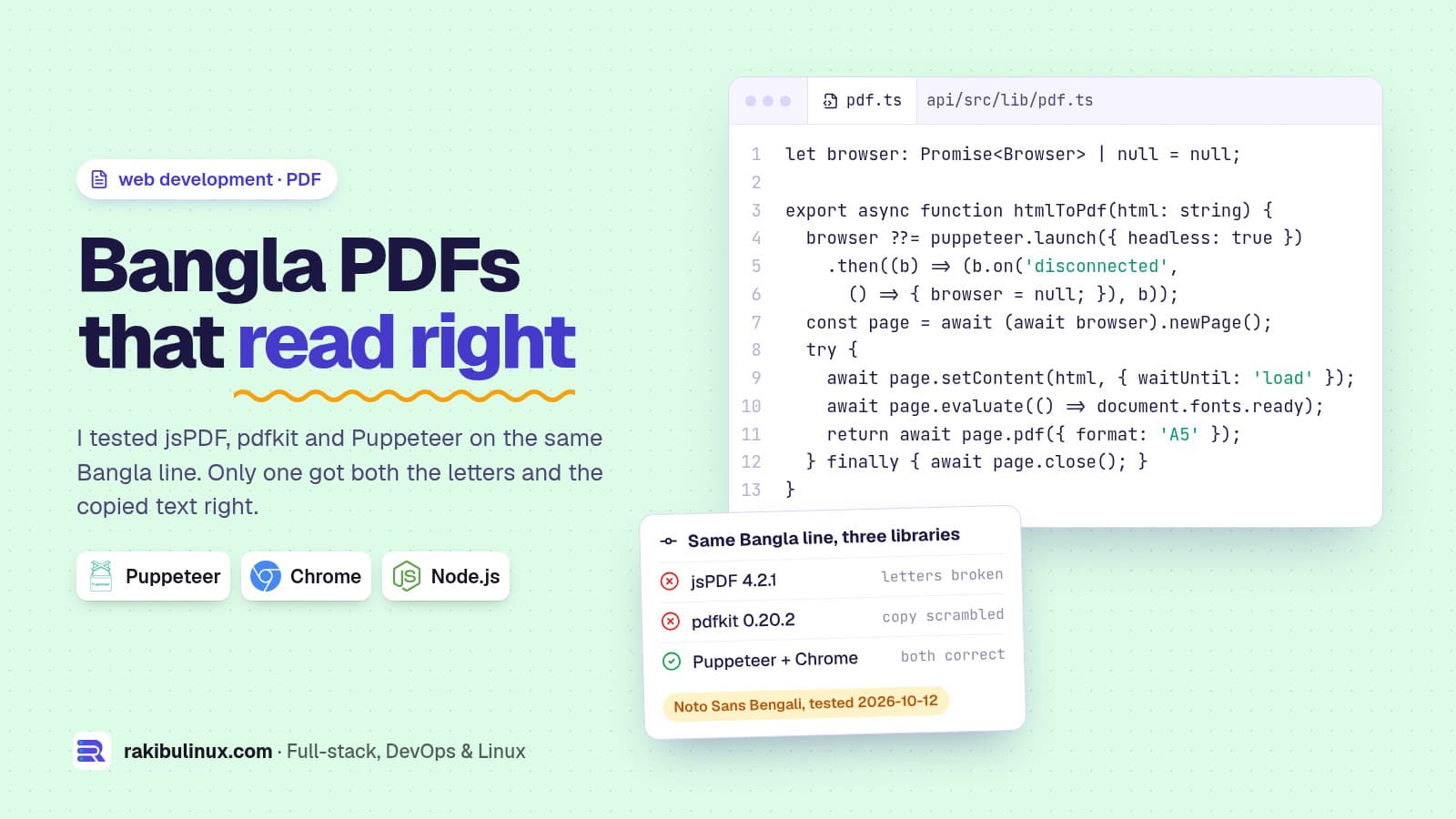
For Bangla PDFs in Node.js, render HTML in headless Chrome with Puppeteer. In my test jsPDF broke the letters and pdfkit scrambled copied text.
On MedicsBD, a telemedicine platform in Bangladesh, doctors write prescriptions that patients print, show at pharmacies and keep for years. They are in Bangla. The old Laravel app made them with mPDF and dompdf. When I rebuilt it on Node.js in September 2026, I moved PDF generation to Puppeteer. For this post I went back and tested the popular Node.js options on one Bangla line, so you can see why.
Key takeaways
- Bangla needs text shaping. Vowel signs move before consonants and consonants join into conjuncts. A PDF library has to do that work, or the text is wrong.
- jsPDF 4.2.1 broke the letters in my test: detached vowel signs and split conjuncts.
- pdfkit 0.20.2 drew the line correctly, but copying or searching the PDF returned scrambled text.
- Puppeteer with Chrome got both right, because Chrome shapes text the same way it does on screen.
- Wait for fonts before printing (
document.fonts.ready) and install a Bangla font on the server as a fallback.
Why is Bangla hard for PDF libraries?
In Bangla, the order you type is not the order you see. In রোগী ("patient"), the vowel sign ো is typed after র but drawn on both sides of it. Conjuncts like ক্ষ and স্ত্র are two or three consonants joined by a hidden virama and drawn as one shape. The font contains the rules for all of this, but something has to apply them. Browsers use a shaping engine (Chrome uses HarfBuzz). Many PDF libraries only map each character to a glyph and place them left to right.
A PDF also stores text twice in effect: the shapes you see, and a text layer used for copy, search and screen readers. A good result needs both to be right.
The test: one line, three libraries
I used the same string in each library, with Noto Sans Bengali loaded from the same font file:
রোগীর নাম: মোঃ করিম — প্রেসক্রিপশন ক্ষ্ম্য স্ত্রী
Versions: jsPDF 4.2.1, pdfkit 0.20.2, puppeteer-core 25.13.0 driving Chrome 154, Node.js 24. I rendered each PDF to an image with pdftoppm to check what a reader sees, and ran pdftotext to check what copy and search get.
jsPDF: letters come apart
const doc = new jsPDF({ format: "a5" });
doc.addFileToVFS("b.ttf", fontBase64);
doc.addFont("b.ttf", "B", "normal");
doc.setFont("B");
doc.text("রোগীর নাম: মোঃ করিম ...", 10, 20);
The rendered page showed the vowel signs as separate marks with a dotted circle, conjuncts split with a visible hasant (ক্ষ came out as ক + ্ + ষ), and করিম drawn with the ি after র instead of before it. A patient could guess the words, but no clinic would hand this out. Interestingly, pdftotext returned the correct string, because jsPDF stored the characters in typed order. The text layer was right and the drawing was wrong.
pdfkit: right on screen, wrong when copied
const doc = new PDFDocument({ size: "A5" });
doc.font("NotoSansBengali-Regular.ttf").fontSize(20).text(line);
pdfkit uses fontkit, which applies the font's shaping rules, and the page looked correct. I had expected it to fail like jsPDF, so this was the surprise of the test. The text layer was another story. pdftotext gave:
েরাগীর নাম: েমাঃ কিরম —
েপ্রসিক্রপশন ক্ষ্ম্য স্ত্রী
The vowel signs are stored in visual order, so রোগীর becomes েরাগীর. Copy a patient's name out of that PDF, or search for it, and you get the wrong word. Screen readers read the same broken text.
Puppeteer and Chrome: both layers right
Chrome's PDF looked the same as pdfkit's on screen, and pdftotext returned the original string exactly. That is the result you need for documents people copy names from, search in their email, or check against a database.
The Puppeteer setup I run in production
This is the PDF helper from the MedicsBD API, lightly trimmed. One browser per process, launched lazily, and a fresh page per document:
import type { Browser } from 'puppeteer';

let browser: Promise<Browser> | null = null;

export async function htmlToPdf(html: string) {
  // a crashed Chromium must not stay cached: relaunch on the next render
  browser ??= (await import('puppeteer')).default
    .launch({ headless: true, args: ['--no-sandbox', '--disable-setuid-sandbox'] })
    .then((b) => (b.on('disconnected', () => { browser = null; }), b))
    .catch((e) => { browser = null; throw e; });

  const page = await (await browser).newPage();
  try {
    await page.setContent(html, { waitUntil: 'load', timeout: 20_000 });
    await page.evaluate(() => document.fonts.ready); // Bangla web font before print
    return await page.pdf({ format: 'A5', printBackground: true,
      margin: { top: '12mm', bottom: '12mm', left: '12mm', right: '12mm' } });
  } finally {
    await page.close();
  }
}
Why each line is there:
- One shared browser. Launching Chrome takes far longer than opening a page. Sharing it makes each PDF fast.
- Reset on disconnect. If Chrome crashes, the next request launches a new one instead of failing forever on a dead browser.
document.fonts.ready. Without it, Chrome can print before the Bangla web font arrives and fall back to a different font.finallycloses the page. Leaked pages are the usual cause of a Puppeteer server slowly eating its RAM.
--no-sandbox is common in containers that run as root. Only use it for HTML you generate yourself, never for pages from user-supplied URLs.
Fonts on the server
The prescription template loads Noto Sans Bengali from Google Fonts, and the Docker image also installs a system copy so PDFs still render correctly when Google Fonts is slow or unreachable:
FROM node:22-bookworm-slim
RUN apt-get update && apt-get install -y --no-install-recommends \
      chromium fonts-noto-core ca-certificates \
  && rm -rf /var/lib/apt/lists/*
ENV PUPPETEER_SKIP_DOWNLOAD=true PUPPETEER_EXECUTABLE_PATH=/usr/bin/chromium
Using Debian's Chromium package, rather than letting Puppeteer download its own Chrome, keeps the image smaller and lets security updates come through apt. If you run without Docker on Ubuntu, install a Bangla font package and check it with fc-list | grep -i bengali.
One template for screen and paper
The biggest win of HTML-to-PDF is not Bangla. It is that the doctor sees the prescription on screen in the same layout the PDF uses, so what they check is what the patient gets. Each MedicsBD prescription PDF also carries a QR code that opens a public verify page, so a pharmacy can confirm it is genuine. The same htmlToPdf helper prints receipts and sick-leave certificates, and a sibling htmlToPng makes the doctors' share cards.
When not to use Puppeteer
- Very high volume. Each PDF uses a browser tab. For tens of thousands of documents an hour, run renders in a queue with a fixed number of pages open, or move PDF work to its own server.
- Tiny serverless functions. Chrome is large. It fits better on a VPS or container than in a size-limited function.
- English-only invoices. If you never need complex scripts, pdfkit is lighter and works well.
Frequently asked questions
Why does Bangla text look broken in my PDF?
Your PDF library is placing characters one by one without applying the font's shaping rules, so vowel signs and conjuncts are drawn in typed order. Render the text through a shaping engine instead, for example HTML printed by headless Chrome with Puppeteer.
Can pdfkit generate Bangla PDFs?
In my test with pdfkit 0.20.2 and Noto Sans Bengali, the page looked correct, but copying or searching the text returned scrambled words. That may be fine for a picture-only document. It is not fine for prescriptions, invoices or anything people search.
Which font should I use for Bangla PDFs?
Noto Sans Bengali is a safe default: free, complete and maintained by Google. Pick a font that covers both Bangla and Latin text well if your documents mix the two, and load it the same way on screen and in the PDF.
Does this work for Hindi, Arabic or Tamil?
The same problem and the same fix apply to other scripts that need shaping, such as Devanagari, Tamil and Arabic. Chrome shapes all of them. Test your own strings with pdftotext to check the copy layer too.
Need documents that print correctly?
I build web apps that produce real paperwork: prescriptions, invoices and certificates, in Bangla and English, with QR verification. See my web development services, read about what a telemedicine platform costs, or get in touch for a fixed quote.

Written by
MD Rakibul Islam Rakib
Full-stack developer, DevOps engineer and Linux system administrator with 5+ years of production experience. I deploy, harden and fix servers and web apps for clients worldwide, and everything in this article runs on real servers I manage, including this site.
- bangla pdf nodejs
- bengali pdf generation
- puppeteer pdf bangla font
- jspdf bengali broken
- pdfkit bangla
- html to pdf nodejs
- prescription pdf